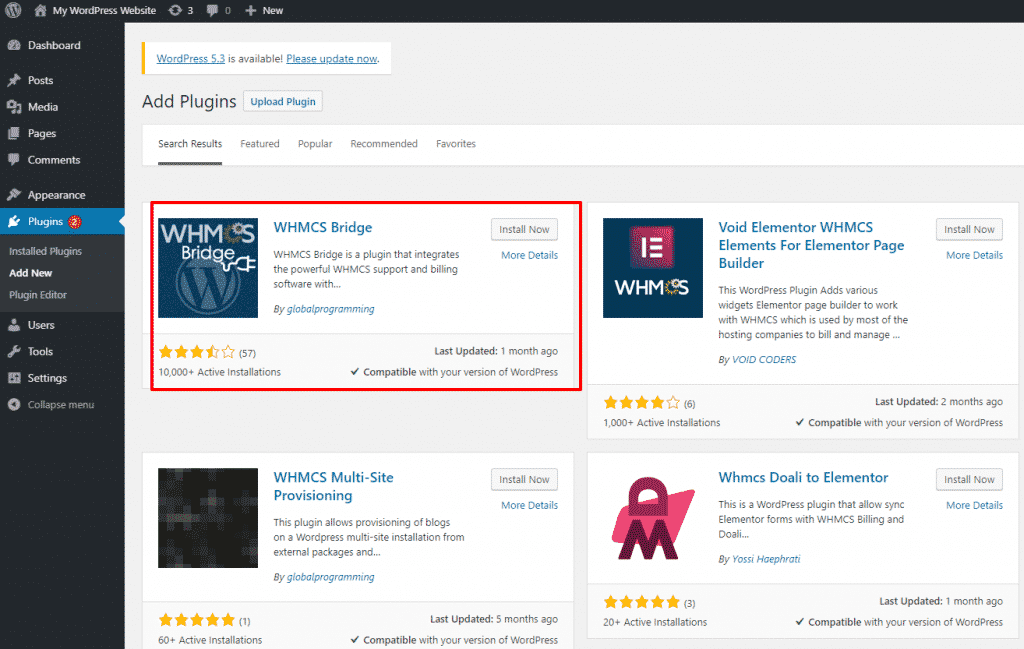
WHMCS Global Services has introduced a new update for its popular Cloudflare WHMCS module. With the fresh update, the module allows Web Hosting providers to easily add existing Cloudflare domains in the WHMCS and manage it from the client area. The 5.0.4 version of Cloudflare WHMCS is being replaced by Version 5.0.5 along with some new features.
Cloudflare WHMCS module is an all-embracing solution for web hosting providers to help them succeed in the dynamically changing, highly competitive web hosting industry.
The team of WGS adapted to the market change quickly and diversified customers’ requirements to offer a perfect and on-spot solution as a Cloudflare WHMCS Module. Using this module, web hosting providers can easily resell Cloudflare services in no time. There is a bundle of benefits which you can avail from Cloudflare services such as it allows your customers to get all the cloud flare services from one platform, scalability increases, there are numerous security features, and so on.
Furthermore, after the valuable feedback from the customers, our team resolved some of the issues including display error(6003) in the Product Setting page in the case of hosting partner account, displaying domain list in the client area and errors/success messages while adding or removing the domain on the client area.
Other features of the Cloudflare WHMCS module empowering web hosting providers include:
Clients can buy Cloudflare services from your WHMCS website
With the newly updated Cloudflare module, your customers can purchase it easily through your WHMCS client area. As per their requirements, they can buy Cloudflare free, pro, business plan.
Clients can easily upgrade their Cloudflare plan
What if your client starts with the free plan but eventually wants to upgrade it to the pro plan? Don’t worry, with the updated module the up-gradation has become the easiest thing to do. This new module act as a link between Cloudflare and WHMCS.
Clients can manage scrape shield setting and cache
Using this module, your clients can easily manage the scrap shield setting (Email Address Obfuscation, Server-Side Excludes, Hotlink Protection) and caching settings from your WHMCS client area.
Clients can manage website speed
Cloudflare module is known to be the best module to increase the speed of the website. Other things that your client can manage from the client’s area are Auto minify, Mobile redirect, IP Geolocation, Max upload size, and Rocket Loader.
Clients can manage firewall settings
Your clients can manage the security level, browser check, challenge time, and so on without logging in Cloudflare website. All this can be managed through the WHMCS client area.
Clients can quickly view analytical data
Cloudflare WHMCS modules allow your clients to view all the traffic on the website, bandwidth, and other statistics that too just through the WHMCS client area.
Clients can manage DNS records
Your users are able to easily manage the DNS with a user-friendly interface. Without having any advanced technical knowledge, they can add, edit or update DNS records at any time. The DNSSEC section can also be enabled or disabled by your users and they can view DNS records. The latest version of Cloudflare WHMCS module is definitely a game-changer when it comes to accelerating the web hosting business in such a highly competitive environment.
Do you have any queries related to the latest version of the Cloudflare module? If yes, then our Support team is always available to help you out with the best WHMCS solutions.
The spookiest occasion is just around the corner! Halloween is a festival to enjoy scary monsters, haunted houses and sweet deals. This is the time when almost all businesses offer huge discounts, freebies, and deals for their customers to grab and save money.
This Halloween, WHMCS Global Services is offering WHMCS modules at the best price for web hosting providers. You can check out our WHMCS modules on the Marketplace and “No PROMO CODE” is required to avail the offer. The mentioned prices on the Marketplace are the final Halloween Prices.
So, to make Halloween more spooky for our potential customers, we are here with our WHMCS modules at competitive prices-
You must be aware that the latest version WHMCS 8.0 has been launched. This time also, the new WHMCS kit of implements created a buzz among the community. In the latest version, WHMCS added many interesting features for business owners and software developers. After the launch of the new WHMCS version, we also updated our WHMCS modules to make it compatible with the latest version. So, you will get a double benefit – all our modules are updated, highly compatible with WHMCS 8.0 and available at the best price.
Why Choose Our WHMCS Modules?
WHMCS Global Services offers numerous WHMCS modules and themes for web hosting service providers. We use innovative and technical expertise for developing WHMCS modules and provide customized solutions to help web hosting businesses to achieve their business goals.
You can contact our support team anytime that can help you to manage your portal efficiently. Furthermore, if you are looking for any development solutions or customization services in existing WHMCS modules, then you can hire our dedicated tech staff.
Do you have any query related to our WHMCS modules? Feel free to contact our Support Team anytime.
WHMCS recently announced the release of WHMCS V8.O The latest version has lots of game-changing features for business owners and software developers. The new WHMCS V8.0 is all set to make automated billing and management much easier for web hosting providers. Excited to know more about the features of the new version 8.0 in detail? Let’s check out what’s new in it–
Overview of all new WHMCS 8.0
The new and refreshed look of the admin area
Integrations with new Email delivery providers
New OX App Suite with productivity suite reselling option
A single client can access multiple accounts
Advanced PHP designs to streamline the WHMCS modules
What is unique in WHMCS 8.0?
1) Accessibility of Users and Client Accounts
In the latest version of WHMCS, a new concept for end-user login management is introduced. Account-holders are gaining more control, while multi-account users are gaining versatility and convenience. Replacement of sub-accounts in WHMCS 8.0 and users represent any individual having login access to the client area of WHMCS. This version allows to invite and manage clients via a new dedicated User Management interface, with a simple email-based invite workflow and permission-based controls. WHMCS 8.0 is, therefore, proving to be the most convenient way to access and manage services across multiple client accounts through a single login.
2) Refined admin area
WHMCS 8.0 is available with a new admin area to offer a simple, fresh and optimised admin experience. The main focus of the new admin area is on content and distractions are reduced. Other than this, the new admin area is more functional and proves to be beneficial for enhancing the experience for mobiles and touch screen gadgets.
3) Integrations with Email Delivery Providers
Email deliverability is the essence of business when it comes to notifications related to account and billing. The new feature will help to increase email reliability and deliverability. One can use MailGun, SparkPost and SendGrid using the latest Email Delivery Provider integrations in WHMCS 8.0 and can take advantage of their automated reputation management and high email deliverability speeds. Integration with other email services providers is also possible, which extends the functionality of WHMCS.
4) Advanced email campaigning tool
The new bulk email tool in WHMCS 8.0 is more efficient for sending emails to your customers with robust tools, which were not feasible in the Mass Mail tool that existed previously. With this advanced email campaign tool, it is easy to create drafts or schedule emails. The rate limits and failures will be managed by an off-session sending process. The email marketing capabilities, after coupling with the new email delivery providers, are more powerful than before.
5) IDN support Improved
In the new tool, there is full support for IDN domain registration automation for registrar modules, including Enom & ResellerClub. For IDN domains, they added more robust validation along with numerous usability improvements. Now it is possible to accept orders for a broader range of domain names(both partial and full IDN domain names). Users can see the UTF-8 version of their domain with Punycode conversion transparently handled in the background. Registrar modules get access to additional parameters to add IDN support to 3rd party and customized modules easily.
6) Improved currency support
The number of decimal places supported by default in tax rules is increased to 3. This helps to adapt tax rates with three decimal precision. Also, the number of digits allowed in the numeric currency values is extended up to 14 digits before the dot and supports values up to 99 trillion.
7) Time-Based Token- two-factor improvements
The latest WHMCS version offers further advancements to the Time-Based Token Two-Factor experience for end-users. Now, with the user’s introduction, Time-Based Token Two-Factor Authentication will be available to all users having WHMCS log in access. There are improvements to QR code generation which will allow generator apps to display codes, users’ email addresses along with your domain name. This will help to easily identify codes and differentiate multiple accounts.
8) Cron setup and automation management
A new and simpler way has been set up in version 8.0 to monitor the cron performance. The new Admin area allows you to access the Automation Status from any page quickly. Every day you can get fast and simple insights into the automated activities and actions of WHMCS. With the cron schedule, WHMCS will inform the user of any sort of issue through a simple traffic light-based system.
9) Open-Xchange App Suite via MarketConnect
Open-Xchange App Suite, Cloud Productivity & Email App Suite is competing with Office 365 and G-Suite. It offers advanced and professional email solutions, along with automation. You can get an OX App Suite via MarketConnect to get a quality and a better email platform at a reasonable price. It is available with ready to use landing pages, inbuilt promotion options, and upsells so that you can easily add the App Suite to your product line-up and instantly get it to your users. OX App Suite is available to activate immediately for existing MarketConnect resellers. You can also Sign up today if you haven’t signed up to MarketConnect yet.
10) Ensuring Compatibility with SMTP OAuth2
Most of the hosted email providers are shifting from conventional type of password-based authentication to new OAuth-based workflow. These changes are already announced by both Google and Microsoft. WHMCS is all set to adopt the new changes from email services whenever they come in effect.
11) Reporting of Transactions
The new feature – transaction reporting provided by WHMCS allows you to get instant insights into your business performance with new charts, and you can easily perform income comparisons in the transactions list. Also, you can instantly compare the performance with the previous times and better visualize the transaction overview.
How to get the update
Update using the Automatic Updater
Automatic Update Use automatic updater to update to the WHMCS latest version. To begin the update process, simply go to Utilities>Update WHMCS Want to install or upgrade WHMCS 8.0 manually? If yes, then you can download WHMCS 8.0 from the download page.
Requirements for WHMCS V8.0
The new system requirement for WHMCS 8.0 is PHP 7.2 or later. The automatic updater will only show you the available update of WHMCS 8.0 if you are running PHP 7.2 or later.
Are you using PHP 7.1 or earlier and expecting the update? It is important to note that you’ll not get the update via Automatic Updater if you are using PHP 7.1 or earlier. First, upgrade to PHP 7.2 or PHP 7.3, and then you’ll get the update. The WHMCS 8.0 version ensures that modern PHP versions and coding features are well utilized. You can also upgrade to PHP 7.4 once you are running WHMCS 8.0.
So, now you are ready to upgrade to the new WHMCS version and use the latest features.
Looking for assistance to upgrade the WHMCS V8.0 version? If so, then you can get in touch with the expert team of WHMCS GLOBAL SERVICES. We are here to help you with custom development services for the betterment of your WHMCS project.
WGS is a leading WHMCS development company, offering WHMCS Installation Services, WHMCS Upgrade Services, WHMCS Theme Customization, WHMCS Custom Development, and Third-Party Installation across the globe.
If you have any questions related to WHMCS V8.0 or looking for WHMCS modules compatible with the latest version, then feel free to contact our Support Team.
Summary: This article discloses an amazing SEO Manager WHMCS Theme: HostX that will let you manage your website’s SEO elements like Meta Tags, OG Tags, and other essential SEO elements from WHMCS admin panel only.
WHMCS (Web Host Manager Complete Solution) is an all-in-one system to automate and manage web hosting businesses. With more than 45,000 customers across the world, WHMCS is a leading web host billing automation platform.
Does SEO Matters For a WHMCS Website?
WHMCS has all the tools you need when it comes to starting or managing a web hosting business. No doubt WHMCS provides tons of services, but there is one aspect where it lacks, and that is WHMCS is not SEO friendly and it does not allow to design WHMCS Client Area Template. It isn’t easy to manage multiple SEO-related tasks such as generating site maps, managing various meta tags, webmaster settings, and many more through WHMCS.
This will directly affect the search ranking or your site, and no one wants that thing to happen. Right?
What is The Best SEO Manager WHMCS Theme?
Now you must be wondering whether these problems have any solution or not. Of course, there is a solution. You can opt for the best WHMCS theme to manage SEO activities. HostX SEO Manager WHMCS can help you in this case.
HostX WHMCS Theme is an all-in-one SEO Manager WHMCS Theme exclusively designed to help web hosting providers manage and sell hosting services. This WHMCS theme is available with an engaging and highly functional front end and client area.
SEO Settings of HostX SEO Manager WHMCS Theme
With the vision to help WHMCS users with SEO, the latest version of HostX comes with an all-new in-built Enhanced SEO Manager tool. Using this feature, HostX SEO Manager WHMCS Theme users can get full control of their website SEO.
Let’s have a look at some of the features of the Enhanced SEO Manager of HostX:
1. Manage Meta Tags/OG Tags
Meta tags play an important factor in Google ranking. You need to upload the Meta tags in the header.tpl file. Adding the meta tags in WHMCS pages needs basic knowledge of code.
Here is our detailed blog for adding the meta tags in the WHMCS website.
Similarly, Open Graph meta tags (OG Tags) control how the URL of your website is going to display after sharing on social media. You have to add the OG tags in the header.tpl file of the WHMCS.
Without the knowledge of WHMCS code, you can’t add meta tags and OG tags if you are not using any third-party tool. However, you can do it easily with the help of the HostX Enhanced SEO Manager tool.
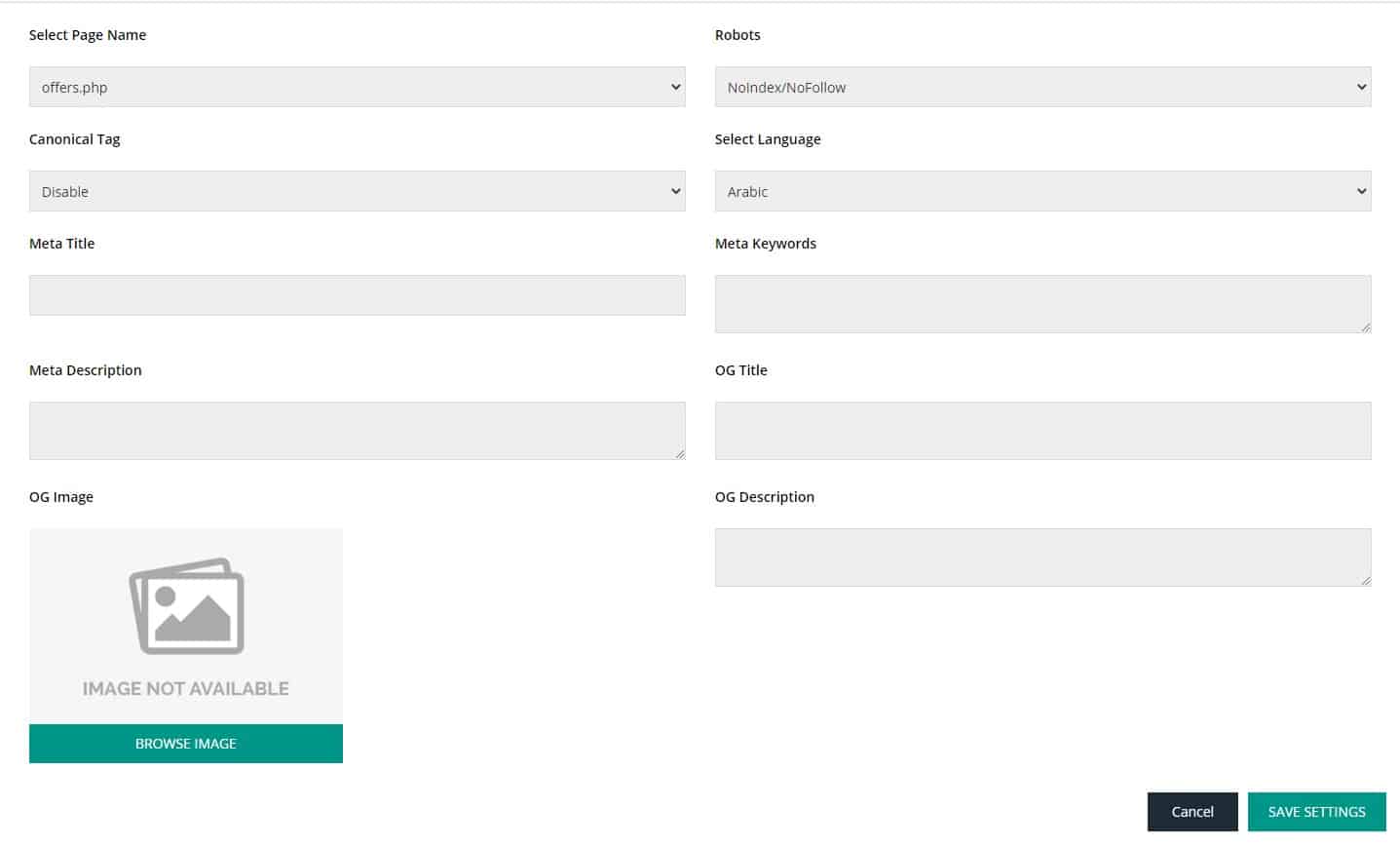
HostX SEO Manager WHMCS Theme allows you full access to adding the Meta title, Meta descriptions, Meta keywords, OG title, OG description, and more so that you can boost your Web Hosting Business with the best digital marketing tips. You don’t need technical knowledge of code to update meta tags. Just go to the ‘Meta tag’ section of HostX SEO Manager WHMCS and easily keep track of all the meta/OG tags for all pages and update them anytime.
2. Site Map Generator
A sitemap is an XML file that informs search engines about the content of your website and assists crawlers to reach the content for faster indexation. It also informs about new pages, any update on your website and even the language. Again the problem is the same with WHMCS as there is no sitemap and no such file is possible that allows search engines to find your pages in a reasonable amount of time.
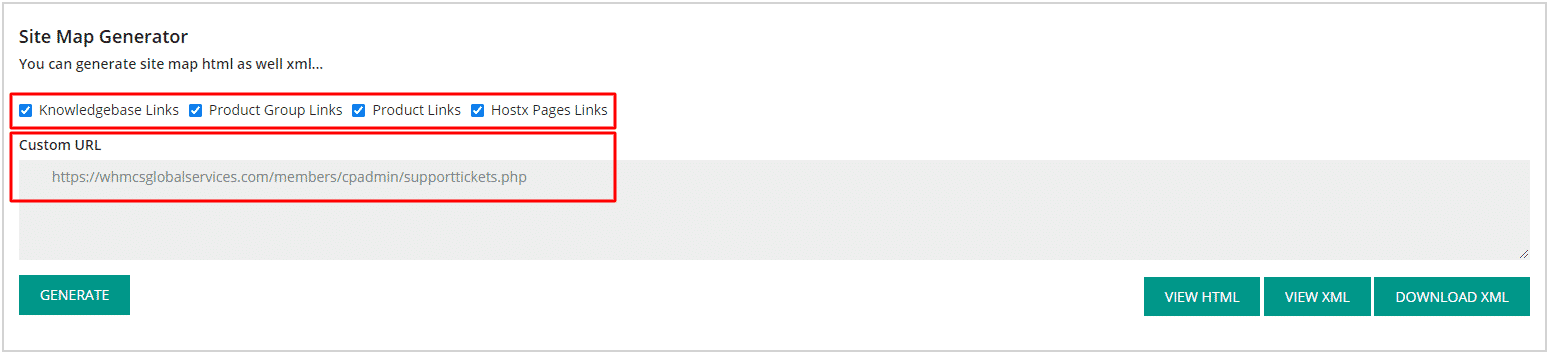
However, with HostX SEO Manager, it is easy to generate sitemaps in just a few clicks. You just need to select the page type and generate the site map in just one click. It is easy to view the site map in both HTML and XML files, and you can also download the XML file. There is no need to upload the XML and HTML sitemap files via file managers. The sitemap created will automatically get saved in the website files.
3. Webmaster Settings
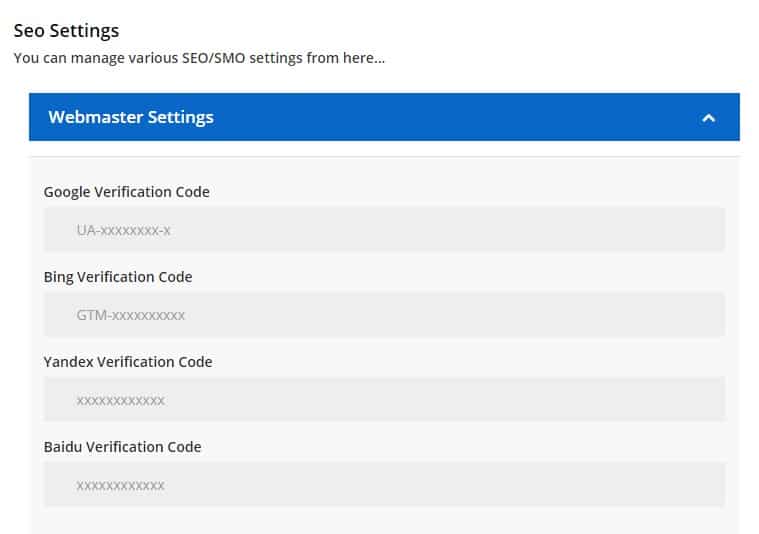
How is your website performing in Google, Bing, Yandex, and Baidu search? If you want to know the answer to this question, then you have to allow your website to communicate with these search engines. First, you need to verify your website with different search engines. And these search engines will generate verification codes for your website. Then, you have to add that verification code in the header.tpl file.
So, you need technical knowledge of code. But not with HostX. When you have verification codes, you just need to add those codes in the SEO Manager – Webmaster settings. That’s it! No need to go to the WHMCS code and add the verification code manually.
4. Tracking Settings
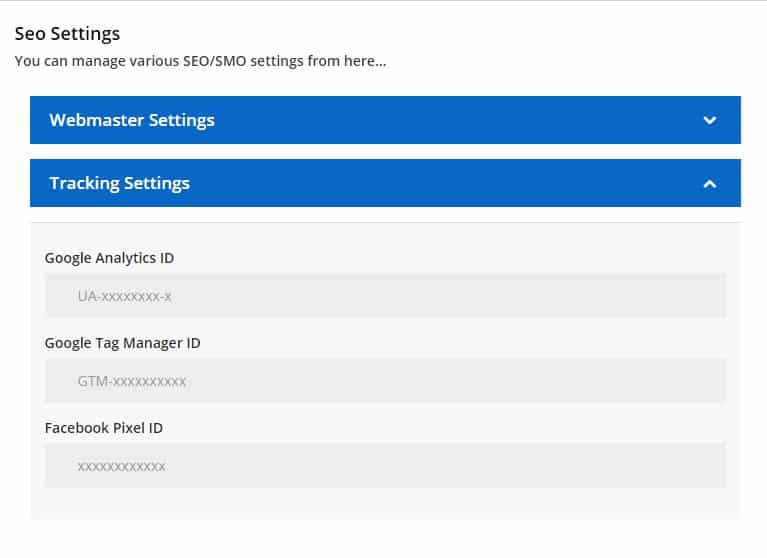
You may have to perform various activities to track the site’s traffic, verify your site, measure the effectiveness of your social media page. Without HostX SEO Manager WHMCS Theme, it is not that easy, as you have to put the tracking code scripts directly in the files which are not possible without hiring a developer. On the other hand, if you are using HostX SEO Manager then get the tracking code from Google and Facebook and include in the ‘Tracking Settings’ section. Now, you can easily track all the website traffic by adding Google Analytics ID, Google Tag Manager ID, and Facebook Pixel ID in HostX SEO Manager.
5. Social Sharing/ Connect
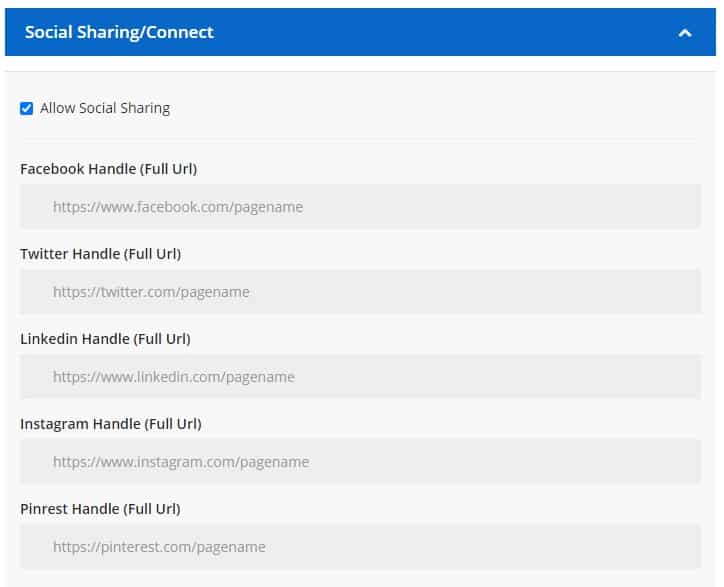
Easily link your social media channels on your WHMCS website using HostX WHMCS theme. You can also enable the social sharing of the pages by social sharing tools. These are some of the features of the new SEO Manager. Now, get ready to improve the SEO ranking of your web hosting website.
So, what are you waiting for? Get HostX SEO Manager WHMCS Theme and use its SEO manager tool to overcome all the issues related to SEO in WHMCS. Furthermore, the latest version of HostX includes many new features to help you manage the WHMCS in a better way. To learn more, you can contact our WGS experts anytime. We can also customize a WHMCS theme according to your requirements.
cPanel is a widely used Linux-based control panel for easy website and server management. It has a user-friendly, web-based interface and allows you to manage websites/servers without any technical knowledge. It’s been the most popular choice in the hosting industry for over two decades because it is well laid out and easy to operate. Here are the statistics that show its credibility. cPanel has collaboration with LiteSpeed, JetBackup, Softaculous, Imunify360, CloudLinux PHPSelector, and more, making it more secure, faster, reliable with additional features. But, the cPanel price hike in June 2019, was a big surprise for many users of cPanel. It disappointed the users of cPanel and forced them to think about cPanel alternatives.
Many small providers are closing shop because of the cPanel price hike. People are going mad.
Before the cpanel price hike, it allowed hosting unlimited control panel accounts with a license per server. In the new licensing structure, you have to purchase the license according to the number of accounts and plans on your server. Ultimately, there is a huge increase in the prices as it depends on the number of cPanel accounts hosted per server. The old license structure was simple. Regardless of the number of accounts, it was $12/month for VPS hosting and $20/month for a dedicated server. In the new license structure, when the account reaches its limit for a particular plan, then you have to pay the price difference between the two fixed plans. For instance, if your plan is cPanel Admin and you want to add more than 5 cPanel accounts, then you need to upgrade to the next cPanel Pro plan which allows you to add up to 30 accounts. There is an increase of $10 when you upgrade from cPanel Admin Cloud ($20 per month) to cPanel Pro Cloud ($30 per month)
Impact of cPanel Price Hike on Hosting Industry
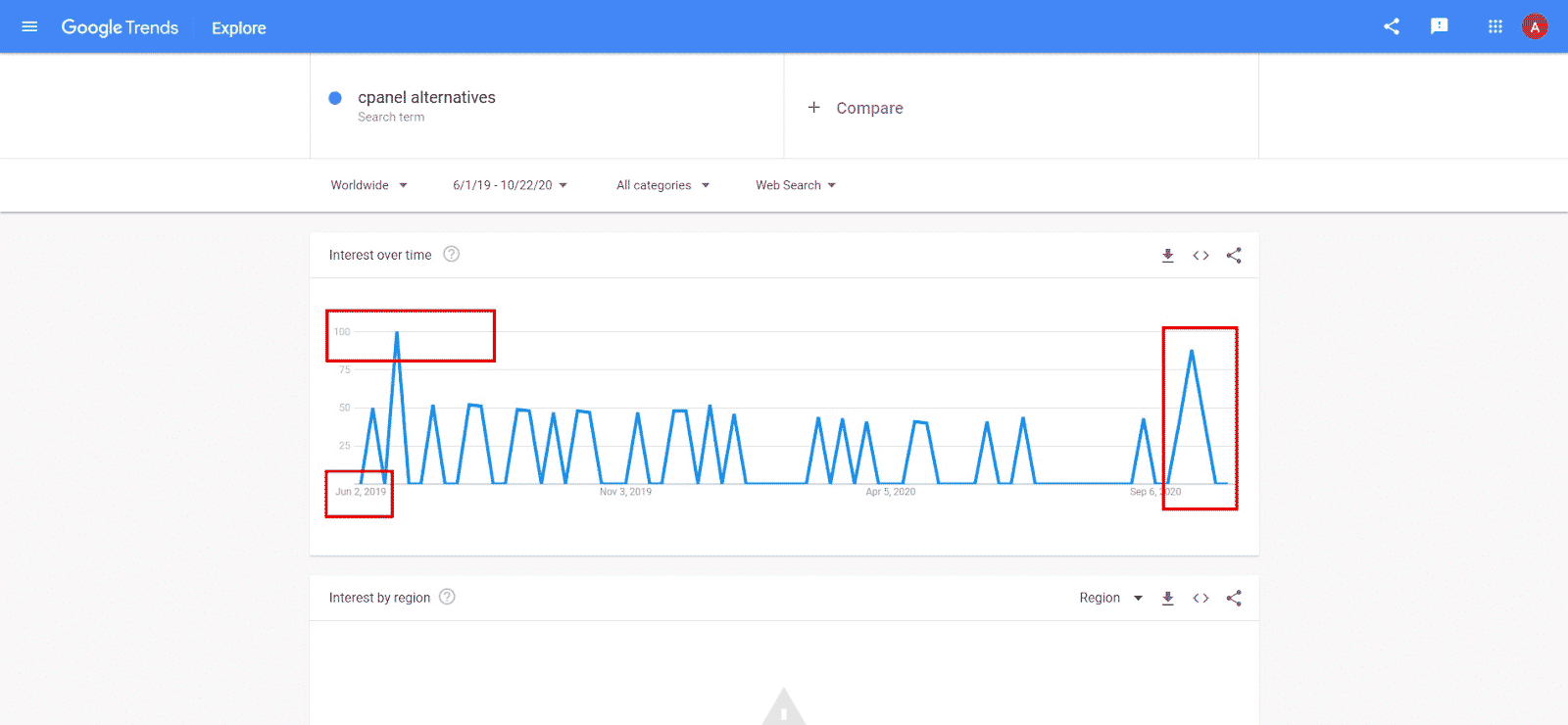
Web hosting service providers backfired cPanel due to a sudden price hike. After cPanel announced new pricing and licensing structure in June 2019, many hosting providers started searching for the best alternative. The new account-based pricing policy is extremely expensive, especially for hosting resellers. If they choose to continue with cPanel, it is going to cost them an arm and leg. Customers also used social media platforms to show disappointment with the new cPanel pricing. Here is the google trend on the keyword “cPanel alternatives” in June 2019, you can see a spike in the searches. We have noticed a similar spike in October 2021 when cPanel announced that they are going to revise/increase their price again in January 2022.
Plesk is an open hosting platform. If you think Plesk can help, then it is for infrastructure providers, IT admins, developers, content managers, and digital agencies. Let’s have a look at some key features of it such as it is compatible with all the platforms, security is at its best, centralized control panel, backup, and so on. There are many products and services which Plesk offers, some of them are WordPress toolkit, SEO toolkit, Plesk premium email, and more.
Cloudways is well known for its managed hosting platform feature. They believe in providing the best experience to their customers. And if we look at the features, it is one of the best control panels that you can have. Some of the features are a 24×7 support system, supreme quality of security, 1-click backup and restore, cron job manager, 1-click stop app, app setting via UI, advanced varnish settings, change application webfoot, and more.
InterWorx offers configuration tools for your web server, email, domains, and websites. You can use it for WordPress installation, file management, and security enhancements. It has 2 sections one is NodeWorx and the second one is SiteWorx. It is best suitable for web designers, developers, resellers. Let’s have a quick peek at the key features of it. It has the best features you can avail such as it allows you to access hosting interfaces from the command line, offering control panel-related community forums, and multiple admin accounts can be created.
If you are looking for the most simplified control panel, then OviPanel is what you are searching for. Along with simplification, it is one of the most affordable control panels. It has many features including enhanced security, manual email limits, logging & stats, unlimited accounts, multiple database support, PHP multiple version, One-click SSL, secure panel, and more.
The next on the list is Cyberpanel. It is one of the famous control panels which offers speed, reliability, and security. In a nutshell, all the best things are under one roof. The key features of Cyberpanel are built-in LSCache module, ModSecurity, email limits, one-click SSL, auto-installer, and many more. You can enjoy all these features at a very reasonable rate with Cyberpanel.
It is another one in the list of the open-source control panel. With this, you can create and manage multiple websites too with just one click. And if you want to know about what else it has to offer then there are numerous keyboard shortcuts, a website analytics system, and there is an inbuilt firewall too. This will help you manage your websites faster and hassle-free.
Another name in the list of open-source web hosting control panels is Aapanel. It allows the webserver to be managed via a web-based GUI. The key features of Aapanel are that the website can be generated and managed effortlessly. Using the AaPanel online editor, you can quickly manage python projects, manage safety, schedule tasks, and an all-around file management system, system monitoring, and many more.
Want to manage your server directly through your web browser? Then Ispconfig is the best option for you. Above all, it is an open-source web hosting control panel. It has a wide array of features like single and multi-server, supports many Linux distributions, and is translated in more than 20 languages, it has 4 access levels, and supports HTTP, SMTP, FTP, DNS.
This control panel is best suitable for developers, agencies, and hosting companies. It is best known for security, speed, and support. You can enjoy features like a free SSL certificate, changes as per your requirements, fast installation, firewall, automated updates, and so on.
The next on the list is ISPmanger. It provides the best solution for VPS and dedicated hosting services. It is best for the website owner as well as a hosting provider. And if you are looking for the unique features it has then here are some of them such as multiple PHP versions, databases, file manager, security, backup system, domains, and DNS records. What else do you want? You are getting all of the above mentioned in a single place.
Froxlor is the lightweight server management software that you are looking for. Above all, it is an open-source web hosting control panel. Let’s have a quick peek at the features it offers you. It has a themeable interface, MySQL management Directory protection, allows easy access to all major functions via API, advanced SSL certificate, and so on.
Directadmin provides you with everything you are looking for, including ease of use, speed, stability, support, and more. You are getting all this by the Directadmin Cpanel. And all these at a pocket-friendly price. And if we talk about its features then you will be able to create, modify the settings, the admin can delete or modify any DNS record, two-factor authentication, integrated ticket support system, live update, and many more features.
Blue onyx is an integrated solution for internet hosting that includes email, DNS, web service, and file transfer. It provides a web-based, user-friendly interface that is installed on private or commodity hardware or virtual servers. It has a very active user base, is available in multi-languages, optional free and commercial third-party modules are available via a built-in interface, and supports HTTP/2.
The next one on the list is the CentOS Web Panel. CentOS Web Panel is a rich control panel, which is way easier to use. It has numerous features such as easy and frequent backups, free DNS server, file system lock, live monitoring, config server firewall, and many more.
Cloudron made self-hosting the easiest thing to do. It is a platform that allows you to install web apps on your server, manage them, and secure them easily. It offers a centralized way of managing users’ access control. The key features of Cloudron – there are more than 45 apps, easy backups, and this allows you to use the Cloudron app store to deploy apps and many more amazing features. So, these are the top 15 alternatives you can choose instead of cPanel. Now, you don’t have to stick to just one option. Consider all control panels mentioned above before making your final decision. Planning to migrate from cPanel to its alternative? We at WGS have an expert team providing the best migration services to our customers. With our help, you can easily migrate from cPanel to the best-suited alternative. Contact us at WGS Support.
Festival season is around the corner. The time is here when people love to shop for what they want. But amid this pandemic, digitalization has replaced conventional shopping. So, the online platform has become the ‘new normal. And being a web hosting provider, you have to be aware of the needs of your customer. This is the time when you can take your business to new heights.
Ask yourself a question: Is your web hosting website festival-ready? And if the answer is NO, then you should do something right now.
Let’s have a look at what you can do to make your customer’s day and boost up your sales.
1) Be ready with the marketing material
Make your marketing material ready for your website. And if you are wondering what you can do then here are some more points for you
(i) Offer Coupons — Discount coupons always attract customers and especially during festival season when everyone wants to find the best deal in the competitive marketplace. Be prepared for offering coupons as this will lead to attracting more customers.
(ii) Invest in online advertising — Festival season has the charm to do wonders. Don’t miss such an opportunity. Advertisements will make people aware of your products, and that will lead to attracting more traffic. Keep in mind that your advertisement should be in accordance with the festival.
(iii) Reach Customers — Be sure that your customers are aware of the deals you are offering. Making a strategy, whether through emails or social media platforms, and its execution is going to be a real game-changer. Don’t let any of the customers or visitors miss out on the deals.
(iv) Answer every query — Your customers can come up with any query related to your web hosting plans or deals you are offering. Be ready to help your customers out as soon as any query rises.
And, you can engagingly present all the above things by adapting the themes as per the festival, which will be around the corner.
For instance, if it is time for Halloween, then you can use a WHMCS Theme that includes creepy and dark things. And if it’s Christmas time, then you can plan your strategy by offering some surprising deals and gifts to your customers.
So, if you are creative, then this festival season will take your website to new heights. Just make a marketing plan and execute it with good planning.
2) Make your website ready to handle huge traffic
It is the specialty of the festival season that your customer’s website will have to entertain a lot of traffic due to an increase in sales and for that reason, you have to prepare your servers to handle all that traffic.
So, making your server handle load should be your priority. You have to ensure that your web hosting plan is rigid enough to deal with the traffic. If required, then this is the right time to invest in quality hardware.
Your website should be ready because it is the best of the times to win the hearts of your customers and to convert your potential customers into permanent ones. The best quality services will help you to ace it. So, be ready to taste the fruit of success if you can handle this situation. Don’t let your customers down at this point. It can cost you a fortune if any mistake happens.
3) Make yourself available for 24×7 customer support
To be your customer’s favorite hosting provider you have to be available 24×7 during the festival season. As there are more chances that your customers will face problems and they will come to you only for the solution.
You can’t afford to neglect this point in this season. The speed and availability of your presence are directly proportionate to your customer satisfaction and your profit. So buckle up your shoes and be ready to serve the best customer service and gratify them.
4) Data backup
Tomorrow is unpredictable. Therefore, it is always better to prepare for unforeseen events. One among them in web hosting is a sudden crash. You can’t afford a website crash during the festival season no matter what.
What is the best thing you can do then? Let’s have a look at some of the effective ways that you can consider –
Introduce cost-effective data backup plans during festival seasons.
Run campaigns to outspread the importance of data backups during the festival season.
If possible, offer free data backup with hosting plans.
These backup data ideas will genuinely help for any situation like a sudden crash of the website.
5) Powerful website builders
Be ready to entertain some new customers in the festival season. There are chances when people think to start their website near the festival season to generate profit from the very start. So on your part, you have to be prepared to offer powerful website building services.
Cloud hosting is in trend these days. When you allow your customers to just pay for the services they use, it always attracts your customers to take your service. Especially during the festival season, customers may have an increase in the number of visitors to their websites. So, rather than shifting to a bigger hosting plan, cloud hosting allows customers to use as many resources as required and just pay for the same.
If your website is bug-free, then your customers and their customers will have a smooth flow. A bug-free website will lead to ordering and making payments without any issue. Customers would be able to trust your website more if it is bug-free and secure.
So the best way to check whether your site is bug-free or not, test your website daily during the festival season. And ensure that there is no issue. As in the festival season, you can’t afford to lose a sale. Test all the payment gateways to be sure about the smooth running of the website. This will help you to never lose the sale due to any technical issue.
8) Make security extra tight
Festival season offers opportunities to all, no matter whether its entrepreneurs or hackers. So pay some extra amount to make your website security services more efficient.
Protecting your server should be your priority because in festival season cybercrime reaches a new height. So it is advisable to prevent your website from any of the malicious attacks.
Trust me, this is one of the major gifts that you can present to your customers. It’s time to hack the tears, the stress of your customers by providing them with the supreme quality of security services.
9) Offer fast hosting plans
Do you offer eCommerce-ready web hosting services? If your answer is NO, then it’s the right time to offer the best and fastest solutions for your eCommerce hosting needs.
As you know, eCommerce sales are on a boom during festivals, so it’s better to invest in eCommerce hosting plans. And you can avail many more benefits by investing in eCommerce hosting plans. In the eCommerce hosting solution, offer superior quality services, features, and advanced tools that make the transaction process easy for your customers.
10) Offer fast hosting plans upgrade
This festival season, chances are very much high that your customers will have an increase in the visitors to their website. Suppose your customer is using shared hosting right now, and due to higher traffic on their website, the customer wants to upgrade the plan from shared hosting to VPS hosting. In this case, you should be ready to offer an easy and fast hosting plan up-gradation.
So, this festival season, make your website ready to reach new heights.
Are you excited to make this whole season turn into bliss? Then why are you still waiting? Go and be prepared with all the stuff as the countdown is about to begin. In case you are planning to hire WHMCS developers for some custom development tasks, feel free to reach us.
Managing your business with WHMCS? Automating web hosting business has never been this easy before WHMCS. With the help of WHMCS(Web Host Manager Complete Solution), it is much more flexible to manage your business.
What is the task of a currency selector in WHMCS? Well, it helps to convert the currencies according to the customer’s requirement. WHMCS consists of a default currency selector that helps clients to select the currencies of the products. However, when you create a custom WHMCS page, the currency selector does not work, now there is no use of the page without the currency selector consisting of products. So to add the currency selector on this customized page you need to follow this procedure.
The meta tags basically the codes written in HTML language for different search engines to know what a specific web page is about. The main motive of meta tags is to make Google understand the content and reference of a specific web page.
If you want to see meta tags then, you have to do the follows:
Open any web page, hit a right-click on it, and click on “see page source code”. You can also use the CTRL + U commands.
So, it is a quite critical element that makes your web page familiar with the search engines and the positioning of your website depends on it. Therefore, it is recommended to follow all the best practices to make your meta tags highly functional, website crawlable and everything smooth within. This will help search engines to capture your webpage better and efficiently.
As you very well know that WHMCS does not have the option to add or update meta in WHMCS and titles for a specific product group, knowledgebase, and announcements.
Moreover, do not forget to use the best WHMCS Theme on your hosting website to manage, alter, and update all the crucial SEO website elements.
So here we are sharing the procedure by which you can update meta in WHMCS along with titles, descriptions, keywords, and canonical tags easily:
Step 1: Go to whmcsdir/templates/yourtemplate/header.tpl
<!-- For product group id cart page -->{if $smarty.get.gid eq '1'}
<title>Test Meta Title</title>
<meta name="description" content="Test Meta Description">
<meta name="keywords" content="Test, Meta, Keywords">
<link rel="canonical" href="yoururl.com"/>
<meta property="og:title" content="How to Become an SEO Expert (8 Steps)" />
<meta property="og:description" content="Get from SEO newbie to SEO pro in 8 simple steps." />
<meta property="og:image" content="https://ahrefs.com/blog/wp-content/uploads/2019/12/fb-how-to-become-an-seo-expert.png" />
{else if $smarty.get.gid eq '2'}
<title>Test Meta Title</title>
<meta name="description" content="Test Meta Description">
<meta name="keywords" content="Test, Meta, Keywords">
<link rel="canonical" href="yoururl.com"/>
<meta property="og:title" content="How to Become an SEO Expert (8 Steps)" />
<meta property="og:description" content="Get from SEO newbie to SEO pro in 8 simple steps." />
<meta property="og:image" content="https://ahrefs.com/blog/wp-content/uploads/2019/12/fb-how-to-become-an-seo-expert.png" />
<!-- Similarly you can add meta tags for other product groups --><!-- For product id cart pages-->{else if $smarty.get.pid eq '2'}
<title> Product Title </title>
<meta name="description" content="product id 2">
<meta name="keywords" content="Test, Meta, Keywords">
<link rel="canonical" href="yoururl.com"/>
<meta property="og:title" content="How to Become an SEO Expert (8 Steps)" />
<meta property="og:description" content="Get from SEO newbie to SEO pro in 8 simple steps." />
<meta property="og:image" content="https://ahrefs.com/blog/wp-content/uploads/2019/12/fb-how-to-become-an-seo-expert.png" />
<!-- Similarly you can add meta tags for other products --><!-- For Main Announcement page -->
{else if $templatefile eq 'announcements'}
<title>Test Title</title>
<meta name="description" content="Test Meta Description">
<meta name="keywords" content="Test, Meta, Keywords">
<link rel="canonical" href="yoururl.com"/>
<meta property="og:title" content="How to Become an SEO Expert (8 Steps)" />
<meta property="og:description" content="Get from SEO newbie to SEO pro in 8 simple steps." />
<meta property="og:image" content="https://ahrefs.com/blog/wp-content/uploads/2019/12/fb-how-to-become-an-seo-expert.png" />
<!-- For a particular announcement -->
{else if $templatefile eq 'viewannouncement'}
<title>{$title}</title>
<meta name="description" content="Test Meta Description">
<meta name="keywords" content="Test, Meta, Keywords">
<link rel="canonical" href="yoururl.com"/>
<meta property="og:title" content="How to Become an SEO Expert (8 Steps)" />
<meta property="og:description" content="Get from SEO newbie to SEO pro in 8 simple steps." />
<meta property="og:image" content="https://ahrefs.com/blog/wp-content/uploads/2019/12/fb-how-to-become-an-seo-expert.png" />
<!-- For Main Knowledgebase -->
{else if $templatefile eq 'knowledgebase'}
<title>{$title}</title>
<meta name="description" content="Test Meta Description">
<meta name="keywords" content="Test, Meta, Keywords">
<link rel="canonical" href="yoururl.com"/>
{else}
<title>{if $kbarticle.title}{$kbarticle.title} - {/if}{$pagetitle} - {$companyname}</title>
{/if}
Note: The comments mentioned in the above code are just for describing the code breakdown. You can remove that or keep it as it is in the code.
So this is how you can add meta tags and canonical tags to the WHMCS website.
Waiting for the new version of the WHMCS OVH Module? Your wait is finally over with the launch of WHMCS OVH Module V 6.0.2.
OVH cloud regularly introduces new features and updates the platform to enhance the customer’s experience making it hassle-free. This time, the new update of WHMCS OVH Module is launched with new features, improvements, and bug fixes.
What’s new in the 6.0.2 version?
1. VPS/Dedicated Server Product Import & Pricing Sync
Setting up and managing new products becomes challenging as well as a complex task for every web hosting provider.
In this new 6.0.2 update, we have introduced an all-new “VPS/Dedicated server from OVH/SoYouStart and Kimsufi Product Import & Pricing Sync tool” that makes it quicker and easier to populate the products you want to sell. You can easily set your price margins and automatically set pricing based on the rules you define.
Want to know more about how this tool can be useful for the providers?
a) Faster Initial Setup for New Users
For the providers who are new to OVH and want to resell OVH products in WHMCS using our module, this tool offers a faster way to set up all the products. The provider can import all VPS/Dedicated servers with just a few clicks, set the prices according to the defined rule and set the custom name of the product.
b) For Existing Users: Identify & Add New Servers
Every user receives a quick notification when OVH introduces a new server.
If you are an existing user of the module, you can easily check and import the new servers introduced by the OVH.
This gives you the option of verifying and synchronizing the servers that are not in your WHMCS.
c) For Existing Users: Auto-Sync Prices
OVH generally changes the prices and sometimes provides discounted prices for their servers and hence it becomes difficult to keep a track of all the prices of the products. With this new tool, you can easily keep a track of the prices, in case OVH changes the prices of the product, our tool will automatically sync and update the retail pricing of the servers.
With a clear configuration, you can quickly set up ready products in your WHMCS and directly offer them to the customers. This is one of the unique modules that eliminates the requirement to manually create products, groups, and configurable options. You can also auto-synchronize product pricing. The complete process is done with simple integration.
2. Automatically Map Kimsufi Products
Earlier you can only automatically set up OVH and SoYouStart products and pricing. In this new 6.0.2 update, we have made the module compatible with Kimsufi. Now the providers can also automatically import, set prices of the Kimsufi products using our module.
What’s improved in the 6.0.2 version?
1. Module Is Compatible With Third-Party Themes
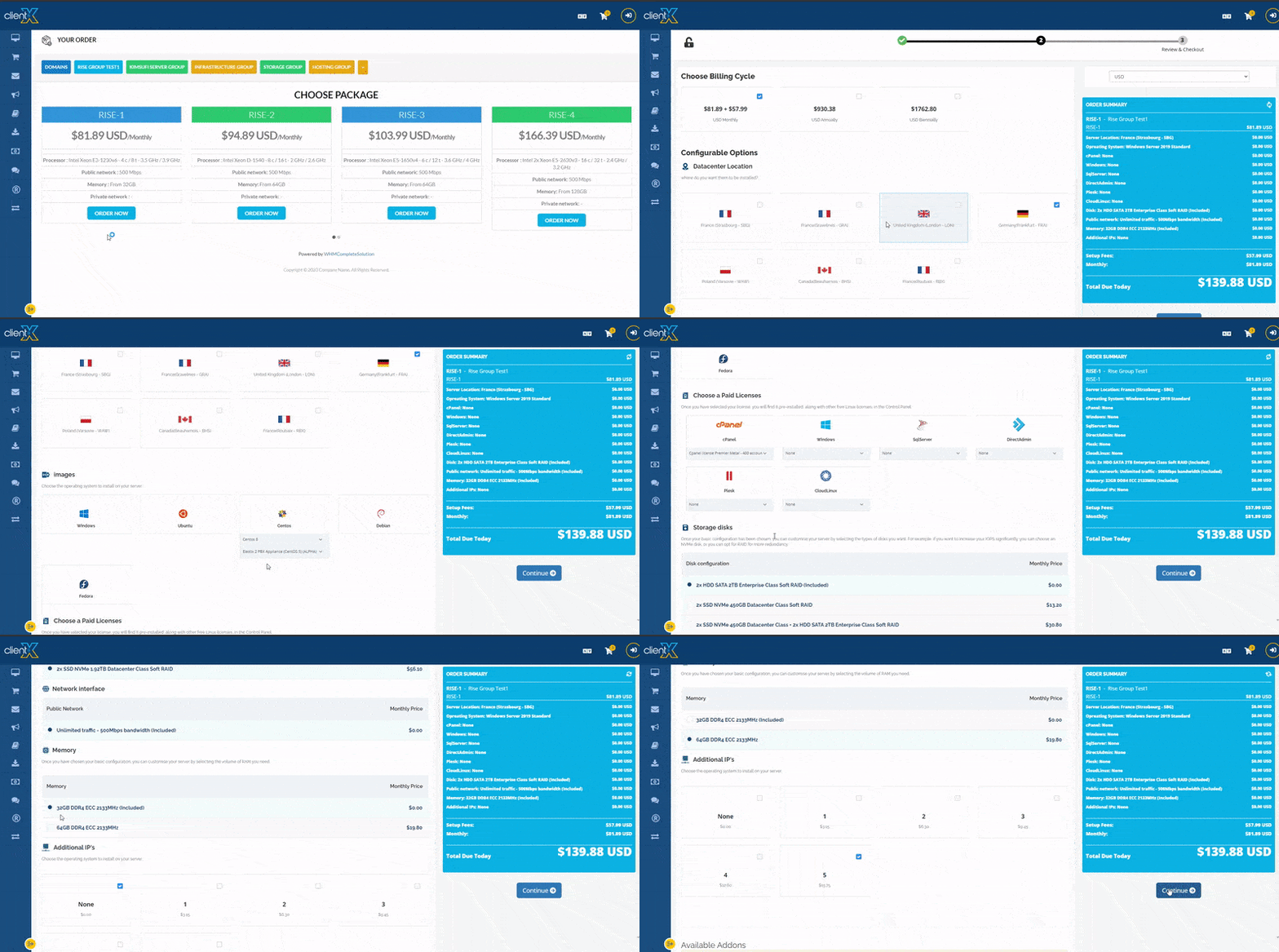
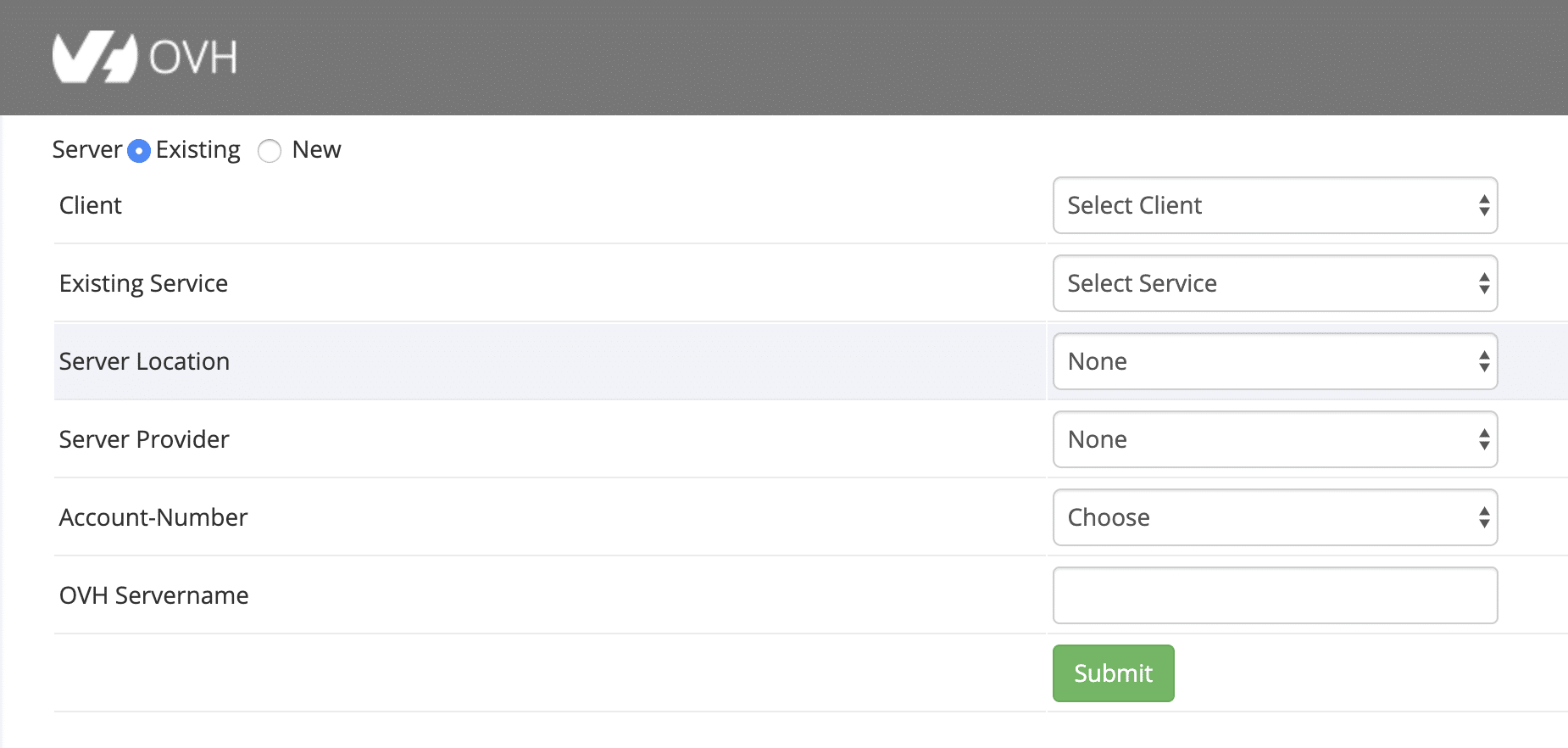
Earlier, the OVH order form was incompatible with the simple, intuitive, and fully responsive HostX, ClientX, and Lagom theme. Due to this, many users were facing issues. In this release, the OVH order form is now compatible with multiple themes making it easy for the customers to use. This has simplified the way to manage and customize the style and layout.
Below is the working screenshot of the OVH order form in ClientX WHMCS Theme:
2. New VPS Products Added
OVH launches new VPS products regularly according to the demand of the market and discontinues some older ones. The new products come with additional features to help clients boost up their businesses.
We want our clients to avail the benefits of modern and best-valued VPS products. This is the reason we launched the new version, OVH module 6.0.2. This version is compatible with the new OVH VPS products.
3. New Locations Added
This new update brings in the compatibility of the module with all the locations of OVH, SYS, and Kimsufi. Now there are no restrictions left regarding specific locations.
4. Server Setup Fee Introduced
We have introduced the server setup fee in this new update in the case of OVH dedicated servers. Now admin can set the price margins for the server setup.
What’s fixed in the 6.0.2 version?
1. Invisible IP Reserve in Client Area
Earlier, the user was unable to view the IP reserve in the module client area. But now the IP reverse is clearly visible and this issue has been resolved.
2. Reinstall Mail Issue Fixed
In the previous version, there were instances where the server reinstall mail was not working properly. But in this updated version, this mailing issue has been resolved.
You are advised to download the new version from the client area of the website. Here is the detailed process to upgrade the module to the latest version. In case you want to hire our expert to upgrade the module, feel free to reach us at our customer support.
Planning to install WHMCS to automate your web hosting business? Great choice!
With advanced tools from WHMCS, you can boost up the profit of your business. Looking for a complete guide to install WHMCS? If yes, then we can help you out.
Have a look at the steps you need to follow to install WHMCS.
Let’s get started!
Step 1. Download WHMCS
If you want to directly download WHMCS then visit here.
Are you a reseller customer? If yes, then you must have obtained your license key from a reseller but no login for our member’s area. Isn’t it? Your reseller can provide the latest WHMCS files in this case.
Step 2. Install Ioncube
How to protect the WHMCS source code? ionCube Loader® is used to encrypt the WHMCS and protect the source code. Usually, hosting providers prefer to compile iobCube support into PHP.
Need help to install ionCube on your server? You can explore the internet for IonCube Installation Tutorial.
Step 3. Create Database
How to store settings and data? Well, WHMCS uses a MySQL® database. During the installation process, you can create one database or you can choose to create one before you begin.
You can check the Database Setup tutorial on the internet for more information. You may get different tutorials for creating databases in cPanel & WHM and Plesk.
Step 4. Restrict Database Privileges
Have a look at database privileges you will need for many tasks:
INSERT
SELECT
DELETE
UPDATE
LOCK TABLES
Additional privileges required for installation, up-gradation, and activating and deactivating modules including:
CREATE
ALTER
DROP
INDEX
Step 5. Install WHMCS
Let’s have a look at the following process to install WHMCS:
First, find the .zip file and unzip the content to a folder on your computer.
Second, change the name of the file from configuration.php.new to configuration.php.
Third, the entire WHMCS folder needs to be uploaded to your website. Facing a problem with uploading the folder? Try uploading the folder in binary mode.
Rename the folder such as billing. It is an optional step. However, you can’t name the installation folder as admin as it is used by the administration area.
Then navigate the installation script and click on it to run the installation. and in case if you see an error related to ionCube then perform the ionCube steps mentioned above.
Follow all the instructions like entering the license key, file permissions, and so on to install the WHMCS.
Once done with this delete the installation folder from the web server and keep a check on the configuration.
Step 6. Installing WHMCS in cPanel
Do you use cPanel? Want to install WHMCS there? Just follow these steps and your task will be done.
The first thing to do is to check whether the hosting provider has installed WHMCS using WHM software.
Then log in to your cPanel account and there click on the site software icon.
Then you will be able to see the option of WHMCS click on it.
Choose the domain you want to install WHMCS in.
Then click on the install option.
This can take up to 30 seconds to install. After it finishes, you’ll see a message of success, a link to the login page, and the default login credentials automatically generated.
Then click on the link which is provided when you log in for the first time.
The interface will prompt you to check and agree to the End User License Agreement upon first logging in.
In this step, you have activated WHMCS. If you already have one, enter an existing WHMCS license key to do this, or follow the link to purchase a new license.
Once you are done with entering the license key Click Activate to validate and complete the process.
The very first thing to do is to perform further security steps.
Log in to your account and then configure its setting. (Configuration > System Settings > General Settings or, prior to WHMCS 8.0, Setup >General Settings).
In this step all you have to do is to set up the payment gateways, (Configuration > System Settings > Payment Gateways or, before WHMCS 8.0, Setup >Payment Gateways).
Then set up the products and services you are offering (Configuration > System Settings > Products/Services or, before WHMCS 8.0, Setup >Products and Services).
In this all you have to do is to configure your domain pricing (Configuration > System Settings > Domain Pricing or, before WHMCS 8.0, Setup > Domain Pricing).
Then set up the support ticket departments (Configuration > System Settings > Support Departments or, before WHMCS 8.0, Setup Support department).
Using WHMCS Support Desk to set up email piping so you can handle tickets. For more detail see Piping by Email.
Make sure the WHMCS cron job is activated and configure automated tasks (Configuration > System Settings > Automation Settings or, prior to WHMCS 8.0, Setup >Automation settings).
Then for a trial place some test orders and check whether the setup is working or not.
Now, you are ready to install WHMCS in a few steps.
Looking for a reliable WHMCS developer, Want to know, how? If yes, then keep on reading:
Thanks to WHMCS, it has become easier to grow your web hosting business. Web Host Manager Complete Solution (WHMCS) is the engine for providing web hosting services, it has everything you need, all in one place to automate your business.
WHMCS solutions are efficient to empower your hosting business growth with some additional features. Additional features? How to add additional features?
Well, WHMCS solutions are customizable. If you are looking for quality WHMCS Modules, add-ons, and other custom modules that can meet the requirements of your business then you should get in touch with the WHMCS developer.
Finding the best WHMCS developers to get the desired WHMCS solutions?
1. Choose Renowned WHMCS Developer Company
First, it is important to choose a renowned WHMCS development company. Search for a WHMCS Developer company offering reliable customized software solutions for your web hosting companies. Discuss your business in detail with the developing company because every business is different and make sure that they would be able to deliver according to your business needs.
Let’s have a look at some of the things you can’t ignore to choose the reliable resource for your web hosting business:
2. Conduct an interview
You might be wondering how you can take the interview of WHMCS professionals without any technical knowledge. Well, you need to do some prior research. While exploring the internet, you will get enough information regarding WHMCS services. You can also take some help from the official WHMCS website https://www.whmcs.com/.
Make sure you ask general questions about experience, development times, previous work, support service, and more.
3. Experience
Experience matters in almost every field. Having decent experience in developing custom WHMCS solutions across the globe is important. The WHMCS Developer would be responsible for adding or integrating your own custom functionalities in WHMCS’s existing project. Before giving the responsibility for your work, check their previous works.
4. Estimated Development Time
Don’t forget to confirm the development time. Every project is different, so it is difficult for the professionals to give an accurate time for the delivery of the project. However, the estimated development time can be expected by the developers. Development time becomes crucial especially when the project is time-critical.
5. 24/7 Support Service from WHMCS Developer
The professional developer you choose should be able to provide 24/7 support service that will save you time, money, and effort. Many WHMCS Developer companies offer high-quality, integrated technical support to their customers for their services. So, you can choose a renowned developing company to hire their WHMCS developers.
6. Check Reviews
What do others say about the services? Previous customers could give you a better idea of their services. Online reviews are an easier way to know what they liked and what difficulties they faced. It ultimately gives you a clear understanding of the company, developers, and the services they offer.
Conclusion
Whenever it comes to choosing the right WHMCS services for your web hosting company, don’t forget to follow the above-mentioned tips.
Looking for reliable WHMCS developers? If yes, then look no further than WHMCS Global services. With an experience of more than a decade, our WHMCS developers offer the best WHMCS services to their clients. We make sure to deliver the services before the project deadline and to help the customers in the installation and other operations, we also offer 24*7 support services. For more information about our services, you can check out our clutch reviews online.
Revolutionary changes have been experienced by technology in the recent era. Many organizations, whether startups or established firms have ventured into the Future of Cloud Computing. This experience is necessary to become successful in this competitive marketplace.
Digital transformation is the most innovative way to gratify customers and for this reason, companies rely on cloud hosting.
Agility, flexibility, and scalability are what define cloud hosting. You pay for the services used and this declines the operational cost. In addition, it improves the overall productivity of the organization while moving towards transformation. Undeniably, cloud hosting is a primary factor why businesses are flourishing.
The future of Cloud Computing is all about maximizing the utility of the network servers. This helps users with improved functionality, more storage, quick processing, and high security. For bringing a digital transformation, every organization should leverage advanced technologies so that the business processes are revolutionized.
According to the authentic Gartner Report, public cloud services have exponentially risen by 18% in 2019, from $180b in 2018 to $215b in 2019.
Future of Cloud Computing what are the expectations of this technology
1. Reaching New Heights with Cloud: What does the future of Cloud Computing hold?
Cloud hosting is a cornerstone of business organizations as it offers secure access to system data and a high level of security. This seamless facilitation helps users with multiple authentication levels, a centralized database, and various automated servers.
2. Serverless Architecture Will be the Key
Today, a considerable amount of time, as well as resources, are invested in the development of innovative applications. Consequently, serverless architecture assists developers in system and application creation with ease.
3. Artificial Intelligence: In the spotlight
Unstoppable innovation and cloud hosting providers will help AI and IoT stay at the forefront. They will support emerging technologies while adapting to various platforms.
Today, more devices take plenty of time and processing power to study unstructured data. The data is sent to the server which decreases the response time of AI. Therefore, industry experts have predicted that smartphones will use inference continuously in the future.
Inference means where Artificial Intelligence grasps in the cloud is where AI learns in the cloud and applies the knowledge gained to real-life issues. This will further help in categorizing images as per the content and thereby respond to voice commands.
4. Efficient Data Management
As per big data generation stats, 40 zettabytes of data will be created by the end of 2020. There are different challenges being faced when the data volume is high:
Storage
Processing
Data management
The cloud hosting providers furnishes a one-stop solution to tackle all the aforementioned challenges. With the help of the cloud, data is divided into small packets and managed virtually. This helps organizations amplify big data management in the following ways.
Applications are processed at a faster pace
Easy to manage data
Securely managed data as a cloud is centralized
Accurate data analysis results.
5. Better Digital-First Infrastructure
By 2050, the population of the world will surge to a high number (say 12 billion). Large numbers will be concentrated in urban areas and this will require innovative digital solutions to manage everything.
The cloud will start providing a digital infrastructure for smart cities which may include:
Connected vehicles
Smart parking facilities
Efficient farms
Power Plants
Well-equipped trains and subways
If all this management becomes possible, the credit goes to the cloud’s capability to store and analyze data. Also, organizations will effortlessly be able to access artificial intelligence, data analytics, etc.
The Future of Cloud Computing will make inroads in the enterprise industry, everyone is looking forward to the model’s evolution.
The strategies will continue to play a key role in the organization’s network and strategy in the upcoming years. With scalability and flexibility, tools help in driving better business results. Unquestionably, the cloud hosting future is prosperous as there are a lot of expectations.
Indeed, WHMCS simplifies and automates daily tasks and operations for many businesses across the world. When it comes to finding the solution to automate the business, the first thing that comes to mind is WHMCS for managing clients, Weekly Recurring Invoices, orders, services, billing, support, and other ancillary functions.
Are you using the WHMCS software to generate invoices? WHMCS software generates invoices automatically for recurring products and services. However, you can’t generate custom recurring invoices without creating a new product or service in WHMCS.
But, is it possible to raise weekly recurring invoices in WHMCS? Yes, you can but not directly! You need WHMCS Recurring Invoice Management Module. Using this module, you can easily raise weekly recurring invoices without creating products and services in WHMCS.
Features of WHMCS Recurring Invoice Management Module
Have a look at some of the features of the WHMCS Recurring Invoice Management Module:
Invoices without creating product or service: WHMCS admin can generate a recurring subscription for a specific client and can generate recurring invoices without creating any product or service in the WHMCS admin area.
Different time frames: This module allows the admin to create recurring invoice subscriptions for different time frames such as 7 Days, Monthly, Quarterly, Semi-Annually, and Annually.
Default invoices section: The generated invoices are automatically added to the default invoices section of the WHMCS admin area. Invoice logs generate each time an invoice raises.
Generate unlimited recurring invoices: This module allows WHMCS admin to create unlimited custom recurring invoices without creating any product or service in WHMCS admin area.
Regular notification: After the invoice generation, the client will receive an email notification.
Cancel a recurring invoice subscription anytime: Admin can also cancel the recurring subscriptions any time whenever he wants.
These are some of the features of the WHMCS Recurring Invoice Management Module to make your invoicing more flexible.
This innovative WHMCS module is available in the marketplace. Not sure about this module? Don’t worry! This module comes with a 10 days money-back guarantee offer. If you do not like the module functionality or not working as per your requirement then you can ask for a refund. You will get your money back within 10 days of your purchase.
So, what are you waiting for? Go check out the module at the marketplace today!
The whole world is suffering amid COVID-19 and so is the Web Hosting Industry. The world has never been so still before. Covid-19’s impact on hosting is being like a social animal who can never stay within four walls of the house now has made those four walls his/her world. The horrific reality, isn’t it? But it’s the rule of life if there is darkness then light will eventually emerge.
At a time when every business is suffering or seeing its darkest hour, an online platform has come as the ray of light.
Still not getting the idea? Imagine a scenario with the same situations but the only difference is you can’t have access to the internet, you can’t order anything online.
Exactly the shocked expression on your face and the twitch in your heart is enough to be the icebreaker of the scenario.
Now you must be grateful that the business industry is operating online. All the credit goes to web hosting companies who are providing the best services even in this period of time.
Let’s discuss how the web hosting industry is playing a major role.
Covid-19’s Impact on Hosting Industry
Before providing a solution we must address the problem first.
The traditional model of business is now the toughest thing to do during a coronavirus outbreak. Because as precautions you must follow all the norms like wearing masks, social distancing, disinfecting everything, avoiding touching any sort of surface, and so on.
But do you think it is possible to follow these rules in the traditional model of business? No, it can’t happen.
Let’s take a hypothetical situation of the clothing business. Earlier while going on shopping do you just see the article and purchase it? No, you check the fabric, you try it on and see if it fits you properly or not, and many more things which you consider and do.
But are you able to do the same procedure now? No. In this case, comes the role of websites that provide you with a wide range of options and the full description of the product.
If you are among the people who think COVID-19 has disrupted their smooth business then this article will give you a new ray of hope.
According to the study, E-commerce rose 47.8% to $45.9 billion in revenue. We have the biggest example of Amazon.com Inc, which is the go-to shopping site for many consumers during COVID-19.
Amazon reported a 43.4% increase in North American sales and 33.5% worldwide revenue growth in the second quarter. As consumers went online in large numbers to buy food during the coronavirus pandemic, online grocery sales tripled in 2019.
So, many of the hosting providers faced sales dip because of Covid-19’s impact on the hosting industry. By following the right strategies, every business can boost up sales and double its revenue.
Now we must move forward to find the answer to another related question and that is
How to Boost Business Sales amid COVID-19?
Taking business on an online platform is the option one can go for. It not only saves the business from going into complete ruin but also provides a new horizon for it.
Simply means an online business can give you stability plus expand your business.
What else do you want? Even the confinement of the four walls can’t stop you from achieving your dream and earning a hefty amount.
And amid Covid-19’s impact on hosting, web hosting companies are the best support for small and medium-sized businesses or reseller businesses. Businesses can only make their website accessible to other users when they have space over the internet or server. And that is possible only if they purchase a hosting plan provided by web hosting companies.
Here are some of the Major COVID-19 Impacts on Hosting Companies
Still, wondering if COVID-19 is a boon for web hosting companies? Let’s have a look at some of the impacts:
Improved Sales
Amid this outbreak, most of business owners have already started selling their products and services online. To start building an online presence, they first approach a web hosting service provider to get online space for their website. As a result, the sales of web hosting companies increased many folds. Moreover, SEO plays a vital role in increasing sales by boosting website traffic.
Blessing in Disguise
Selling online and building an online presence without a website is not possible. So, thankfully web hosting providers are allowing you to showcase your products and services on your website by providing a virtual space online.
Even more, many web hosting companies are providing numerous offers for newbies. Even, companies are offering free hosting services for a few months just to help during these difficult times due to major Covid-19’s impact on the 4hosting industry. They are also trying their best to uplift small-size businesses that are suffering extremely in the time of the pandemic.
Increased Profit
With the continuous increase in online businesses and websites, hosting service providers are enjoying a boost in revenue. According to Statista, it is expected that the hosting, storage, and computing market will amount to approximately 162.8 billion U.S. Dollars by 2021.
Advancement
Most of hosting providers aim to build customer trust for a lifetime. So, they believe to opt for advancement in their services. To achieve new heights, companies offer
99.9% Uptime, 24/7 Customer support, the best price, and strong security with an SSL certificate and embedded DDoS protection.
After considering the above-mentioned points, it is not wrong to say that COVID-19 is a boon for web hosting companies. Undoubtedly, COVID-19 has brought tough times for the whole world. In the web industry also, the competition is really high, and to match the expectations of your potential customers, it is imperative to work on new strategies.
Have a Look at Web Hosting Trends After Covid-19’s Impact on Web Hosting Industry
The growth of the hosting industry is amazing and here are some of the latest hosting trends hosting web hosting companies should follow to maintain their position in the market:
Green Web Hosting
The web Hosting Industry badly affects the environment. Ever thought about it? Well, this is reality. The hardware in data centers where all your website data get stored needs to be stored in a cool and controlled environment. They require energy-intensive maintenance resulting in CO2 production.
These days, web hosting companies are investing in green web hosting which allows web hosts to reduce negative impacts on the environment. They invest in carbon offsetting schemes by gaining renewable energy certificates (REC) or carbon offset certificates (VER). These certificates certify that the companies are helping in generating renewable energy and practicing reduced greenhouse gas output.
Cloud Hosting
Many areas of technology have already adopted the cloud. It is expected that cloud data centers to process 94% of workloads in 2021.
It’s now a web hosting industry opting for a cloud hosting trend with no physical servers and data storage across multiple computers. Cloud hosting is more reasonable as it eliminates the constraints of typical server configurations and physical servers. It provides access via the internet or network connection.
Cloud hosting is both scalable and reliable and its virtual resources are available 24/7. Moreover, its pay-as-you-use model always attracts customers to opt for it.
Security Protocols
Increasing instances of data violations and cybersecurity meltdowns have become a big concern for hosting providers. They are required to enforce more tightened security.
This is why web hosting providers emphasize hosting security protocols, such as the standard SSL certification, compliance checks for CMS vulnerabilities, and encrypted data storage.
Free HTTPS
Non-HTTPS websites are not secure – declared by Google. Even more, Google Chrome promised fair rankings to boost to encourage sites to shift into HTTPS. So, HTTPS has become mandatory for websites to rank higher on search engines, build customer trust, and protect sensitive data.
Therefore, it has become imperative for web hosting providers to offer customers HTTPS. Even, many hosting companies are offering FREE HTTPS to stay ahead in the race.
Price
Competition in the web hosting industry is increasing every day. Not unique tools and features, but they also have to work on the price schemes as well. Tempting offers and fairly discounted buy-in deals always attract new customers. Among all web hosting services, shared hosting services are usually available at lower prices. There are hosting providers in the market offering the services free for three months to stand out from the competition.
Additional Services
Web hosting service providers are no longer limited to offering servers and storing files, they have started offering services including HTTPS, SSL, DDoS protection, web design, e-mail marketing solutions, and more. Offering services for free or at lower prices can tempt the customers but providing several value-added services can help you build a strong client base.
It is well said, the worst of the times can be the best of the times. It only depends on the ways you choose.
In today’s rapidly evolving digital landscape, cloud hosting has become indispensable for businesses and individuals seeking reliable and scalable infrastructure. As we enter 2025, the demand for top-notch cloud hosting provider continues to rise as organizations strive to optimize their operations and leverage the full potential of cloud computing. In this article, we will explore the best cloud hosting providers of 2025, evaluating their key features, performance, security measures, and customer satisfaction.
At first, only three types of hosting services were available: i.e. shared hosting, VPS hosting, and dedicated hosting. With Cloud hosting in the market, it has driven customers towards it from the other three hosting services.
When you look at the market, hundreds of Cloud hosting service providers are out there. So, how do you find the best Cloud hosting service provider for you? This is where we come into play in helping you get the best Cloud hosting services in 2025. But before we start, w Let’s understand what cloud hosting is.
What is Cloud Hosting?
Cloud hosting server refers to providing computing resources, such as storage, processing power, and applications, through a network of interconnected servers. Instead of relying on a single physical server, cloud hosting utilizes a distributed network of servers in various data centres worldwide.
These servers work together to provide a reliable and scalable infrastructure that can accommodate fluctuating demands.
Cloud hosting definitely provides more security to these types of websites. It is a great choice for people looking for more flexibility and scalability. Thus, it won’t be wrong to say that cloud hosting definitely has an advantage over traditional hosting services.
Without any further ado, let’s go ahead and look at the best cloud hosting company in the market.
Tips to remember before selecting a cloud hosting provider
Selecting the best cloud hosting provider among the hosting service providers among hundreds can be a daunting task. Before choosing the cloud hosting provider, make sure you research and analyze the theme based on the following;
Performance
Features
Dependability (Reliability)
Customer Support
Pricing of Plans
Here Goes The List of The Best Cloud Hosting Providers In 2025
SiteGround
SiteGround offers the best plans for medium-level businesses. When it comes to providing a fully optimized cloud environment=ment only a few can do better than SiteGround. That is the kind of quality SiteGround brings for its customers.
Features
SiteGround consists of PHP, MySQL, CentOS, Ngnix, Apache, etc.
Moreover, it also gives a lot of free stuff like dedicated IP, private DNS, SSL certificate, CDN, etc.
Pricing
The basic cloud hosting plan starts at $80/month and goes to $180/month.
30-day money-back guarantee.
Customer Support
Exceptional support is provided in all means offered for customer support.
All problems are solved easily with experts in a short duration of time.
Hostinger
Hostinger offers the best plans for small-level businesses. It offers quite flexible plans giving you the freedom to focus on your business completely. It’s a high-performance cloud hosting provider for small businesses. Highly suited for business projects.
Features
Hostinger’s smallest plan consists of 800,000 inodes.
Moreover, it also gives a lot of free stuff like dedicated IP, domain registration, SSL certificate, Cloudflare integration, etc.
Resource allocation in plans.
3GB / 6GB / 16GB RAM
100GB / 140GB / 200GB SSD space
2/4/8 CPU cores
Pricing
The basic cloud hosting plan starts at $7.45\month and goes to $37/month.
30-day money-back guarantee.
Customer Support
24*7 customer support available.
No phone and live chat support are available.
Average customer support service
DreamHost
DreamHost is one leading cloud hosting providers in the market. It offers the best and most simple cloud hosting server setup in the market. Therefore, setting up your cloud hosting plan is the fastest in the case of DreamHost. Best suited for developers.
Features
DreamHost resource allocation.
512 MB of RAM Server
2 GB of RAM Server
8 GB of RAM Server
Moreover, it also gives a lot of free stuff like dedicated IP, SSL certificate, etc.
Pricing
The basic cloud hosting plan starts at $4.5\month and goes to $48/month.
30-day money-back guarantee.
Customer Support
Email and live chat support are available.
16 Hrs a day of customer support provided.
Phone Support is not available.
Hostgator
HostGator is a giant in the web hosting niche. This company is practically everywhere around the globe. One of the basic reasons for that is the fact that it started early. And it has been growing strong ever since. Not just that it gives exquisite performance to its customers.
Features
HostGator’s smallest plan has one domain name and up to 2GB of memory.
Additionally, it also gives a lot of free stuff like dedicated IP, SSL certificate, etc.
Also provides unmetered bandwidth and storage with its plans.
Pricing
The basic cloud hosting plan starts at $4.95/month and goes to $9.95/month.
The renewal rate is $12.95/month.
Customer Support
Not a good support system is offered.
Highly unsatisfactory.
Big Rock
Big Rock has definitely built its reputation in the niche of web hosting over time. It provides optimum quality of service to its customers.
Features
Big Rock resource allocation.
Up to 8 CPU cores and 8 GB RAM.
For starters, pack storage is 1GB with one website and 10GB bandwidth.
Moreover, a free SSL certificate is also provided.
Pricing
The basic cloud hosting plan starts at $5.69\month and goes to $9.49/month.
30-day money-back guarantee.
Customer Support
Live chat and phone support are available from 8 am – 8 pm.
Ticket support is available 24*7.
Not satisfactory customer support with lots of delays.
Vultr
Vultr has made name for itself by offering some exquisite cloud hosting packages for the last 6 years. When it comes to offering cloud hosting packages Vultr is a trendsetter.
Features
Vultr resource allocation.
1 – 24 CPU Cores, 512MB – 96 GB RAM, 10GB SSD Space, and 0.5TB Montly traffic bandwidth.
It offers 8 operating systems to choose from.
Additionally, gives you a choice to add software/CMS by providing you with 15+ software to choose from.
Pricing
The basic cloud hosting plan starts at $2.5\month and goes to $640/month.
30-day money-back guarantee.
Customer Support
Live chat and phone support are not available.
Customer support through internal ticketing and online forum.
Not satisfactory customer support with delayed replies.
A2Hosting has a repo of being a lightning-fast web hosting company. The reason is they are one of the fastest hosting providers in the market. Plus, the plans offered by them to their customers are very reliable and efficient ones.
Features
99.99% uptime guaranteed.
You have the ability to design your own server as per your requirement.
Additionally, gives free SSD in all plans.
Pricing
The basic cloud hosting plan starts at $5\month and goes to $15/month.
Customer support is very reliable, effective, and efficient.
InMotion
InMotion doesn’t have a big name in the niche of cloud hosting providers. But is definitely gaining popularity among customers with its affordable and flexible cloud hosting plans. The reason being it provides a cloud hosting plan for everyone from small businesses to large enterprises.
Features
Features like auto backups, a full snapshot of servers, resource monitoring dashboard, rapid provisioning, etc are provided.
Moreover, InMotion also gives free SSL, cPanel License, etc.
Pricing
The plans offered are suitable for each category of customers just a bit the expensive the expected.
InMotion offers 10 diffent plans.
Customer Support
Customer support provided by InMotion is average just good enough to work with.
Chemi Cloud
ChemiCloud is an old-school web hosting company. With experience of over 10 years in web hosting. ChemiCloud’s main focus has always been on customer satisfaction and making the customer experience better and better with passing time. This is one of the reasons why ChemiCloud has been going strong till now.
Features
Resource allocation for the basic plan starts at 4GB RAM, 4TB Bandwidth, 2 CPU Cores, and 80GB SSD Storage Space.
With ChemiCLoud you also get a dedicated IP address, branded name servers, free-of-cost cPanel License, control panel, and SSL certificate.
Pricing
The basic cloud hosting plan starts at $59.96\month and goes to $269.69/month.
ChemiCloud plans are quite expensive but they are worth it.
Customer Support
ChemiCloud provides its customers with world-class customer support.
Customer support is available through live chat, email tickets, phone, and online forums.
Hostwinds
Hostwinds has built itself a solid repo over the 10 years since its entry into the web hosting niche. They make sure that their customers feel satisfied with the services they were provided.
Features
Hostwinds guarantee 99.99% uptime time.
Resource allocation for various plans varies between 1 – 16 CPU cores, 1GB – 96GB RAM, etc.
It also gives you a dedicated IP address and SSL certificate.
Pricing
The basic cloud hosting plan starts at $4.49\month and goes to $296.09/month.
Hostwinds also give a 14-day money-back guarantee.
Customer Support
Hostwinds provides its customers with a library of guidebooks.
Customer support is available through live chat, email tickets, and phone 24*7.
Kamatera
Kamatera is one of the oldest web hosting companies in the market. As it has been in this niche for over 20 years. Building trust among customers with the services it offers. Kamatera is a renowned name among web hosting customers or I should say a reliable name.
Features
Kamatera packages come with SSD hard drives, 600 GB bandwidth, and Intel Xeon E5 v4 processors.
Plus they also provide a good operating system and core apache upgrades from time to time.
Gives you the facility to build your own servers.
Supports major frameworks and tools like .NET, Ajax, etc.
Pricing
The basic cloud hosting plan starts at $50\month and goes to $120/month.
Monthly rates don’t increase at renewal.
Customer Support
Phone and email support are available 24*7.
Response time for tickets is given 4hrs at max.
Clook
Clook is a UK-based web hosting provider. It is best for customers looking for basic cloud hosting plans. Especially if you are in the UK then we highly recommend it. Clook offers the best services at an affordable price to its customers.
Features
Gives you the freedom to customize your own plan as per your needs.
Clook gives services like Spam protection, DNS clustering, 10GBps networking, hardware redundancy, etc. in its plans.
Pricing
As its plans are customizable, therefore, its cost also changes according to your needs.
Clook plans turn out to be quite expensive but they are worth it.
Customer Support
Customer support provided by Clook is remarkable.
They are 24*7 available to give assistance to their customers.
Microsoft Azure
Microsoft Azure is a web hosting company built for medium or big business companies. If you are a small business company I won’t recommend you, Microsoft Azure. It offers powerful plans to its customers. For small business enterprises its an overkill.
Features
Microsoft Azure has a transparent plan system to help you build your plans according to your requirements.
It also provides windows virtual machines, SQL databases, SQL server virtual machines, etc. with its plans.
Pricing
The pricing of plans depends on your requirements.
Expensive plans are only recommended for medium and big business companies/ enterprises.
Customer Support
Microsoft Azure provides its customers with top-notch 24*7 support.
Digital Ocean
Digital Ocean is a well-featured as well as highly flexible web hosting company. Providing its customers with extraordinary cloud hosting plans. All the plans offered by them are completely transparent.
Features
Resource allocation for plans fluctuates between 1GB – 192GB RAM, 1-32 CPU Cores, 1 – 12TB bandwidth, and 25GB – 3.75TB SSD Disk Space.
Digital Ocean also provides facilities like block storage, snapshots, backups, etc. with its plans.
Pricing
The standard cloud hosting plan starts at $5\month and goes to $960/month.
Customer Support
Picket support is provided for the customers.
Customer support is satisfactory.
Liquid Web
Liquid Web is an old web hosting company that didn’t step into the field of cloud hosting for a long time. As it was excelling with shared hosting at the time. But when it started with providing clouding hosting, it came with its own line of cloud servers. Liquid web hosts over 1 million websites worldwide.
Features
Resource allocation fluctuates between 2GB – 8GB RAM, 40GB – 200GB SSD disk space, and maximum 10TB bandwidth in its plans.
Additionally, it also gives features like DDoS protection, CDN, integrated firewall, and many more.
Pricing
The basic cloud hosting plan starts at $59\month and goes to $189/month.
You can pay for the plans annually, biannually, or monthly as well.
Customer Support
The customer support offered by them is so good that they actually get no complaints about their customer support.
Except for that their customer support has also won many awards for providing good support to their customers globally.
Amazon Aws
Amazon AWS is a giant in the field of cloud hosting providers. The company has been market for over 14 years now. AWS is right next to Microsoft Azure but still has a foot ahead of Microsoft Azure. It handles a lot of big enterprises.
Features
Amazon AWS offers both windows as well as Linux hosting configurations.
Customers are given the freedom to create their own customized plans as per their needs.
It also gives some services for free to a special cloud tier.
Pricing
Amazon AWS has three types of standards for billings.
Pay-per-use
Pay-less-using-more
save-when -you-reserve
Rest plans are priced as per your requirements.
Customer Support
No live chat or phone support is available.
Only ticketing through the email is available but no doubt replies received are top-notch and extensive. Probably will solve all your issues.
Plus a wide knowledge base to guide you with the help of videos.
Scala Hosting
Scala Hosting is an upcoming name in cloud hosting. Credit for that goes to the box ideas that they come up with. And it is so good at it that they get 100% customer satisfaction.
Features
Resource allocation stays in between 1 – 6 CPU Cores, 2GB – 8GB RAM, 20GB – 80GB Storage in all its plans.
The facility to upscale resources according to your needs is available.
Scala consists of CPanel for free and can be integrated with WHMCS.
Pricing
The basic cloud hosting plan starts at $9.95\month and goes to $63.95/month.
It gives the option of monthly and annual billing.
Scala Hosting’s plans value for money.
Customer Support
Scala provides 24*7 customer support.
The customer support team is highly qualified and solves are your solutions instantly.
Final Words
After extensive research and analysis of the top cloud hosting providers in 2025, it is evident that several exceptional options are available for businesses and individuals seeking reliable and efficient cloud hosting services.
We have covered the top cloud hosting providers that can help you select the best one per your requirements. These providers have demonstrated their commitment to innovation, scalability, security, and customer satisfaction.
The WHMCS team is preparing to launch Version 8.0, the next Major version of WHMCS soon. What are you expecting? Significant behind the scenes changes? Fresh look for the WHMCS admin area? Improved support?
Curious to know? Let’s check out what WHMCS Founder and CEO, Matt Pugh is planning to deliver in Version 8.0:
Shared Users for Client Login
This feature is a significant update in WHMCS user authentication model allowing multiple users to share a single account (which has access to multiple client accounts). They can access the same account using a single credential set.
New Look and Feel of WHMCS Admin Area
No more boring and outdated user interface design of the WHMCS admin area. Get ready to enjoy the new look and feel with improved desktop, mobile and tablet devices experience. You can expect a better responsive and touch-friendly experience on touch-screen devices, plus lightweight and modern experience on desktops.
Improved Email Deliver-Ability
WHMCS 8.0 is going to support email sending providers such as SendGrid, MailGun, and SparkPost. This will improve email reliability and delivery-ability which will ultimately help you drive user engagement with your company and boost up your business revenue.
IDN Support
In WHMCS 8.0, functionality added to improve IDN support which enables and simplifies IDN sales. Furthermore, there will be full native support for internationalized domain names registration with Enom and ResellerClub.
Better Support for Currencies and Increased Limits
WHMCS 8.0 is coming with increased limits for the product size, improved support for currencies, and better support for up to 3 decimal places for tax rates.
Want to know more? Stay Tuned!
Strategy Behind Shared Feature
Authentication and user management is an imperative part of any massive system. Adding a shared feature is a massive undertaking that allows one user (single login) to manage multiple client accounts. Ultimately, this will provide a seamless and stronger solution for the modern-day web host service providers.
Minimum Requirement for WHMCS 8.0
There will be a new minimum requirement for Version 8.0. It will require a minimum PHP 7.2.
New releases and updates of PHP versions are faster and more frequent than ever. So, it is difficult to maintain backward compatibility with older versions for so long. Therefore, finally, WHMCS has decided to raise the minimum requirements to get benefit from recent developments and modifications to PHP and the libraries they utilize.
Do you have PHP 7.2 or 7.3? These two versions are common, and if you have any of these two, you are ready for WHMCS 8.0.
Reasons behind big release like 8.0
Numerous different factors have taken into account to release Version 8.0 including:
Modification in the upstream PHP
Adoption rates of PHP versions among the user base
To improve the performance
Requests received from users
The WHMCS team is always more concerned about their users. So, they ensure that any big upgrades don’t cause any disruption and incompatibilities.
Final Word
User authentication changes will make the product more flexible to use for both customers and businesses. With new PHP versions, the performance gain is also expected in WHMCS 8.0. This version will help businesses to lead the industry in the coming months.
Ready to experience all the above-mentioned features? You won’t have to wait too long. WHMCS 8.0 is coming soon!
Web hosting businesses rely on efficient billing and client management systems to streamline operations and provide a seamless experience to their customers. In this fast-paced digital era, choosing the right platform for managing web hosting services is crucial for success. Two popular options in the market are WHMCS and Blesta, each offering its own set of features and advantages. In this blog, we will delve into a detailed comparison of WHMCS and Blesta to help you determine which one is better suited for your specific needs. Now, let’s dive deeper into the comparison of key features, pros and cons, customer support options, and real-world experiences to help you make an informed decision about whether WHMCS or Blesta is the better choice for your web hosting business.
WHMCS vs BLESTA Comparison Chart
Features
WHMCS
BLESTA
Billing Portal
YES
YES
Customizable Invoices
YES
YES
Project Billing
YES
NO
Billing & Invoicing
YES
NO
Free Trial
NO
YES
Pricing
$18.95 /month
$12.95 /month
WHMCS VS Blesta: Which one to select?
To give you a clear picture, let’s understand the features, pros, and cons of WHMCS Vs Blesta.
WHMCS (Web Hosting Manager complete solution)is a significant billing and client management platform designed for web hosting organizations. Also, WHMCS serves as an all-in-one solution that automates various aspects of web hosting business operations, including invoicing, billing, customer support, domain registration, and more. WHMCS has been one of the leading names when it comes to web hosting management software for some time. WHMCS has one of the best features that you have expected in customer, billing, and domain management. This enables you to handle other tasks like providingtechnical support for your clients.
Pros:
1. WHMCS provides seamless integration with popular control panels like cPanel and Plesk, which makes it easy to manage and organize hosting accounts. It also supports integration with numerous payment gateways, enabling businesses to automate payment processing.
2. WHMCS provides a customizable interface, enabling businesses to brand the software to match their own identity. It also supports the development of custom modules and plugins, allowing for further customization and integration with other systems.
3.WHMCS automates many routine tasks such as invoicing, provisioning, and account management. This automation saves time and reduces human error, increasing overall efficiency and productivity.
Cons:
1.Most users think it’s expensive compared to Blesta, But the pricing is worth it as it provides top-notch quality with a robust feature set.
Blesta is a popular web-based client management and billing software created specifically for web hosting developers, providers, and other online services businesses. It is utilized to automate and streamline various aspects of business operations, including billing, invoicing, support ticket management, and customer management. Speaking about the features, Blesta includes all the basics like invoice delivery, account management, and payment processing. Blestaprovidescustom services that enable businesses to manage their customers, products, and services efficiently. It offers a centralized platform for managing billing cycles,generating and sending invoices, tracking payments and handling recurring billing.
Pros:
1. Blesta offers an intuitive and user-friendly interface, making it easy for businesses to navigate and utilize its features effectively.
2.Invoicing, payment tracking, and recurring billing are just a few of the billing procedures that Blesta is excellent at automating. Through automation, administrative processes are streamlined, time is saved, and the possibility of billing management errors is reduced.
3. With Blesta, businesses can customize the software’s appearance, layout, and branding to align with their own identity.
Cons:
1. While Blesta offers several integration options, its ecosystem of third-party extensions and plugins may be more limited compared to other billing platforms. This could potentially limit some businesses’ ability to integrate with specific tools or services they rely on.
2.Blestaprovides support resources such as documentation, a knowledge base, and a community forum, some users have reported challenges in obtaining prompt and comprehensive support for complex issues.
What can you expect from these?
Customer Experience: Using WHMCS, you can easily control everything from the control panel, including selling domains, registering/transferring/renewing domains, and hosting plans. It gives you easy access to information related to all orders, clients, products, and services. Along with essential utilities, it also offers add-on services, including apps and integration.
Reporting: WHMCS generates a detailed analytic report which includes Daily Performance, Income Forecast, Annual Income Report, New Customers, Tickets, Feedback Scores, and Batch Invoice PDF. Even more, it is easy to manage and escalate the tickets submitted by customers in the control panel. When your customer submits a new ticket, immediately, you get a notification through email. Blesta’s report is not detailed as compared to WHMCS. Its default reports include aging invoices, client data portability, custom report, invoice creation, tax liability, transactions applied, transactions received, and package revenue.
Pricing: WHMCS offers two monthly plans – a Starter plan and a Plus plan. A starter plan costs $15.95/month, and a Plus plan costs $18.95. Both plans can support up to 250 clients. So WHMCS is more expensive? But remember, all precious and quality things are costly, and all the plans of WHMCS come with a 30-day money-back guarantee. So, you can easily avail yourself of a 30-day money-back guarantee and quickly try WHMCS. Moreover, it is observed that many users prefer WHMCS over Blesta as its modules need to be revised for their needs.
Customization: You can go for it Whenever you need to modify, customize, or integrate your WHMCS with other systems. Third-party developers are welcome to customize the client-facing UI, Customise text & phrases, Integrate & Extend functionality and APIs for Authenticating WHMCS, Hook into events as they occur, and Interact with WHMCS remotely. They also have documentation on their official website for developers working with WHMCS. Blesta is designed to be more developer friendly than WHMCS. So, it offers many customizable options for customer billing. The source code of Blesta is available for editing natively.
Marketing / Business: Blesta is the best option if you have a low budget and are looking for only a few modules. And it offers plenty of billing options. On the other hand, WHMCS provides an affiliate system that helps you promote your hosting services. So, eventually, you could bring a lot more business over the long term.
WHMCS vs BLESTA: Final Verdict
When comparing, it’s vital to consider your business’s specific requirements and priorities. WHMCS has advantages that make it a popular choice among web hosting providers. At the same time, both platforms offer similar functionalities. ButIt’s worth noting that the final verdict ultimately depends on your specific needs and preferences. Therefore, consider evaluating both platforms based on your requirements, budget, and the customization and integration you desireto start your reseller web hosting business.
With the release of the Ubuntu version, 20.04 everyone has been eager to switch to its latest version. Where on the one end all Ubuntu users are excited about it. There has been a question troubling them. As most of the users use version Ubuntu 18.04. Question popping in mind of such users is how to upgrade Ubuntu 18.04 to 20.4?
Mostly the people fear losing their files during the process of upgrading their Ubuntu. So we decided to help the users and give them a proper and precise guide to upgrading ubuntu without and data/ file loss.
Ubuntu version 20.04 was released on 23rd April 2020 as the latest version available out there. Moreover, security patches and updates for this will be provided till 2025. Thus making it a very important upgrade for all Ubuntu users. It is also called Ubuntu 20.04 LTS where LTS stands Long term support.
But before we dig deep down into how to upgrade your Ubuntu version to 20.4. Let’s learn about what new features come along with ubuntu 20.04.
New Features Introduced In Ubuntu Version 20.04
Here is the list of new features present
1. Linux Kernel 5.4.
2. Modified ZFS File System
3. Redesigned Log In & Lock Screen
4. PHP 7.4
5. Python 3.8
6. Open JDK 11
7. Ruby 2.7
9. New Wallpapers & App Icons
10. Computer manufacturer logo displayed during boot
11. Do Not Disturb Mode
12. ZFS 0.8 (with native encryption)
13. Fraction Scaling
14. GNOME 3.36(Faster)
15. New Standard Color Themes
Now that you know what all is present in Ubuntu 20.04. Let’s move towards the next step of upgrading your version of Ubuntu to the 20.04 version.
Upgrading to Ubuntu 20.04
Before you go forward to do the upgrading the most important thing is to have a full-fledged backup of all. It’s better to be safe than sorry.
Let’s move forward with the process of upgrading your Ubuntu to 20.4 version. There are two ways to do this upgrade.
Method 1 – Upgrading using GUI
Step 1 – Search for an updater in your system. Then search for new updates once found click on them. Further, click on install now in new updates.
Step 2 – Once all the updates are installed. It’s time to reboot your system.
Step 3 – Now, the system reopens. Search for Software & Updates and click on it.
Step 4 – If the updates appear then it’s good.
Just in case it doesn’t write Alt + F2. And enter the command in the dialogue box “update-manager -c -d” and press enter.
Step 5 – The next screen will show your U 20.04 version available. Further, click on upgrade to initiate the upgrade procedure.
Step 6 – Once the upgrading is completed it will ask to restart the system.
After the restart verifies the new upgrade by logging in and checking about it from settings > about.
Method 2 – Upgrading Using Command Line
Step 1 – The first step would be to update all the installed packages. For doing that write the following command.
Step 2 – Once all the updates are installed. It’s time to reboot the system with this command.
aaronjones@wgs:~$ sudo reboot
Step 3 – Once your system comes back on after the reboot. It’s time to remove the unused kernels to get some free space. In order to achieve that use the following command.
aaronjones@wgs:~$ sudo apt --purge autoremove
Step 4 – The next step would be to install the “ update-manager-core”. Write the following code to get it installed.
Step 5 – To check whether Ubuntu version 20.04 is available or not. Use the following command.
aaronjones@wgs:~$ sudo do-release-upgrade
Step 6 – If still, it doesn’t show the new version. You can use this force command.
aaronjones@wgs:~$ sudo do-release-upgrade -d
Step 7 – Now run the upgrade and use “y” or “enter” to confirm the details of the upgrade whenever asked during the upgrade. At last when the upgrade is completed use y to restart the system.
Step 8 – Once the reboot is completed. Open the terminal and write the following command to verify the upgrade.
aaronjones@wgs:~$ cat /etc/lsb-release
Using any of the above two mentioned methods your upgrading of your Ubuntu to version 20.04 is successful.
Now you have all the knowledge you need to complete the upgrade of your Ubuntu successfully without and loss of data. Just follow the simple steps to achieve what you crave.
In making our one-page order form more secure, powerful & useful to the WHMCS users, we keep on upgrading it with more and more new features, improvements, and bugs fixes. This time we have introduced One Step Checkout V1.0.7 with some new features that are very important to all our one-page order form users.
What’s New in One Step Checkout Order Form Template V 1.0.7?
Introducing Color Scheme Changer
We have introduced the most required feature that the color scheme changer. With the huge success of this feature in our ClientX WHMCS Client area theme, it becomes mandatory for us to introduce this feature in our one-page WHMCS order form, as everyone has its own color scheme and with this feature, they can easily change the color scheme of the order form from WHMCS admin.
Set Payment Gateways According to the Product Group
Now we have given an option to the WHMCS users to set the payment gateways according to the product groups. It means a WHMCS admin can set payment gateways that he wants to show for a specific product group once their clients add the product to the cart via the query string.
Show/Hire Currency Switcher
WHMCS Admin can now Show/Hide the currency switch drop-down on the One Step Checkout V1.0.7 from the WHMCS admin.
Show/Hide Product Group & Products
Now WHMCS admin can control the visibility of the product group and products on the order form when the product is added to the cart via query string.
We have given an option in the WHMCS admin to disable the section once a user adds the product to the cart via query string.
Improvements:
Setup fees icon added in the order summary.
Now the billing cycle dropdown will only show if the billing cycle defined for a product is more than one.
Now you can set the One Page Order Form according to a specific product group from WHMCS admin, (This will work only once we add the product to the cart via a query string)
Bugs Fixes:
When we click on the “Add To Cart” button only the billing cycle that is showing on the top will be added, previously it was adding only the monthly cycle.
When we add the products to the cart without selecting custom fields, the order form bypasses all the custom fields, now it will not bypass and gives an error.
Domain additional required fields not validating and redirecting the page to default whmcs validate page for specific domains like (.it, .my, etc). The issue is now fixed.
Previously when we set the billing cycle one time it shows “monthly” on the order form product listing section, now it will show “One Time”.
Fixed the Payment Gateways text is going outside of the box in case of lengthy text.
Usually, users ask what is new in WHMCS One Step Checkout order form template v.1.0.5? But we will do you one better by asking you, have you wondered why WHMCS One Step Checkout v1.0.5 is required? The answer to it is quite simple. As it is the need of the hour especially keeping on page with marketing strategies in the market. Let’s elaborate on the marketing perspective.
This new version of WHMCS One Step Checkout was released keeping in mind the hosting companies. And increasing their sales.
So it won’t be wrong to say that this update is just for increasing the overall conversions of the hosting companies. Marketing has been one perspective that was highly focused on in this V 1.0.5 update. In this competitive world, one way to beat all competition and increase your sales is through doing better marketing. And that is exactly what this new update focuses on.
More the sales more will be the revenue that you will be generating from your hosting business.
What’s New in One Step Checkout Order Form Template V 1.0.5?
Now that we have already told about why this newly updated WHMCS One Step Checkout module is required. It’s time to move forward and have a look at what all new things have come out of it for a better user experience.
Stripe Integration
The older version of the WHMCS One Step Checkout order form did not support stripe integration except for standard cart. That being said we proudly present the WHMCS One Step Checkout Order Form is now fully compatible with Stripe Payment Gateway.
As this integration was high in demand from the stripe user base, this will definitely turn to be a boost in sales. Here is the detailed procedure for setting up the Stripe Payment Gateway.
Redesigned Product Plan Section
When it comes to appearance there have been quite a few changes done to the order form. These changes definitely make the checkout process more user friendly. Let’s get in details of the changes made to the order forms.
The new layout for choosing your plan is way more simple and precise. As the plans consist of drop-down boxes giving the option to choose the billing cycle monthly, quarterly, semi-annually, and annually and even provide them the confidence to choose higher plans.
Once you have chosen your preferred billing cycle there is an add to cart button just below it.
Just in case you wish to change the billing cycle just click on that option on the plan you choose before. It would be at the place of the add to cart button in your chosen plan. Thus making your life way easier.
How the calculation of the discounts in the billing cycle works?
If you buy Monthly plan you will not save anything. Let say in our case Monthly product price is Rs 200/month then you have to Pay Rs 200/Month. If you opt to buy annually and pay annually upfront you save 50% So you just have to pay Rs 1200 at once instead of the Rs 2400 that you were about to spend monthly. If you go for Biannually you save 75 % and you just have to pay Rs 1800 and that’s a saving of Rs 5400.
So we have configured the billing cycle to boost the conversions of the bigger products.
Improved Order Summary
We have totally redesigned the order summary section in order to give your clients a more eye-soothing checkout experience. The order summary is a way faster now as we have optimized the ajax functionality.
Moreover, the text of the promo code button has also been changed to make it look more convenient to users.
We have added a Notes section under the Order Summary in which the hosting provider can add a note to boost the conversions. The notes section is fully multi language compatible.
Redesigned Domain Configuration Section
We have redesigned the domain configuration section in order to sell extra domain services. We have completely redesigned the domains addon section that will attract users to buy different domains addons like ID Protection etc…..
Domain Registration Section Shifted Below the Product Plans
In the previous version of the one step checkout order form the domain registration block was coming before product plans selection.
We used to get updates from our customers that it is somehow confusing for them, so now we have given the setting in admin to allow the hosting provider to switch the domain registration block before product plan selection or after product plan selection.
Own Domain & Domain Search Issue Fixed
We have fixed the Domain Search Shortcode, in the previous version the domain name was not passing to the cart via HTML website using the shortcode. Now we have fixed it permanently.
(cart.php?a=add&domain=register&period=2)
Also in this version we have integrated the missing “Own domain” feature also.
Most of the web hosting companies use OVH servers when it comes to reselling VPS and Dedicated servers. Our WHMCS OVH module allows web hosting businesses to resell OVH VPS and Dedicated servers in WHMCS. Since OVH changes the VPS products model. Thus, they shut down the old VPS server selling and updated the complete API which makes us update our module compatible with the new updated APIs. Keeping that in mind comes to our new OVH Module v6.0.0 update developed especially for OVH users.
What’s new in the WHMCS OVH Module 6.0.0?
1. Easy Product & Pricing Setup
Admin now has the ability to set the pricing margins based on the product groups. By default, the new version of the OVH module provides the option to set predefined prices. These predefined prices add up to the following:
Products Pricing
Configurations (Licences price, Extra Hard disk & Network price, etc.)
Additional IP’s (Set margin as default IP price is $3 per IP)
2. OVH Subsidiary Option has been added
We have also added an option to select the OVH Subsidiary. That helps users to select a subsidiary and fetch their products without having an account under the same subsidiary.
For example – If a user has an account in OVH CA. They will be provided with an option to fetch the product from the below-mentioned subsidiaries:
Canada WE(USD)
Asia (USD)
Australia AU(AUD)
Canada CA(CAD)
Singapore SG(SGD)
3. Supports Dynamic Product Descriptions
In the previous version, we were required to manually add a product description. And now with this new update, we have automated this process. Therefore, now the product title and product description will come dynamically from the OVH itself.
4. Automatic cPanel Pricing
As you know in the previous version, the cPanel pricings used to be fixed. As of now, the cPanel has changed their entire pricing structure. Thus, we have added the cPanel Pricing API in this new update. What makes it better is the fact that it can automatically fetch the cPanel prices and reduce the time for adding the cPanel pricing manually.
5. Hide/Show the OS Options
We have been working on the importing of all the OVH products dynamically so that the module automatically fetches the operating systems. In which there are some outdated operating systems such as cPanel, Plesk, DirectAdmin, CorOS, Slackwave, etc.
Therefore, we have added an option in the module. By enabling that option you can restrict those operating systems to get imported.
6. Redesigned Orderform Config Option
We have redesigned the complete config option of the order form of the module. In order to give your clients a unique purchasing environment. That is not just unique but highly user friendly as well.
7. Compatible with OVH VPS API
Since the OVH Module changes the API for VPS products & reinstalls the OS. And shuts down the old VPS server selling. Therefore, the release of the new VPS plans for that also changes the API. This implements the API for the product setup as well as the reinstallation of the OS.
8. Quick & easy way to assign existing VM’s
The module has now the ability to assign the existing VM’s created for WHMCS users.
9. Compatible with WHMCS 7.10.1
New version of the module is now compatible with the latest WHMCS 7.10.1.
Apart from these new updates and features, we have done many bug fixes in this new update.
Here’s a Detailed Video Explaining the Steps to Install WHMCS Order Form Template in WHMCS
Have you been wondering lately how to install the WHMCS order form template in your WHMCS? If the answer is yes then you have come to the right place to get answers to all your queries.
The global market of web hosting services is on a rise. Looking at the speed of growth of the web hosting industry.
Everyone wants to be a part of it. Though it’s a highly technical field that probably requires you to create your own software to start a web hosting business.
But for the people who are not so technically sound there is a way out. It is called reseller hosting. And when reseller hosting is integrated with WHMCS (WHMCS Reseller Hosting), then you can sell your reseller hosting as a white-labeled web hosting service as your own.
WHMCS Order form template makes your payment forms simpler for your customers. Therefore leading to more conversion rate.
But due to a lack of technical skills, you might not know how to install a WHMCS order form template in WHMCS. Without any further ado let’s begin with it.
Step by Step Guide to Install WHMCS Order Form Template in WHMCS
For a better understanding of the process. We divided it into simple steps to provide you with clarity. Let’s begin with it.
Step 1 – First, open your FTP (example FileZilla).
Step 2 – Next, navigate to your WHMCS root directory.
Step 3 – Locate the templates/order form folder.
Step 4 – Further, overwrite the order form folder in that location.
Step 5 – In case your order form has a “modules” folder override it with the existing modules folder.
Step 6 – Go to the WHMCS admin panel.
Step 7 – Next, go to Setup -> Addon Modules.
Step 8 – Now, find your order form module and press the Activate button.
Step 9 – Enter your module license key if it has.
Step 10 – Once you have done that, Assign user(s), who can access this module like Full Administrator, Sale Operator, and Support Operator.
Step 11 – Click on the Save Changes button.
Step 12 – Navigate to the Setup -> General Settings -> Ordering.
Step 13 – Select the default order form template to the one you have installed.
Now you have successfully installed the WHMCS Order Form Template in your WHMCS.
Conclusion
By now your process of installation should be completed. At first, the process may look like an uphill to non-techies at first. But now it must be clear to you that it is quite an easy process to perform in order to integrate WHMCS order forms to your WHMCS.
This news came out of the blue as Amazon officially announced that Amazon Linux 1 operating system will reach the end of its course on 31 December 2020. Though there are months of time left before Amazon Linux 1 comes to an end.
Unfortunately, cPanel customers won’t be able to update to cPanel & WHM Version 88. Plus cPanel & WHM also doesn’t support any installations on Amazon Linux 2. If you wish to continue using Amazon Linux 1, then you will be glad to know that you can do this using cPanel & WHM version 86.
Moreover, it will keep on getting support and updates till 31st December 2020.
Users still using Amazon Linux 1 will keep getting a constant notification about and will be deprived of upgrading to version 88 of cPanel & WHM. Additionally, the support from Amazon will stop on 31st December 2020 in the wake of this announcement.
Therefore, we highly recommend you consider migrating to a new operating system now. To avoid last moment issues and any problems that might occur to you regarding the support.
Just in case if you remain an Amazon Linux 1 user and are not able to upgrade to the new cPanel & WHM version 88. It will lead to you being vulnerable to security issues.
Moreover, you won’t be able to reap the benefits of new features.
It’s no rocket science that you cannot swap your operating system in a few clicks. So that pretty much means migrating to the new operating system is the only bullet left in your gun.
This migration might lead to a small period of downtime but it comes with other perks too.
You can upgrade to the official Amazon listing for cPanel & WHM. This will allow all the existing and new users to full advantage of completely supported versions of cPanel.
Not just that you also receive regular security and feature updates along with it.
Moreover, the new Amazon Web Services users get an opportunity to choose cPanel & WHM for installation. That too from Amazon Web Services Marketplace listing to get the most out of the official supported version of the software.
Or you can go for the more trusted server-providing companies that have been in business with cPanel & WHM.
If you are thinking about migrating, we highly recommend you to join WGS(WHMCS Global Services). With over 10 years of experience, it looks to be a wise choice to join them. Get in touch with WGS today to make your business reach new heights like never before!
Efficiently managing a server can be tedious, but with appropriate tools, it becomes easier and smoother. If you seek a comprehensive and user-friendly solution, cPanel and WHM (Web Host Manager) are widely acclaimed options. By offering a graphical interface and a suite of robust features, cPanel and WHM empower server administrators to handle various aspects of server management effortlessly. In this article, we will guide you through installing cPanel or WHM on a CentOS 7 server, allowing you to streamline your server administration and unlock a world of possibilities. Let’s get started.
What is cPanel & WHM?
cPanel & WHM serves as a robust server management solution, catering to the diverse needs of IT professionals, developers, business leaders, partners, and small and midsize businesses. This comprehensive solution empowers teams to create and manage websites, domains, and cPanel accounts effortlessly, unleashing their creativity and productivity.
With cPanel & WHM, professionals can leverage an array of powerful tools such as phpMyAdmin and MySQL Wizard, enabling seamless design and deployment of custom databases. Administrators gain granular control over their servers by effortlessly allowing or blocking specific IP addresses, proactively monitoring servers to identify potential issues, and encrypting outbound messages for enhanced security.
The Webhost Manager interface provides administrators with a centralized platform to efficiently manage reseller accounts, create tailored hosting plans, seamlessly restore data from archives, monitor server processes, and monitor disk usage. Furthermore, cPanel & WHM facilitates the establishment of robust email networks, enables efficient management of intranets through domain name spaces (DNS), and simplifies the creation of file backups, ensuring data integrity and reliability.
Recognizing the importance of security, cPanel & WHM offers features such as the streamlined deployment of SSL certificates across web servers, bolstering the protection of sensitive information. Additionally, the solution enhances authentication by providing multi-factor authentication services to customers, further safeguarding valuable resources.
Businesses can easily add or remove subdomains, create custom name servers, and terminate user accounts, allowing for streamlined management and scalability. By leveraging the power of cPanel & WHM, organizations can optimize their server management workflows, reduce complexities, and focus on driving their target business goals.
We need cPanel simply due to the fact that it is the best web-based control panel in the market. No other web hosting management software can match its features and functionality. It is much safer and easy to use.
In this article, we will focus on how to install cPanel and WHM on CentOS 7 and let us have a glance at the installation requirements.
Please note: Once you have installed cPanel/WHM, you cannot remove it from your system. For this, you need to reinstall your operating system to remove it. cPanel is commercial software and, of course, needs a license to work. However, you can get it at a 15-day trial and purchase the software later.
Difference Between cPanel and WHM
Features
cPanel
WHM
Reseller Hosting
Not designed for reseller hosting.
Enables reseller hosting by allowing creation and management of reseller accounts.
Account Management
Manages individual cPanel accounts.
Creates and manages cPanel accounts, assigns resources, and sets up hosting packages.
Server Configuration
ConfigurationLimited access to server-level settings.
Full control over server-level settings and configurations.
Domains
Adding and removing add-on domains and subdomains is possible.
One can only add domains and not subdomains.
Security Features
Offers account-level security features like SSL certificates and IP blocking.
Provides server-level security measures, firewall configuration, and access control.
cPanel provide a user-friendly graphical interface, allowing users to easily navigate and manage their hosting accounts without requiring extensive technical knowledge.
WHM offers comprehensive server monitoring capabilities, allowing administrators to track server performance, monitor resource usage, and identify potential issues or bottlenecks. It provides real-time statistics and alerts to ensure optimal server performance.
cPanel provides various security measures, including SSL certificate management, IP address blocking, and directory password protection. Users can also configure firewall settings and access security features like Hotlink Protection and ModSecurity.
Users can manage domain names and configure DNS settings directly from the cPanel interface. They can create custom DNS records, set up subdomains, and manage domain redirects.
What are the Requirements to Install cPanel & WHM?
Fresh installed CentOS 7 no other control panel installed on it
Minimum of 2 GB RAM Required.
At least 25GB of free disk space
A valid cPanel license. If you haven’t purchased yet a cPanel license you can install it with 15 Days free trial.
Standard hostname (FQDN or Fully Qualified Domain Name)
Install Perl
Installed Curl latest version
Steps to Install cPanel
Step 1. Type the following command to Install Perl
[root@qcprotal ~]# yum install perl
Step 2.Type the following command to install Curl
[root@qcprotal ~]# yum install curl
Step 3.Now you need to set the hostname
[root@qcprotal ~]# hostname us1.myserver.com
Step 4. To disable Network Manager on Fedora or CentOS/RHEL 7 or later:
Wasn’t it a simple and short process? We know the feeling when users think the task is uphill, and it turns out to be too simple. We at WHMCS Global Services offer cPanel Server Management services to make your cPanel management way easier for you.
It includes initial server setups, installations, Linux support, Lightspeed setup, Nginx reverse, customer support, and more.
After the installation of RHEL/CentOS 7 minimal, there might be an issue that you won’t be able to connect network in that machine. This would be in the case when you don’t enable Ethernet interfaces.
Let us know in the guide what you need to do to setup network on RHEL/CentOS 7:
Setting up network on CentOS 7 minimal:
1. Initially, you need to type “nmcli d” command in your terminal in order to quick list ethernet card installed on your machine :
2. Now, type “nmtui” command on your terminal and open Network Manager. After opening Network manager, select “Edit connection” and press on Enter button.
3. Pick the network interfaces and click on the “Edit button“.
DHCP configuration
Choose “Automatic” in IPv4 configuration and check the Automatically connect checkbox.
Press OK and quit from the Network Manager to proceed with CentOS setup.
Reset the network services:
Now, you will see your server attaining the IP Address from DHCP.
Today early morning we have returned from Mumbai after attending the CloudBazaar 2019 Event.
We have earned customer recommendations over there and are back with some more techie futuristic ideas and are ready to make you stand first in the competition and achieve higher levels of success in hosting business.
Shown our interest in listening to the conversations among big business leaders as well as investors and explored a lot of little things required by many clients for their hosting businesses.
We have delivered our context to better connect people with WHMCS. We were surprised to know that 80% of the delegates are WHMCS users, they shared the challenges they face while using WHMCS. So we guided them that how can they come over with these challenges. We have left no stone unturned talking about the innovation in the hosting industry which can shape the future of technology.
We found many WHMCS users who are using our WHMCS modules and they appreciated us to keep up the good work. The biggest point of attraction was our HostX WHMCS theme. The theme surprised many WHMCS users and we even got good orders there.
So, the people who are planning to start up their web hosting business, are most welcome to our company. We showed our ways by guiding you and offering our tech support services to make your business a success.
This way we promise to deliver compatible services to our clients and fulfill their needs in WHMCS.
You can also check out beyond our talks what happened in the event.
We are delighted to announce that we will be attending the Cloudbazaar event 2019 on the 6th of December 2019 at Nesco Grounds, Mumbai. Cloudbazaar is a well-known conference and trade show that attracts web designers, developers as well as other web solutions providers. This is one of the premier conferences as well as trade shows for the domains, cloud as well as hosting industry. We want to be the spark to hosting companies as we are continuing our journey while attending different events like the last time we attended Techspark Event in Bengaluru.
We, at WGS, are all set to enjoy the insightful sessions as well as network exchanges to build up new connections. We are waiting to be a part of this event and are excited to deliver our views that would help the hosting businesses to grow and compete with big giants in the industry. For the past 10 years, we are indulged in continually developing innovative ways so that our customers leverage the highest quality programming automation services with our WHMCS modules.
A Glimpse of Cloudbazaar Event 2019
There would be a stellar lineup of speakers including Yvonne Doll, Sr. UX Developer at Jetpack, Romain Cholat, VP and General Manager, Verisign, Sidharth Malik, Chief Revenue Officer at Freshworks, Sanjay Mehta, Joint CEO at Mirum India, Manish Dalal, Sr. VP and General Manager at Endurance International Group, Meherzad Karanjia, Chief Learning Officer at Indian Institute of Digital Education, Shridhar Luthria, Founder and CEO of Logotron, Pari Natrajan, CEO at Zinnov, Ram Aleti, Co-founder and Design Director at Think Design, Harish Vellat, Small Medium Business and Corporate Business Leader at Microsoft, Jasminder Singh Gulati, Co-founder and CEO at NewFloats, Ruslan Synytsky, CEO at Jelastic, James Grierson, SVP/General Manager at Jetpack, Rohit Rao, Sr.Director, Product Management at Verisign, Saifi Khan, DevOps Automation at Strikr Systems LLP, Inma del Rosa, Sr. Director of Channel Services at Public Interest Registry(PIR). These industry extremists will cover the topic namely, Cloud, IoT, SaaS, Big Data.
Come and attend the Cloudbazaar event 2019 and snag the moment to connect well with WGS Team and win your business solutions.
You can subscribe to our blogs to see highlights of our presence in this event.
Keep your WHMCS store updated with the latest release
PayPal Checkout
WHMCS has introduced a new and improved PayPal checkout experience. Here, you can offer your customers a faster and more streamlined checkout with the new PayPal module in WHMCS 7.9. This features the automated pre-filling of the new user signup, region, and context-driven payment methods, duplicate subscription prevention. You can receive a more refined and optimized PayPal payment experience for your customers.
Usage-Based Billing
Now, you can see usage billing in WHMCS 7.9.0, which enables you to bill your customers for the products they’ve used. This opens up many products as well as pricing configuration capabilities. You can bill your customers for the usage of resources such as Disk space, bandwidth, Addon Domains, MYSQL databases with the help of new usage and metric billing functionality. You can also configure the pricing with the choice among pricing schemes and the automated invoice generation based on the usage data provided to WHMCS.
Stripe ACH and Sepa
In the new WHMCS version 7.9.0, you can see the STRIPE integration to include the support for ACH and SEPA payments. Therefore, you can now accept and process the ACH payments directly from the customer bank accounts within the US and process SEPA Direct Debit payments from the customers in countries within the Single Euro payments area.
Go Cardless ACH
The WHMCS expanded the GoCardless integration to support US bank account payments via ACH. This will now support the Direct Debit Payments in Australia, Canada, Denmark, Eurozone (EUR), United Kingdom, New Zealand, Sweden, and the United States. You can get the benefits of direct debit payments that include lower transaction fees, non-expiring payment methods, and a lower likelihood of the payment declines for the successful renewal rates.
SiteLock VPN
Your customers can now avail high speed, secure as well as easy to use VPN service. In fact even in the case when someone has nothing to hide, people used to avoid the idea of being watched and tracked. Most people are choosing VPN for great privacy and general security and also a web hosting provider is considered a fit for the consumers. You are also able to offer a VPN service to your clients with the SiteLock VPN service available with the WHMCS MarketConnect with the starting range of $3.75 per month.
Now in WHMCS 7.9.0 domain renewal terms will be restricted based on the expiry date of a domain name to display the renewal options that don’t exceed the lifetime limit of the domain.
Conditionally required Additional Domain Fields
The additional domain fields can be set as conditionally required where the field is required depending upon the value of another field or selection.
Admin Service Quick Look
This fresh quick look functionality permits you to get quick access to the additional information relating to product/service, addon, domain and the cancellation request within the admin area via an expand icon.
Improved invoice numbering reset
The invoice numbering reset logic has now additional functionality to assure the reset occurrence at the month or year-end.
Recording of Invoice cancellation and Refund dates
That date invoices which were canceled or refunded would now be logged and recorded to simplify the integration as well as synchronization with 3rd party accounting as well as reporting systems.
Improvements to ACH/eCheck UX
Now, the checkout experience has been updated as well as updated for the payments via ACH as well as eCheck gateway modules.
Registrar Initial Setup Validation
The API credentials will now get validated before saving when activating and configuring the registrar modules. So, this new functionality is available to the registrar module developers.
Language translation improvements
They have also made additional wording and phrasing improvements to the English, French as well as Spanish language translations.
If you have some relevant ideas in your mind, then be the first one to have your hand on its features and functionalities. All the best guys!
Enter the comprehensive guide to integrating WHMCS with WordPress to unlock the potential of seamless automation and simple client administration. Learn how to enhance your website step-by-step with a dynamic client portal, streamlined billing procedures, and unmatched control over your online business. Discover the ideal synergy between these two powerful platforms. Let’s get started.
WHMCS is one of the well-known hosting automation software. This platform delivers you several options to create the hosting provider website. The WHMCS web hosting permits you to manage your clients and provides an interactive user interface and helps manage the payments.
It is the one-stop solution for hosting resellers. Here, you can manage your clients, handle the support tickets, organize the billing, and a lot more.
Let us talk about its unique features and the benefits you get from WHMCS web hosting.
Features of WHMCS Web Hosting and Why You Should Use It
1. Customizable and User-Friendly
Even individuals with limited technical knowledge can navigate the WHMCS dashboard effortlessly, much like accessing the admin dashboard of a WordPress site. By logging in, users gain access to a comprehensive overview of their orders, requests, and pending tickets that require attention. WHMCS WordPress integration offers a high level of customization, allowing users to enhance its functionality by incorporating custom features using WHMCS modules. This enables users to elevate their professional image and tailor the platform to their specific needs.
Billing and Automation are the strong points of the WHMCS web hosting software. There are other marketing and billing automation tools, but no one is dedicatedly optimized for the preferences of the hosting company.
WHMCS web hosting platform keeps the payment and billing cycle as simple as possible. This will solve the central cost problem faced by online businesses today.
This allows you:
1. Bill and invoice your customers in several currencies 2. Figure the sales tax and EU VAT with the multi-level of taxation as well as inclusive taxing 3. Generate the promo codes as well as coupons with discounts. 4. Support for fixed-day billing and upgrades. 5. Offer the products with one-time or recurring charges up to every 3 years. 6. Refund directly from the invoices and automate the payment dispute handling. 7. Apply fixed or percentage-based late and overdue fees. 8. Accept offline payments such as check and Mail-in payments too.
3. Wide Customer Support
The WHMCS web hosting software offers comprehensive customer support capabilities, allowing you to efficiently assist your customers. With this software, customers have the ability to raise tickets and lodge complaints, while also having the option to set their desired priority level.
Additionally, the platform provides a chat support feature and allows seamless ticket management and assignment to available agents. By automating the customer support process, you can prioritize and escalate critical issues based on predefined rules and enforce service level agreements (SLAs) for improved efficiency and professionalism.
4. Wide Integration Support
WHMCS provides you with a range of options to integrate the services with it. You can also integrate services such as:
1. cPanel, Weebly, OVH, Hetzner, AWS, and other famous web hosting services. 2.Cloudflare, rapidSSL, and famous website security feature provider. 3. Likewise, you can integrate with Enom, Namecheap as well as Nominet for domain registration and other domain management. 4. PayPal, Stripe, Skrill, and other famous payment gateway options.
5. cPanel Web Hosting
cPanel is a famous web hosting control panel. This is flexible and easy to use. You can integrate cPanel to the WHMCS. With WHMCS, you can provide a unique look to your cPanel. It is flexible and developer-friendly and provides you the well-documented support for integrating cPanel with the WHMCS.
Features of WHMCS cPanel Dashboard:
Creation of automated cPanel Account
cPanel/WHM Account Importer
Automatic suspension and reactivation
Integrated disk and bandwidth usage tracking
Passwords reset remotely
Automatic sign-in/Transfer
Integrated billing and support links inside the cPanel
Streamlined hosting experience
Easy access to billing and support resources for customers
Integration of cPanel OpenID
How to Integrate WHMCS with WordPress?
You must know that you can integrate WHMCS with WordPress with the help of the WHMCS bridge plugin. The WHMCS Bridge plugin is a powerful tool that allows seamless integration between WHMCS and WordPress. By bridging these two platforms, you can enhance your website’s functionality and provide users with a professional and streamlined experience.
You need to log in to your WordPress dashboard and install the WHMCS Bridge plugin and activate it in your WordPress.
Now, you can move to the WHMCS Bridge plugin settings. So, you are required to add your WHMCS account URL and click on the save settings.
Features WHMCS Bridge Plugin
Multi-Lingual Support: The plugin offers built-in support for multiple languages, allowing you to cater to a global audience. You can easily translate your WordPress site and WHMCS client area into different languages, providing a localized experience for your users.
Single Sign On: WHMCS Bridge plugin provides you with SSO feature that means your users only need to log in once to access both your WHMCS client area and WordPress site. This feature eliminates the hassle of separate logins and enhances user convenience.
Customizable Templates: The plugin provides a range of professionally designed templates that you can use to match the look and feel of your WordPress site with your WHMCS client area.
Secure Integration: The WHMCS Bridge plugin ensures secure integration between WordPress and WHMCS, protecting sensitive user information and maintaining data privacy. It follows industry best practices to prevent unauthorized access and safeguard your users’ data.
Watch this Detailed Video to Integrate WHMCS with WordPress
When your WHMCS account is synced to WordPress, then you can click the “HELP” tab on the settings top page. This way you will get the WHMCS bridge page that your user will see and now you can Integrate WHMCS with WordPress.
Note: WHMCS is the all-in-one solution for the entire hosting website needs. You will easily find other alternatives for WHMCS but they don’t provide the complete package as WHMCS do.
Bottom Line
Integrating WHMCS with WordPress is a powerful solution for web hosting and domain registration businesses. By following the steps mentioned above, you can quickly and easily incorporate WHMCS into WordPress. However, by seamlessly combining the functionality of WHMCS, a comprehensive billing and client management system, with WordPress’s versatility and user-friendly nature, you can create a streamlined and professional website.
cPanel user does not exist: What This Error Means?
From what we see “cPanel user does not exist” error, it appears that most, if not all of the cPanel users aren’t properly mapped to the database.
To understand the occurrence of this situation, we would like to put forward some of the questions.
Were there any recent changes to this server before this error started occurring?
Were the domains migrated, or was there any specific work done that happened right before these errors started happening?
Gathering this information will help us understand exactly when this error started occurring and will allow us to better search the logs for an issue as well.
In the meantime, the “rebuild_dbmap” tool can be used to map individual cPanel users back to each database.