WHMCS Global Services has launched a new version of its Spanish Fiscal E-Invoicing (VERIFACTU and TicketBAI) WHMCS Module. The new version “v1.1.0” has been launched on 28th November 2025. The new version has significant latest features and improvements that will eventually enhance your experience and flourish your hosting business. Here is all you need to know about the version upgrade!
About Spanish Fiscal E-Invoicing WHMCS Module
The Spanish Fiscal E-Invoicing (VERIFACTU and TicketBAI) WHMCS Module is specially designed to help businesses in Spain to navigate complex tax compliance requirements, along with the national VERIFACTU anti-fraud law and the TicketBAI system in the Basque Country. It automates the e-invoicing process and also ensures full alignment with Spain’s strict fiscal regulations. It is suitable for hosting providers, SaaS companies, and service-based businesses.
How this Module Benefits You?
E-Invoice Auto Generation: The module automatically generates e-invoices directly from WHMCS, ensuring seamless billing without manual intervention and reducing errors in invoice creation.
Real Time Submission: It handles real-time submission of XML data to the Spanish tax agency (AEAT), allowing instant reporting to meet regulatory deadlines and avoid penalties for delayed filings.
Compliance with Anti-Fraud Standards: Invoices include mandatory XML files formatted to Spain’s anti-fraud standards (such as VERIFACTU or TicketBAI), making them legally compliant, audit-ready, and resistant to fraud.
Exports XML (Extensible Markup Language) File: The module exports structured XML files for easy record-keeping, integration with external accounting tools, and quick submissions to authorities or auditors.
Personalized Report Generation: It generates personalized CSV reports for Spanish clients, enabling efficient billing reviews, tax tracking, and preparation for audits or financial reviews.
What has been Updated?
New Features in the Spanish Fiscal E-Invoicing WHMCS Module
1. Added support for new invoice types: We added support for two new invoice types: SIMPLIFIED and COMPLETE, allowing more flexible invoicing options tailored to different business needs.
2. Added an option to disable email notifications: The upgraded version has an option to disable invoice email notifications. When creating invoices for specific payment gateways, it is configurable in the addon module settings to reduce unnecessary communications.
3. Implemented REMEDY functionality: In the latest version, we added REMEDY functionality for updating invoice descriptions, enabling corrections without full reissuance.
4. Implemented CORRECTION functionality: For invoice refunds and streamlining refund processes in line with tax regulations, we implemented CORRECTION functionality to our module.
5. Introduced separate invoice series: For invoice creation, updates (REMEDY), and refunds (CORRECTION), providing better organization and traceability, making it easier to manage different invoices in WHMCS.
6. Added taxpayer validation: Added taxpayer validation on client creation and update, to automatically verify tax details to prevent errors and ensure data integrity from the start.
7. Added a custom button on the admin invoice view: To manually sync existing WHMCS invoices with Fiskaly, providing manual control over synchronization.
8. Implemented a new cron job: To automatically sync invoice status from Fiskaly to WHMCS under E-Invoice Logs, ensuring real-time updates.
9. Added support for international invoices: Expanding usability for businesses dealing with cross-border transactions by adding support for international invoices.
Latest Improvements in Spanish Fiscal E-Invoicing WHMCS Module
1. Disabled taxpayer validation when operating in test mode: Simplifying testing environments without strict validations.
2. Improved discount handling: Discounts are now sent to AEAT as a separate invoice item with a negative value, ensuring accurate tax reporting.
Major Bug Fixing in the Spanish Fiscal E-Invoicing WHMCS Module
1. Fixed an issue with invoice summary length: Now invoice summary length is correctly limited to 256 characters, including special characters (e.g., %), preventing truncation errors.
2. Fixed an issue with the Invoice Payment Confirmation QR Code: We fixed the issue with the invoice payment configuration QR code. Ensuring proper generation and functionality for payment confirmations.
How can You Update the Spanish Fiscal E-Invoicing WHMCS Module Version?
Upgrading to the latest version v1.1.0; here are the steps to follow:
The Spanish Fiscal E-Invoicing (VERIFACTU and TicketBAI) WHMCS Module v1.1.0 simplifies tax compliance in Spain with automated e-invoicing, real-time AEAT submissions, and features like REMEDY and CORRECTION. It empowers hosting providers, SaaS companies, and service-based businesses to meet VERIFACTU and TicketBAI regulations, reduces errors via improved flexibility and bug fixes, and boosts efficiency and audit readiness.
Upgrade to v1.1.0 today via the WGS Client Area to future-proof your billing and focus on growth. If you have any questions or need support, please contact our support team.
As a WHMCS user you may face issues while logging in to WHMCS after an upgrade. Common problems include incorrect login details, invalid reset link errors, unsent general emails, and other unexpected errors. In this guide, we will explain the most common issues, the reasons behind them, and how to resolve them.
What are the Common Login Errors Users Face After WHMCS Upgrade, What are their Reasons?
Here is the list of common issues, with their problem cause and error messages, that you may face while logging in to WHMCS after upgrading:
Common Errors
Problem
Error
Reason of Errors
How to Fix
Login Details Incorrect
Many users face the login details incorrect error, when they try to log in to the client area, they witness errors.
Login Details Incorrect. Please try again.
The main reason for this error is that the URL used for logging in, by the users, is not the correct WHMCS System URL. This often happens when users install their first SSL certificate on their WHMCS installation, or most likely after moving to a new domain or directory.
Some users face trouble in resetting their passwords. When users click on “Reset Your Password” in the “Password Reset Validation Email,” an error is displayed to them.
The reset link you have followed is invalid. Please try again.
The core reason of this is that the WHMCS System URL doesn’t match the URL users used to access to access the password reset page.
Clients encounter various errors when working with email imports via POP3.
Can not authenticate to POP3 server
Logon failure: unknown user name or bad password
Password command failed
Too many login failures
It can be caused if user entered an invalid username or password in their support department email importing configuration. Or the mailserver has blocked (blacklisted) the users. Even when users are using an authentication method that your POP mailbox does not support.
Clients can face error or issues while attempting to authenticate with WHMCS using Facebook, Google, or Twitter Sign-In Integrations.
Invalid details not saved. Please verify your details and try again.
This issue may occur due to invalid Facebook, Google, or Twitter API credentials. Sometimes Twitter callback URL is also invalid or may be due to problem in your Authorized JavaScript Origins configuration.
Sometimes users face error while attempting to use WHMCS single sign-on to authenticate.
Single Sign-On authentication denied for “Closed” User ID: xx
This error occurs when the client account has a closed status, which prevents single sign-on access. WHMCS requires the client status to be Active or Inactive to perform single sign-on authentication.
Users can witness errors while attempting to authenticate with WHMCS using Google Sign-In Integrations.
Google Sign-In is unavailable at this time. Please try again later Google Sign-In is unavailable at this time. Please try again later. Error: Not a valid origin for the client: http://example.com has not been whitelisted for client ID xxxxx
This issue often occurs when Authorized JavaScript Origins and Authorized redirect URIs settings in your Google app are no longer valid, or Google did not access WHMCS from the correct URL.
Every issue or error has different method of resolving; you can follow the below mentioned steps to resolve the issue occurring:
1. How to Fix “Login Details Incorrect” Error in WHMCS?
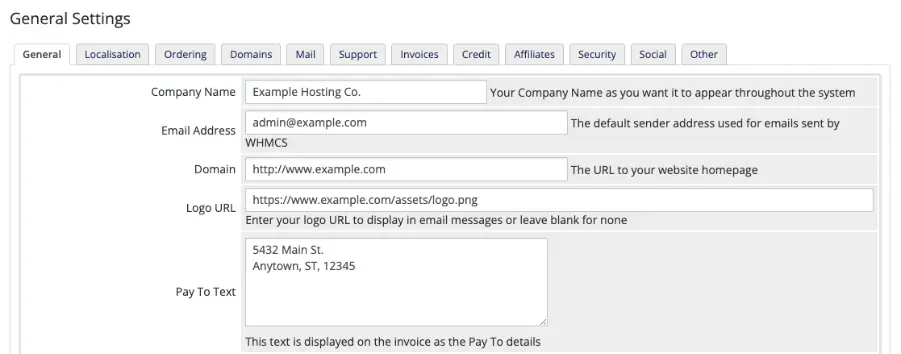
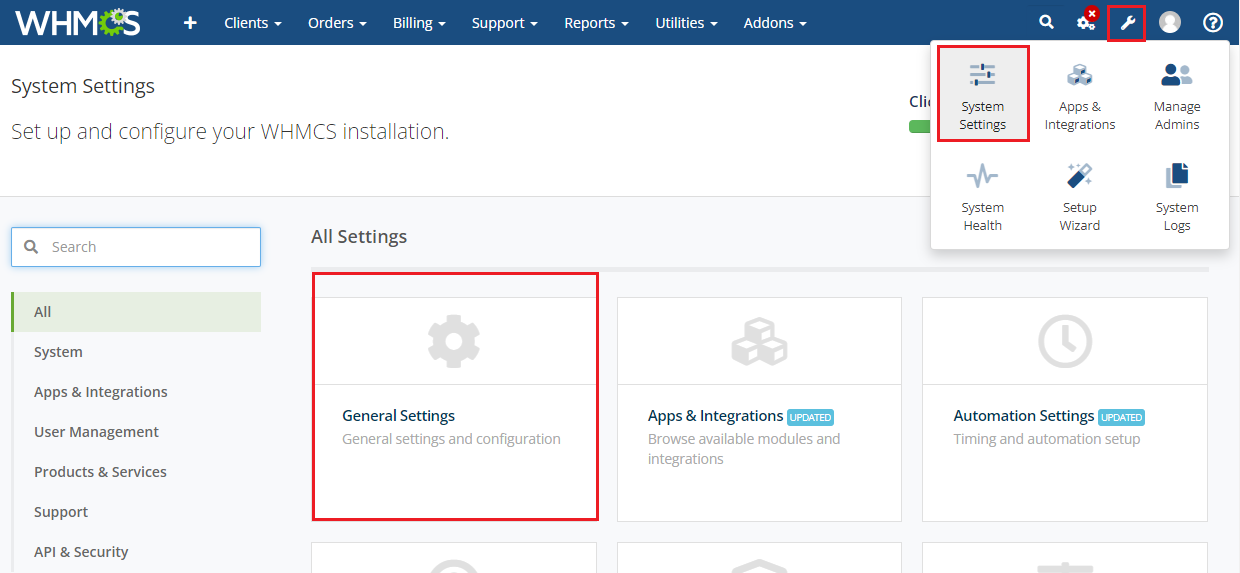
Firstly, you must ensure that the URL matches the WHMCS System URL setting in the General tab at Configuration > System Settings > General Settings.
You can update their system URL settings by following these steps:
Navigate to Configuration > System Settings > General Settings.
In the General Tab, choose the correct system URL.
For Example: if example.com uses an SSL certificate and the WHMCS installation is in the WHMCS directory, the system URL would be https://www.example.com/whmcs/.
At last click Save changes.
WHMCS often stores sensitive data that passes between WHMCS and end user’s browsers. In order to ensure encrypted information, having a solid SSL certificate is essential.
To enable SSL certificate on WHMCS, one needs to follow these steps:
Obtain an SSL Certificate: If you don’t have an SSL certificate, you can buy it from the provider.
Install the Certificate: Configure the certificate on the domain that WHMCS hosts. The process will vary according to the hosting panel you use.
Update WHMCS Settings: Update the WHMCS System URL setting.
Save: Click on save changes.
2. How to Fix “Invalid Reset Link” Error in WHMCS?
To resolve this issue, make sure that the URL matches the WHMCS System URL setting in the General tab at Configuration > System Settings > General Settings. If not, then update the system URL setting and enable SSL. Additionally, the process for fixing an invalid reset link is the same as correcting incorrect login details.
Logon failure error in WHMCS can occur due to various reason. To resolve these reasons, follow these steps:
For Invalid Username or Password:
Here is the step-by-step guide to resolve this issue:
First of all, ensure that WHMCS is using the correct username and password for your email account.
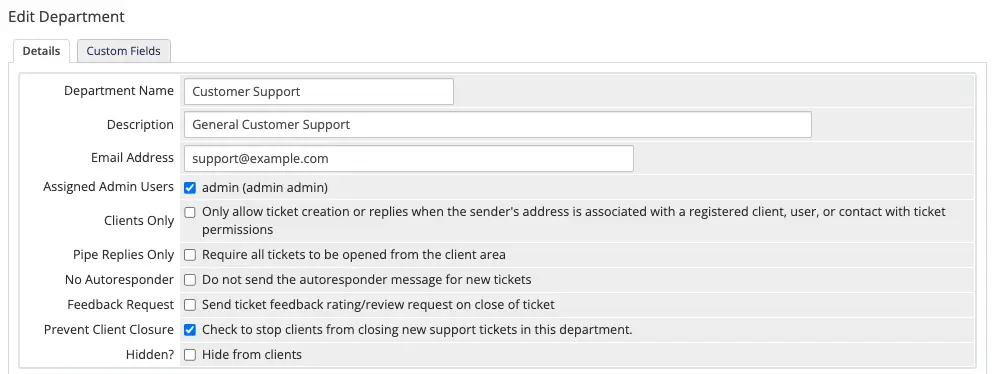
Click Edit at Configuration > System Settings > Support Departments.
Update your Email Address and Email Pass in the Mail Importing Configuration section.
Ensure that the port and hostname in your configuration are correct.
Click Save Changes.
For Mailserver Blocking/Blacklisting:
If you are encountering errors and your mail server has blocked access, you might need to wait until the block period expires.
If you have administrative access to your mail server, consider adding the WHMCS IP address to the whitelist or manually lifting the block.
For Google users, update your Google account settings to permit third-party apps to authenticate via username and password.
To verify if Google has blocked WHMCS logins, visit the Recent Activity section in Gmail and search for notifications about “Suspicious sign in prevented messages”.
Unsupported Authentication Methods:
Google Email Users: To resolve the logon error issue as Google email users; you need to set up email importing with Google.
Microsoft Email Users and Other Email Users: If you cannot access a basic password authentication for POP3 with Microsoft exchange service or other email providers, they can forward emails to a regular mailbox that supports username-and-password authentication for POP3 and then import it via WHMCS.
Note: Microsoft has shutdown basic authentication since Oct 2022.
To update the POP and IMAP import mailbox setting in WHMCS, follow these basic steps:
Click Edit at Configuration > System Settings > Support Departments.
Update Email Address and Email Pass in the Mail Importing Configuration section.
Click Save Changes.
4. How to Fix “Missing Username” Error in WHMCS?
To tackle this issue:
Enter a username.
Save the changes.
Then run the Create command again.
Note: To prevent this issue in the future, always ensure to check the require domain for the product at:
Configuration > System Settings > Products/Services.
5. How to Fix “Invalid Details” Error in WHMCS?
To resolve this issue:
Check your API key and secret.
Whereas if you are using twitter. Then check your callback URL and then try it again.
You should also need to check your Authorized JavaScript Origins configuration.
Make sure the entered value must match the WHMCS System URL value at Configuration > System Settings > General Settings without the WHMCS installation directory and trailing slash.
For example, if WHMCS System URL is https://example.com/whmcs/, you must use https://example.com.
6. How to Fix “Single Sign-in on Closed User” Error in WHMCS?
Follow these steps to resolve the error:
Go to the Profile tab of the client’s profile.
Update Status from Closed to either Active or Inactive.
Click Save Changes.
Make sure the entered value must match the WHMCS System URL value at
7. How to Fix “Single Sign-in on Configuration” Error in WHMCS?
The client needs to re-enable single sign-on in their security settings, they need to follow these steps:
Log in to the WHMCS Client Area.
Go to Account > Security Settings.
Now enable single sign-on.
Then save the changes.
8. How to Fix “Google Sign-in Unavailable” Error in WHMCS?
To solve this issue, check the Authorized JavaScript Origins and Authorized redirect URIs setting in the Google. Make sure the valid URIs begin with https:// and have an active SSL certificate.
What are the Things to Remember While Login After Upgrading Your WHMCS?
To prevent complications during your WHMCS upgrade, complete these essential prep steps. Whenever feasible, have the WHMCS support team manage the upgrade process for you.
Here are the Essential Preparation Steps:
1. Examine Release Notes: Review the release notes for the upcoming version, including any versions in between if you are jumping ahead (for instance, upgrading from 8.11 to 8.13 requires checking 8.12 notes as well). These notes detail fresh features, modifications, discontinued elements, and template adjustments.
2. Confirm System Requirements: Make sure your hosting environment satisfies the needs of the target version and all transitional versions. If starting from outdated End-of-Life (EOL) releases.
3. Review Your Modifications:
Store personalized themes and order form templates in dedicated directories (since updates replace the standard ones).
Scan the release notes for language string updates and adjust your custom wording accordingly.
Employ Git to handle custom themes and templates, release notes include links to GitHub repositories showing the differences.
For minor adjustments like language phrases, WHOIS server updates, or country/calling code changes, opt for “override files” rather than altering main files.
4. Run Tests on a Staging Site: Build a duplicate of your production environment as a testing setup to simulate the update and spot any unique issues. If your license is purchased straight from WHMCS, request a complimentary development/testing license from their Customer Service.
5. Create Full Backups: Prior to the update, save copies of your complete WHMCS folder and database. This helps you to restore quickly if issues arise.
6. Validate MySQL Access Rights: Ensure that your MySQL database user has complete privileges (like creating and modifying tables) throughout the update procedure.
How to Perform the Updates after Preparation?
After completing preparations, select one of these approaches:
Automatic Updater (Preferred Option): Navigate to Utilities > Update WHMCS within the admin panel. This tool automatically detects available updates, fetches the files, verifies integrity, unpacks them, and applies database changes.
Command Line (Manual for Experts): Manually prepare the update files, then execute the install.php script through the terminal.
Browser (Manual): Transfer the update files to your WHMCS directory, then access yourdomain.com/whmcs/install/install.php (replace with your actual domain) and proceed with the guided prompts.
Conclusion
Upgrading WHMCS may trigger login issues like incorrect details or invalid links, often due to URL mismatches, misconfigurations, or skipped preparations, but they are easily resolvable by verifying your System URL, enabling SSL, and troubleshooting emails or integrations. Always review release notes, test on a staging site, and back up everything beforehand to avoid disruptions. If challenges persist, contact WHMCS support for tailored help to get back online swiftly. Additionally, apart from login errors if you face any issue related to WHMCS Themes and Modules you can connect with WGS support. Our team provides 24/7 assistance to ensure smooth operations and uninterrupted business performance.
Choosing the right billing and client management software is crucial for web hosting companies and service providers. While Blesta offers a solid platform, many users find WHMCS to be more feature-rich and better supported. If you are considering migrating from Blesta to WHMCS, this guide will help you do so smoothly without disrupting your business operations.
What is WHMCS?
WHMCS (Web Host Manager Complete Solution) is a popular all-in-one client management, billing, and support solution for online businesses, especially web hosting providers. It automates tasks such as invoicing, provisioning, domain management, and support ticketing, making it easier to manage customers and services efficiently. WHMCS themes customize the Client Area’s look and feel, ensuring brand consistency, responsiveness, and enhanced user experience across all devices.
What is Blesta?
Blesta is a client management, billing, and support software designed for web hosting companies and other online service providers. It is known for its clean interface, modular design, and developer-friendly approach. However, some users report limitations in support and fewer integrations compared to WHMCS. Blesta themes customize the client area’s appearance with responsive, modern designs and branding options, enhancing user experience without requiring code changes.
What is the Difference Between WHMCS and Blesta?
Feature
WHMCS
Blesta
User Interface
Comprehensive and widely used; intuitive and built with web hosts in mind
Clean, developer-friendly, modular and developer-centric
Support
Extensive official support, including ticketing system, community forums, and self-service tools
Official support with phone calls, community features, and documentation
Integrations
Large number of modules and addons; integrated with all leading control panels and service providers
Fewer integrations but modular for developer customization
Automation
Advanced automation for billing, provisioning, recurring invoicing, and payment capture; fully automated hosting account setup and domain management
Good automation for billing and provisioning but less extensive
Pricing
Subscription-based with tiered plans; setup takes days, not months
One-time purchase or subscription options available
Customization
Highly customizable with templates, hooks, and a powerful developer API
Modular design focused on developers for easy customization
Why is it Necessary to Migrate from Blesta to WHMCS?
Better Support
WHMCS offers official support channels and a large user community, which many users find helpful for obtaining assistance.
Blesta provides support with a smaller community but focuses on developer-oriented help, which may suit businesses with technical expertise.
More Integrations
WHMCS includes a wide selection of built-in payment gateways, domain registrars, and hosting control panels, facilitating automation for many common services.
Blesta provides a more focused set of integrations and may require custom development for certain features.
Advanced Features
WHMCS offers a range of automation options like automatic account provisioning, flexible billing, and detailed reporting, which help to reduce manual tasks.
Blesta offers solid core features with emphasis on simplicity and modularity.
Community and Updates
WHMCS has a larger user base and releases more updates frequently, which can contribute to security, new features, and a variety of third-party add-ons.
Blesta maintains a smaller but active community with regular updates tailored to its users.
Scalability
WHMCS is often chosen by businesses with growing client bases and complex billing requirements due to its scalability.
Blesta is well suited for smaller setups or teams that prefer a developer-centric approach may find it sufficient for their current needs.
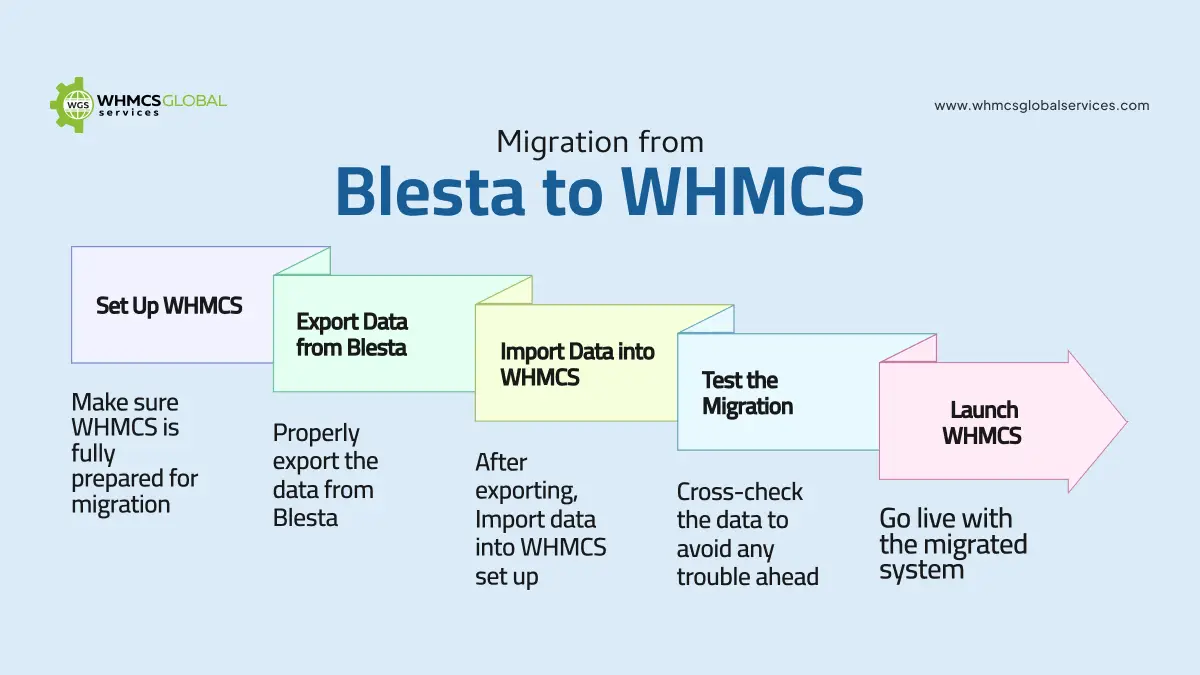
How to Migrate from Blesta to WHMCS? (Step-by-Step Guide)
Step 1: Set Up WHMCS
Purchase WHMCS from the official site.
Upload the installation files to your server and follow the WHMCS setup wizard for a smooth installation.
Log in to the admin dashboard to enter your company info, configure payment gateways, and set up email templates.
Step 2: Export Data from Blesta
In Blesta, export your clients, invoices, and product data.
Verify the exported files are properly formatted for import.
Step 3: Import Data into WHMCS
Access the WHMCS Admin Area and use the import tool.
Map Blesta data fields to the corresponding WHMCS fields.
Step 4: Test the Migration
Confirm all client records, invoices, and tickets transferred correctly.
Perform test actions like creating invoices and submitting tickets to ensure functionality.
Step 5: Launch WHMCS
Make your WHMCS system live and accessible to clients.
Notify clients about the migration and provide new login details if necessary.
How to Prepare for Migration?
Audit Blesta Data: Thoroughly review all client profiles, invoices, service plans, and support tickets in Blesta. Ensure all information is accurate, up to date, and free of duplicates or errors. Remove or archive outdated service plans and resolved tickets to keep the system clean.
Backup Everything: Create a complete backup of your Blesta data by exporting the database and copying all related files, including configuration files, themes, and plugins. Verify the integrity of these backups and store them securely in multiple locations such as cloud storage or external drives to prevent data loss.
Check WHMCS Requirements: Review the official WHMCS documentation to confirm your server meets the minimum software and hardware requirements. This includes verifying the PHP version, database type, necessary extensions, CPU, RAM, and storage capacity. Update or upgrade your server components as needed and perform compatibility tests after installation.
Schedule Downtime: Plan the migration during periods of low client activity to minimize disruption. Inform your clients well in advance about the scheduled downtime, its expected duration, and what to expect during the process. Ensure your team is fully prepared to execute the migration efficiently within the planned window to avoid extended outages.
How to Prepare for Migration?
To guarantee a smooth transition after migration, verify the following:
Accuracy of Client Data: Confirm that all customer information, product details, and invoices have been accurately transferred.
Automation Configuration: Review and test all automated workflows, such as billing and provisioning, to ensure they function properly.
Support System Performance: Check the ticketing system to ensure customers can easily reach out for assistance.
Payment Gateway Integration: Validate the payment gateway setup and conduct test transactions to confirm proper operations.
How to Optimize WHMCS After Migration?
Communication with Clients: Personalize your email templates to enhance client interactions. WHMCS supports automated emails that maintain a personal touch.
Exploring the Add-Ons: Boost your business capabilities by incorporating add-ons such as project management, fraud detections and others.
Regular Updates: Keep your WHMCS installation up to date to benefit from the latest performance improvements and security enhancements.
Integration: Streamline your operations by connecting WHMCS with platforms like cPanel, Direct admin, or external CRM system.
What are the Common Issues and Their Solution While Migration?
Issue
Solution
Data Mismatch or Loss
Double-check export/import mappings; perform test runs
Downtime During Cutover
Schedule migration during off-peak hours; freeze orders temporarily
Payment Gateway Configuration
Reconfigure gateways in WHMCS; test transactions
Client Login Issues
Reset passwords or notify clients to reset
Missing Custom Fields or Data
Manually migrate or customize import scripts
Email Notification Failures
Verify email templates and SMTP settings
Conclusion
Migrating from Blesta to WHMCS can significantly enhance your business operations with better support, more features, and greater scalability. By carefully planning and following the step-by-step migration process, you can ensure a smooth transition without downtime. Always back up your data and test thoroughly before going live.
WHMCS Global Services has recently introduced the PayPal Buy Now, Pay Later (BNPL) WHMCS Module, bringing flexible, interest-free payment options directly onto your WHMCS platform. This seamless integration allows your customers to split their payments into manageable installments via PayPal, without any additional charges, making it easier for them to invest in your premium hosting services.
Fully embedded within the WHMCS ecosystem, the module ensures a smooth checkout experience while simplifying backend operations. From automatic payment updates and invoicing to real-time order status tracking, it handles it all. In this blog, we’ll take a closer look at the key features, benefits, and how this module can redefine the payment experience for your hosting business.
What is the BNPL Module and How Does it Work?
The WHMCS PayPal Buy Now Pay Later (BNPL) module is a payment gateway integration that enables your WHMCS billing system to support PayPal’s BNPL options during checkout. This allows your clients to split their payments into smaller, manageable installments such as “Pay in 4” or “Pay Monthly” directly through PayPal when purchasing hosting, domains, or service plans.
How Does it Work?
The module seamlessly connects with WHMCS (version 8.0 or newer), enabling PayPal’s BNPL options right in the payment process.
Buyers can pick “Pay in 4” or “Pay Monthly” options offered by PayPal, spreading their payments over time, usually interest-free if paid on schedule.
You receive the full payment instantly from PayPal, while your clients repay PayPal in installments on their own.
What Makes this BNPL Module Unique?
The PayPal Buy Now Pay Later WHMCS Module stands out for its full and seamless integration with the WHMCS Platform. What makes it unique is its ability to offer no extra interest. This not only increases affordability but also helps to boost overall sales and client satisfaction.
The module automates payment updates, invoicing, and real-time status tracking. One of its unique features is its refund process. Refunds initiated with WHMCS are directly reflected in the client’s PayPal BNPL account, eliminating the additional steps. This end-to-end automation and customer–centric flexibility make the PayPal BNPL WHMCS Module an efficient tool for users.
Features of Buy Now Pay Later Module
1. Buy Now, Pay Later Flexibility: Clients can split their hosting purchases into manageable installments through PayPal, making premium services more accessible.
2. Easily Manage Refund: Admins can issue full or partial refunds directly from WHMCS. These changes are instantly reflected in the user’s PayPal plan; there’s no need for third-party logins.
3. Secure & Reliable: The WHMCS PayPal BNPL module has robust security for clients’ trust and helps protect against any suspicious attack.
4. Multi-Currency Support: Accept payments in any currency supported by PayPal. This opens the door to global customers with no extra setup required.
5. No Additional Setup for Clients: Customers can pay seamlessly using their existing PayPal accounts, eliminating the need for new registrations or lengthy setup processes.
How Does This Module Skyrocket Hosting Sales?
Clients are more likely to purchase when they feel in control. The Buy Now Pay Later Module helps convert price-sensitive visitors into paying clients by:
Reducing Payment friction with fewer steps at checkout.
Making higher-tier plans feel more affordable with installment options.
Enabling fast, flexible, and secure billing post-trial.
Supporting refunds and currency flexibility to accommodate global buyers.
These enhancements increase cart completion rates, average order values, and repeat purchases.
Summing Up
The WHMCS Buy Now, Pay Later module isn’t just a payment option; it’s a complete billing solution. It gives you flexibility, control, and room to grow. Whether you are offering trial hosting, premium plans, or one-time services, this module makes billing easier while letting your clients enjoy modern payment choices.
WHMCS Global Services recently announced a WHMCS AI Helpdesk Assistant Module that automates and enhances your user experience and frees up your team from repetitive tasks. Let’s check out what this WHMCS AI Helpdesk Assistant Module is and how it works, its key features, and more.
What is the WHMCS AI Helpdesk Assistant Module?
In simple terms, the WHMCS AI Helpdesk Assistant is an intelligent chatbot module that plugs into your WHMCS system to automate customer support. It instantly answers client questions, suggests AI-based domain names and product recommendations, and uses AI to make support faster, smarter, and more helpful 24/7.
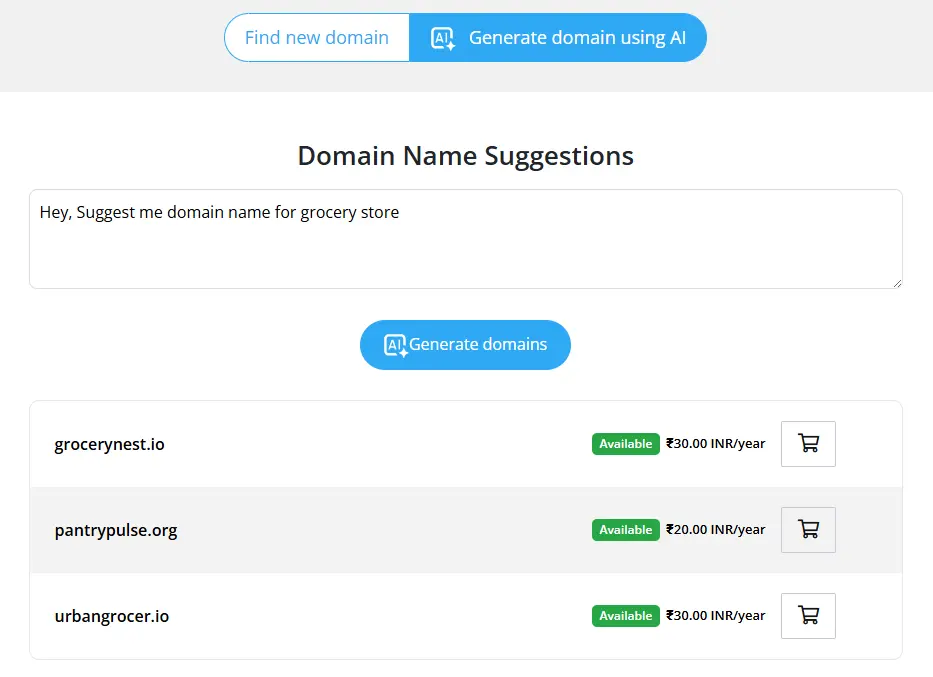
This module’s standout feature is AI-based domain name generation, which enables users to instantly generate relevant domain suggestions personalized to their business requirements.
It’s an all-in-one module that includes content creation, domain name generation, product recommendation suggestions, invoice management, ticket summarization, 24/7 chatbot support, and more.
Key Features of the AI Helpdesk Assistant Module
1. AI-Based Domain Suggestion Module
This module allows your customers to generate relevant, unique, and brandable domain name ideas depending on user input and business type. This not only improves user engagement but also increases conversions.
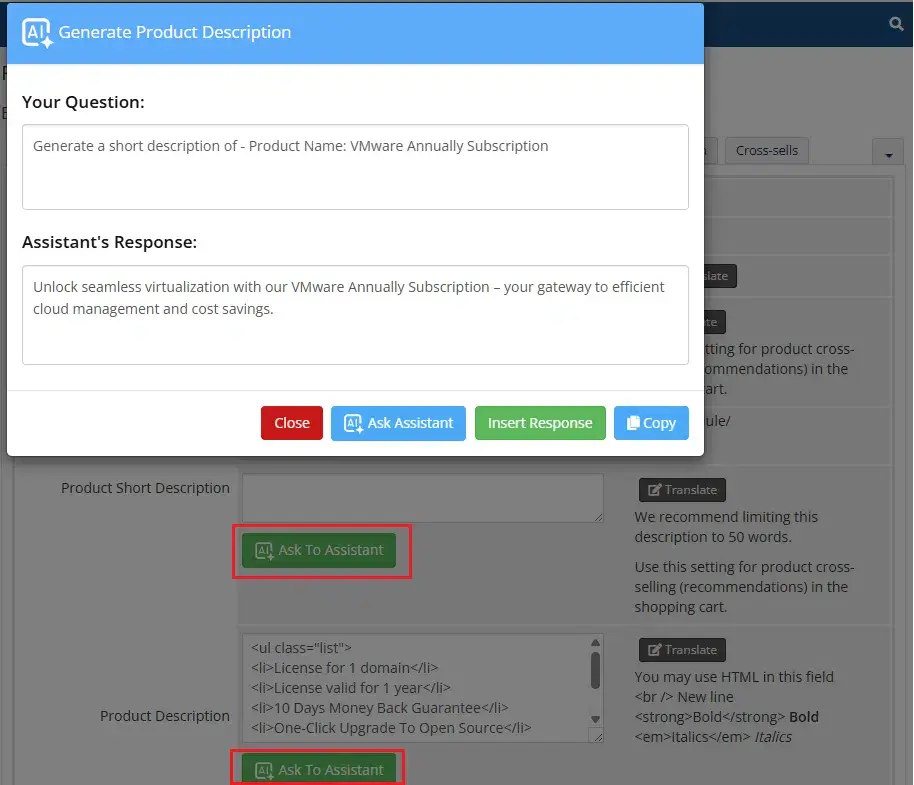
2. AI Product Description Creation
You don’t need to spend more time writing a product description. This module makes it easier for you. Simply add your product details, and it instantly generates clear, catchy descriptions to help you sell more and save time.
3. Auto Ticket Responder & AI Pre-Support
You don’t need to stay online to respond to your tickets. Our AI assistant module provides instant responses to client queries by leveraging your WHMCS knowledge, FAQs, and internal data, ensuring a timely and consistent assistant is available anywhere and anytime.
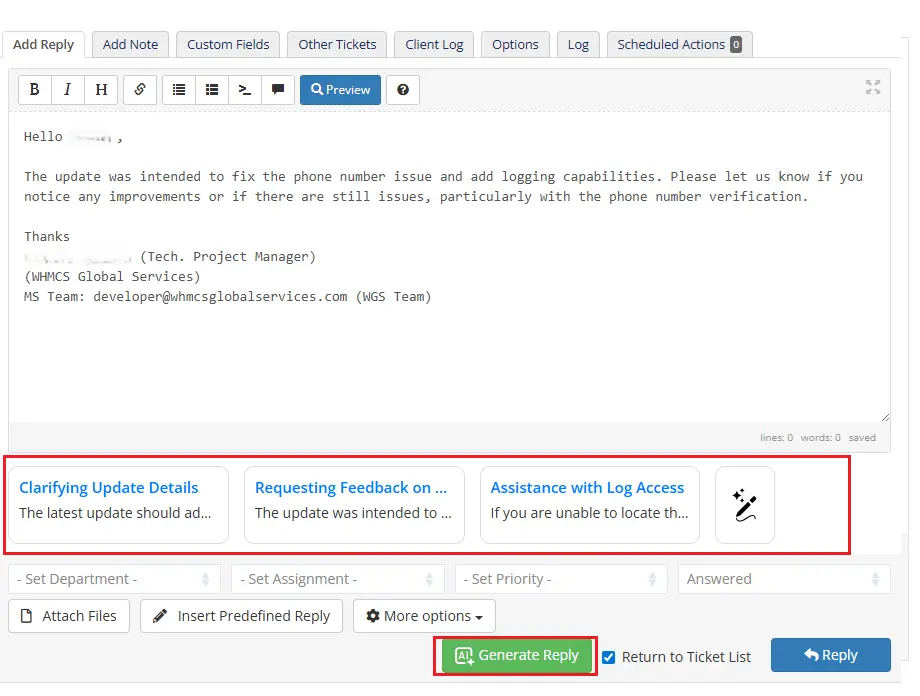
This module will generate 3-4 reply suggestions based on the ticket conversation and help your support staff to use those suggestions to make a professional reply on the ticket. It will help your support staff to save time and make a professional response to customer ticket replies.
4. 24/7 Chatbot Support
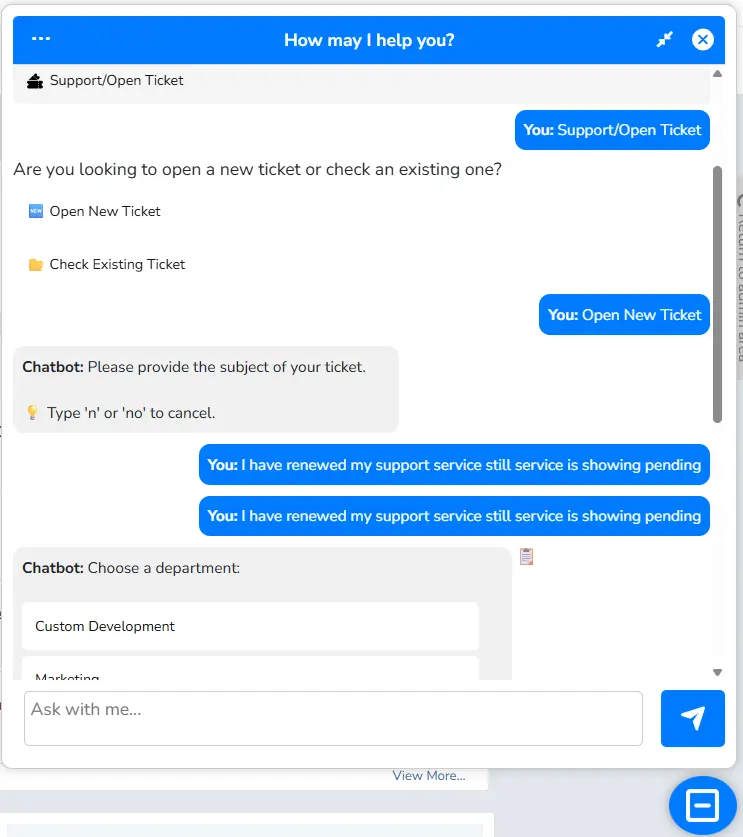
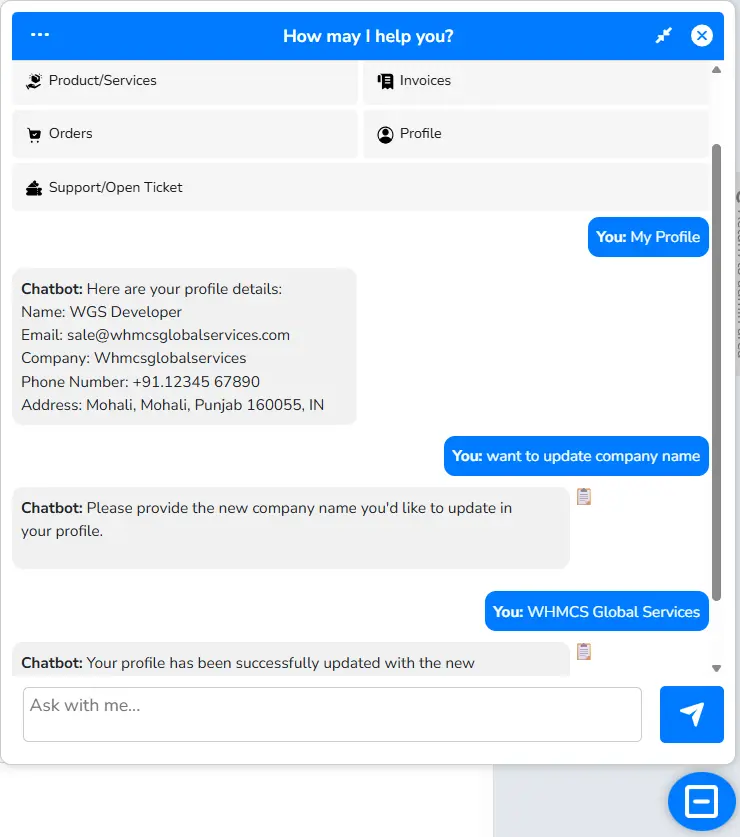
This AI Helpdesk Assistant Module provides instant help anytime with 24/7 chatbot support. Our AI-based chatbot answers client questions, resolves issues, and helps them to manage their profile, invoices, products/services, domains, and tickets. Customers don’t need to go on specific pages to manage the things they can get instant solution from this chatbot.
5. Ticket Summarization
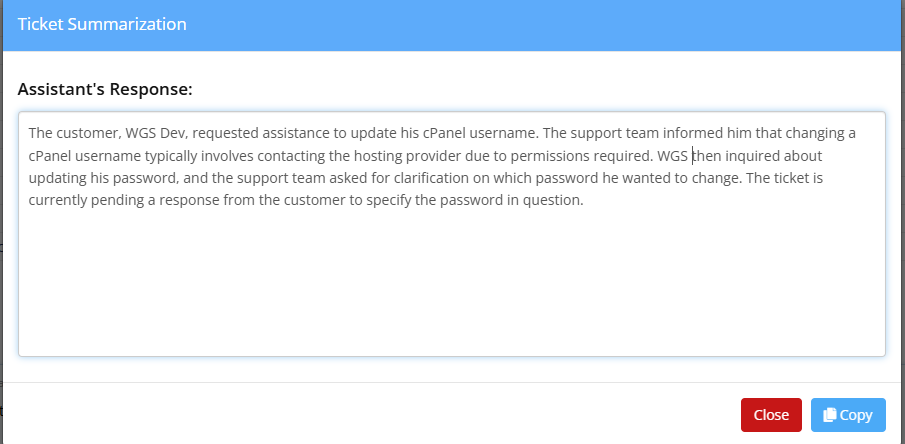
AI-based ticket summarization saves your time by summarizing reviews and support tickets, allowing your team and clients a clear, quick overview of the ticket thread, improving communication, efficiency, and response time.
6. Smart Product Recommendations
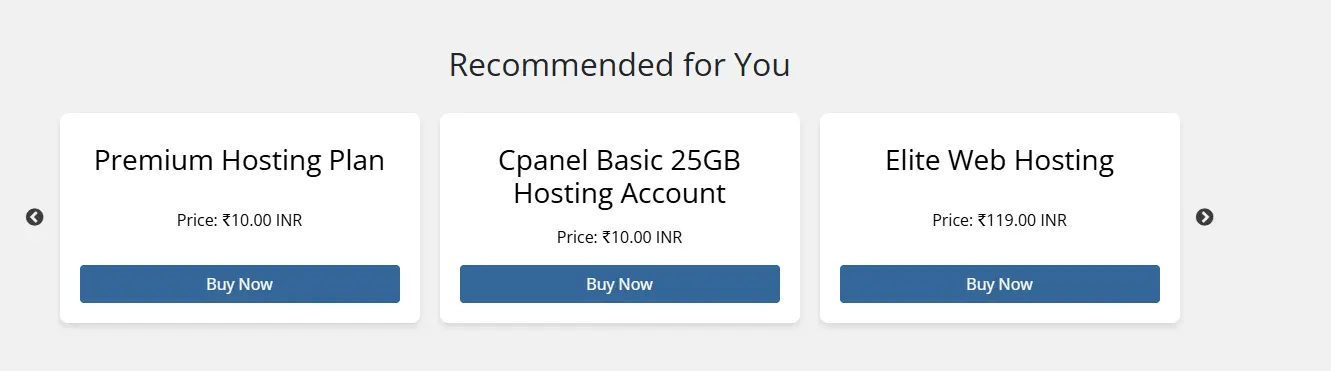
Boost your sales with our WHMCS AI Helpdesk module featuring Smart Product Recommendations. This module will analyzes customer queries and behavior to suggest relevant products.
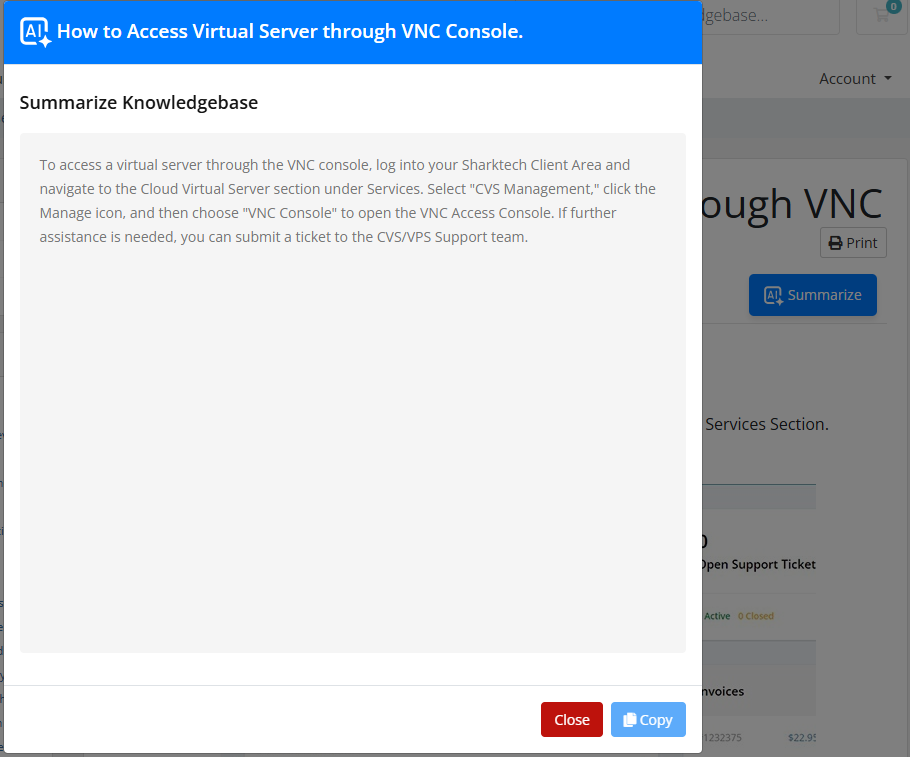
7. Knowledgebase summarization
Utilize our AI-based Module to generate concise, professional summaries of all the content to help consumers. This approach saves consumers time by providing quick access to essential information, allowing them to grasp key points without going through lengthy content. By offering clear and context-aware summaries, customers can efficiently find the guidance they need, enhancing their overall experience and ensuring consistent communication.
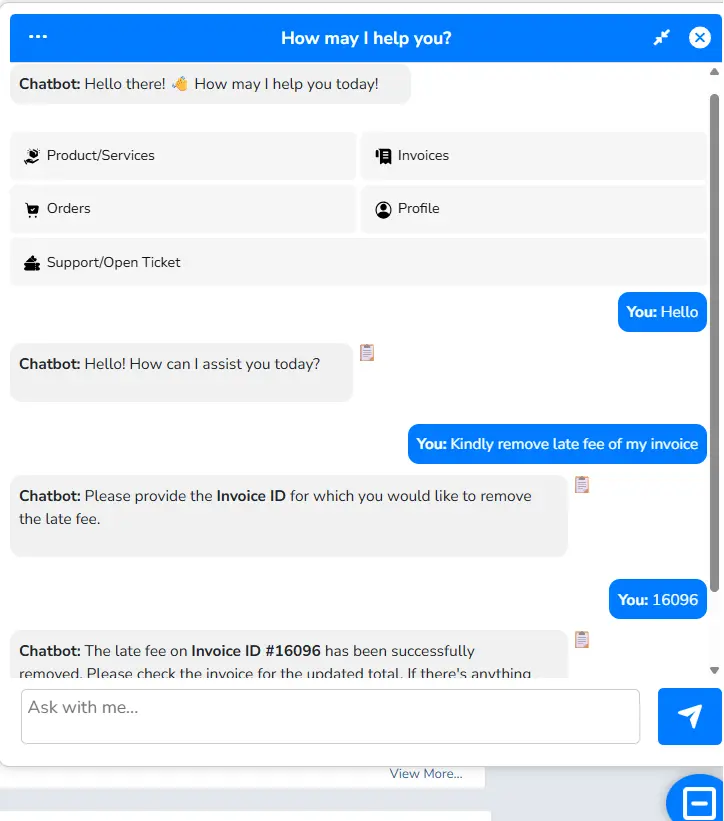
8. Smart Invoice Management with AI Chatbot
This module will give an advance feature to allow your customers to manage their invoices from chatbot. Your customers can get a list of paid/unpaid invoices and get a pay now link for unpaid invoice. This module will allow them to remove late fees from their invoice and extend the due date of their invoice. The customer has no need to contact you and you don’t need to do anything manually. It will give an instant solution to them.
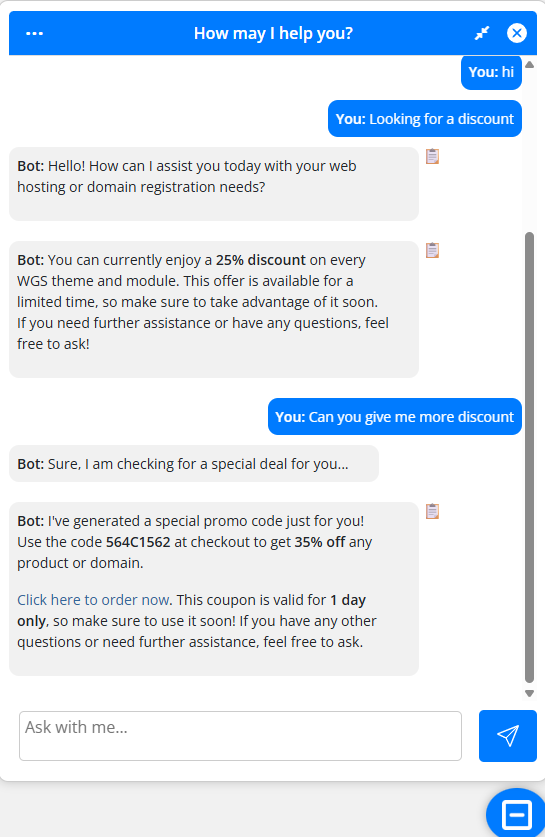
9. Drive More Sales with AI-Generated Discount Coupons
Our AI helpdesk assistant module will help you boost your sales by auto discount coupon generation based on customer discount demand. This module will create a new one-time discount coupon for more discounts. Admin can manage this discount value from the module settings.
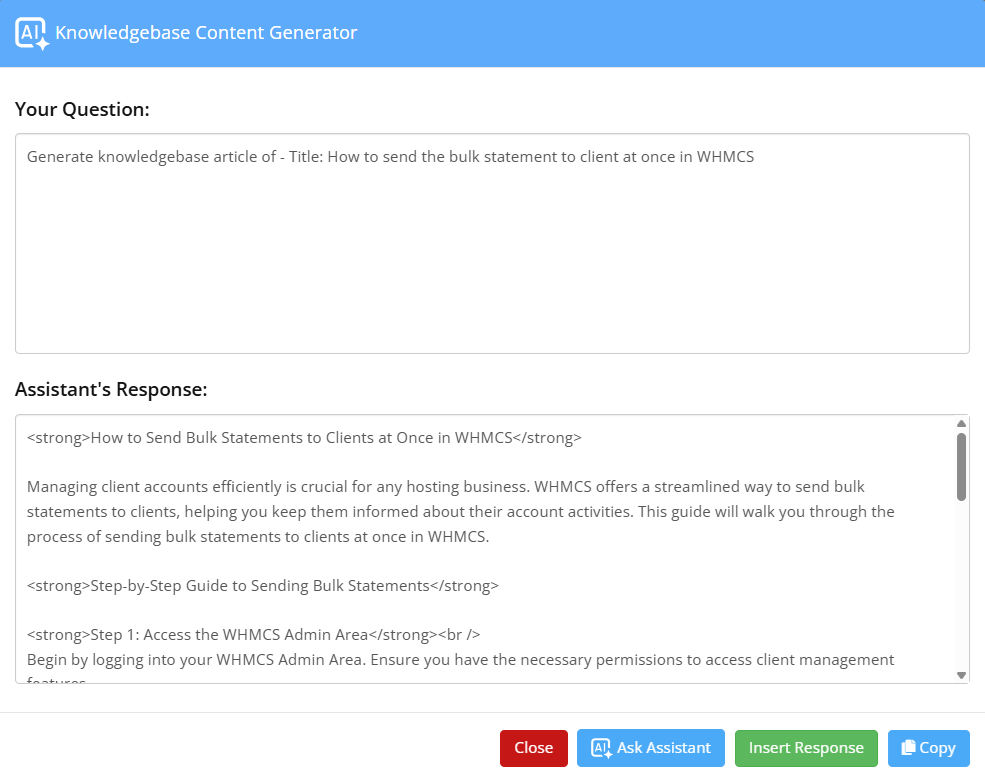
10. AI Content Generation
Admin can easily generate content like knowledgebase articles, announcements, and product descriptions by using an AI assistant. It will save your time by ensuring consistency and quality of the content.
11. User Account Assistance
With this module, users can update profiles, manage tickets, renew services, and track orders all through the chatbot. This gives them more control while reducing incoming support requests.
12. Conversation Insights and History
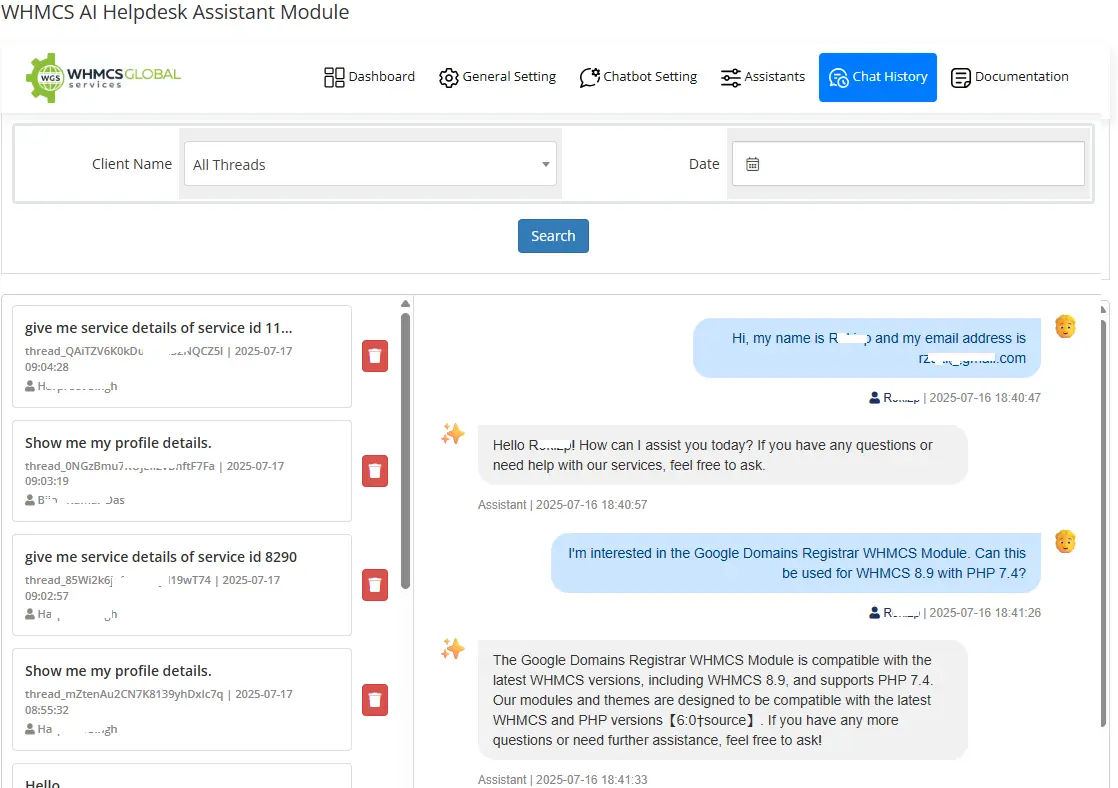
With this module, from admin side you can easily track and see the conversation history between customer and chatbot. You can also train chatbot from history where chatbot was unable to answer to customer for untrained queries. This helps to track issues faster and ensure smooth communication with customers.
13. Custom Bot Training
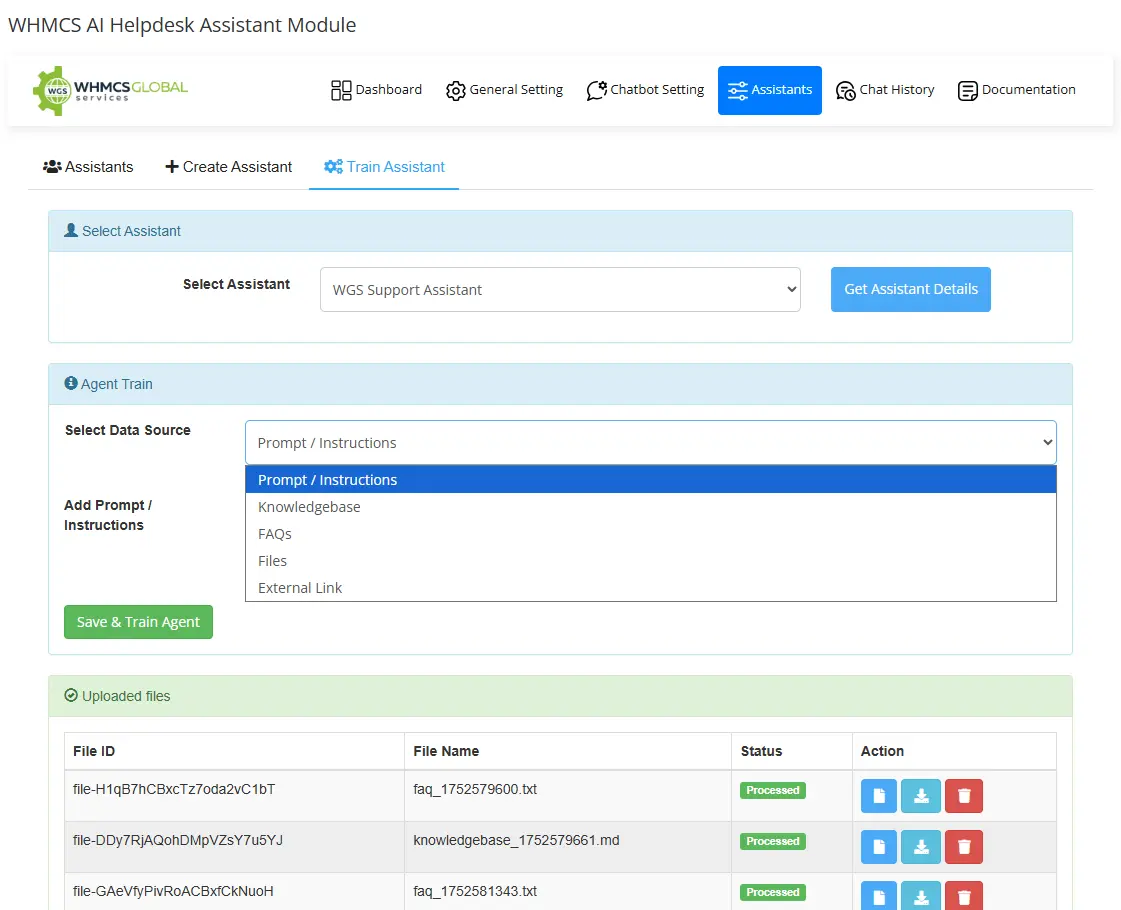
This module enables you to train an AI assistant using your own custom data using your knowledgebase articles, FAQs, and documentation, resulting in accurate, context–specific responses that perfectly align with your business support requirements.
Why Select the WHMCS AI Helpdesk Assistant Module
Increased Conversions: With features like AI-based domain name suggestions, product recommendations, removing invoice late fee and customized discount coupons, the chatbot actively engages users and encourages them to make a purchase.
Instant Customer 24/7 support: With AI-powered chatbot support, your clients don’t need to wait for answers. The assistant responds in real time, day or night, and offers consistent, reliable service around the clock. It reduced response times and improved client satisfaction, without requiring your human agent to be constantly online.
Scalable without Adding Staff: Need to support more clients as your business grows? This module scales effortlessly. There’s no requirement to hire more support teams as your AI assistant can manage growing ticket volumes and inquiries with zero burnout.
Saves Time and Resources: Repetitive tasks, such as writing product descriptions, summarizing support tickets, or generating content, take time. This module automates those processes so that your team can focus on high-level tasks and strategic business growth.
How the AI Helpdesk Assistant Module Works?
Our exceptional feature is AI-based domain name generation. Using it is quite easy. Customers can request domain name suggestions for their businesses, like “Hey, generate a domain name for a grocery store.” Our module instantly provides creative options, making it easier for them to choose. Next, we have an auto-ticket responder. This feature generates professional replies and summarizes ticket threads, saving your support staff valuable time.
Our system suggests products based on customer interests, helping them find what they need quickly and boosting sales. Also, Staff can easily create announcements, knowledge base articles, and product descriptions with AI assistance. Our advanced AI chatbot assists customers in updating their profiles, checking invoices, and even making payments, enhancing their experience and increasing your revenue significantly, resulting in their business growth. For more information, check our detailed video below:
Summing Up
In the increasing AI era, the WHMCS AI Helpdesk Assistant Module is more than just a chatbot; it’s an intelligent, all-in-one assistant developed for modern digital businesses. It saves time, enhances user experience, improves support quality, and boosts sales, all while operating silently in the background 24/7.
The WGS VMware WHMCS Module released a new version, v4.1.0, on 21st May 2025, and delivers one of the most feature-rich updates. With enhanced automation, robust security, broader compatibility, and wide critical bug fixes, this version is a significant milestone for service providers who depend on WHMCS to manage VMware environments. Let’s explore what’s new in this VMware Module version v4.1.0.
About WGS VMware Module
WGS VMware vSphere WHMCSModule is a fully automated virtualization solution designed to streamline VM provisioning and management within WHMCS. This powerful module can help reduce up to 90% of your IT operational costs by eliminating the need for manual VM setup. Once a user places an order, the system automatically creates the virtual machine, installs the operating system, and configures the network adapter without any manual intervention from the admin. After the provisioning, the module instantly sends the full access details to the end user.
What has been updated?
Features Updated
1. Two-Factor Authentication (2FA) for NoVNC Console Access: 2FA has been integrated into the NoVNC console to enhance VM console security. This ensures users undergo an additional verification step before gaining console access, reducing the risk of unauthorized entry.
2. Create New vCenter User Accounts for VMRC Access: Now, module auto create a new customer account with vCenter for specific customer to access VMRC console, and admin can also create user directly from the product/service detail page for customer VM.
3. Reset VMRC User Password from Admin: Admin can now reset VMRC user password directly from product/service detail page inside WHMCS admin. This allows for quicker credential management without manual intervention through vCenter.
4. Delete VMRC User from Admin: In addition to password resets, you can delete VMRC users via the admin panel. This streamlines user lifecycle management and helps maintain clean access control.
5. Select a Specific Network with a Host for Auto-Provisioning: Integrated new network adaptor selection option with specific host under WGS VMware addon module provisioning setting. This ensures that VMs are provisioned in the correct VLAN or subnet aligned with your network architecture.
6. Custom Root/Administrator Usernames: A new field lets you define custom root or Administrator usernames with a VM template mapping setting. This option will help you define your custom username for existing VM templates.
7. Set Custom Port for Linux and Windows VMs: Admins can now assign custom ports for virtual machines, whether Linux or Windows, with VM template mapping settings. So, it will help your customers to make SSH or RDP using your custom ports.
8. Create IP Pools Based on Network Adapters: You can now define IP pools based explicitly on different network adapters. This gives greater precision in managing IP distribution across different infrastructure layers.
9. Create Private NAT Pools with Custom Ports: This powerful feature enables the creation of private NAT pools with custom port configurations. It’s beneficial for isolating customer traffic and setting up secure, custom port forwarding.
10. Show All or Limited OS Options During Reinstall: During VM reinstallation, you can control whether all operating systems are visible or only those from the purchased OS family initially. This helps maintain licensing compliance and consistency.
11. Client Area ACL Configuration per Product: A new ACL system lets you define which client area features are visible based on the product purchased. This helps tailor the client experience and simplify UI navigation.
12. Reserve IPs Within IP Pools: You can now mark specific IPs as “reserved” within your IP pools. These IPs won’t be assigned automatically during provisioning, making them perfect for priority usage, particular clients, or future planning.
Improvements made in VMware WHMCS Module
This update brings a range of enhancements to improve compatibility, usability, and user experience across different environments. Firstly, the module is fully compatible with WHMCS 8.13 and supports the latest PHP 8.2, PHP 8.3, and Ioncube 14.x, ensuring better performance, enhanced security, and future readiness.
Support has been extended to the latest VMware vCenter version 8.x, allowing users to leverage the most recent vCenter capabilities without compatibility concerns. Additionally, the module now includes support for more Linux distributions such as Debian, AlmaLinux, Kali Linux, and Cloud Linux, giving service providers greater flexibility in offering diverse operating systems to their clients. Product configurable option, which allows users to choose a datacenter while ordering.
The HAProxy documentation has been updated in the official wiki, offering more explicit guidance and best practices for those implementing high-availability configurations using load balancers. On the usability front, the Client Area’s mobile responsiveness has been significantly improved, ensuring smooth navigation and control for users accessing their virtual machines from mobile devices.
To simplify onboarding, the default WHMCS service password is now automatically set as the root or Administrator password for new virtual machines. This helps users access their VMs immediately without confusion or additional steps. Lastly, the HTML5 console can now be accessed using white-labeled URLs, allowing hosting providers to maintain consistent branding throughout the customer interface for a more professional and seamless user experience.
Major Bug Fixes and Stability Enhancements
This version resolves several bugs to improve stability and functionality. Issues with cron jobs not running correctly due to non-public paths have been addressed. Problems with the console not working when multiple ESXi hosts are configured have been resolved, and VM network connectivity when powering on has been restored.
The update also ensures the console works correctly if there are multiple ESXi hosts and even ESXi hosts are on private network, particularly when accessed via HAProxy. A critical memory leak in the reinstall cron job has been fixed, and bandwidth usage crons now function correctly without connection failures. The system no longer displays improper array data during VM creation and corrects the “Class ‘WGSVmware’ not found” error during reinstallation.
Issues with auto-upgrades failing, incorrect datastore paths during VM creation from ISO, and missing welcome emails have also been resolved with bulk VM orders. The module now ensures that VMs are reinstalled on the host they were initially created. Additionally, all ESXi hosts are now correctly fetched, and the issue of empty data updated client service notes has been fixed. Bugs that led to two IPs being assigned to a single VM and incorrect traffic bandwidth calculations have also been addressed.
How can you update the WGS VMware WHMCS Module?
Updating to v4.1.0 is simple. Log in to your WGS Client Area, navigate the Downloads section, and download the specific latest version PHP and Ioncube files.
This v4.1.0 update of the WGS VMware WHMCS Module delivers significant enhancements. From tighter security and more intelligent provisioning to better compatibility and robust bug fixes, this release equips hosting providers with all the tools they need to manage VMware environments more effectively. If you haven’t updated yet, now is the perfect time to take advantage of everything this version offers. Update Now! Moreover, WGS comes with a variety of WHMCS Modules that helps you upscale your web hosting business.
WHMCS released a vital security update on 3rd June 2025, impacting all currently supported versions of their systems: v8.13, v8.12, and v8.11. These updates help resolve several security vulnerabilities that have been identified as affecting all currently supported WHMCS versions.
This update resolves multiple security vulnerabilities, including cross-site scripting (XSS) and cross-site request forgery (CSRF), that were identified through a combination of internal security audits and responsible disclosures via WHMCS security Bounty Porgram.
Why this Matters to WHMCS Global Services Client Theme Users?
As the vulnerabilities were not directly within the WHMCS Global services themes or order forms, our products are developed using WHMCS core templates like “Twenty-One” and “Standard_Cart” which were impacted by the security patch.
Therefore, to ensure our client areas remain stable, secure, and fully compatible with WHMCS 8.11.x to 8.13.x, we have updated all affected components in our themes. Applying the updated patch or full version is vital to maintain seamless functionality and compliance with WHMCS’s latest security standards.
What has Been Updated?
Our WHMCS themes ClientX, CloudX, HostX, TwentyX, and the One Step Order Form—leverage core JavaScript and CSS resources from WHMCS’s default “Twenty-One” theme and” Standard_Cart” order form template.
When you upgrade to the latest version of WHMCS or apply a security patch, these core files are automatically refreshed with the latest security enhancements.
At this time, a specific update is available only for our HostX WHMCS Web Hosting Template, compatible with WHMCS version 8.13.1. We’ve proactively updated the necessary files in the HostX theme to maintain full compatibility and enhanced security.
How to Download the Updated Files?
There is only an update available for our HostX WHMCS Web Hosting Template for WHMCS 8.13.1.
We have updated the relevant file in our HostX theme to ensure continued security and complete compatibility.
We recommend downloading the latest patch or updated package from your client’s area.
For Users on Older WHMCS Versions
WHMCS has not released security patches for versions below 8.11.x. No official fixes are available if you’re still using WHMCS 8.10 or earlier. To stay protected:
We strongly recommend upgrading to WHMCS 8.11 or higher as soon as possible.
Then, apply the matching updated theme or order form from your WHMCS Global Services client area.
Need Help?
If you need assistance applying the patch, upgrading your WHMCS version, or downloading the correct files, our support team is here to help. Contact our support team.
As a web hosting business, you always strive to reduce manual workloads, streamline operations, manual workloads, and maximize revenue. For web hosting companies, SaaS providers and other subscription-based businesses, an efficient billing system is vital for success.
WHMCS (Web Host Manager Complete Solution) is a robust automated billing and management platform designed and organized to optimize and simplify these processes. In this article, we will explore how you can maximize using WHMCS’s automated billing system.
Understanding the WHMCS Automated Billing System
WHMCS being the web host manager complete solution is a comprehensive automation tool developed and design to manage provisioning, handle billing and client management for web hosting businesses.
The system automates recurring billing, generates invoices, tracks payments, and integrates with multiple payment gateways.
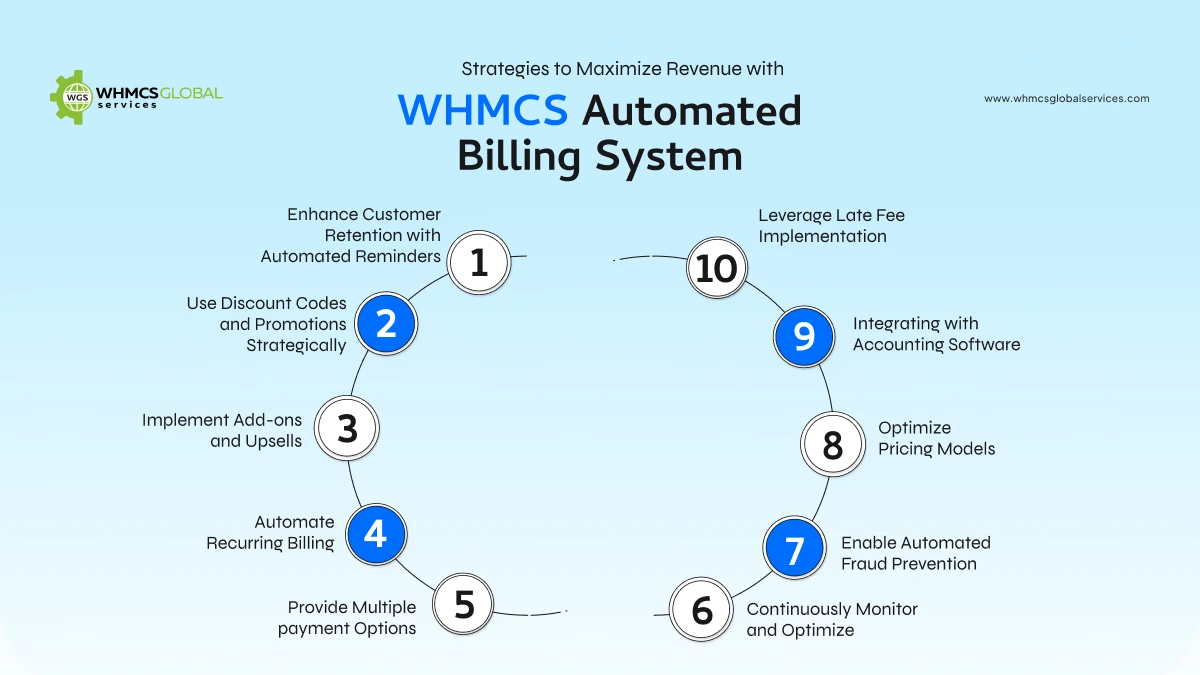
Strategies to Maximize Revenue with the WHMCS Automated Billing System
1. Provide Multiple payment Options
Offering payment gateway make sure that clients can easily complete transactions utilizing their preferred payment method. You can use WHMCS integrations with Stripe, PayPal, Authorize.net, and other payment processors. By providing various payment options, businesses can decrease payment friction and increase conversion rates.
You can check out various WHMCS Payment gateways like PayPal Tokenization WHMCS Module, Alipay cross border WHMCS Module, Payzone WHMCS Module, and more.
2. Automate Recurring Billing
Recurring Billing is a core feature of WHMCS that allows businesses to charge clients automatically at predefined intervals. This allows continuous revenue flow while decreasing late or missed payments. Moreover, setting up automated payment reminders also reduces the chances of failed transactions.
3. Implement Add-ons and Upsells
Increase revenue by providing complementary services and products as add-ons. WHMCS supports configurable options, enables businesses to upsell higher-tier plans, additional storage, security add-ons and domain registration. Adding cross-selling strategies maximizes average revenue per client.
You can also use our add on modules like Partial Payment WHMCS Modules, WHMCS WhatsApp Notification Module, WHMCS Recurring Invoice Management Module, and more. This module has different specialties that can help you to operate your web hosting business seamlessly.
4. Use Discount Codes and Promotions Strategically
Discount codes and promotions are powerful tools for attracting new customers, retaining existing ones, and boosting sales. However, they must be used strategically to avoid eroding profitability or devaluing your services. WHMCS provides robust discount and coupon features that allow businesses to create targeted promotions, reward loyalty, and drive conversions.
For instance, offering first-time buyer discounts or free trials can lower the barrier to entry for potential customers, while exclusive discounts for long-term clients foster loyalty and encourage repeat business. Additionally, limited time offers, or flash sales create a sense of urgency, prompting customers to act quickly, and seasonal promotions like Black Friday or Cyber Monday can capitalize on periods of high shopping activity.
5. Enhance Customer Retention with Automated Reminders
Retaining existing customers is more cost-effective than acquiring new ones. WHMCS allows businesses to send automated reminders for upcoming renewals, expiring services, and pending payments. These reminders help reduce churn and improve customer retention.
These automated reminders play a crucial role in reducing churn and improving customer retention by keeping clients informed and engaged. For instance, sending a reminder a week before a service renewal or payment due date gives customers ample time to take action, preventing unintentional lapses in service. Additionally, reminders for expiring domain names or SSL certificates ensure that customers don’t face disruptions, which can negatively impact their experience and perception of your business.
6. Leverage Late Fee Implementation
To make sure timely payments are performed, businesses can include late fees on overdue invoices. WHMCS offers options to set up automatic late fees, making sure clients pay on time while generating additional revenue from overdue accounts.
Additionally, businesses can configure grace periods before late fees are applied, ensuring fairness while maintaining a steady cash flow. By clearly communicating late fee policies in the terms of service, businesses can minimize disputes and encourage prompt payments. Automated notifications for overdue invoices can further remind clients to clear their dues before penalties apply, improving overall payment compliance.
7. Integrating with Accounting Software
Accurate financial reporting is vital for business growth. WHMCS integrates with accounting software like QuickBooks online CRM and Zoho CRM. QuickBooks online is among the top platforms that can help businesses sync invoices and transactions. WHMCS automatically transfers invoices, payments, and refunds to QuickBooks, reducing manual entry and errors.
Whereas Zoho is another robust platform that helps in real time financial update. It also helps you to generate, Send, and track invoices from WHMCS while syncing them in Zoho books online. Moreover, Businesses dealing with multiple currencies or different tax structures benefit from seamless tax reporting and multi-currency support.
8. Optimize Pricing Models
Regularly reviewing and optimizing pricing strategies ensures competitiveness and profitability. Consider offering:
Tiered pricing models to cater to different customer needs. Volume-based discounts to encourage bulk purchases. Bundled packages to increase the average transaction value.
9. Enable Automated Fraud Prevention
Fraudulent transactions can lead to chargebacks and revenue loss. WHMCS integrates with fraud prevention tools ensuring that suspicious transactions are flagged before processing. Automated fraud checks protect businesses from financial risks.
By setting up processes of verification like two-factor authentication (2FA) and CAPTCHA, businesses can add extra layers of security to client accounts. Regularly reviewing flagged transactions and implementing IP-based restrictions further decreases fraudulent activities. By leveraging these automated fraud prevention mechanisms, businesses can make secure transactions while maintaining client trust and minimizing financial risks.
10. Continuously Monitor and Optimize
To maintain a competitive edge and maximize revenue, businesses must continuously monitor and optimize their billing processes. Conducting regular performance audits helps identify inefficiencies and areas for improvement, ensuring smooth operation. A/B testing different elements such as order forms, pricing pages, and promotional campaigns allows businesses to refine their strategies based on data-driven insights.
Additionally, collecting customer feedback is crucial for refining billing processes and enhancing user experience. By addressing common pain points and implementing user-friendly improvements, businesses can increase customer satisfaction and reduce churn. A proactive approach to monitoring and optimization ensures sustained revenue growth and long-term success.
Summing Up
Maximizing revenue with WHMCS’s automated billing system requires strategic implementation of its features. By offering multiple payment options, automating recurring billing, optimizing pricing, and leveraging add-ons, WHMCS Modules, businesses can streamline their operations and boost profitability.
Additionally, analyzing billing reports, enhancing customer retention, and using fraud prevention tools contribute to sustained revenue growth. Adopting these best practices will ensure that businesses utilizing WHMCS not only enhance efficiency but also maximize their financial potential.
Web hosting solution is a complete client management, billing, and support platform designed for online businesses, especially web hosting firms. It automates most functions in operating a hosting business, such as payment processing, and client management. Also, partial payment processing, guest invoicing, and other financial transactional processes can be labor-intensive and cumbersome.
This is where WHMCS Modules help us in automating all the work. These modules enhance WHMCS Functionality, allowing easy organization, management, and processing of partial payment, guest invoicing, recurring invoice management, and account statements generation.
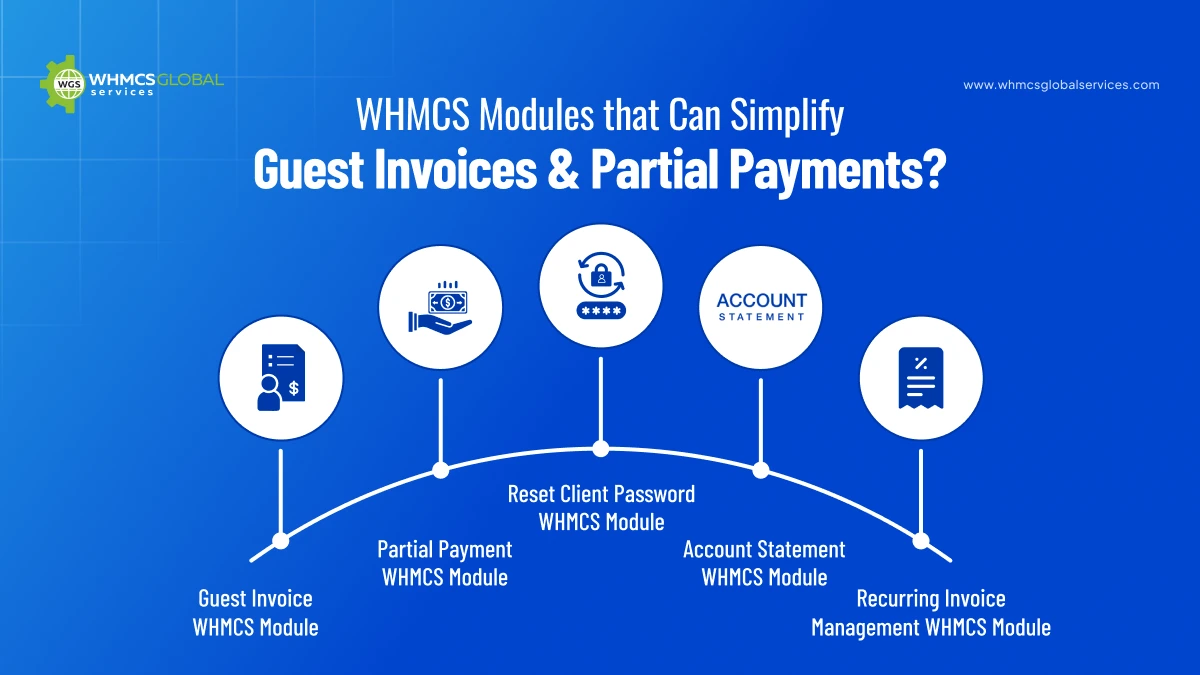
WHMCS Modules that Can Simplify Guest Invoices & Partial Payments
1. Guest Invoice WHMCS Module
The Guest Invoice WHMCS Module enhances convenience for WHMCS users by allowing clients to pay invoices without logging in. This feature enables WHMCS admins to generate and share a guest invoice link, allowing clients to make payments directly without entering their account credentials.
Customers can share guest invoice links with their friends, family members etc to make payment for their invoice directly without entering login details.
It is secure and other person can only access the invoice page to make the payment.
For instance, you can generate the link of your invoice and send it to your friends, family or guest. They can simply click on a guest invoice link and complete the payment instantly.
Admins can get advanced tracking capabilities so that you can monitor the invoice activities and track when and how often clients access their invoices.
Furthermore, it also comes with multi-language support so you can access invoices in your comfortable language without any language barrier.
2. Partial Payment WHMCS Module
Partial payments WHMCS Module allow customers to pay a portion of their invoice balance rather than the full amount. This is particularly useful for clients who may be facing financial difficulties or for businesses that want to offer flexible payment options.
Let’s say your client needs to pay a $1000 invoice but can only afford $500 now. Instead of delaying the payment options on selected invoices. Instead of delaying the payment, they can pay half now and settle the remaining balance later.
Therefore, with this module clients can then select how much they want to pay, and the system records the partial payment while updating the remaining balance. Clients can continue making payments until the full amount is settled.
Furthermore, Admins have full control over which invoices can be partially paid. You can allow or disallow the partial payment option for invoices depending on your business rules or client agreements. This module allows you to set payment limits for part payment on each invoice to regulate their terms.
3. Reset Client Password WHMCS Module
Password resets are a common request in any online business. Customers often forget their passwords and providing a quick and easy way to reset them is essential for maintaining a positive user experience.
The Reset client password module gives an option to the admin users to reset password for customers directly and send them on email or manually so that customers can login to your website.
The admin selects the client and initiates a password reset. Then module will reset password for specific customer and admin can send that password to customer via email. So that customers can easily login into your system.
4. Recurring Invoice Management WHMCS Module
Recurring invoices are invoices that are automatically generated at regular intervals, such as monthly or annually. WHMCS does not provide a feature to manage the recurring billing for manual created invoices.
Many businesses depend on recurring invoices for subscription-based services. For example, a web hosting company bills clients monthly for server maintenance. Therefore, with this module, the invoices are generated automatically, ensuring timely payments.
This recurring invoice module allows you to set up different cycles for different clients like monthly, quarterly or annually. The module tracks the status of recurring invoices, making it easier to analyze and monitor payments and identify any issues. By using the Recurring Invoice Management WHMCS module, you can streamline the invoicing process and ensure timely payments from your clients.
5. Account Statement WHMCS Module
Account statement module analyzes every transaction including invoices, payments, and outstanding balances. It is the most effective way to get statements. It sends auto statements to users monthly. Therefore, a user can utilize this module to automate billing accounts statements which can be used for cashdaybooks or bank statements, etc.
For instance, if a business needs to review all the transactions made by a client in the last six months.The WHMCS Account Statement module automates the process by generating account statements on predefined schedules, such as monthly or quarterly. These statements include all invoices, payments, and outstanding balances. Businesses can customize statement templates with branding and relevant details before sending them to clients via email.
The module assists with every aspect of account transactions, billing, and collections, making it an essential tool for hosting companies and other businesses managing online billing transactions using WHMCS.
Why These WHMCS Modules Matters?
–Guest invoice Module reduces payment barriers. –Partial payments WHMCS Module keeps cash flowing during tight times. –Password resets cut down on support chaos. –Recurring invoices ensure you never miss a bill. –Account statements build trust and clarity. The value of these modules lies in their easy-to-use interface and seamless experience. They don’t need challenging setups or expensive training. Just opting for these WHMCS modules and integrating them into your WHMCS ecosystem can streamline your business operations. Whether you are a small business or a growing enterprise, these modules can give more clarity, making your work hassle-free.
Summing Up
WHMCS modules significantly simplify guest invoices and partial payments, improving the overall payment experience for both businesses and customers. By implementing these features, companies can enhance user convenience, boost revenue, and maintain better financial management. Whether you’re a web hosting provider or an online service business, leveraging these WHMCS modules can be a game-changer in optimizing your billing operations.
Scaling a cloud hosting business needs automation, efficiency, and a seamless billing system to handle and manage client subscriptions, services, and invoices.
Blesta being a robust automation and billing platform, offers all the required tools to streamline operations, improve client experience, and ensure smooth business growth.
Therefore, by integrating advanced modules like Blesta Amazon LightSail Module and Blesta Linode Manager, hosting providers can further enhance their abilities and offer superior cloud hosting services.
In this guide, we will explore how Blesta can help you scale your cloud hosting business, focusing on automation, security, and integration with vital cloud platforms.
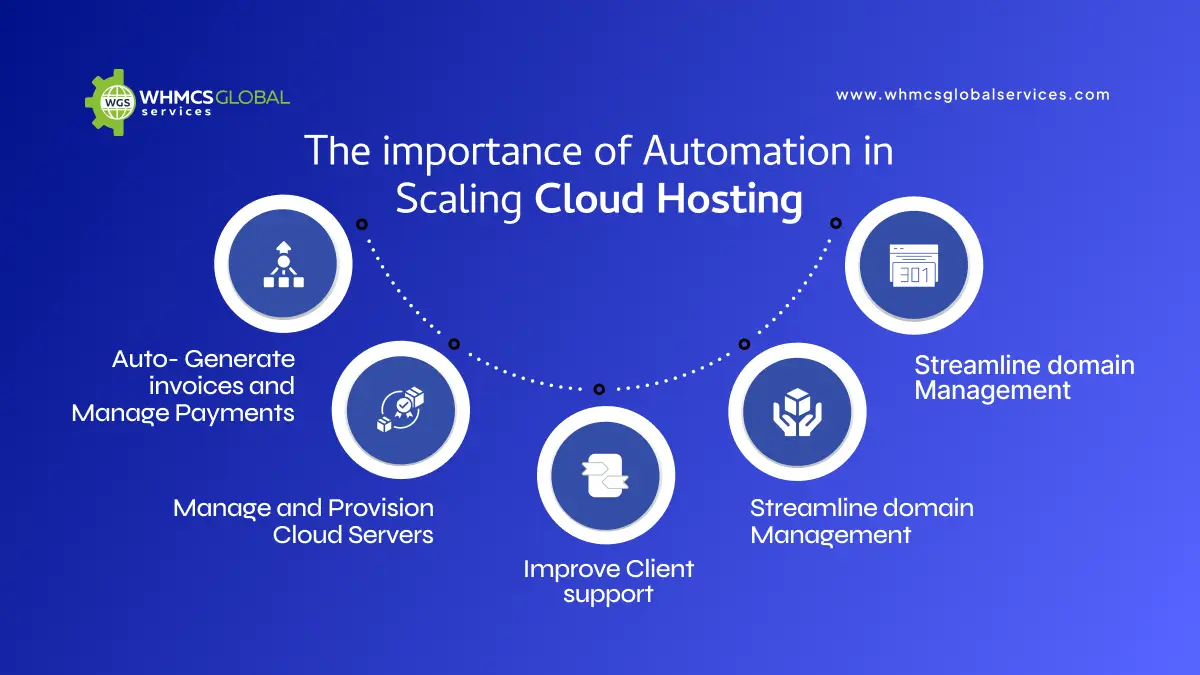
The Importance of Automation in Scaling Cloud Hosting
Cloud hosting businesses have different customers that come with different complexities like billing, and server configurations. Manual processes can lead to errors, inefficiencies, and increased operational costs. Also, automation is key to scaling business. Moreover, Blesta provides strong automation features that enable you to;
Auto- Generate invoices and Manage Payments
Organizing and Managing invoices and Payments manually can be time-consuming and prone to errors. Blesta automates the entire billing cycle, making sure that clients receive timely invoices and process the payments.
Manage and Provision Cloud Servers
Hosting business needs to terminate, deploy, and suspend cloud instances depending on client’s requirements. Blesta automation tools integrates with cloud providers to manage these daily tasks, reducing the administrator workloads.
Improve Client support
Clients expect immediate responses and efficient problem resolutions. Blesta offers a whole integrated ticketing system that enables clients to submit and track support requests seamlessly. Moreover, self-service portals empower users to manage their services independently.
Streamline Domain Management
You can align domain management, SSL provisioning and other hosting-related services. Blesta helps you to automate these processes, making sure that domains are renewed on time and other vital tasks are handled effectively.
Efficient Billing and Subscription Management
Blesta’s core strength depends on its billing automation capabilities. As a cloud hosting provider, you need a dependent system to handle and manage.
Also, Blest offers multiple payment gateways that come with flexibility with stripe, PayPal, and other payment processors. Moreover, you can set up different plans depending on resource utilization and client requirements.
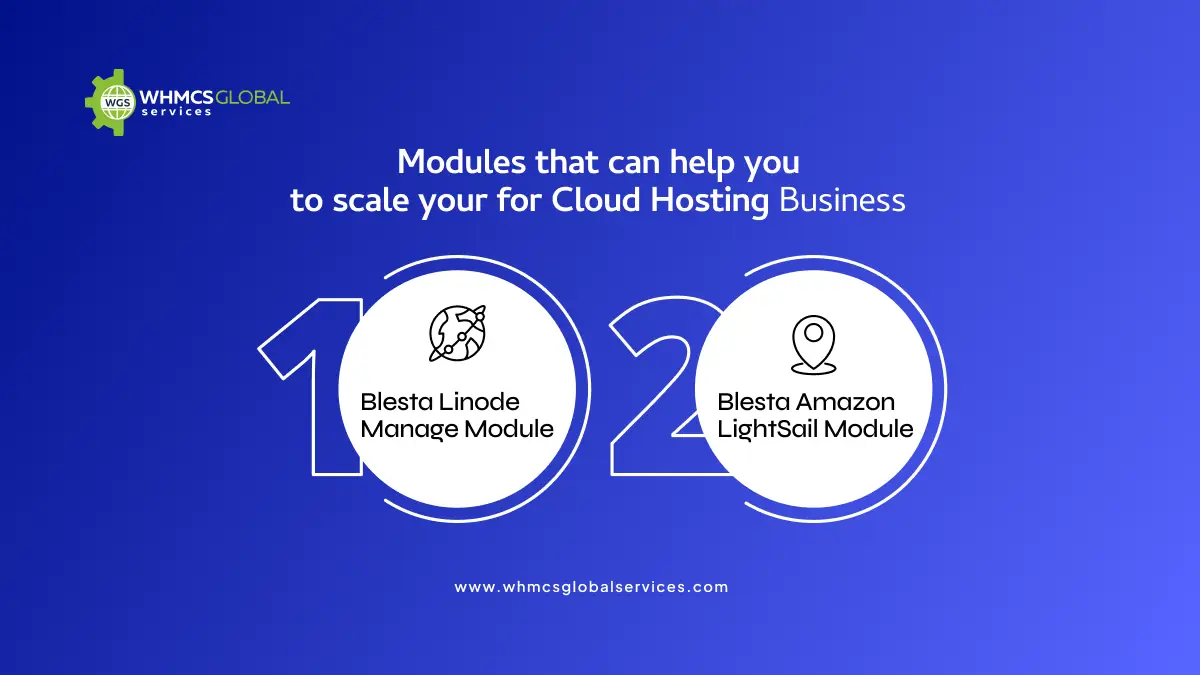
Modules that can help you to scale your Cloud Hosting Business
Blesta comes with robust integration with cloud hosting providers, allowing businesses to automate server provisioning, billing and resource management. These integrations decrease manual work, enhance service efficiency, and improve overall client experience.
Blesta Linode Manage Module
Linode is a robust cloud provider known for its simplicity and cost-effective virtual machines. The Blesta Linode Manage Module enables hosting businesses to integrate Linode Services into their billing platform.
In case you are looking to resell Lindo Servers to your clients through Blesta, then this is the module you require to have on your Blesta website. It also allows you to resell Linode Cloud servers to their customers through their Blesta Clients.
This module also allows customers to manage their entire server options from the Blesta client area which means they do not need to log into the Linode account to handle and manage them.
Blesta Amazon LightSail Module
Amazon lightsail is another preferred cloud solution that offers a simplified approach for deploying cloud instances. The Blesta Amazon Lightsail Modules allows hosting business to easily provision, suspend and terminate Amazon LightSail instances.
This Module provides server management features to clients to power on/off, reboot, snapshots, firewall, SSH detail, stats from the client area.
By promoting Blesta’s Integration with Amazon lightsail, Hosting providers can easily upscale their services, while ensuring performance and reliability for clients. The module simplifies cloud management, allowing businesses to manage and handle rising client demands more efficiently.
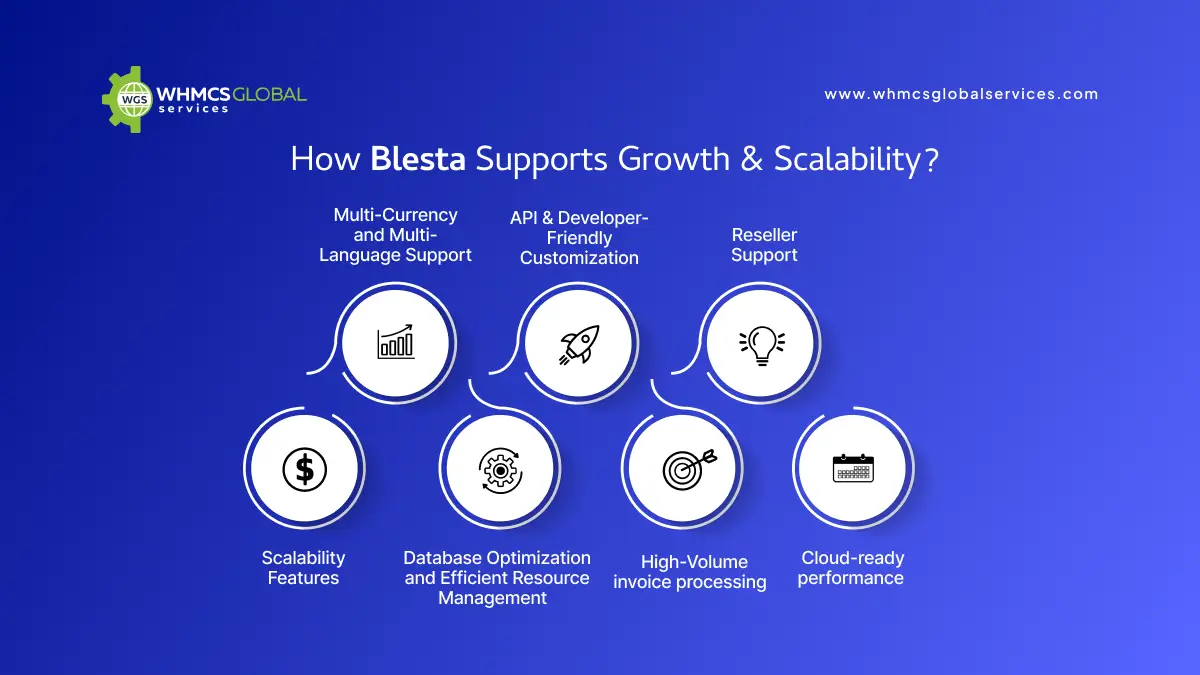
How Blesta Support Growth & Scalability?
To upscale, cloud hosting businesses require a system that grows with them Blesta provides:
Multi-Currency and Multi-Language Support
Expanding your market reach to international clients is vital for scaling your hosting business. Blesta supports multiple languages and currencies, enabling businesses to bill clients in their local currency and communicate in their preferred language.
This feature eliminates requirements to entry in global markets, enhancing client trust, and decreasing confusion caused by currency conversion or language misinterpretations. With seamless multi-currency and multi-language support. Blesta allows hosting businesses to serve a wider audience and increase their global footprint.
API & Developer-Friendly Customization
Blesta offers a highly extensible and developer-friendly platform with a robust open API. This allows businesses to integrate third-party applications, extend core functionalities, and develop custom automation solutions tailored to their particular requirements.
Hosting Providers utilized the API to service provisioning, automated account creation and billing processes. Integrate with external CRM, ERP, and marketing tools to align operations. Moreover, you can also develop custom client dashboards and portals for an enhanced user experience.
Reseller Support
Enhancing a hosting business mostly includes developing and creating a reseller partnership to distribute services on a larger scale. Blesta makes it seamless to support and manage resellers with built-in reseller features like.
Automated resellers account creation that instantly onboard new resellers and grant them access to a branded portal. Also, you can accurately calculate and distribute commissions for resellers depending on performance of sale.
Scalability Features
Blesta is designed to manage and handle increasing client demands without performance issues. Its module structure enables businesses to add new features and integrate with cloud services as they grow. Most of the key benefits includes;
Database Optimization and Efficient Resource Management
Ensuring seamless performance as client numbers increase.
High-Volume invoice processing
It is capable of managing thousands of transactions with automated billing cycles.
Cloud-ready performance
Blesta can be hosted on a scalable cloud environment to manage and handle growth effortlessly.
Summing Up
Blesta is a powerful billing and automation platform that provides cloud hosting businesses with the tools they need to scale efficiently. By integrating advanced modules like the Blesta Linode Manager Module and Blesta Amazon Lightsail Module, hosting providers can automate cloud server management, enhance customer experience, and streamline billing operations.
With its automation, security, and scalability features, Blesta helps hosting providers reduce manual workload, improve service reliability, and focus on growing their business.
In every web hosting business, having customer satisfaction is key to becoming more successful. WHMCS is an effective tool that helps businesses to manage and automate their business operations seamlessly.
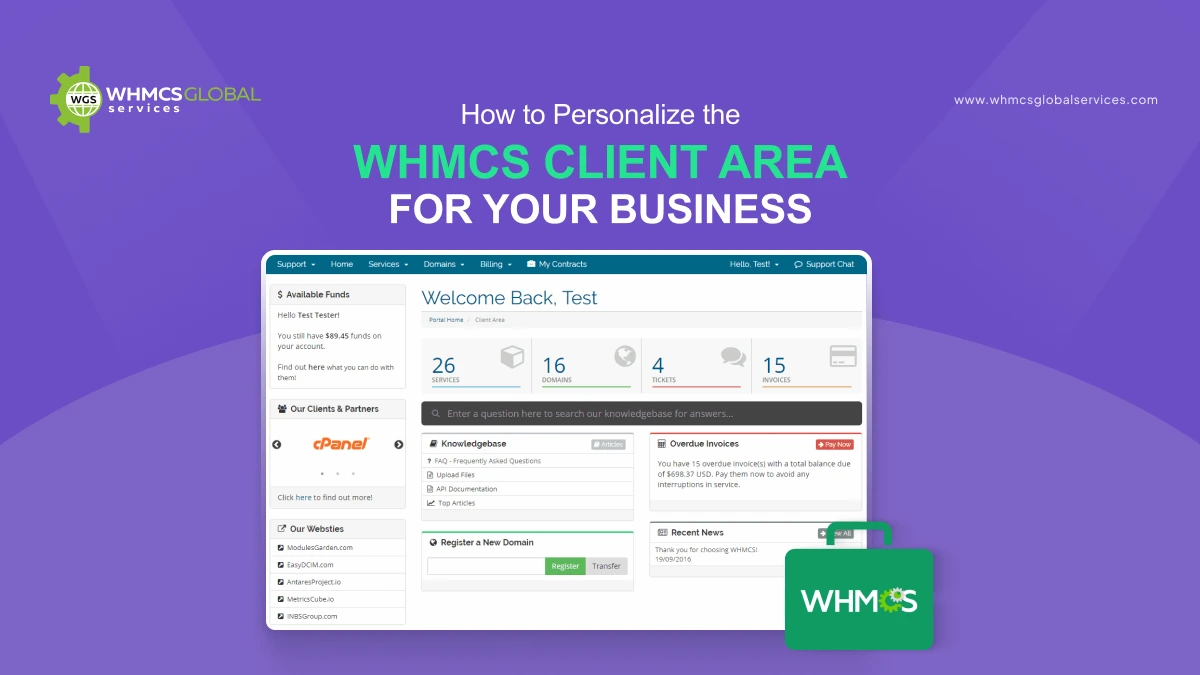
Also, to truly stand out and optimize your business processes, personalization is vital. In this blog, we will explore the top WHMCS customization tips that can transform your business operations and boost your client experience.
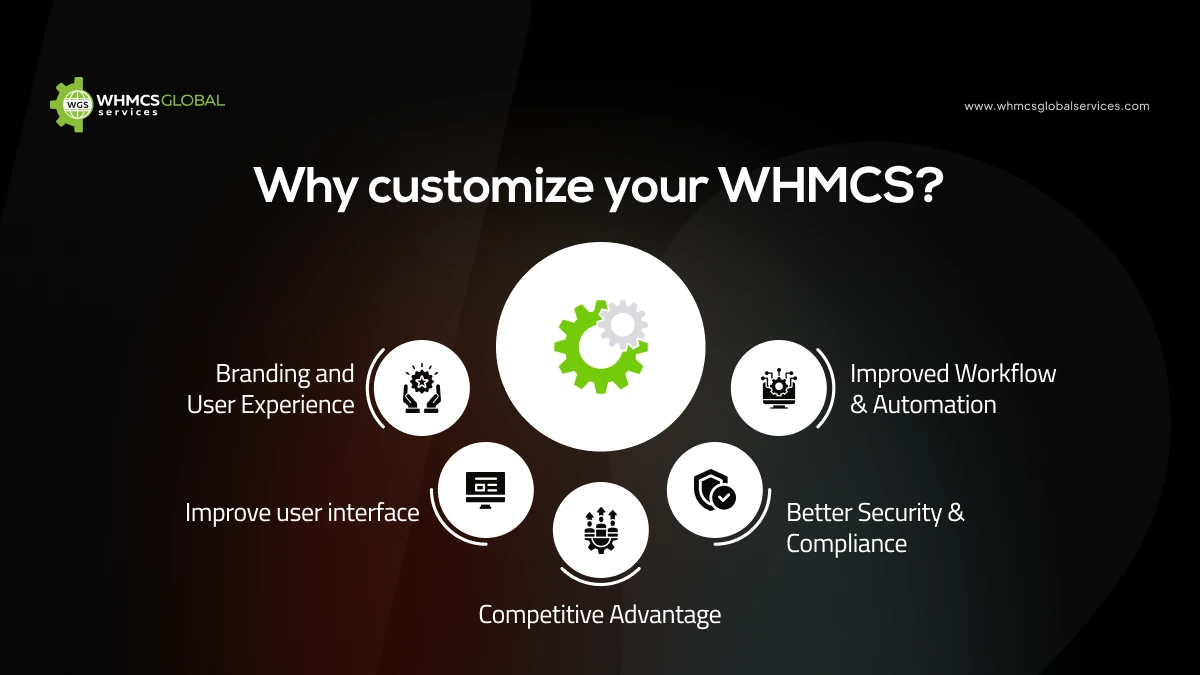
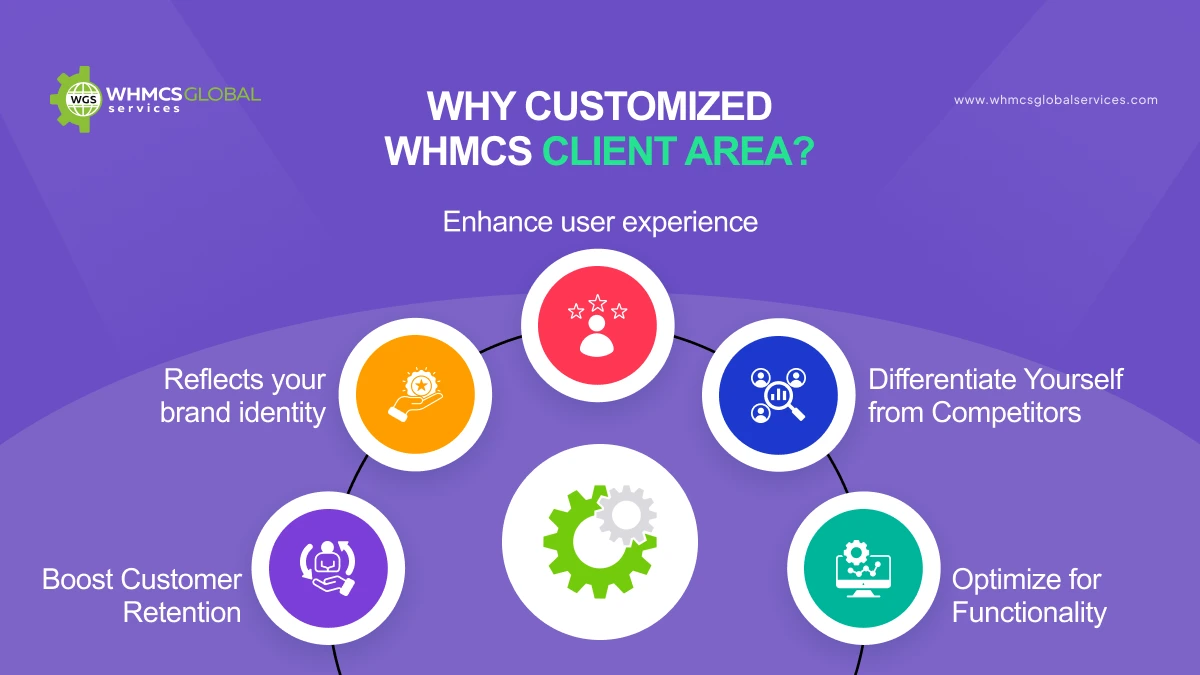
Why customize your WHMCS?
Web Host Manager Complete Solutions is the robust platform developed and designed to client management, automate billing, and support services for web hosting businesses.
While WHMCS offers a solid out-of-the-box solution, many businesses find that personalizing it can significantly enhance their operations, branding, and user experience. Personalization can range from minor visual changes to complete functional overhauls. In this article, we will explore the key reasons why personalizing your WHMCS is beneficial and how it can help you achieve better business security, efficiency, and client satisfaction.
Branding and User Experience
One of the most common reason businesses personalize their WHMCS is to streamline and align it with their brand identity. Default WHMCS installation comes with a generic look and feel that may not match your company’s branding guidelines.
Therefore, customizing WHMCS enables you to match your website’s design by modifying themes, colors, and logos, you can make sure a consistent branding experience for your clients.
Improve user interface
A well-designed UI enhances client navigation, making it seamless for target audience to easily organize and manage their invoices, accounts and services.
Therefore, by streamlining workflows and eliminating unnecessary steps, you can create a more seamless experience for your clients.
You can easily modify client dashboards to highlight relevant data tailored to your client preferences.
Improved Workflow & Automation
WHMCS comes with built- in automation tools, but not all businesses have the same requirements. Personalizing automation rules can help to align operations by
Decreasing Manual work and automation tools, but not all businesses have the same requirement. Also, it helps to minimize repetitive tasks like invoicing, billing, account provisioning, and support ticket handling.
Better Security & Compliance
Security is among top priorities for any online business, especially for those handling and managing client data and payments.
Personalizing WHMCS security features ensures your platform meets industry standards and protects sensitive data. Some ways to increase and improve WHMCS security include custom authentication methods that incorporate 2FA or other login security enhancements.
Competitive Advantage
A personalized and customized WHMCS installation can give your business a significant edge over competitors. Many hosting providers utilize WHMCS, but not all have full advantage of customization options.
By customizing your WHMCS to your business requirements, you can easily provide unique and engaging experience for your clients. WHMCS customization helps you to provide robust features that help to develop custom tools and integration that competitors don’t have. Now let’s exokpre vital customization tips.
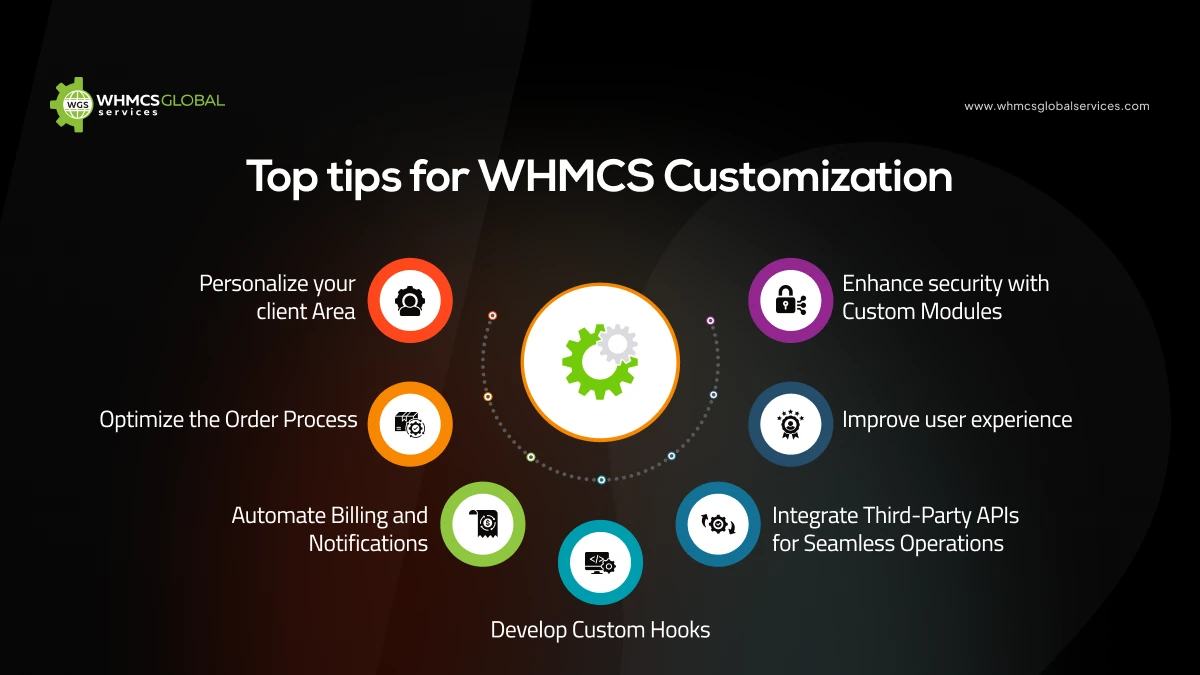
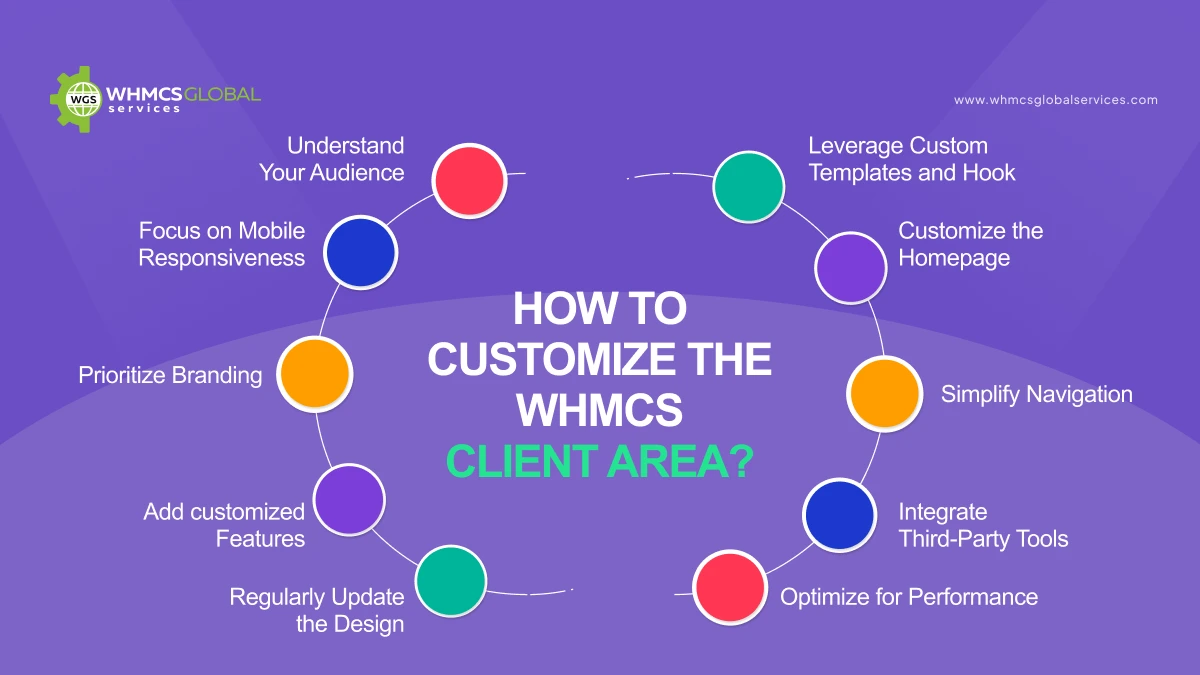
Top tips for WHMCS Customization
Personalize your client Area
Your WHMCS client area is the one that reflects your brand’s identity. Personalizing the theme not only improves the user experience but also increases customer trust and engagement.
You can easily modify WHMCS template files (.tpl) to create a unique design and development. Utilize CSS and Bootstrap tp enhance the user interface. Moreover, you can also leverage third-party theme or develop a custom WHMCS template for a seamless client experience.
Optimize the Order Process
A smooth and optimized ordering process can easily improve conversion rates. You can implement custom order forms to simplify the checkout proceess. Moreover, you can easily introduce upsell and cross-sell opportunities at checkout. Don’t forget to use discount coupons strategically to boost sales.
Automate Billing and Notifications
Billing automation is among the core features of WHMCS. Personalizing it can improve efficiency and customer satisfaction. Therefore, use email template with dynamic variables for personalized communication. You can also integrate SMS gateways to send real-time notifications for billing and service updates. Also, easily personalize invoice templates to match your brand’s aesthetics.
Enhance security with Custom Modules
Security is of outmost importance for any web hosting business. WHMCS enables customization to strengthen security measures. It develops custom authentication modules like OTP login or biometric verification.
You can do two-factor authentication (2FA) to deal with unauthorized access. Also, you can easily set up IP whitelisting to restrict admin access to trusted locations.
Integrate Third-Party APIs for Seamless Operations
WHMCS supports third-party API integration to enhance functionality. You can easily connect with multiple payment gateways like Paypal, Stripe. Etc. Also, you can sync WHMCS with accounting software like QuickBooks or you can directly opt for QuickBooks WHMCS Module for seamless account management.
Develop Custom Hooks
WHMCS offers a flexible hooks system that enables you to trigger custom actions and extend its functionality. You can also utilize action hooks to send custom email alerts, perform security checks or modify service behavior. Also, you can easily develop custom add on to introduce new features without modifying the core system.
Improve user experience
Customizing WHMCS helps to improve both user and admin experience. You can develop and build admin dashboard widgets for real-time analytics and performance tracking. Also, you can create side widgets to display billing summaries, support options and active services.
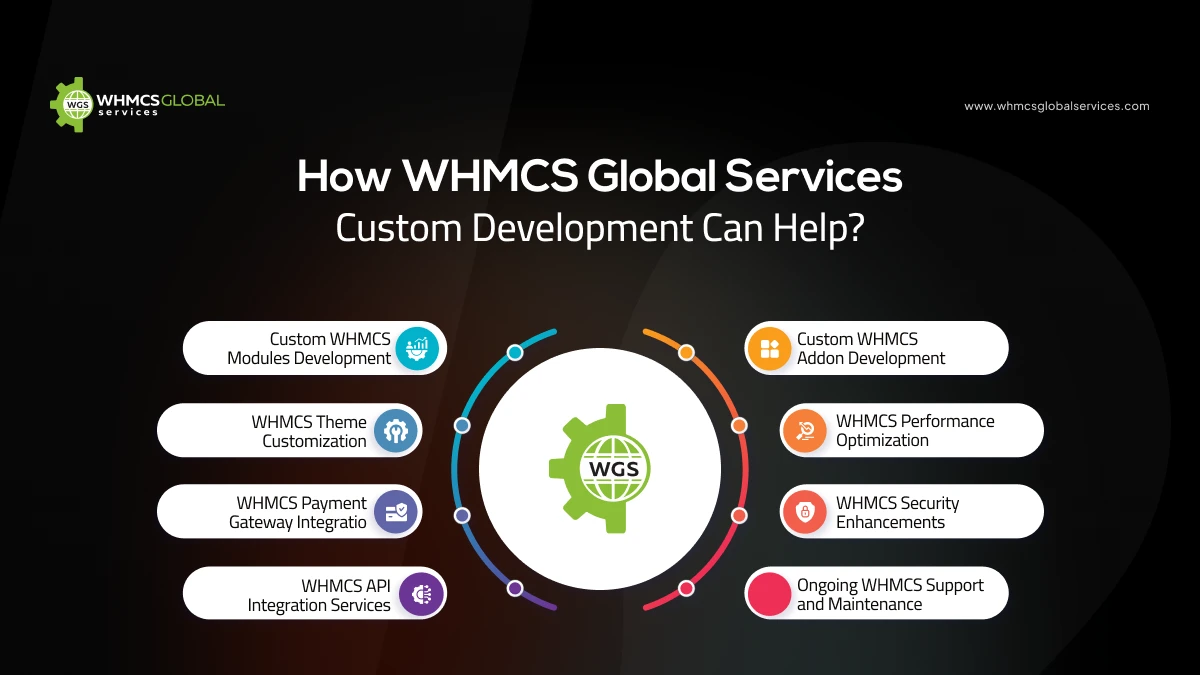
How WHMCS Global Services Custom Development Can Help?
Custom WHMCS Modules Development
WGS specializes in developing custom WHMCS modules tailored to meet your specific business needs. Whether you require a unique payment gateway integration, automated provisioning, or security enhancements, their team can create a solution that perfectly aligns with your requirements.
WHMCS Theme Customization
Your brand identity is crucial, and WGS ensures that your WHMCS client area reflects it. They offer complete theme customization services, designing custom templates that enhance user experience and optimize conversion rates.
WHMCS Payment Gateway Integration
Seamless payment processing is essential for any business. WGS provides expert payment gateway integration services, allowing businesses to accept payments via multiple providers. Their custom solutions ensure smooth transactions with minimal downtime.
WHMCS API Integration Services
If you need to connect WHMCS with third-party software, WGS specializes in API integration. Their expertise includes:
CRM integration for improved customer management.
Accounting software synchronization for streamlined bookkeeping.
Domain registrar API connections for automated domain management.
Custom API development for advanced automation.
Custom WHMCS Addon Development
Beyond integrations, WGS develops feature-rich WHMCS addons that extend your platform’s functionality. Whether you need a custom billing system, advanced reporting tools, or security enhancements, they can build a module tailored to your specific needs.
WHMCS Performance Optimization
A slow WHMCS instance can impact business operations. WGS offers performance optimization services that include:
Database tuning for improved query execution.
Caching strategies to enhance response times.
Server-side optimizations for better resource utilization.
WHMCS Security Enhancements
Cybersecurity threats are a growing concern for web hosting businesses. WGS helps safeguard your WHMCS installation by:
Implementing custom security modules.
Enforcing strict fraud prevention rules.
Enhancing access controls with 2FA and IP whitelisting.
Ongoing WHMCS Support and Maintenance
Managing WHMCS customizations can be complex, but WGS provides ongoing support and maintenance services. They ensure your system remains updated, secure, and fully functional, allowing you to focus on growing your business.
Summing Up
Customizing WHMCS is essential for businesses looking to enhance user experience, automate operations, and improve security. From theme customization and order process optimization to API integrations and AI-driven automation, the possibilities are endless.
However, to achieve the best results, working with experts like WHMCS Global Services can save time, reduce risks, and provide tailor-made solutions that align with your business goals. Whether you need a custom module, API integration, or performance optimization, WGS is a trusted partner for all your WHMCS customization needs.
Are you ready to take your WHMCS-powered business to the next level? Reach out to WHMCS Global Services today and transform your business operations with cutting-edge custom development solution
Managing and organizing domain registrations effectively is vital for any web hosting business, especially when dealing with country-code top-level domains ( ccTLDs). If you are utilizing WHMCS, one of the top web hosting automation platforms, integrating country-specific domain registrars, this is especially important.
This article will help you manage country-specific domains in WHMCS and review top domain registrar modules that streamline the process.
Why do you need to manage a Country-Specific Domain?
Enhanced local trust and credibility
Country code top-level domains are vital factors in gaining the trust of local clients. If a business uses a ccTLD, it is evident that the website is based in a particular region, making it seem more local and trustworthy to users.
Improved local SEO rankings
Search engines prefer local searches utilizing country code top-level domains (ccTLDs). A ccTLD is among the best choices for organizations and businesses targeting a specific region. It signals to search engines that the website is more appropriate for people in that country.
Stronger Brand Identity in Local Markets
With the help of a country code top-level domain, businesses gain more identity in local markets. A ccTLD connects your domain to the identity of the target country in the eyes of local users, hence making it more locally relatable.
For instance, the .ro domain in Romania makes the appearance seem like a part of the local culture, leading to trust and familiarity among clients.
Clients are also more likely to reach out to brands that reflect the values and preferences of their regions. This highlights that your business is mindful of the local market and dedicated to serving it.
Easily connect with a local audience
Another advantage of managing country-specific domains in your WHMCS systems is that you can easily connect with your local target audience, enhancing your business locally.
Therefore, if you Want to develop trust and boost user engagement, country-specific domains help you connect more easily with the local region where non-Latin characters are utilized.
Best Practices for Managing Country-Specific Domains in Your WHMCS System
Understand the Local Requirement
Before providing a country-specific domain, it’s crucial to research the particular need for each domain extension. For instance, .uk domains are managed by Nominet and need appropriate registrant details to comply with their policies.
On the other hand, .de domains, managed by DENIC, need a local administrative contact with a confirmed German address. Additional verification steps, such as confirming the registrant’s address or identity, may also be needed for .de domains.
Ensure Compliance with Local Regulations
Some ccTLDs have various other legal requirements about eligibility and ownership. Most domains need local business registration, legal documents, and address proof. Therefore, to ensure Compliance Configure WHMCS to request and store needed documents at registration. Also, don’t forget to set up automated workflows to verify user identity and approval.
Monitor Domain Expiry and Renewals
Failing to renew a country-specific domain on time can lead to significant errors, including business loss and brand identity. To mitigate risks, you can automate renewal reminders through WHMCS. You can also provide clients with auto-renewal options to prevent accidental expiration.
Offer Multi-Language Support
International customers may recommend utilizing WHMCS in their native language. To expand and enhance user experience, you can enable multi-language support in WHMCS. You can also translate domain purchase and management sections for key markets. WHMCS offers client support in multiple languages where possible.
Top Domain Registrar modules that can help
1..MK Marnet WHMCS Domain Registrar Module
The MK Marnet WHMCS Domain Registrar Module is an excellent choice for managing North Macedonia. It allows automated domain registrations, transfer processes, and renewals and reduces the manual workload.
This module provides clients with seamless experience for registering, transferring, and deleting domains. It also enables them to generate an EPP code, facilitating the transfer of them .mk domain to another registrar when needed.
2. .in Registry Domain Registrar WHMCS Module
The .in Registry Domain Registrar WHMCS Module is developed explicitly for managing .in domains, offering a seamless experience for domain registration and management. This module automates critical processes, including domain registration, transfer, and renewal, ensuring smooth operation without manual intervention. It also provides functionalities for updating nameservers, modifying WHOIS contact details, and syncing domain statuses in real time. By leveraging this module, domain resellers and hosting providers can efficiently handle .in domains while maintaining accuracy and compliance with registry requirements.
3. Neustar .vu Domain Registrar WHMCS Module
Enhance your domain business with our Neustar WHMCS Domain Registrar module, designed to provide seamless functionality.VU domain registrations. This module bridges WHMCS and the Neustar API, enabling customers to purchase and manage VU domains effortlessly.
Explicitly developed for businesses looking to sell.VU domains, our module ensures a smooth and automated experience, streamlining domain management from registration to renewal. Upon successful payment, you can access a fully integrated solution that simplifies domain sales and enhances customer satisfaction. Take your domain services to the next level with our Neustar WHMCS Domain Registrar module, the ultimate tool.VU domain management.
4. WHMCS RoTLD Domain Registrar Module
The WHMCS RoTLD Domain Registrar Module is tailored for Romanian (.ro) domain management. It offers seamless integration with the Romanian Top-Level Domain (RoTLD) registry, allowing for quick and easy domain registration. The module ensures real-time domain status updates and facilitates auto-renewals, reducing the risk of domain expiration.
Conclusion
Managing and handling country-specific domains in WHMCS can align and streamline your business with the appropriate domain registrar module. Whether you are managing and handling .in, .ro, .qa, or other CCTLDS, integrating reliable domain registrar modules ensures seamless compliance, automation, and an improved client experience.
Selecting the appropriate domain registrar Module, such as the .in Registry Module, Neustar .vu, WHMCS ROtld, or another, can effectively scale your business and server to a global audience.
Starting a successful reseller hosting business is a dream for many, yet most face challenges early on or struggle to achieve their goals. To help you launch and thrive in this competitive space, we’ve compiled some effective tips tailored to set you on the path to success. Let’s get started…
Why Reseller Hosting Business fail?
The reseller hosting business is highly profitable and rewarding but many ventures fail due to common mistakes. Below are the main reasons that may contribute to your business downfall and help you to avoid mistakes when starting your reseller hosting business.
1. Lack of Market Research
Many entrepreneurs jump into the reseller hosting business without knowing their target audience or analyzing trends of market. This lack of preparation leads to low service offerings, pricing strategies that may not align with the market, and an inability to meet clients’ expectations.
2. Poor choice of Hosting Provider
A reseller hosting business mostly depends on the reliability and quality of the parent hosting provider. If the provider has many downtimes, low scalability or poor client support, it mostly impacts the reseller’s reputation and leads to client dissatisfaction.
3. Lack of technical knowledge
Reseller hosting needs at least a basic needs of hosting troubleshooting and technologies. Entrepreneurs who lack technical expertise may struggle to resolve client issues or fail to offer robust support, driving clients away.
4. Ineffective Marketing
Without a solid marketing plan, it’s hard to attract and retain clients in a competitive market. Many resellers fail as they do not invest in digital marketing, branding or promotional strategies to establish their presence.
5. Ignoring Client Support
Reliable and immediate client support is a cornerstone of success in the hosting industry. Resellers who do not prioritize client support or fail to offer 24/7 assistance often lose client to competitors who often better support.
6. Overprice or Underprice Plans
Pricing is another vital in a reseller hosting business. Therefore, overpricing can affect potential clients, while underpricing can impact unsustainable profit margins. Striking the right balance between profitability and affordability is vital.
7. Lack of Value-Added Services
Many resellers also provide basic hosting services without differentiating themselves from competitors. Therefore, failing to incorporate value-added services like regular backups, SSL certificates or website builder can make it difficult to stand out in the market.
8. Avoiding Security
Cybersecurity is among the top concerns for clients. Resellers who do not prioritize security measures like malware scans, DDoS protections, and data encryption are more likely to lose clients trust and face reputational damage.
Tips for Reseller Hosting Success with WHMCS
1. Identify your Target Audience
Understanding and knowing your target audience is like having a secret weapon. Because if you know your audience you are halfway there. The better you know the people you are trying to help, the more successful and effective your business can be.
Your potential client can take your business to new heights. Take into considerations new factors like the size of their website, technical expertise, and the specific features they may require.
2. Reseller Hosting Marketing Strategies
Developing a professional website is the first step towards making a lasting impression on robust clients. For this purpose, you can utilize affordable WordPress hosting and create a attracting website on a low budget.
The design must be compelling and user-friendly, making sure that visitors can navigate effortlessly through the pages. Beyond aesthetics, a robust website should attract clients and why your reseller hosting services are the vital fit for their requirements.
3. Social Media Presence
Not all social media platforms are created equal and selecting the appropriates for your business is vital. Understand where your target audience spends their time online and establish a presence on platforms that streamline your business goals.
Whether it’s LinkedIn, Twitters, or Instagram, each platform has its unique strengths and audience locations.
4. Search Engine Optimization (SEO)
Search Engine optimization (SEO), be it on-page or off-page SEO, is very vital for boosting the visibility of your reseller hosting business. Here’s some SEO strategies;
5. Keyword Research
Integrate and Identify relevant keywords into your website content to streamline with what potential clients are searching for. You can also check trending keywords and one with high volume for the best results.
6. On-Page and Off-Page SEO
Optimizing your website content (on-page) and developing a strong online reputation through collaborations and backlinks (off-page) to increase search engine rankings. Also, don’t forget to perform local SEO, customize your online presence for local audiences by utilizing region-specific keywords, developing and creating a google my business profile and boosting local client reviews.
7. Content Marketing
Content Marketing is robust tool to boost and boost reseller hosting business, offering a platform to inform and engage with the audience effortlessly and effectively. Blogging becomes a gateway to position your reseller hosting business as a main leader within the industry. Regularly publishing articles on industry-related topics highlights your expertise and keeps your audience informed about technological advancements and emerging trends.
Utilizing a content marketing platform can help you organize and optimize your blogging efforts, making sure consistency and maximizing impact. Moreover, this not only develops and builds reliability and credibility but also develops trust among your audience.
8. Master WHMCS Features
As WHMCS is robust and versatile platform that automates vital factors of your reseller hosting business, aligning operations and enhancing efficiency. To make the most of its capabilities, start by familiarizing yourself with the client management dashboard to handle and manage accounts seamlessly.
Set up automated billing and invoicing to make sure smooth financial transactions and configure domain registration and renewal processes to offer a hassle-free experience for your clients. In addition, by effectively using WHMCS, you can decrease manual tasks, increase operational efficiency, and boost your professionalism.
9. Monitor Performance
WHMCS provides detailed analytics and reports that are invaluable for optimizing and monitoring your reseller hosting business. These tools allow you to track client growth and churn rates, helping you understand client retention trends.
You can identify high demand plans to pay attention to offerings that reflect most with your audience and monitor audience and expenses for increased financial planning. Also, regularly reviewing data and performance enables you to refine your business strategy, make informed decisions and ensure sustained growth in a competitive market.
Utilize WHMCS Themes and Modules to upscale your business
WHMCS services include in-depth reports and analytics that are not valuable for monitoring and optimizing your reseller hosting business. These tools allow you to track client growth and churn rates, helping you to understand client satisfaction.
You can also enhance your business with WHMCS Themes and modules to offer a professional and user-friendly experience. WHMCS Global services comes with a wide range of WHMCS Themes and modules.
You can opt for HostX theme for modern and intuitive interface. Whereas you can opt for modules like Cloudflare, Linode, Hetzner WHMCS modules to easily boost your reseller hosting business.
Also, you need to review performance daily and redefine strategies to maintain consistent growth.
Summing up
Reseller Hosting business can only be successful with appropriate and relevant experience. Therefore, the key to effective reseller hosting business success is to stay updated, identify your target audience and keep monitoring your reseller business. With usage of appropriate WHMCS Themes and Modules, you can skyrocket your reseller WHMCS Business. You can also implement the above-mentioned strategies and adapt changes to your business.
Running your online business without a payment gateway is impossible. Especially if you are using WHMCS for your web hosting business. Therefore, Selecting the perfect payment gateway is vital for online businesses. This guide will help you to opt for an appropriate WHMCS Payment gateway for your business in 2025.
What is a Perfect WHMCS Payment Gateway?
A perfect WHMCS Payment Gateway is a Payment Processing system integrated into WHMCS platform that allows businesses to accept online payments from their clients securely and efficiently.
As you know WHMCS is the comprehensive tool utilized primarily by web hosting companies for client relationships, billings, and automation tasks.
How does it work in WHMCS?
1. Client Checkout When a client places an order, they are directed to a payment page on WHMCS.
2. Payment Processing The Payment gateway securely collects the client’s payment details like PayPal account or credit card and transmits them to the payment processor.
3. Transaction Approval The gateway communicates with the financial institution to approve and validate the transaction.
4. Invoice Updates WHMCS marks the associated invoice as “paid” and triggers automated actions like service renewal or provisioning.
How WHMCS Payment Gateway can impact your business?
Integrating a WHMCS Payment gateway into your business can have a major impact on your operations, client experience, and overall profitability. Here’s how it can influence your business.
1. Enhance your client’s convenience Clients can pay directly through your website utilizing their preferred payment method, including credit/debit cards, PayPal, or more.
2. Boost Revenue With different payment gateway options like Stripe, Paypal, and more, you can serve a wide audience, enhancing your client base. Also, it fosters higher conversion rates with a user-friendly and secure checkout process that encourages more clients to complete their purchases.
3. Automates Billing and Reduces Manual Work WHMCS Payment Gateway automatically generates invoices and updates them once the payment is completed. Also, it sends payment reminders for pending payments, reducing the risk of missed revenue, and more.
4. Strengthen and Security WHMCS payment gateway also incorporate advanced fraud detection tools, ensuring secure transactions for your clients. Most of the payment gateways are PCI- Complaint, safeguarding sensitive client payment information. This helps to build client trust and minimizes the risk of financial fraud.
5. Improves cash flow management It offers real-time transaction tracking, offering real-time updates on payments, allowing better financial planning and management. Moreover, it provides faster settlements including certain gateways offer quick access to funds, improving cash flow. It helps maintain smooth business operations and financial health.
How to select perfect WHMCS Payment Gateway for your Business
Selecting the perfect WHMCS payment includes evaluating your business requirements, client preferences and technical requirements. Here’s a step-by-step guide to help you make the perfect choice.
1. Identify your target market Identify where your clients are situated. For instance, if your clients are situated in other countries, you can use Paypal WHMCS Module. If your select region-specific gateway for instance razor pay or more.
2. Evaluate Client Preferences Always remember that client prefer fast, smooth and secure checkout process. Check client preferences, therefore select the gateways that support famous payment methods like credit/debit cards. Bank transfers and more.
3. Assess WHMCS Compatibility Check if the gateway is supported by WHMCS or has an official module/plugin for integration. Review the installation and configuration process to make sure it aligns with your technical expertise.
4. Prioritize Security Features Before opting for Payment Gateway prioritize secure features and ensure that they are PCI and DCC compliance. Also, look for features like 3D secure authentication, and fraud detection mechanisms.
5. Consider Scalability Select a gateway that can manage increased transaction volumes as your business expands. If you offer subscription-based services, make sure that gateway supports automated billing.
Some of the Popular WHMCS Payment Gateway Modules for your business
Well, there are many WHMCS Payment Gateway Modules that you can check. We have listed the popular ones that can foster your business growth.
1. QuickBooks WHMCS Module
This module bridges your WHMCS Setup with QuickBooks. It allows credit card payments directly on your website via QuickBooks gateway. It saves time and decreases manual errors and offers exact financial insights.
2. PayPal Tokenization WHMCS Module
This module acts like a credit card specifically for PayPal users. It enables you to charge customers using PayPal reference transaction tokens, giving you unmatched flexibility.
Just like the default WHMCS functionality that mostly depends on fixed recurring payment profiles, this PayPal tokenization WHMCS module supports billing on demand. With Paypal reference tokenization you can easily initiate charges on-demand without waiting for a fixed schedule.
3. Alipay Cross-Border WHMCS Module
Unlock the Chinese market with the most popular payment gateway in China. Alipay boasts over 700 million users and is the go-to payment platform in China. With Alipay module, your website can accept payments from Chinese customers, even if your business operates outside of China.
4. Network Merchant WHMCS Module
The network Merchants (NMI) Payment Gateway allows real-time transaction processing across the globe. This module is good for businesses that prioritize scalability and security.
Moreover, it securely manages and handles sensitive credit card details, It securely manages and handles sensitive credit card details, making sure PCI compliance and supports businesses with high transaction volumes. Moreover, it also needs SSL certification for robust security.
5. myPOS Virtual WHMCS Payment Gateway Module
myPOS virtual module is developed and personalized for European-based businesses who are looking for secure and safe transactions. It supports different currencies and offers a free merchant account for an enhanced payment experience.
Also, it accepts debit and credit cards seamlessly. This are backed by a free and comprehensive merchant account. Moreover, it comes with seamless checkout extension. But to ensure seamless operations, your stores must be verified by Satabank, which may take upto 5 business days. While under verification, you can process transactions but with certain limits.
6. ClickBank IPN WHMCS Module
ClickBank IPN WHMCS module allows businesses to integrate Click Bank with WHMCS via API, enabling smooth transaction management and recurring payment support.
It Supports both one-time and recurring payments. Also, this module
Automatically maps ClickBank products to WHMCS products. Moreover, it Ensures invoices are marked as paid in WHMCS when transactions are completed. It also Logs gateway responses for transparency and troubleshooting.
Wrapping UP
The perfect WHMCS payment gateway is one that not only facilitates smooth transactions but also enhances customer trust and supports your business expansion. By understanding your audience, prioritizing security, and planning for scalability, you can select a module that drives revenue, reduces operational complexity, and strengthens your market position. Choose wisely and invest in a payment solution that propels your business forward!
Reseller hosting business is one of the best ways to upscale your business as it opens a new revenue stream helping you to grow. It also adds more value for your clients. But any business can be only successful if it’s planned and implemented in a well-organized way.
So, if you are starting a reseller hosting business, this guide can help you to avoid common mistakes. Let’s get started.
What exactly is reseller hosting?
Reseller Hosting is a hosting solution that enables you to buy web hosting services in a bulk from a well-established parent web hosting company and sell these services to your clients and customers at competitive rates.
So, as a Hosting Reseller, you can categorize, personalize and change the hosting services as per your particular business requirements and operate your Hosting Reseller business.
Moreover, Reseller hosting with WHMCS and other tools likecPanel, allows you to easily access white label services, and flexibility to sell custom hosting plans. Now let’s understand how generate revenue with reseller hosting business.
How do you generate revenue as a Reseller?
Reseller hosting is a top-notch source of extra income. As a business owner or entrepreneur of a business providing website services you can gain more clients by selling the complete packages from hosting to website development. This helps you to earn extra money.
Well, your income may depend on the wholesale price you may pay to the host for buying a large space on the server and the cost you will charge from third parties. Also, some of the web hosts may include maintenance charges for reseller web hosting accounts.
Therefore, you need to spend more time on monitoring and researching the market and comparing services and prices. Moreover, do not compromise on the resources for a low cost, as it may impact on your services and brand name. Always select a recommended and top performed hosting provider who has good reviews and ratings.
Mistakes to avoid when starting reseller hosting business
Well anyone can start a reseller hosting business, but upscaling and growing can impact clients need effort and well-thought business strategies. Here are the most common mistakes you need to avoid when starting a reseller hosting business.
1. Ignoring research and Planning
Without in-depth research and planning you cannot start any business. So, researching and having a clear and concise business plan is very important. Therefore, it’s vital to find out and outline your business mission, vision, USP and Target audience without which you will be lost and won’t be able to reach your target audience.
Tip to overcome The very first tip is to identify your target audience and clients. You can also analyze the future prices and costs. Also, you need to analyze the vendors, entities, and stakeholders the same as your hosting provider. In addition, don’t forget to set up troubleshooting strategies and identify potential risks including security and backup.
2. Not creating unique and competitive hosting packages
Every business is not same; this goes the same with clients. Not all customers are the same, each of them has unique identity and requirements when it comes to opting for hosting solutions.
Well, there are tons of hosting companies that come with unique services and features. So, in such a competitive market, make sure that you find the gap analysis and make web hosting easier and intuitive to your users.
Tip to Overcome Conduct thorough market research and customer surveys to identify gaps in existing hosting packages. Focus on offering tailored solutions that address specific customer needs, such as niche hosting (e.g., WordPress-specific hosting, eCommerce hosting) or added value services like enhanced security, free migrations, or performance optimization.
3. Ineffective Branding
Effective business marketing and branding is one of the vital areas. Once you have done with research and identifying your target audience. Businesses mostly ignore the branding part.
No matter if you have outstanding services developed with quality. But if you don’t showcase it well, it can impact your reseller hosting business. Therefore, it’s vital to brand yourself in front of the target audience.
Tips to Overcome Start implementing SEO strategies as without SEO you cannot rank your business or website. Along with it, you need to leverage social media marketing where you can create awareness and reach your potential clients through different social media platforms.
Email marketing campaigns are another effective method to reach a target audience. Therefore, make sure that you use banner advertising and promotional campaigns and implement it effortlessly.
4. Failing to offer customer support
Client satisfaction and support are vital factors for any business’s success. As a Hosting Reseller business, you need to always be available for your clients and solve their problems and technical issues.
Without robust support, your client may not retain and may choose your competitor’s services. Therefore, it’s recommended to be available for your clients whenever they seek support.
Tip to Overcome Do not delay your replies. Highlight that you are always available to your clients. You can simply add 24/7/360 days of support. This helps to build trust with customers as they may express relief knowing that in case of any support they can receive a prompt response from your side.
5. Ignoring Negative Feedback
Whenever you hear negative review or feedback from your client. You may be likely to ignore it or get irritated. It can be very easy to ignore and move on further while repeating the same mistake.
If you are beginner, then you need to note that one negative comment can impact your business and hamper your business in the very beginning. Therefore, it’s vital to response negative comments patiently and peacefully.
Tip to overcome So, very first before reacting carefully listen to client’s perspective. You can give extra support by asking them for specific suggestions or support that will help to improve your services.
May be your client is facing technical related issue, and you failed to respond on time. In such a case, you can apologize and then start by resolving their issue. This can build trust and turn your negative review into a positive one.
Modules and themes that can help to start your reseller hosting business
When starting your reseller web hosting business, you need the best themes and module that can help you boost your reseller hosting business. Let’s explore some vital tools that can help you to start your reseller hosting business
HostX WHMCS Theme
No matter what services you resell; designing is always the main part that attracts more clients and visitors. So, you can select themes that go well with your business and reflects your brand identity. HostX WHMCS theme is one of the recommended themes that can help you to design our website.
It comes with robust features like SEO manager, Page manager top menu, Dynamic testimonial, Live Timer on offer, Live chat. Moreover, HostX is among the best choices when it comes to developing intuitive and user-friendly reseller business websites.
OVH WHMCS Module
If you are looking to resell OVH server, then the OVH WHMCS module can be a good choice. It allows you to seamlessly select and resell OVH, SYS, and Kimsufi/Dedicated Servers to your customers without even letting them know. Reselling fully white labeled with an option to set admin margins on all the products.
You can manage their server from client area, they do not require to set out of your WHMCS website to manage their OVH VPS or Dedicated Servers. Additionally, your customers can Perform different server operations in your website client area like check server usage and more.
Linode WHMCS Module
If you are looking to resell Linode Cloud servers then Linode WHMCS module is the best choice. It allows you to seamlessly resell Linode cloud servers to clients through WHMCS client area.
Moreover, your clients can also easily manage and organize their complete server options from the client that means they do not require to login to the Libode account to organize and manage them.
Hetzner WHMCS Module
Hetzner WHMCS Module is another good choice to start your reseller business. It allows you to server management, IP management, auto provisioning, and more.
With this module you can easily resell Hetzner cloud servers under one roof. Moreover, with Hetzner WHMCS module you can seamlessly track activity and server log through which you can track changes, diagnose challenges, and maintain security.
Payment Gateway
You need payment gateway to start business. PayPal Tokenization WHMCS Payment Module is your go to choice that can help you to do secure transactions. It is totally PCI complaint as it stores a secure token as a reference transaction to the credit card data. Moreover, this module provides server management features to clients to reboot, snapshots, firewall SSH detail and more.
Summing Up
Starting a reseller hosting business is simple, requiring minimal skills, expertise, or upfront investment. However, success demands more than just launching—it’s about rising above the competition and avoiding common pitfalls.
To thrive, craft distinctive hosting plans tailored to your audience, prioritize strategic marketing, actively listen to customer feedback, deliver exceptional and responsive support, and, above all, partner with a reliable reseller hosting provider that aligns with your business goals. If you want to start your reseller hosting
For the businesses in the industry, where client retention and satisfaction are main targets, also without offering your client a personalized approach you cannot gain client satisfaction. Therefore, having customized WHMCS client area can easily impact.
Why customize WHMCS Client Area?
1. Reflects your brand identity Most of the companies and businesses use default themes, so to give the unique look and reflect your brand’s identity customizing WHMCS client area can help you gain more client’s trust and credibility. With this, you can customers will not understand that you are using WHMCS.
2. Enhance user experience A personalized client area can align navigation, making it seamless for users to find what they are looking for. By tailoring the layout and design to suit your client’s preferences, you can easily improve their overall experience, decreasing frustration and increasing satisfaction.
3. Differentiate Yourself from Competitors
As the hosting market is most saturated, it provides a unique client area that is intuitive, visually appealing and aligned with your services. It can set you apart from competitors who rely on the default WHMCS design.
4. Boost Customer Retention A customized client area fosters a stronger connection between your business and your clients. You can easily simplify the user experiences to manage the server action.
5. Optimize for Functionality
Well, Customization is not only about looks, but it’s also about the functionality. By tailoring your client portal, you can integrate features like quick support access, custom dashboards or personalized product recommendations that add real value to the user.
How to customize the WHMCS Client area?
Customizing the WHMCS Client area doesn’t need to be more difficult. Instead of diving into the technical steps, here are some vital guides that will help you in customizing.
1. Understand Your Audience
Before making any changes, always consider your client’s needs and preferences. Consider your clients’ needs and preferences. Are they primarily looking for ease of use? Do they value your aesthetics? Understanding your audience makes sure that your personalization are both valid and impactful.
2. Prioritize Branding
Integrate your brand’s elements consistently, use your logo, colors, and typography to create a cohesive visual identity. Avoid overloading the design-clean and simple layouts are often more effective.
3. Simplify Navigation
Make sure that your client area is intuitive and easy to navigate. You can use clear menus, organized tabs, and logical groupings to help users immediately find what they require. Moreover, consider adding a search bar for added convenience.
4. Focus on Mobile Responsiveness
With most users accessing their accounts on mobile devices, make sure that your WHMCS client area is mobile responsive, test the design across various devices to confirm that it performs well on all screen sizes.
5. Customize the Homepage
The client area homepage is the first thing users see. Make it engaging and useful by adding personalized messages, account summaries or quick links to frequently utilized features like support tickets, invoices or product launches.
6. Integrate Third-Party Tools
Enhance functionality by integrating third-party tools, for example, you can add live chat, payment gateway or any analytics dashboard that improves the overall user experience.
7. Optimize for Performance
Personalization shouldn’t slow down your WHMCS system. You can use optimized code and test for performance to make sure the client area remains fast and responsive. A slow loading interface can irritate the users.
8. Leverage Custom Templates and Hooks
WHMCS support hooks and templates for deeper personalization. Utilize these features to create tailored workflows, add custom notifications or redesign specific sections of the client area.
9. Add customized Features
Give the customers the ability to personalize their experience. Allow them to change language settings, select themes or personalize their dashboard to suit their preferences.
10. Regularly Update the Design
Design trends evolve and so do clients’ expectations. Regularly review and update your client area to keep it modern, functional and aligned with your brand.
Themes that can help
Selecting the appropriate theme can significantly simplify the process of personalizing your WHMCS client area. Here are some popular WHMCS themes designed to enhance the experience.
1. ClientX
If you are looking for a WHMCS theme that combines aesthetics, functionality, and flexibility, ClientX is the best choice. Known for its user-friendly design and extensive customization options, ClientX enables businesses to create a sleek, modern client area that only aligns with their brand identity but also improves the overall user experiences.
Key Features of ClientX
-Multiple Attractive Home Page Layouts
-Multi Menu Style with (Menu Manager to activate / deactivate particular many layout)
-Seamless Social Signup
-RTL Supported
-Custom Order Form
-Domain Register Page
-Two Color Schemes Editions (Dark /Light)
Why Choose ClientX Theme
Versatility
Whether you are a small business or a large hosting provider. ClientX can adapt to your requirements with its flexible features and designs.
Brand Consistency
With its extensive personalization options, ClientX ensures that your client area feels like a natural extension of your website.
Enhanced Client Engagement
Interactive elements and an intuitive design can help to boost customer satisfaction and retention.
User Friendly
You don’t require advanced technical skills to make the most of ClientX. The drag and Drop builder and pre-built templates make customization a breeze.
2. TwentyX
When it comes to creating a Professional straightforward and user-friendly WHMCS client area. TwentyX stands out as an exceptional choice. Design with Simplicity and functionality in mind, the theme prioritizes usability and performance, making it ideal for businesses that want to offer a seamless experience for their clients.
Key features of TwentyX WHMCS Theme
-Highly Responsive
-No License Check
-Never Lose Changes
-Flat and Modern Design
– Ultra-fast and Easy on WHMCS
-Multilingual Supported
Why Choose TwentyX WHMCS Theme?
Ease of use: The theme is incredible easy to install and configure, even for those with limited technical expertise.
Modern Year Professional Look: TwentyX strikes a perfect balance between modern design and professional aesthetics, making it suitable for both small business and large enterprises.
Enhanced Client Engagement: Its intuitive design ensures clients spend less time figuring out the interface and more.
Future-proof updates: The developers behind twentyX regularly update the theme to keep it compatible with the latest WHMCS versions, ensuring long-term reliability.
Summing Up
Customizing the WHMCS Client Area is an excellent way to strengthen your brand identity, enhance user experience and differentiate yourself in the competitive hosting industry. By focusing on design and functionality client preferences, you can create a client area that not only meets but exceeds expectations. You can also go with Custom WHMCS development services to customize your own interface.
WHMCS is a popular choice for automating billing and support. However, the urge to use nulled WHMCS themes and modules can lead to significant risks. In this blog, we will explore what nulled WHMCS products are, the dangers associated with them, and how to protect your business.
What Are Nulled WHMCS Themes & Modules?
Nulled WHMCS themes and modules refer to versions of the software that have been modified to remove licensing restrictions. This means that users can access premium features without paying for them. While this may seem appealing, it is important to understand that using nulled products is illegal and unethical.
What are the Hidden Dangers of Using Nulled WHMCS Products?
Using nulled WHMCS themes and modules can expose your business to various risks, including:
Security Vulnerabilities: Nulled products often contain malicious code that can compromise your website and customer data.
Lack of Support and Updates: Without a legitimate license, you will not receive updates or support from the developers, leaving your system outdated and vulnerable.
Performance Issues: Nulled products may not function as intended, leading to potential downtime and loss of revenue.
What are the Legal Consequences of Using These?
Using nulled WHMCS products is a violation of copyright law. If caught, you could face legal action from the authorities, resulting in fines or other penalties. Additionally, your business reputation could suffer, leading to a loss of customer trust.
What is the Business Impact of Using Nulled WHMCS Themes?
The impact of using nulled WHMCS themes can be detrimental to your business. Aside from legal consequences, you may experience:
Loss of Revenue: Downtime and security breaches can lead to lost sales and customers.
Damage to Reputation: Customers may be hesitant to trust a business that uses illegal software.
Increased Costs: The cost of recovering from a security breach can far exceed the price of legitimate software.
How Hackers Exploit Nulled WHMCS Modules?
Hackers often target nulled WHMCS modules to exploit vulnerabilities. They can inject malware, steal sensitive information, or even take control of your server. This not only puts your business at risk but also endangers your customers’ data.
Why People Still Use Nulled WHMCS Themes?
Despite the risks, some individuals and businesses continue to use nulled WHMCS themes due to:
Cost Savings: The allure of free software can be tempting, especially for startups with limited budgets.
Lack of Awareness: Some users may not fully understand the implications of using nulled products.
4 Reasons Why You Should Stop Using Nulled WHMCS Themes and Plugins
While nulled WHMCS themes and plugins may seem like a cost-effective solution, there are significant reasons to reconsider their use. Here are four important factors to keep in mind when evaluating these products:
Security Vulnerabilities: Nulled WHMCS themes and plugins often come with hidden risks. These versions can contain malicious code that compromises your website’s security. By using nulled products, you expose your system to potential attacks, data breaches, and other security threats. It is crucial to prioritize the safety of your website by choosing legitimate themes and plugins from trusted developers, ensuring that your business and customer data remains protected.
Lack of Future Updates: The landscape of web development is constantly evolving, and staying current is essential for any business. Nulled WHMCS themes do not receive regular updates, which means you miss out on important improvements and new features. Developers rely on revenue from legitimate sales to fund ongoing enhancements. Without this support, the quality and functionality of nulled products stagnate, leaving you with the outdated tools that may not meet your future needs.
No Access to Support: When you invest in legitimate WHMCS themes and plugins, you gain access to professional support from developers. This assistance is valuable when you encounter technical issues or need guidance on using the software effectively. In contrast, nulled products offer no support, leaving you to troubleshoot problems on your own. This lack of assistance can lead to wasted time and frustration, ultimately impacting your business operations.
Missed Automatic Updates: One of the key benefits of using licensed WHMCS products is the ability to receive automatic updates. Nulled versions do not provide this feature, which can result in outdated software that may not function properly with other components of your website. Automatic updates streamline the maintenance process, allowing you to focus on growing your business rather than managing software updates manually. By choosing the legitimate WHMCS modules, you ensure that your website remains up-to-date and performs optimally.
How to Protect Your Business from Significant Loss?
To safeguard your business, consider the following steps:
Invest in Legitimate Software: Purchase licensed WHMCS themes and modules to ensure you receive updates and support.
Educate Your Team: Make sure your team understands the risks associated with using nulled products.
Regular Security Audits: Conduct regular audits of your website to identify and address potential vulnerabilities.
Domain Verification: WHMCS provides domain verification tool for hosting customers so that they can verify domain before purchasing the hosting.
How to Choose the Right WHMCS Theme or Module for Your Business?
When selecting a WHMCS theme or module, look for reputable vendors that offer:
Regular Updates: Ensure the product is regularly updated to address security vulnerabilities.
Customer Support: Choose vendors that provide reliable customer support to assist you with any issues.
Positive Reviews: Research user reviews and testimonials to gauge the quality and reliability of the product.
Conclusion
In conclusion, while the urge to use nulled WHMCS themes and modules may be strong, the risks far outweigh the benefits. Protect your business and customers by investing in legitimate software and staying informed about the potential dangers of using nulled products.
One of the most popular and complete automation and billing platforms is Web Host Managed Complete Solutions (WHMCS). Web hosting firms and domain resellers are able to efficiently manage their services and streamline their business requirements due to its ability to integrate with many domain registrars in an effortless manner.
But WHMCS’s extensibility through modules and plugins gives it even more power. By allowing users to link with several domain registrars, these WHMCS modules enhance the functionality of the system, allowing users to offer more services and automate domain management duties.
In this guide, we will explore the top WHMCS domain registrar modules essential for achieving seamless integration and optimizing domain management process. But first let’s understand what domain registrar module is and its benefits.
What is Domain Registrar Module?
The domain registrar module enables WHMCS users to provide domain registration services directly through their WHMCS interface. Through this interface, users can quickly manage domain transfers, register new domains, register existing domains, check the availability of their domains, and control domain settings all inside the WHMCS environment.
Users of WHMCS can simplify their operations by centralizing domain management with other hosting and invoicing functions by utilizing the domain registrar module. Additionally, by providing a full solution for managing domain registration and hosting services through a single platform, this integration improves user experience.
Benefits of WHMCS Domain Registrar Modules
Manage Domains
Domain registrar modules enable users to manage domain registration within WHMCS interface. This helps administration to streamline takes by removing the need to utilize separate systems for domain management.
Efficiency
By integrating domain registration functionalities into WHMCS, users can perform tasks like renewal, domain registration, and management more efficiently. This reduces the obstacles that occur when utilizing multiple different systems.
Seamless Integration
Domain registrar module easily integrates with WHMCS, offering a consistent user experience. Users can access domain management features alongside other WHMCS functionalities like billing and support, without Shifting between different platforms.
Automation Process
This WHMCS module also includes automation features that streamline the most common domain management tasks. For instance, users can set up auto-renewal reminders, update domain settings, and easily initiate domain transfers.
Enhance client Experience
By offering domain registration services directly within WHMCS, you can offer a more comprehensive solution to their customers. Who don’t like to manage all the functionalities under one roof, WHMCS domain registrar modules improve overall client satisfaction.
Top 7 WHMCS Domain Registrar Modules
1. WGS SWITCH EPP Domain Name Registration WHMCS Module
This WHMCS module enables your clients to easily register or transfer their .ch & .li domains on your website. Switch EPP Domain registrar module offered by WHMCS Global Services allows registration as well as management of .ch & .li domains on your websites.
Key Features
Register Domain
Transfer Domain
Get EPP Code
Delete Domain
Get Contact Detail
Update Contact Detail
Manage Nameservers
2. .qa (قطر.) WHMCS Domain Registrar Module
The Internet country code top-level domain (ccTLD) for Qatar is.qa (قطر.). Select the WHMCS Domain Registrar module for.qa (قطر.) extensions to access full capabilities for these domain extensions. This module helps users who want to sell.qa (قطر.) domains and allow your clients to control their purchases domains from your website client area.
Key Features
Auto Domain Registration
Transfer Domain
Get/Update Name Server
Get/Update Contact Whois
Get EPP Code
Domain Sync
3. Neustar .vu Domain Registrar WHMCS Module
Select the Neustar WHMCS Module, which offers the.vu extension domains complete feature coverage. Our module helps to create a bridge between WHMCS and Neustar API by making it simple for your customers to buy.vu extension domains after your module purchase has been successfully paid for. This module was made specifically for people who want to sell.vu domains.
Key Features
Comprehensive domain management
Lock/Unlock Registrar
Register and Manage Nameservers
VU Registrar Accreditation Test
4. WGS Gandi.NET Domain Registrar WHMCS Module
With the help of WHMCS Gandi.net module, you can open up a world of limitless possibilities for your clients.
This module offers 700+ domain extension choices. You are giving an experience rather than merely domain registration services with our module’s seamless integration into WHMCS.
Key Features
Register Domain
Transfer Domain
Get EPP Code
Renew Domain
Get Contact Detail
5. Google Domains Registrar Module
You may do all of your domain-related tasks, including domain registration, directly on WHMCS with the help of the Google Domains Registrar Modules. This module enables management via your WHMCS interface in addition to auto-provisioning domains.
Key Features
Comprehensive domain management
Lock/Unlock Registrar
ID protection
Domain Check Availability & Suggestions
6. Amazon Route 53 Domain Registrar WHMCS Module
This domain allows you to sell domain AWS route 53 services with our WHMCS module. The entire process will consist of auto-provisioning as you do not need to perform any manual activation. This WHMCS module allows the user to purchase the domain and it will get registered without logging into the AWS login panel within WHMCS Module.
Key Features:
Comprehensive domain management
Domain Importer
TLD/Bulk Price Importer
Flexible DNS Management
Lock/Unlock Registrar
Enable/Disable Auto Renewal
ID protection
DNS Security Extensions (DNSSEC)
Domain Check Availability & Suggestions
7. RoTLD Domain Registrar WHMCS Module
This module enables your clients to easily register/transfer. Ro domains on your website with our WHMCS RoTLD domain registrar module. Also, this module offers a frictionless experience by registering and managing.ro domain extensions more easily and seamlessly through seamless integration with WHMCS.
Since RoTLD serves as the registry for.ro domains, each purchase or renewal made through WHMCS sets off a series of events that guarantee rapid domain provisioning.
Key Features:
Register Domain
Domain Renew
Transfer Domain
Get Contact Details
Update Contact Details
Manage Nameservers
Conclusion
WHMCS Domain Registrar modules help web hosting businesses and domain resellers with a wide range of domain services and domain management procedures with the help of WHMCS domain registrar modules. Investing in these best WHMCS modules is crucial for attaining smooth integration and streamlining your domain management operations, regardless of whether you’re a web hosting company, domain reseller, or digital agency providing domain services.
Encountering errors while accessing pages within the admin or client area of your WHMCS installation can be frustrating. Here are some common errors you may come across:
“Oops! Something went wrong and we couldn’t process your request. Please go back to the previous page and try again.”
Entirely blank page.
500 Internal Server error.
To resolve these errors and ensure smooth functionality, follow the professional instructions provided below:
Steps to Enable Debugging Mode in WHMCS
Step 1. Log in as WHMCS Admin
Step 2. Go to Configuration >> System Settings >> General Settings >> Other Tab or Setup >> General Settings >> Other Tab (prior to WHMCS 8.0)
Step 3. Tick the Display Errors checkbox located towards the bottom of the page.
Display Errors
Tick to enable Displaying PHP Errors (Not recommended for production use)
Log Errors
Tick to enable logging of PHP Errors when possible (Not recommended for daily production use)
SQL Debug Mode
Tick to enable logging of SQL Errors (Use only for testing purposes)
Hooks Debug Mode
Tick to enable logging of Hook Calls (Use only for testing purposes)
Debugging Mode enabled in WHMCS!
Once you are done with the above steps, try to access/reload that page where you are getting an error and after that, you will find the exact error and then you can contact your third-party vendor or module provider with that error screenshot.
Note: Don’t forget to uncheck the “Display Errors” option when you are finished troubleshooting. Leaving the error display enabled can be a security concern.
Enable Debugging Mode in the Configuration File
If you are unable to log in with the WHMCS admin area or don’t have access to enable debugging mode, then in that situation, there is a manual way to enable it with the configuration file. You can enable error reporting in the configuration.php file in the WHMCS root directory.
Access WHMCS files via FTP/cPanel/Plesk/etc, edit the configuration.php file, and add the below line at the end of the configuration.php file before the PHP tag closing (?>).
$display_errors = true;
After adding this line and saving and uploading the file on the correct path, retry the same previous steps to reload that error page, and then you will get additional error information, and you can contact your third-party vendor for that error.
Note: Do not forget to remove this code line when you are finished troubleshooting. Leaving the error display enabled can be a security concern.
How to Enable Debugging Mode in cPanel and Plesk?
To enable debugging mode in cPanel and Plesk, the specific steps may vary depending on the version and configuration of your hosting environment. However, follow these general guidelines for both cPanel and Plesk.
Enabling Debugging Mode in cPanel:
-Log in to your cPanel account.
-In the “Software” section, look for the “Advanced” or “Advanced Options” category.
-Find and click on the “PHP Configuration” or “Select PHP Version” option.
-In the PHP configuration settings, look for the “error_reporting” option. Set it to “E_ALL” to display all errors.
-Look for the “display_errors” option and set it to “On” to enable error display.
-Save the changes.
Enabling Debugging Mode in Plesk:
-Log in to your Plesk control panel.
-Navigate to the domain or subscription you want to enable debugging for.
-Go to the “Websites & Domains” section.
-Depending on your Plesk version, you may find different paths to enable debugging:
-If you have Plesk Onyx or Obsidian, click on “PHP Settings” under the “Hosting Settings” section.
-If you have Plesk 12.x, go to “Website Scripting and Security” and click on “PHP Settings.”
In the PHP settings page, find the “error_reporting” option and set it to “E_ALL” to -display all errors.
-Look for the “display_errors” option and set it to “On” to enable error display.
-Save the changes.
Note: After enabling debugging mode in either cPanel or Plesk, error messages and warnings will be displayed on the website if any issues occur. Remember to disable debugging mode once you have resolved the problems, as error messages can expose sensitive information and impact the performance of your website.
Why Enable Debugging Mode in WHMCS?
Importance of Enabling Debugging Mode: Enabling Debugging Mode in WHMCS is an essential step for effectively troubleshooting and resolving errors that may arise within your WHMCS installation. By following the outlined steps, you can access detailed error messages that provide insight into the underlying issues affecting your system. This information is invaluable for diagnosing problems, whether they stem from custom modules, third-party integrations, or configuration settings.
Benefits of Detailed Error Reporting: When you enable debugging, you can identify specific errors that may not be visible under normal circumstances, allowing you to take appropriate action. For instance, if you encounter a vague error message or a blank page, enabling error reporting can reveal the exact nature of the problem, such as missing files, incorrect database connections, or syntax errors in custom code.
Security Factors of Debugging Mode: However, it is crucial to remember that while debugging mode is a powerful tool for development and troubleshooting, it should be used with caution. Displaying errors in a production environment can expose sensitive information to potential attackers, leading to security vulnerabilities. Therefore, always ensure that you disable error display once you have resolved the issues.
Best Practices for Enabling Debugging Mode: In addition to the steps provided for enabling debugging mode through the WHMCS admin interface, configuration files, cPanel, and Plesk, it is advisable to maintain a regular backup of your WHMCS installation. This practice ensures that you can quickly restore your system to a stable state if any issues arise during troubleshooting.
Conclusion
In summary, enabling Debugging Mode in WHMCS not only aids in identifying and fixing errors but also enhances your overall understanding of the system’s functionality. By taking the necessary precautions and following best practices, you can ensure a smoother experience for both administrators and clients, ultimately leading to improved performance and reliability of your WHMCS installation.
Canonical, the founder of Ubuntu, released Ubuntu 20 with an emphasis on security and high performance. However, building an Ubuntu 20 VM Template that is ready to be used in VMware automation is something that seems complex for admins.
Therefore, we have come up with this technical documentation and here we will show you how to create Ubuntu 20 VM Template in 7 simple steps.
What is a VM template?
A VM template is a master copy of a virtual machine (VM) that is used to create multiple identical VMs quickly and efficiently. It contains the operating system, applications, and configurations that are pre-installed and configured. By using a VM template, administrators can streamline the deployment process, ensure consistency across VMs, and save time when provisioning new virtual machines.
What are the Advantages of Using Ubuntu 20 VM Template for Automation?
Consistency: Using a VM template ensures that all deployed VMs have the same configuration, reducing discrepancies and configuration drift.
Time Efficiency: Templates allow for rapid deployment of new VMs, significantly reducing the time required to set up new environments.
Simplified Management: Templates can be updated and redeployed easily, making it simpler to manage and maintain multiple VMs.
Scalability: Organizations can quickly scale their infrastructure by deploying multiple VMs from a single template, accommodating growth and demand.
Cost-Effective: Reducing the time and effort required for VM deployment can lead to lower operational costs and improved resource utilization.
Prerequisites
Download the ISO file of Ubuntu-20 on your local PC
Go to your VMware ESXI Server
Create Ubuntu 20 VM Template
Follow the steps below to create the Ubuntu 20 VM Template for VMware automation:
Step 1. Download The ISO File
1. Visit on the official website of Ubuntu. Click on the link below to download the Ubuntu 18.04 ISO
Step 3. Upload the ISO Image to VMware ESXi Datastore
1. Click on the Storage button, then select Datastore browser. 2. Click on the Create Directory and create the folder with the name of iso 3. Hit the Upload button 4. After that, choose the Ubuntu-20.04 ISO image from your local computer and click on the Open button.
Step 4. Create a VMware ESXi Virtual Machine for Ubuntu-20.04 Installation
1. Click on the Create / Register VM
2. Then select the option to Create a new virtual machine and click on Next.
3. Enter VM name and select the Guest OS family to Linux and Guest OS version to Ubuntu Linux (64-bit). Then, click on Next.
4. Select the datastore and click on Next.
5. Configure the virtual machine hardware and click on CD/DVD Drive 1 and browse the Ubuntu-20.04 ISO file from the datastore. Click Next.
6. Then choose the ISO file.
7. Once done with the above steps click on Next >> Finish
Now the new VM should be created on your VMware-ESXI. Click on Virtual Machine
Step 5. Installation of Ubuntu-20.04 Operating System
1. For the installation of OS, click on the VM or Power On button
2. Now installation is initialized, then only select language and press Enter.
3. Press Enter on the interface ( ens160 ) to configure the IP address.
4. Then, click on the Edit IPv4 option.
5. Choose the manual option under IPv4 Method
6. Now configure the IP addressing according to your network. Hit the Save button.
7. Enter the Continue button.
8. Now configure the Storage Configuration. Select the option Use an entire disk and
Click on Done
9. Again hit the Done button
10. Select the username and password for Profile Setup and click the Done button
11. For SSH access, press the space button on the Install OpenSSH server and press Enter
12. Now installation is complete, press the Reboot Now Button
Note: After all the steps, the Virtual Machine is ready to boot Ubuntu-20 from the virtual hard drive. Here enter the username and password.
Step 6. Installation of VMware Tools on Ubuntu-20.04 VMware Virtual Machines
1. On VMware ESXI, click on the Action button > Guest OS > Install VMware Tools. After the Install VMware Tools option, CD-Drive is automatically connected with your OS.
2. Confirm the CD-Drive is connected properly. Run the below command
3. After confirmation, execute the following command:- # mount /dev/sr0 /mnt # lsblk
4. After the CD-Drive is mounted on /mnt directory, run the below command:-
# cp -rv /mnt/VMwareTools-10.3.23-17030940.tar.gz /tmp # ls /tmp
5. Extract the VMwareTools-10.3.23-17030940.tar.gz file in /tmp directory.
Run the below command. # cd /tmp # tar -xvzf VMwareTools-10.3.23-17030940.tar.gz
6. Once done with extracting the file, you need to run the script under /tmp/vmware-tools-distrib directory.
Execute the command that are mentioned below:- # cd /tmp/vmware-tools-distrib # ./vmware-install.pl
Step 7. Check whether VMware tools are installed or not. Run the below command
# systemctl status vmware-tools
OR
# systemctl status open-vm-tools
# systemctl start vmware-tools
# /etc/init.d/vmware-tools status
# /etc/init.d/vmware-tools start
!!!!! Reboot the Virtual Machine by running the command > init 6 !!!!!
Step 7. Convert the Virtual Machine to Template
After the installation of the virtual machine and VMware tools on it. We are going to convert the virtual machine to a template.
1. Go to your Vcenter server.
2. After login you can see your virtual machine under the VMware-ESXi (host).
Right-click on the virtual machine, then go to the Template option and choose the Convert to Template.
…And you are done!
What are the Common Issues and Troubleshooting?
Ensure that the correct network adapter is selected in the VM settings.
Verify that the IP address configuration is correct and matches your network settings.
Check if the network services are running on the Ubuntu VM.
If VMware Tools do not install correctly, ensure that the CD drive is properly connected and that you are using the correct version of VMware Tools for your version of Ubuntu.
Check the logs for any errors during the installation process.
If the VM does not boot from the virtual hard drive, ensure that the boot order is set correctly in the VM settings.
Verify that the installation of Ubuntu was completed successfully.
Ensure that the VM has adequate resources allocated (CPU, memory, disk space).
Monitor the performance metrics in VMware to identify any bottlenecks
Conclusion
In summary, creating a VM template using Ubuntu 20 offers a streamlined and efficient approach to deploying virtual machines. Utilizing templates ensures consistency, stability, and ease of management in virtual environments. Additionally, installing VMware Tools enhances performance and integration, making automation more effective.
As an integral part of the web hosting industry, WHMCS (Web Host Manager Complete Solution) has gained immense popularity for its robust billing and automation capabilities. This blog post will delve into how the WHMCS billing system works, shedding light on its billing cycles, payment gateways, and the overall logic behind its operations.
Two Important Aspects of WHMCS Billing System
1. Billing Logic
Efficiently automating the WHMCS billing and invoicing process is vital for any business, and WHMCS Global Services in these areas. Understanding the inside workings of these systems is critical during configuration to ensure optimal choices for your business.
2. Ordering
When a new user submits an order, the WHMCS systems automatically generate multiple records to store and capture the relevant information from the order form.
Billing and Invoicing: Key Tasks Automated by WHMCS
Billing Automation:
WHMCS streamlines the billing process, saving your effort and time. By configuring billing cycles according to your business model, you can also offer flexible payment options to clients. In addition, WHMCS supports a variety of billing cycles, including one-time, monthly, quarterly, semi-annually, annually, and more.
The following billing cycles are available for products or services and product add-ons:
One Time
Monthly
Quarterly
Semi-Annually
Annually
Biennially
Triennially
Invoicing Automation
WHMCS generates invoices for the services rendered during a particular period. Invoices can be customized with the service details, pricing and additional charges or discounts. The system also calculates taxes, if applicable, based on the client’s location and tax setting.
Also, there are mainly two types of invoices depending on the services and products you provide to your customers.
Product Type
This invoice format is widely used in WHMCS and is highly versatile for various products and services. It allows for customization, enabling you to include specific details such as items, prices, and other relevant information related to the services provided. Furthermore, you can choose a payment frequency based on the nature of the services, including monthly, quarterly, or yearly. Enhancing the professionalism of your invoices is crucial, and this format facilitates that process.
Custom Invoice
Custom Invoices can also be stated as fixed invoices, where you can send an invoice to your client for the service. These can be one-time charges, special services, or customized offerings tailored to individual clients. Moreover, Custom invoices are particularly useful for handling one-time charges, professional services, or other non-recurring transactions that automatic product-type invoices may not cover.
WHMCS Invoice Recurring Module
The WHMCS Invoice Recurring Module offers a seamless solution for streamlining the generation of many invoices, eliminating the tedious task of individually creating over 100 product-type invoices. Our module serves as a catalyst, empowering WHMCS administrators to effortlessly generate multiple custom recurring invoices directly from the admin panel.
By automating the process, the module intelligently generates invoices based on the selected billing cycle: seven days, monthly, quarterly, semi-annually, or annually. This efficient system expedites the creation of custom recurring invoices, enabling administrators to handle invoicing tasks swiftly and effectively.
Payments and Overpayments
WHMCS supports various payment gateways, allowing clients to choose their preferred payment method. Popular payment gateways like PayPal, Stripe, and Authorize.net are seamlessly integrated into the system, ensuring secure and efficient transactions.
Sometimes, clients may accidentally make an overpayment or intentionally choose to make an advanced payment towards future invoices. WHMCS provides mechanisms to handle such scenarios efficiently.
WHMCS automatically identifies the excess amount when an overpayment is received and updates the client’s credit balance accordingly. This credit balance can then be applied to future invoices manually by the client or automatically by the system based on the configured settings.
Refunds
In cases where clients request a refund for a paid invoice, WHMCS offers a straightforward refund process. Service providers can issue refunds directly from the WHMCS interface, refunding the appropriate amount to the client’s original payment method.
Wrapping Up
The WHMCS billing system simplifies managing billing cycles, invoicing, and payment collection for web hosting companies and service providers. With its flexible billing cycle logic, automated invoicing and payment collection, built-in reminders, and support for one-time payments and add-ons, WHMCS streamlines the billing process, reduces manual effort, and ensures efficient revenue management.
Invoicing plays a crucial role in every organization and business. So, regarding efficiency and streamlined processes, WHMCS (Web Host Manager Complete Solutions) stands out as an exceptional tool. This article will provide a detailed step-by-step guide on creating invoices in WHMCS, allowing you to manage your billing processes with ease and professionalism.
WHMCS invoicing provides numerous benefits to businesses, making it an ideal choice for invoicing purposes. So, buckle up and get ready to embark on a journey towards a streamlined billing process that will reduce your time, develop client and improve the productivity of your business.
Understanding WHMCS Invoicing
WHMCS invoicing is a unique feature of the WHMCS platform specially crafted for web hosting businesses and service providers. It simplifies managing and creating invoices, enabling the business to streamline its billing operations. Here are some vital points to understand more about WHMCS invoicing;
Types of Invoices
There are mainly two types of invoices depending on the services and products you offer to your clients;
Product Type
This is the most common type of invoice in WHMCS. You can add the type of your products or services and generate the invoice. Product-type invoices are customizable and enable you to add items, prices and other details of the services.
In addition, you can select a payment mode depending on services., monthly, quarterly or yearly.
Custom Invoice
Custom Invoices can also be stated as fixed invoices where you can send an invoice to your client for the service. These can be one-time charges, special services, or customized offerings tailored to individual clients.
Moreover, Custom invoices are particularly useful for handling one-time charges, professional services, or other non-recurring transactions that automatic product-type invoices may not cover.
WHMCS Invoice Recurring Module
Generating more product-type invoices can be tedious when you have to generate 100+ invoices at a time. This is where the WHMCS invoice recurring module acts as a catalyst for generating more invoices at a time. With our module, WHMCS admins can generate multiple custom recurring invoices directly from the admin panel.
The module automatically generates invoices based on the selected billing cycle, whether seven days, monthly, quarterly, semi-annually, or annually. This streamlines the process of raising custom recurring invoices, making invoicing tasks quick and efficient.
WHMCS provides an intuitive interface to generate invoices. You can choose the products or services the client offers, specify quantities, set prices, and apply discounts or coupons. In addition, WHMCS automatically calculated the total amount, including taxes, if applicable.
Client Management:
With WHMCS invoicing, you can create client profiles, store their contact information and track their billing history, which makes it easier to manage invoicing for every client.
Automation:
Automation features save time and improve efficiency. For instance, you can set up automatic invoice reminder notifications to notify clients about upcoming or overdue Payments. This reduces the need for manual follow-ups and improves cash flow management.
Invoice Delivery:
WHMCS offers multiple options for delivering invoices to customers; You can send your invoices via email, generate PDF versions for download or even send printed copies through postal mail. This flexibility accommodates different client preferences.
Step-by-Step Guide: Creating an Invoice in WHMCS
Step 1: Sign in to WHMCS Dashboard
Login to the WHMCS admin area with your credentials
Navigate to the dashboard where you can access all the invoicing features.
Step 2: Invoice Settings
Configure invoice settings such as invoice numbering, currency, and tax settings according to your business requirements.
Define invoice terms and conditions that will appear on each invoice.
Step 3: Adding Client Details
Search for an existing client or create a new profile in WHMCS.
Fill in client information, including their name, address, and email.
Step 4: Selecting Products/Services
Select the products or services you want to include from your product or service catalogue in the invoice.
Specify the quantity, price and any applicable discounts for each product/service.
Step 5: Generating the Invoice
Review the invoice details to ensure accuracy.
Click the “Generate Invoice” button to create the invoice in WHMCS.
Step 6: Sending the Invoice
Choose the delivery method for the invoice, such as email or PDF download.
Send the invoice to the client using the selected method.
Step 7: Managing Payments
Track the invoice status within WHMCS, which can be pending, paid, or overdue.
Update the payment status manually as payments are received or integrate WHMCS with payment gateways for automated tracking.
Other Setting
Generate WHMCS Invoice Automatically
WHMCS has a feature that automatically creates invoices for recurring products and services before their due dates. You can adjust when these invoices are generated by accessing the Invoice Generation option in the Billing Settings section. This can be found at Configuration > System Settings > Automation Settings, or in WHMCS versions before 8.0, it is located at Setup > Automation Settings.
Invoices are generated 14 days in advance by default, but you can customize this setting to suit your needs. To further fine-tune the timing of invoice generation, you can access Advanced Settings and configure the number of days in advance for each billing cycle individually. This gives you more control over the invoicing process based on your specific requirements.
Invoice Reminders & Notices
In WHMCS, you can send the following notifications:
A single reminder before the invoice becomes due.
Up to three reminders for overdue invoices after the due date has passed.
You can customize the timing of these notices in the Billing Settings section located at Configuration () > System Settings > Automation Settings. Before WHMCS 8.0, this can be found under Setup > Automation Settings. This feature allows you to manage your invoices professionally by sending timely and appropriate reminders and notices.
Summing Up
Creating an invoice in WHMCS is a straightforward process that enables you to manage your billing and invoicing needs efficiently. By following the steps outlined in this blog, you can quickly generate professional invoices tailored to your specific business requirements.
Are you facing obstacles in managing your web hosting business? Don’t worry; we have covered the ultimate showdown between two powerhouses in the industry: WHMCS and Clientexec!, In this tug–of–war of billing and automation platform, we will dive into the dynamic features, examine their weakness and strengths and help you find the perfect fit for your hosting business needs. So, let’s get started with the WHMCS Vs Clientexec comparison.
WHMCS (web host manager complete solution) is a comprehensive web hosting billing and automation platform. It offers tools for invoicing, customer management, support ticketing, domain registration, and server provisioning.
With WHMCS, you can quickly onboard new clients, manage existing ones, and effortlessly handle their accounts. From automated provisioning and domain management to client self-service portals and customizable order forms, WHMCS puts you in the driver’s seat, allowing you to deliver exceptional client experiences at every touchpoint.
Key Features:
Web Hosting Automation
Set up multiple hosting tiers and products
Support Ticket System
Integration with Control Panels
Reporting and Statistics
Customized Dashboard
WHMCS Pros and Cons
Pros:
The robust feature set for web hosting automation and billing.
Wide range of integrations with third-party services and tools.
Established and widely utilized in the industry.
Cons:
While some might find it as costly, rest assured that WHMCS’s value far outweighs its price tag. Since, it offers a wealth of top-tier features and uncompromising quality.
What is Clientexec?
Clientexec is a client management software specifically designed for web hosting businesses. It allows users to automate all aspects of web hosting, right from setup and billing to support. Also, Clientexec simplifies the process of managing your web hosting company as you can integrate it easily.
Furthermore, Clientexec also places a great emphasis on client support and communication. It provides a built-in support ticketing system that allows effective communication and swift resolution of clients’ issues. You can also easily track tickets, assign a theme to specific employees and provide timely responses under one roof.
Key Features:
Invoicing and billing
Integrated Billing Module
Easily Configurable
Integrated Support Module
Clientexec Pros and Cons
Pros:
User-friendly interface and easy to navigate.
Lower cost compared to some other solutions.
Quick setup and deployment.
Cons:
Smaller market share compared to WHMCS.
Limited integrations with third-party tools and services.
What do you expect from these?
Both Clientexec and WHMCS provide core features for web hosting billing and automation. You can expect standard parts and functionalities like invoicing, domain registration, client management, and support ticketing from both platforms. Moreover, speaking about WHMCS and Clientexec’s differences, WHMCS is more widely utilized and established in the industry, while Clientexec has a smaller market share.
Client Experience: Concerning client experience in WHMCS and Clientexec comparison, WHMCS and Clientexec offer a user-friendly interface for clients to manage their accounts, view invoices, submit support tickets and organize their domains. However, WHMCS may provide more customization options to tailor the customer experience.
Customization: WHMCS is a highly customizable platform, enabling you to modify the user interface, design custom themes and templates and extend functionality through Modules. Clientexec, on the other hand, has limited personalization options and may need to provide a different level of flexibility.
Pricing: WHMCS typically has a higher cost compared to Clientexec. WHMCS offers various licensing options depending on the number of active clients, while Clientexec provides an affordable pricing structure but lacks many other features and functionalities.
WHMCS vs Clientexec: Final Verdict
WHMCS and Clientexec are both capable of web hosting automation and billing platforms. It is a more comprehensive and feature-rich solution, suitable for larger hosting providers with more complex requirements. On the other hand, Clientexec features automation billing capabilities. Your selection between the two depends on your specific needs, budget, and level of customization requirements.
WHMCS and BoxBilling difference are both popular web hosting automation platforms created to manage invoicing, billing, and customer support for hosting businesses. Selecting WHMCS and BoxBilling can be difficult for you when both platforms provide the best web hosting solutions. So, to help you to make an informed decision and choose the best among you, we have covered a detailed comparison blog of WHMCS vs BoxBilling depending on features, pros and cons, customization options, client experience, pricing, and marketing/business aspects of BoxBilling and WHMCS to determine which one may be the superior choice for your requirement.
A complete platform for web hosting management and automation is WHMCS. A single interface enables enterprises to manage billing, client administration, domain registration, ticket assistance, and other associated operations. WHMCS has been regarded as one of the top web hosting management software brands for a while now. As you may have anticipated, customer, billing, and domain administration are WHMCS’s most significant capabilities. This frees you up so that you may take care of other things like giving your clients technical help.
Key Features:
Web Hosting Automation
Set up multiple hosting tiers and products
Support Ticket System
Integration with Control Panels
Reporting and Statistics
Customized Dashboard
Pros 1. Established market presence and widely used in the industry
2. Comprehensive feature set and robust functionality
3. Integration with popular payment gateways and control panels
4. Customizable with a wide range of themes and modules
5. Extensive reporting and analytics for business insights
Cons 1. Most users think it’s expensive, But the pricing is worth it as it provides top-notch quality with a robust feature set.
A billing and customer management tool created exclusively for web hosting companies is called BoxBilling. It provides essential features for managing clients, invoices, products, and support tickets. BoxBillingprovides a client portal where your clients can manage their accounts, view invoices, submit support tickets, and make payments. It also lets you store client details track their activities, and manage their services from the admin interface.
Key Features:
Billing & Invoicing
Domain Management
Support Ticket System
Collection Management
Exchange Rate Management
Pros 1. User-friendly interface and ease of use.
2. Affordable pricing plans.
3. Multilingual support for international businesses.
4. Support for popular payment gateways.
Cons 1. Limited customization options compared to WHMCS.
2. Smaller community and fewer available add-ons and modules.
What can you expect from these:
Both WHMCS and BoxBilling offer billing and automation capabilities, allowing you to manage clients, invoices, and support tickets. WHMCS provides a more comprehensive range of features and modules, while BoxBilling offers a more straightforward and lightweight solution.
Client Experience: WHMCS provides a professional and feature-rich client experience with customizable templates, integration options, and a robust support ticket system. BoxBilling offers a more straightforward and user-friendly interface that may appeal to users who prefer a streamlined experience.
Customization: WHMCS allows for extensive customization through modules and templates, enabling you to tailor the platform to your needs. BoxBilling, while offering some customization options through plugins and themes, has more limited customization capabilities compared to WHMCS.
Pricing: WHMCS follows a pricing model that includes monthly or owned licenses, with additional costs for specific modules and support. BoxBilling, on the other hand, is free and open source, meaning there are no direct costs associated with the platform.
Marketing/Business: WHMCS offers built-in integration and marketing tools to help market and grow your reseller business. Boxbilling, a more straightforward platform, may have more limited marketing features.
WHMCS vs BoxBilling: Final Verdict
The decision between WHMCS and BoxBilling will rely on your unique needs, available funds, and required level of customization. WHMCS can be a good choice if you want a straightforward, inexpensive solution and are okay with having fewer capabilities. In the end, it is advised to consider your unique demands and preferences before making a choice.
If you are still utilizing manual billing for your business, then you need to be corrected. You may save hundreds of crucial times, which could be used for productive endeavors otherwise. You need to shift to automated billing and level up your business. Also, when you
You may gain valuable information about your company’s success when you automate your business billing. Plans for automated recurring billing systems can give consumers access to analytics, including regular monthly income, customer lifetime value, reported credit card decline rates, and more. Now the question arises, which billing, and automation solution is best for you? There are two popular options named WHMCS and hostBill. Both platforms provide comprehensive benefits, but selecting from them can take time and effort.
To help you, we have covered a detailed comparison of WHMCS Vs HostBill that will provide unbiased insights into both platforms. Let’s get started and explore the features, pros, and cons of WHMCS and HostBill.
WHMCS, Web Host Manager Complete Solution, is a leading billing and automation platform designed for web hosting companies. It is a central hub for managing client accounts, invoicing, provisioning, and support. It supports multiple payment gateways, making it easy to collect payments from customers. Also, WHMCS allows you to automate the entire billing process, including invoicing, recurring payments, and tax calculations.
HostBillprovides a complete business automation solution. The combination of HostBill themes and HostBill payment gateways will streamline processes like client acquisition, customer service management, billing, and service providing. Due to its ongoing feature improvements, HostBill excels above other business and payment automation platforms.
Features of HostBill:
Billing and Invoicing
Client Management
Product and Service Management
Integrated Support Desk
Pros and Cons of HostBill
Pros: 1. HostBill offers a user-friendly interface with intuitive navigation, making it easier for new users to get started.
2. Customizable product configurations enable you to customize your hosting plans to specific client needs.
3. HostBill has a reputation for providing prompt and responsive support to its users.
Cons: HostBill has a more limited selection of third-party integrations, which may limit its compatibility with other tools and services.
What can you expect from this?
Client Experience: WHMCS and HostBill strive to improve customer experience by providing tailored billing processes, automation tools, and efficient support systems. However, WHMCS has a larger community and extensive support resources, which can be beneficial in resolving issues and sharing best practices.
Pricing: WHMCS offers a tailored pricing structure based on the number of active clients, which may be more suitable for larger businesses. HostBill, on the other hand, provides flexible pricing plans that cater to businesses of various sizes, making it a viable option for both small and large companies.
Customization: Both platforms provide customization possibilities, but WHMCS offers a broader selection of interfaces and extensions, making it possible to customize the platform more thoroughly and integrate it with external systems. HostBill provides customization options, although some areas may have certain restrictions.
Business advantages: WHMCS and HostBill offer crucial tools for speeding provisioning, managing customer support, and automating billing procedures. WHMCS is a reliable option for more prominent reseller web hosting businesses because it is well-known and recommended. With its user-friendly design and flexible pricing, HostBill may be a good choice for companies of all sizes, particularly smaller ones. Your organization’s precise requirements and size will determine which option you choose.
WHMCS VS HostBill: The Final Verdict
With its broad feature set and customization capabilities, WHMCS is a fantastic alternative for all types of businesses. It’s critical to consider your unique company requirements, budget, and scalability when selecting WHMCS VS HostBill. Before opting for any of them, assess your needs, look into demos, and ask for suggestions from colleagues in the sector.
Every business strives to provide unique services to its clients. Also, to successfully dive into the highly competitive world of web hosting, it’s crucial to provide the best user experience. Suppose you are utilizing the WHMCS platform for your web hosting business and are using the WHMCS theme and templates for your business. You might be hunting on how you can customize the theme as per your unique requirements. This blog will explore how you can customize the WHMCS themes and templates effortlessly.
Understanding WHMCS Themes and Templates
Before starting to customize WHMCS themes and templates, it’s vital to understand the basics. WHMCS themes refer to the overall design and appearance of your client and admin area, while templates are specific sections or pages within the themes. They control various pages’ content, structure, and functionality, such as the client login page, product pages, order forms, support ticket system, knowledgebase, and more.
Top WHMCS Themes and Templates
1.ClientX
ClientX is a premium WHMCS theme that offers a modern and user-friendly interface for web hosting providers. It is designed to enhance the client experience by providing a sleek and intuitive interface that aligns with current design trends.
ClientX theme offers a range of features and customization options that allow hosting providers to create a unique and branded client area. With its responsive design, the theme ensures a seamless experience across different devices, including desktops, tablets, and mobile phones.
2.HostX
HostX is crafted to be fully compatible with WHMCS, providing seamless integration and preserving the essential functionality of the platform. It enables hosting providers to extend the capabilities of their client area with robust features.
The HostX theme has many features and customization options, allowing hosting providers to tailor their client area to match their brand identity. The theme offers multiple color schemes, fonts, and layout styles, enabling providers to create a unique and personalized interface. HostX is inbuilt so that you create frond end pages easily with the help of HostX.
3.CloudX
The CloudX premium WHMCS theme was created to give web hosting companies a modern and user-friendly interface. CloudX delivers a smooth experience for hosting providers and their clients because of its slick and expert design.
One of its primary characteristics is the responsive design of CloudX, which guarantees that the theme adjusts and displays flawlessly across various platforms, including PCs, tablets, and mobile phones. Because of this responsiveness, customers may easily access their hosting services and manage their accounts from any device.
4.TwentyX
TwentyX WHMCS theme is versatile and has a modern design that offers a sleek and professional design for web hosting providers. Built with the latest web technologies, TwentyX provides clients and administrators with a seamless and engaging user experience. TwentyX WHMCS theme offers a range of customization options, allowing you to tailor the theme to match your brand identity. You can easily customize the color scheme, fonts, and layout styles to create a cohesive, personalized interface that aligns with your company’s visual identity.
You can customize any of the above-mentioned themes. Let’s take the example of the ClientX WHMCS theme.
Please note: To customize the theme you need a little knowledge of PHP, HTML, and Smarty to carry on this task. Step 1: Log in to WHMCS Admin
Step 2: Go to Addons > WGS ClientX > Settings
Step 3: After clicking on the setting button you will see the general settings as shown in the screenshot below
Step 4: In the General setting you can see the options from where you can check these two options then click on save changes as shown in the below screenshot.
Step 5: Open FTP and go to the following path (/templates/ClientX-child/)
Step 6: Open this folder as shown in the below screenshot
Step 7: Remove_new from these files so that it looks like custom_header.tpl and custom_footer.tpl
Step 8: Now you can open custom_header.tpl and add your html here
Step 9: Now open this CSS folder so that add your header footer CSS here
Step 10: Now remove_ new from the file so that it looks like below and included automatically custom-header_footer.css
Step 11: Now open this folder to include the js file if you need to add some js code
Step 12: Now remove_ new from the file so that it look like below and included automatically custom-header_footer.js
Step 13: Now your frontend will look like this as shown screenshot below
You can also customize other themes and templates in a similar manner.
Bottom Line
Therefore, following the steps mentioned above, you can easily customize your WHMCS themes and templates per your business requirements. If you are unsatisfied, feel free to connect with us; we can help you personalize your themes and templates.
In today’s digital age, web hosting business has become a fundamental aspect of improving online presence. So, managing and organizing the intricacies of web hosting can be a complex task, especially for businesses that offer hosting services for their clients. This is where WHMCS comes into the picture as a game changer and panacea in the hosting industry.
Don’t worry. We know that you may be hunting about WHMCS and want to explore more about WHMCS and how it will be beneficial for your web hosting business. Keep calm; you are in the right place. In this guide, we will take you through the basics of WHMCS andhow you can drive your web hosting business successfully with WHMCS. So, let’s get started.
What is WHMCS?
Web Host Manager Complete Solution (WHMCS) is a leading automation platform for web hosting businesses. This platform is one-of-its-kind and enables hosting businesses to handle everything from signup to product provisioning, billing, and support. By using this fully featured suite, businesses can save a lot on their cost, time, and effort and focus on crucial things for success.
In simple words, it is a WHM (Web Host Manager) software that helps billing and supports users to run their hosting business.
Advent of WHMCS
In 2003, Matt Pugh, a web host himself, decided to develop a solution that simplifies and automates essentially anything to make the lives of web hosting businesses easy.
WHMCS Company is today one of the most potent Resellers hosting management tools. Its sole aim of Matt was to create a one-stop solution that offers client management, recurring billing, and integrated support tools in a single centralized platform. He wanted to make everyday tasks quicker, easier, and more efficient for the hosting companies. It took only two years for WHMCS to become the most liked web hosting automation platform among developers. Currently, it is the most sought-after solution offering a feature-rich and highly customizable platform.
What is WHMCS used for?
WHMCS is a feature-rich client management solution explicitly crafted for web hosting providers and allows them to integrate a fully functional cart system into their websites. This also allows the visitors to purchase web hosting services under one roof. Moreover, WHMCS is highly recommended and utilized by hosting providers, web agencies, IT professionals, and developers worldwide.
In addition, WHMCS is easily integrated with a range of web hosting services and related applications. So, for instance, when a client purchases any services on a website, it automatically creates a user account for the client to manage their service, collect a payment, and provision the web hosting account on the hosting server. All this makes onboarding fast and straightforward that saves your manual task.
WHMCS is a complete suite of tools required for client management, including:
Billing management
Order management
Customer support
Domain Registration
Fraud management
Reports generation
Besides configuring a cPanel account, WHMCS also enables businesses to automate provisioning on:
Game servers
VPS Hosting
VPN Accounts
Email Accounts,
Domains
What are the features of WHMCS?
Client Management: WHMCS provides a centralized system for managing client accounts efficiently. It allows hosting providers to easily create, modify, and suspend client accounts and track client details and contact information.
Billing and Invoicing: With WHMCS, hosting companies can automate their billing processes. It enables the generation and customization of invoices, supports multiple payment gateways, and facilitates the setup of recurring payments. The system also sends automated payment reminders and handles overdue invoices.
Domain Management: WHMCS incorporates area enlistment and the executives’ abilities. Hosting companies can now offer domain registration services to their clients’ thanks to its integration with domain registrars. It facilitates a streamlined experience for hosting providers and customers by automating domain provisioning, renewal, and transfer.
Support Ticket System: A support ticket system is built into WHMCS, making it easier for hosting companies and their customers to communicate with one another. It enables customers to submit support requests, monitor the status of tickets, and receive prompt responses. Hosting providers can prioritize, assign, and manage tickets effectively to ensure the timely resolution of client issues. WHMCS Global Services (WGS) provides end-to-end customer support and maintenance and makes sure to resolve problems within the given time frame.
Integration with Control Panels: WHMCS seamlessly integrates with popular web hosting control panels like cPanel and Plesk. This integration simplifies hosting account management, allowing hosting providers to create, modify, and manage client services directly from WHMCS.
Reporting and Statistics: Tools for comprehensive statistics and reporting are available in WHMCS. Facilitating hosting providers can produce investigates client accounts, solicitations, installments, and other fundamental measurements. These bits of knowledge assist with breaking down business execution, distinguishing patterns, and pursuing informed choices.
Customization and Extensions: WHMCS provides extensive customization options to tailor the system to specific business needs. It offers templates, themes, and API access for developers to create custom modules and extensions, expanding the platform’s functionality.
Why should you choose WHMCS?
Automation and Billing Payment options are a challenge in today’s online businesses, and WHMCS has conquered it. It handles every level of client management like a pro. It enables users to incorporate automation into the billing process, from account creation to invoice generation, payment processing, suspension/termination, and others.
WHMCS allows payment and billing in multiple currencies. And to make the billing smoother, it delivers more than 75 integrated payment methods. With WHMCS, you can:
You can create promo codes and coupons.
Process refunds directly through invoices.
Bill in many foreign currencies.
Apply fixed or percentage-based late or overdue fees.
Security If security is your priority, you should stick with WHMCS without a second thought. It has useful built-in features such as alerts, automatic bans, and security support that offer you the utmost security.
Great Customer Support When did you last ditch a shopping or purchasing site because of poor customer support? Undoubtedly, customer support is a measure of an online store or any customer-centric business. It can make or break your trust and reputation with all your existing and potential consumers.
Customer support needs to be available all the time and easy to access. With WHMCS, you get both in addition to other benefits. The platform has an automatic ticket support system where customers can raise a ticket anytime. Another factor that drives us as an excellent support system is social integration and the fact that existing staff members can respond to customers’ support.
Custom Development Every customer has their own needs and expectations. As a service provider, you should offer them what and how they need it. The flexible customization features that WHMCS offers help in achieving the same. You can control your client-management platform and configure the platform as per your needs. The wide array of WHMCS themes, modules, widgets, and multiple language options make it a treasured choice.
Real-Time Domain management
This is a powerful asset for your clients, ensuring they have instant access to critical information. With WHMCS, your clients can register, manage, transfer, and renew domain names depending on the ups and downs in the business.
What about WHMCS Pricing?
WHMCS license pricing depends on the number of active clients you have; as of November 2021, the following are the three packages offered by them;
Up to 250 clients per month: $18.95
Up to 500 clients per month: $29.95
For more than 500 clients per month: $44.95
WHMCS licenses come with a 30-day money-back guarantee! You can test any of the packages you want and get your money back if you are unsatisfied. What more do you need?
You can check out more about WHMCS plans here.
WHMCS increased its prices in comparison to last year. But that is okay because the features it comes with are of paramount importance. The prices can increase; you need to understand the corporate structure to understand why prices rise eventually.
WebPros own WHMCS. It is a capital group that executes acquisitions in the hosting industry. Companies or businesses that use WHMCS will continue using it, no matter the price. This year WHMCS tried to milk its large majority of users as much as possible.
Follow these simple steps to get started with WHMCS:
Step 1: Visit the official website and buy a license for WHMCS. Select a plan based on your client base. You can upgrade the program at any time as per your need.
Step 2: Next, you must purchase a server and install WHMCS. You can choose a server using cPanel / WHM or Softaculous. Refer to the WHMCS installation guide for help.
Step 3: After the installation process, begin with the software configuration. This includes product creation, setting up the panel design on your website, etc.
Step 4: Lastly, integrate WHMCS into your company website. You can also use it as a stand-alone interface for customers to buy domains and other hosting services from your business website.
Wait, there’s more; WHMCS Modules and Themes are the Real Gems for your Business.
What are WHMCS Modules?
WHMCS Global Services (WGS) provides a variety of WHMCS modules that enhance its functionalities and allow integration with third-party services. These modules are crafted to automate tasks like domain registration, customer service provisioning, billing and managing web hosting services, and more. These modules expand the capabilities of WHMCS and offer additional features and services.
This module allows you to resell OVH easily, so start Kimsufi VPS/Dedicated servers to your clients without letting them know and reselling entirely white labeled with an option to set admin margins on all the products. Moreover, your customers can now manage their servers from your client without leaving WHMCS web to manage their OVH VPS or dedicated servers.
VMware WHMCS module provides monitoring capabilities, allowing hosting providers and clients to monitor the performance. With this module, once the user orders the service, the admin does not need to create VMware WHMCS manually or install the OS. Moreover, the network adapter also manages itself, and once the server is provisioned, the module will send all the details to the end user.
Cloudflare WHMCS Module enables WHMCS users to manage Cloudflare services such as DNS management, security, performance optimization, and content delivery from their WHMCS dashboard. It offers automated provisioning and billing, multi-user support, and customer self-service options.
WhatsApp notification module that enables businesses to send notifications directly to their client’s WhatsApp accounts. WHMCS WhatsApp Notification module allows the admin to send service activation notifications. So, when a client purchases a new hosting service like domain name, web hosting or VPS, the service activation notification feature will automatically notify the client’s Whatsapp account, informing them that their service is activated.
Receiving your statements easily, quickly, and sustainably is possible with the Account Statement module. This module lets users automate online billing account statements, such as bank statements and cash notebooks.
WHMCS themes refer to the visual designs and layouts that determine the appearance and user interface of the WHMCS client and admin areas. These themes allow hosting providers to customize the look and feel of their WHMCS installation according to their branding and design preferences.
HostX WHMCS web hosting theme is a highly responsive WHMCS theme that ensures your WHMCS interface looks great and functions seamlessly on various devices, including mobile, desktop, and tablets. This responsiveness improves the user experience and accessibility for your clients. The features of the theme provide a professional and visually appealing interface. It offers clear layouts, attractive typography, and carefully crafted elements to create an engaging user experience.
CloudX WHMCS web hosting theme is among the trendiest WHMCS themes that enable you to establish your business seamlessly. This Cloud X theme provides customization features that allow you to update and modify your theme with a few clicks. This highly intuitive Cloud X theme comes with 15+ prebuilt unique layouts. You can easily change designs, color schemes, fonts, custom badges, multi-navigation, and more.
ClientX WHMCS theme is designed to provide a visually appealing and user-friendly interface for hosting providers and their clients. Moreover, The Client X theme offers extensive customization options, allowing hosting providers to tailor the appearance and branding of their WHMCS installation.
TwentyX is a top-rated web hosting theme explicitly designed for WHMCS, providing a professional and visually appealing interface for both the client and admin areas. The TwentyX theme is built with a responsive layout, ensuring your WHMCS interface is optimized and accessible across various devices, including desktops, tablets, and mobile devices.
Get customization with WHMCS Custom Development Services.
At WHMCS Global Services, we provide customized WHMCS functionality depending on the customers’ requirements. Our expert team of WHMCS module development will serve as a valuable source of information. Whether you need software installed or any number of customizations, we are here to support you; connect us.
Alternatives of WHMCS
When it comes to alternatives to WHMCS, various paid and free options are available in the market. Here are two alternatives worth considering:
Blesta is a paid web hosting billing and automation platform that offers similar functionalities to WHMCS. It provides features such as client management, automated invoicing and billing, domain management, a ticketing system, and integration with popular payment gateways. Blesta focuses on delivering a user-friendly interface and aims to simplify the process of managing web hosting services.
WISECP is another paid alternative to WHMCS that provides comprehensive web hosting management capabilities. WISECP aims to provide a modern and intuitive user interface for hosting providers to streamline business operations. It offers features like client management, invoicing and billing automation, domain registration and management, a support ticket system, and integration with multiple payment gateways.
Final Verdict
Thank you for reading, Hope you find this guide helpful and valuable for your web hosting business. WHMCS is a unique platform that helps to streamline your hosting business by automating tasks, improving efficiency, and enhancing the overall customer experience. Therefore, while selecting the WHMCS service provider, choose the best that fulfills your requirement and upscale your web hosting business.
Frequently Asked Questions
Q. What does WHMCS stand for?
Ans. The full form of WHMCS is Web Host Manager Complete Solution.
Q. What is WHMCS integration?
With WHMCS integration, a WHMCS client area template is created that matches the header and footer sections of your main website design. It ensures the layout consistency of both your main website and your WHMCS installation.
Q. Is WHMCS a CMS?
Ans. WHMCS can be a CMS and a CRM simultaneously.
Q. Which companies are using WHMCS currently?
Ans. Companies using WHMCS include The Storage Group, GigaPros Networks, Garanntor, Qservers Network Limited, wall host Web Services, and DataSoft Networks.
Q.How can I upgrade to WHMCS’slatest version?
Ans. You can easily update WHMCS’s latest version; here are the vital and simple steps;
As the holiday season approaches, the excitement is building up, and so are the savings! This Black Friday, we are thrilled to announce a Black Friday Deals of 40% Off Flash Sale on premium WHMCS modules and themes that will boost your web hosting experience to new heights. Whether you are a seasoned web hosting professional or just starting, now is the perfect time to invest in cutting-edge WHMCS solutions.
40% Discount on All WHMCS Products
Use Coupon Code: BLACKFRIDAY40
Validity: 22Nov – 5Dec 2025
Spectacular Savings on WHMCS Themes
Discover a world of functionality and design without a diverse range of WHMCS themes. From sleek and modern layouts to personalized options that suit your brand, our Black Friday deals provide the ideal time to refresh your website’s look. Enjoy substantial discounts on themes that not only enhance aesthetics but also improve user experience.
Our Black Friday Deals of 2023 on the Best WHMCS Themes
HostX, our flagship theme, is developed to make a lasting impression. With its sleek and modern layout, customizable color schemes, and intuitive navigation, Hostx WHMCS Theme ensures that your brand stands out in the competitive hosting landscape.
As cloud hosting becomes increasingly prominent, stay at the forefront with CloudX. This black Friday, explore cutting-edge features that cater specifically to cloud-based services. Whether you are offering scalable resources or advanced cloud Solutions, the CloudX WHMCS theme aligns with the future of hosting. Don’t Miss the chance to incorporate the latest in cloud hosting technology at a fraction of the cost.
For a theme that balances simplicity with sophistication, the TwentyX WHMCS theme is a perfect choice. Its clean and minimalistic design doesn’t compromise on functionality. Enjoy a hosting experience with this versatile WHMCS theme, suitable for a wide range of hosting businesses.
Behind every successful hosting business is a powerful admin panel, and AdminX is developed to be the command centre you need. Take advantage of Black Friday offers of 2023 to enhance your admin experience with an intuitive design and responsiveness. Manage orders, clients, and support tickets effortlessly, empowering you to streamline operations and focus on what matters most growing your business.
Impress your clients from the moment they land on your website with ClientX. This client-focused WHMCS theme combines aesthetics with functionality, providing an exceptional user experience. Showcase your hosting plans, facilitate easy navigation and instill confidence in your clients with the professional and polished look of clients.
Power up with Discounted WHMCS Modules
Take your WHMCS functionality to the next level with our premium modules. This Black Friday, access exclusive discounts on modules developed to streamline your business operations, enhance security, and provide a seamless customer experience. Whether you need billing solutions, ticketing systems or client management tools, our modules have you covered.
Upraise your domain registration capabilities with the .qa a (قطر.) WHMCS domain registrar module. Seamlessly integrate this module to offer your clients domain registration services specific to Qatar. Provide a hassle-free experience with automated domain management and renewal functionalities, ensuring your client’s online presence is always secured and up to date.
Enhance the security and performance of your web hosting services with the Cloudflare WHMCS Module. Integrate Cloudflare’s powerful lightning-fast website loading times, enhance security features, and DDoS protection, setting your hosting services apart in terms of reliability and speed.
Unlock a new level of efficiency and virtualization with the VMware WHMCS module. Seamlessly manage virtual machines and resources directly from your WHMCS dashboard. This module empowers you to provide scalable and flexible virtualization solutions to your clients, ensuring they have the resources they need when they require them.
Integrate the OVH, SOYoustart and Kimsufi WHMCS modules to tap into the robust services and infrastructure provided by OVH. Offer your clients a range of hosting solutions with ease from dedicated servers to budget-friendly options. Streamline the ordering and management process, giving your client access to OVH’s renowned performance and reliability.
Expand your domain registration services with the .in Registry Domain Registrar WHMCS module. Cater to clients targeting the Indian market by offering seamless registration, management, and renewal of .in domain names. This module makes sure that you can effortlessly provide domain services TLD, enhancing your service offerings.
Enhance financial transparency and client communication with Account Statement Module. Provide your clients with detailed statements outlining their transactions, invoices, and payments. This module not only promotes trust but also simplifies the reconciliation process, offering your clients a clear overview of their financial interactions with your hosting services.
Stay compliant and streamline your billing process with the WHMCS GST Module. Easily manage Goods and Services Tax (GST) calculations and invoicing directly from your WHMCS dashboard. This module makes sure that your hosting business adheres to tax regulations, simplifying financial processes and providing accurate tax information to both you and your clients.
Embrace modern communication channels with the WhatsApp Notification Module. Keep your clients informed in real-time by sending important updates, invoices, and notifications directly to their WhatsApp accounts. This module adds a personal touch to your client communication strategy, ensuring that important information is promptly delivered and easily accessible.
Simplifying the invoicing process for one-time clients with Guest invoice WHMCS Module. Keep your clients informed in real-time by sending important dates, invoices and notifications directly to their WhatsApp accounts. This module adds a personal touch to your client communication strategy, ensuring that important information is promptly delivered and easily accessible.
Integrate Linode’s powerful infrastructure seamlessly into your WHMCS platform with the WHMCS Linode Manager. Offer your clients reliable and scalable cloud hosting solutions through Linode’s infrastructure. This module facilitates effortless management of Linode services, allowing you to provide cutting-edge cloud solutions to meet your clients’ diverse hosting needs.
Simplify and secure client account management with the Reset Client Password WHMCS Module. Allow clients to reset their passwords easily through the WHMCS client area, enhancing user experiences and reducing support requests. This module makes a straightforward and secure process for clients to regain access to their clients.
Conclusion
Gear up for a transformative Black Friday as you unlock unparalleled savings on WHMCS themes and modules. With customer-centric support, future-proofing capabilities, and the opportunity to stay ahead of the competition, our black friday deals are designed to propel your web hosting business to new heights. Seize the moment, invest wisely, and make this Black Friday a game-changer for your hosting endeavors. Grab 40% off now!
Nowadays, web hosting business has gained popularity, and reseller web hosting is one such business that can give you robust ROI with desired outcomes. Do you want to start a web hosting business, or are you looking for guidance on how to start a reseller web hosting business?
Don’t worry if you don’t have much knowledge about the web hosting business. You can easily set up your own reseller web hosting business without any obstacles. Keep reading to know more about how you can kickstart your reseller web hosting business. Let’s dive into and explore more about reseller web hosting business in depth.
According to statistics,The Server Market Will Be Worth USD 145.31 Billion in 2028 and it is predicted that it’ll grow at a CAGR of 7.8% from 2021 to 2028.
What is a Reseller Web hosting Business?
A reseller web hosting business is a hosting service where an individual or company purchases hosting resources from a web hosting provider and resells those resources to their clients. Reseller web hosting enables businesses to enter the hosting industry without extensive infrastructure or technical expertise. It offers an opportunity to generate revenue by providing hosting services to clients needing more resources or knowledge to set up and manage their own servers.
Why should you start a Reseller Web Hosting business?
Starting a reseller web hosting business can provide entrepreneurs with compelling benefits and opportunities. Here are some essential reasons why you should consider starting a reseller web hosting business. 1. Easy Entry and Low Barrier to Entry: Starting a reseller hosting business requires low technical knowledge or expertise. The hosting provider takes care of the backend operations, including server management, network infrastructure, and security, and enables you to focus on acquiring clients and growing your business.
2. Flexibility and Scalability: WHMCS Reseller hosting services provide scalability and flexibility as your business expands. With a reliable hosting provider, you can easily upgrade your hosting resources to accommodate increasing demand from your clients. This scalability ensures that your business can grow alongside your client’s requirements. 3. Brand identity and customization: A reseller web hosting business enables you to develop your brand’s identity by customizing hosting packages, setting your pricing, and offering unique features. This level of personalization enables you to differentiate your business from competitors and build a strong brand reputation in the hosting market. 4. Robust client relationships: You can build robust client relations while running an affordable reseller hosting business. By providing reliable hosting services, exceptional customer support, and tailored solutions, you can establish loyalty and trust with your client, leading to client retention and positivity word of mouth referrals. 5. Entrepreneurial Freedom: Starting a reselling web hosting business provides you with the freedom and flexibility to work on your terms. You can set your own business strategies, target specific niches or industries, and adapt your offering to the evolving requirement of the market.
Benefits of Reseller Web Hosting Business
1. Minimal Initial Investment: You don’t have to invest much in setting up a reseller hosting business. The requirement for purchasing and managing a costly dedicated server is eliminated, as you can rent one from a hosting company. This reduces the start-up costs, making the business highly economical.
2. Ease of Setup and Operation: Technical proficiency is not a requirement for success in this industry. Many hosting companies provide beginner-friendly platforms and thorough instructions, reducing setup costs and complexity even further.
3. Growth and Expansion: If your business includes several websites that receive a huge amount of traffic, you can get bonuses and extra features by selecting a WHMCS reseller hosting business. For instance, you can run various website components by utilizing multiple URLS and servers.
4. Expands your portfolio and skill set: You may differentiate yourself from the competition and improve both your abilities as a hosting provider and as a business owner by including web hosting services in your portfolio along with other services like web development or web designing.
Tips to Consider Before Starting Your Reseller Web Hosting Business
Before starting your reseller web hosting business, it’s vital to consider several tips to set yourself up for your success.
1. Research the Market: Conduct thorough market research to understand the demand for web hosting services, identify your target audience, and assess the competition. Determine the unique selling value and points you can offer to differentiate your business in the market.
2. Define your Business Strategy: Develop a concise business strategy that covers your goals, pricing structure, target market, marking approach, and value-added services. Decide how you will position your business in the market and attract clients depending on your unique value proposition.
3. Establish customer support: Exception client support is crucial for retaining clients and building a positive reputation. Determine how you provide efficient and prompt support to your clients, whether through live chat, email, or a dedicated support ticket system.
4. Build a Scalability Plan: Plan for scalability from the start to accommodate future growth. Consider how you will scale your resources, support capabilities, and server capacity as your customer base expands. Select a hosting provider that offers flexible scaling options.
5. Select a Reliable Hosting Provider: Select a reputable hosting provider that offers reliable infrastructure, excellent uptime, robust security measures, and reliable client support. Ensure that the providers offer affordable reseller hosting plans that align with your business requirements and growth potential.
What Products and Services Will You Offer?
Shared Hosting:
Shared hosting is famous for small businesses and individuals starting their online presence. You can offer different shared hosting plans with varying storage, bandwidth, and other features to accommodate various client needs.
VPS Hosting:
Virtual Private Server (VPS) hosting provides clients with dedicated resources within a virtualized environment. Offering VPS hosting plans allows you to cater to clients who require more control, scalability, and customization options.
Dedicated Servers:
Dedicated server hosting providesclients withexclusive use of an entire physical server. You can offer different dedicated server configurations to meet diverse client requirements. This option suits high-traffic websites or applications requiring maximum performance and security.
Cloud server:
Although considerably easier to expand, this is quite like shared hosting. This is excellent if you have a lot of clients that may experience sudden surges in web traffic and need to scale up or down rapidly. Larger firms frequently choose this option.
Steps to consider while starting your Reseller Web Hosting Business
Here are the 16 steps to consider before choosing a Reseller web hosting business:
1 Basic Web Hosting Industry Knowledge
2. Select your Audience
3. Set Your Goals
4. Learn from Trends in Market
5. Self-explanatory Brand/Domain Name
6. Get your Website Running
7. Create the best hosting plan
8. Install an Authentic Billing System
9. Create WHM Packages
10. Provide Multiple Secured Payment Gateways
11. Provide Customers with Dedicated IP
12. Get Private Name Servers for Better Migration
13. Add some Trusted seals to your website
14. 24*7 Customer Support is a Must
15. Good Marketing Strategy
16. Select the best reseller hosting service partner
16 Steps To Keep In Mind To Start Reseller Web Hosting Business
1. Basic Web Hosting Industry Knowledge
Having basic web hosting knowledge is crucial for you. You need to upskill yourself with some basic information about reseller web hosting. You need to get familiar with terms like WHM, WHMCS, CDN, cPanel, bandwidth, disk space, SSL certificate, SSH, etc. This won’t just help understand the business better,will also help you build good hosting plans for your customers.
2. Select your Audience
The next step after setting your goals is to select your target audience. The success of every business is bound to understanding who your target audience is and knowing their requirements. The businesses which boom up quickly usually are good with their selected target audience. Some may require high–5end hosting services while some may just need low-end hosting services.
3. Set Your Goals
The first step in any business is to set your target goal. Whether it is related to the income you generate or the profit margins, you are aiming for in the future. Everything works better when you have set your goals right. The sight of your goals is one thing that keeps you motivated to keep going on and on.
4. Learn from Trends in the Market
When we speak of business in the 22nd century, we should know how important trends are in this field. Therefore, it is highly recommended by experts to analyze your competitors. The successful ones and see what they are doing. You can also perform a SWOT analysis of the market by analyzing Strengths, Weaknesses, Opportunities, and threats. This will help you to establisha successful reseller web hosting business.
5. Self-explanatory Brand/Domain Name
The first impression you get of any business is from its name rather than from the services they offer. Hence choosing a good brand/domain name for your hosting business has the utmost priority.
The domain/brand name should be self-explanatory. You might be wondering why it is so. The answer is simple in this online world; we buy the brand name first rather than services. First impressions do matter. So, make sure your first impression of your business should be creative, relevant, self-explanatory, innovative, and easy to comprehend. But most important, it should highlight the company you are in.
6. Get your Website Running
Once you have completed the above-mentioned steps. It’s now time to get your planning into action. This is where you start with setting up a website. Make your website user-friendly so that your client can perform smooth operations. Finally, get your hosting plans to be accessible to your customers. It shouldn’t be a scavenger hunt kind of scenario to figure out your website. For website development, you can opt for WHMCS web hosting themes available in the market.
7. Create the best hosting plan
Now you are all set to build your hosting plans for your reseller webhostingbusiness. But before you start you need a good reference to do it. So don’t forget to analyze and refer to the competitor’s plan. Also, remember people always like free stuff that comes along. If you get loads of traffic on your website using this. We would say it’s worth it to throw them some goodies as a temptation. This will further help you build a loyal customer base.
8. Install an Authentic Billing System
WHMCS is a professional corporate authentic billing system that helps you keep track of all the payments. But it also helps the payment gets made whenever you are unavailable. So, if you have opted for WHMCS services, then you don’t need to worry about it. It is highly recommended which has a loyal customer base. Moreover, WHMCS does have a good developer community, and you will find it easy to hire a WHMCS developer, so you can easily trust this billing platform.
9. Create WHM Packages
Now you need to create packages inside the WHM. Here is the detailed procedure you need to follow:
1. Log in to WHM using http://domain.com/whm or https://hostname_server/whm.
2. Navigate to the Add a Package menu in the section Packages.
3. Set appropriate quotas in the Resources section.
4. Choose the required settings for the package in Settings, including Feature List.
5. Click on the Add button:
10. Provide Multiple Secured Payment Gateways
In today’s world, online transactions have become a medium for scamming people. So, to ensure secure digital payment, you must provide multiple secured payment gateways. This will not just offer flexibility to your clients, but it will also help you gain the client’s trust.
11. Provide Customers with Dedicated IP
Cyber attacks are no new term in today’s world. So if your hosting provider gets attacked, it might hamper you and the customers. Therefore, providing a dedicated IP to your customers to ensure security is essential when starting a reseller web hosting business. It’s better to be prepared than sorry.
12. Get Private Name Servers for Better Migration
Wish to save yourself and your customers some headaches getting the private name servers. Sooner or later you will change your reseller hosting provider. When you do that private name servers will be a life savior for you.
If you got private name servers the migration process will be smooth as butter. But if you don’t get it done you and your customers will go through a sandstorm. Probably it might end up with you losing quite a few customers. Therefore, get Private name servers as soon as possible.
13. Add some Trusted seals to your Website
Everyone trusts a product or service that comes proven by some authentic organizations. This acts as a major trust builder in your customer base. So make sure you add trusted seals like PayPal, SSL Value, Trustwave, Trusted seals, etc. at the footer of your website.
Showing that you are an authentic online web hosting services provider. If you can’t get them all then make sure you have at least 3 of them. Gaining the trust of your customers is important in this business. These seals verify the trust that customers want to put in their web hosting service providers.
14. 24*7 Customer Support is a Must
Customer support is the backbone of any hosting provider. Thus, make sure the customer support you provide your clients is top-notch. Usually, people underestimate the importance of good customer support.
In addition, also ensure that you have good technical professionals providing good support to customers 24*7 using various methods such as tickets, emails, live chat, and telephonic conversation. You need to be a people person in this business to accelerate.
15. Good Marketing Strategy
Having a good marketing strategy is a must in this competitive world. You wish to stand apart from your competitors and try and build a good marketing strategy. These days quite a lot of people got the right goods to sell. But all of those don’t end up being a top-dog business enterprises.
The difference-maker is a good marketing strategy. Its importance is immense. All have ideas, but to make your ideas reach your target audience is a tough job. This is where digital marketing strategy for web hosting businesses plays a crucial role in increasing reach and sales. There are various means, like social media networks, advertisements, etc., to do the job. But they all come under a good marketing strategy.
16. Select the best reseller hosting partner
Selecting the best reseller hosting partner is crucial before starting a reseller web hosting business. We have shortlisted top best reseller hosting services providers for you;
(i) GPDHost
Fast, Secure & Reliable Web Hosting for You & Your Business. If you are considering starting your reseller web hosting business, GPD Host is the best hosting provider, with cost-effective plans and endless support. We have been working with this vendor for years; It has a great setup and customer support.
(ii) Siteground
Siteground is known by its name; you will not find any other web hosting company that supports E-commerce CMSs or Siteground. So, if you want to target the eCommerce industry, choose Siteground.
(iii) Reseller Club
How can someone forget this name when we are talking about reseller hosting? They are a leading name in the reseller web hosting business; You can manage your customers efficiently 24//7 support via chats, calls, emails, and more.
(iv) Greengeeks
GreenGeeks comes with excellent plans for Linux reseller hosting. They also offer FREE SSL certificates, CDN, nightly backups, Free WHMCS, WHM, cPanel, and quick WordPress deployment. White-labeled support, and much more. What else do you need for a trial? They do offer a 30-day money-back guarantee.
(v) Hosting24
This is another alternative and best reseller hosting provider to start your reseller web hosting business. We find Hosting24 the best reseller hosting provider at the price they sell their hosting plans.
(vi) Host4Geeks
Host4Geeks is another name with a full-fledged reseller package at very pocket-friendly prices. We recommend them for cheap reseller hosting.
Their name is enough for the Indian continent; though they have a global vision, most of their customers come from the Indian region. They are very much popular in India. So, starting your reseller web hosting business with them is an excellent option.
(ii) Qualispace
QualiSpace offers everything from WHM, cPanel, etc. but more is needed. QualiSpace also provides one in all packages for reseller hosting. They are IACNN registered. But they have a good reputation for supporting and their quality servers.
(iii) Bigrock
BigRock, too, comes with a big package with almost everything required in a reseller hosting package. So you can go ahead with their reseller hosting plan without any hiccups.
Final Thoughts
Thus, starting a reseller web hosting business can be a rewarding business with lucrative opportunities. However, for setting up a productive and profitable reseller hosting company, selecting a reliable and suitable web hosting provider that provides uptime, high performance, support, and security is crucial. By following the appropriate steps and considering the key factors, you can set yourself up for a successful reseller web hosting business.
WHMCS Global Services provides highly reliable and high-performing reseller hosting solutions with 24×7 technical and customer support at an affordable price.
Finally, you decided to take your business online. Right? You took the perfect decision. But what next? Where you should start, what to do next, and how you can attract customers. Well, fret not. WHMCS Global Services (WGS) has provided a one-stop solution for all your needs.
By utilizing their platform, you can make informed decisions about the right web hosting plan for your business, ultimately boosting your sales. WGS provides a range of services, including WHMCS development, automation, web hosting templates, and hosting plans, all designed to elevate your business and give it a more professional edge. In this blog, we will explore the best features that you need to check before buying a perfect web hosting theme.
Steps For Building Your Business Website
The first step to taking your local business to the online world is deciding the medium through which you want to showcase your products/services. You can build an app, social media profiles, or a website.
Selecting a suitable medium depends on the preferences of your audience (customers) and business needs. Decide whether your target audience primarily uses mobile/web apps or websites based on your business. In this write-up, we will focus on companies that prefer websites to showcase their product/services from websites.
The next step in building your business website is deciding on the best template, hosting plan, and theme. Let’s begin one by one.
1. Get A Good Domain Name
Your domain name (website address) is your website’s main door. It must leave a positive & effective impression for both search engine optimization (SEO) and usability purposes. Here are some of the suggestions to help you decide on the best domain name:
Prevent abbreviations, acronyms, and numerals to avoid confusing customers. Also, choose your TLD (top-level domain). This is the domain suffix, like .com, .net, or .biz. Nontraditional TLD names have grown. TLDs can be location-based, like .nyc, or business-type-based, like marketing agency or the law. While descriptive, .com remains the go-to. Select the best option as per your budget.
2. Get Scalable, Secure Web Hosting
Every website requires a host, a server where all its data is stored for public access. Because hosting your website is likely too expensive for your small business, you must choose an external host.
Web hosting is available at competitive prices in WHMCS Development and hosting packages. You have two options depending on your financial situation. The less expensive option is shared web hosting, which entails sharing a server with other business websites. Dedicated hosting is costly, but it offers a private server and eliminates the need to share resources with other sites, which could slow down your speed.
3. Select the Perfect Web Hosting Theme
It’s time to choose a theme. You can prefer selecting one from various free and paid website hosting themes with WHMCS Global Services. You can also sort the templates by how popular they are, by category, by features, and by layout. Also, you can change or improve your web hosting theme at any time.
4. Set Up Payment Method
Companies wishing to provide clients with the option to pay online must connect electronic payment systems with their websites. The most efficient method is e-commerce software or small business credit card processing solutions.
Many web providers include an in-house shopping cart or e-commerce program connection. Research to ensure your chosen solution is user-friendly and adaptable enough to meet your current and future needs.
5. Test & Publish Your Website
Before announcing its launch, ensure your website is compatible with all leading browsers, including Internet Explorer, Microsoft Edge, Firefox, Safari, and Chrome. Check each page and feature on each browser to check that the images displayed, links work, and the layout is uniform. This may take some time, but your work now will prevent future complaints from visitors who cannot access functions.
In addition, ensure that your website shows appropriately on mobile devices such as smartphones and tablets. This stage should be addressed as Google and other search engines have transitioned to mobile-first indexing, prioritizing the performance of your website’s mobile version regarding search engine rankings.
10 Pro Tips for Choosing the Perfect Web Hosting Theme
A theme is a pre-designed framework that necessitates minimal adjustments, primarily for personalization, prior to its implementation. It serves as a partially developed website, already 80% complete, requiring only minor modifications such as replacing default content and images with customized ones.
The underlying concept is uncomplicated yet has demonstrated long-standing success: designers craft templates while users tailor them to align with their specific requirements and preferences. We firmly believe that the extensive range of web topics available ensures even the most discerning tastes can be catered to effectively.
1. Header Design
The header is the initial section of a webpage that visitors see. Your primary objective is to welcome your viewers with open arms and pique their interest to explore more.
Most header designs combine the brand’s emblem with an attractive image. Typically, the text provides context and an introductory call to action.
Your website’s header will depend on how difficult or simple it is to communicate your brand. Online, first impressions are significant. Choose a web design template that positively portrays your brand.
When you enter a physical store, it is relatively simple to locate things. They have signage marking specific aisles, a separate location for customer assistance, and even a store worker roams the halls to assist customers. Likewise, it is essential to replicate this buying experience online.
The navigation bar is a road map, directing site users to specific pages. It should be easily readable with a primary backdrop color and simple typefaces.
The idea is to avoid overwhelming customers. An overly cluttered menu is not aesthetically pleasing and can complicate the visitor’s experience.
Additionally, you will need to build a hierarchy or architecture for your web pages. Place the most significant pages on the left side of the layout. You can use a different hue or a known symbol to emphasize crucial information.
3. Functionality
It’s not enough to have excellent pictures and colors on your site. You need to add functionality to your site to give it a point. First, decide what you want people to do when they visit your site. Do you want people to buy your goods? Would you like them to call you at certain times?
The goal of your site will help you choose a suitable template. You might need a live chat feature if you want people to talk to you directly. You will need an eCommerce store if you want people to shop from you. Your website is more than just a pretty place online if it can do things. A good eCommerce web design template can turn a visitor who isn’t sure about buying into a loyal customer.
4. Content Section
Content is critical to your business website’s success. Text and photos complement your design and provide site visitors with information about your products and services.
Your content area may feature a blog, a photo gallery, or a slideshow, depending on your brand. Choose a section of material that teaches your visitors more about your worth.
Customers who need help deciding what to do will likely leave your website. However, avoid complicating your design with an excessive number of content areas. The disorder will confuse (or perhaps irritate) visitors where they should direct their attention. Your content area is excellent for experimenting with how your business presents information. For example, you may use a fixed sidebar to display your navigation menu, social network connections, and contact information. Your site design template should communicate a narrative. Be selective in your utilization of content regions.
5. Consider Options for Flexibility and Customization
You will need to modify the template to impart a sense of individuality to your website. Your website will never distinguish itself from the thousands of other websites that use the same template if you rely solely on templates and provide little original content. Keeping this in mind, template developers provide modification possibilities. Some give the customers many customization possibilities, but others limit your ability to modify key website aspects.
6. Learn About Your Template Provider And Customer Service
Numerous developers are currently releasing their themes online. Not every theme or template is beautifully written or substantially functional. A poorly written theme will generate additional issues and will not aid in developing your website. Whether you pay for a theme or one for free, you should obtain it from a reliable and trustworthy source.
Customer service is another crucial aspect to consider while hiring a template provider. Investigate the supplier’s rating and read reviews from prior customers to assist you in making a decision. Even the best-written templates may contain errors; if you encounter one, your provider must prioritize correcting it.
7. Customer Support
Look for themes that come with reliable customer support options, such as documentation, forums, or direct assistance from the theme developer, to help you resolve any issues or customization queries.
8. Security Features
Verify that the theme follows coding best practices and incorporates security measures to protect your website from vulnerabilities and potential cyber threats.
9. Compatibility with Plugins
Ensure that the theme is compatible with popular WordPress plugins or other platforms you intend to use, allowing you to add functionality to your website effortlessly.
10. User Reviews and Ratings
Before making a purchase, check user reviews and ratings for the theme. This can provide insights into the theme’s quality, flexibility, and overall user satisfaction.
Web Hosting Themes/Templates that Meet all the Specified Features
If you’re searching for web hosting themes that meet all the specified features mentioned above, HostX and CloudX are worth considering. Both themes offer a range of customization options, ensuring that you can tailor the design to match your brand. With their responsive design, your website will look great on any device, providing a seamless experience for your visitors.
HostX and CloudX are optimized for search engines, ensuring that your website has the best chance of ranking well in search results.
Additionally, these themes are built with performance in mind, resulting in fast page load speeds and an enhanced user experience. You can easily integrate hosting-specific features such as domain registration, SSL certificates, and server management into your website with HostX and CloudX. Their compatibility with popular plugins further expands the functionality of your website.
Both themes come with dedicated customer support, so you can rely on their assistance if you encounter any issues or have questions during the setup process. Additionally, HostX and CloudX prioritize security, implementing robust coding practices to keep your website safe.
Summing Up
When purchasing web hosting themes, it is essential to consider several important features. By evaluating aspects such as responsiveness, customization options, speed and performance, SEO-friendliness, browser compatibility, plugin and extension support, documentation and support, security measures, cross-browser and device testing, and user reviews and ratings, you can make an informed decision.
These features ensure that the chosen theme aligns with your needs and requirements, allows for easy customization, provides a seamless user experience, enhances your website’s visibility and performance, and offers reliable support. Taking the time to evaluate these factors will help you select a web hosting theme that best suits your goals and ensures a successful online presence.