How to Upgrade from WHMCS 7.5 to Beta 7.6? All in one Guide!

How To Upgrade WHMCS 7.5.1 to WHMCS 7.6

Step 1. Go to download.whmcs.com to download the latest 7.6 version.
Step 2. Backup Process
Everyone knows the importance of the backups before proceeding with any kind of upgrades.

  • Create a complete Database backup.
  • Create backup for Templates & Lang folders on the root.
  • Backup Admin/Templates & Admin/Lang folders.
  • Create backup for dist.additionalfields.php & dist.whois.json files.
  • Create a backup of configuration.php file.

Step 3. Upload the downloaded version of WHMCS 7.6 version files in the root.
Step 4. Restore backup configuration.php file in the root.
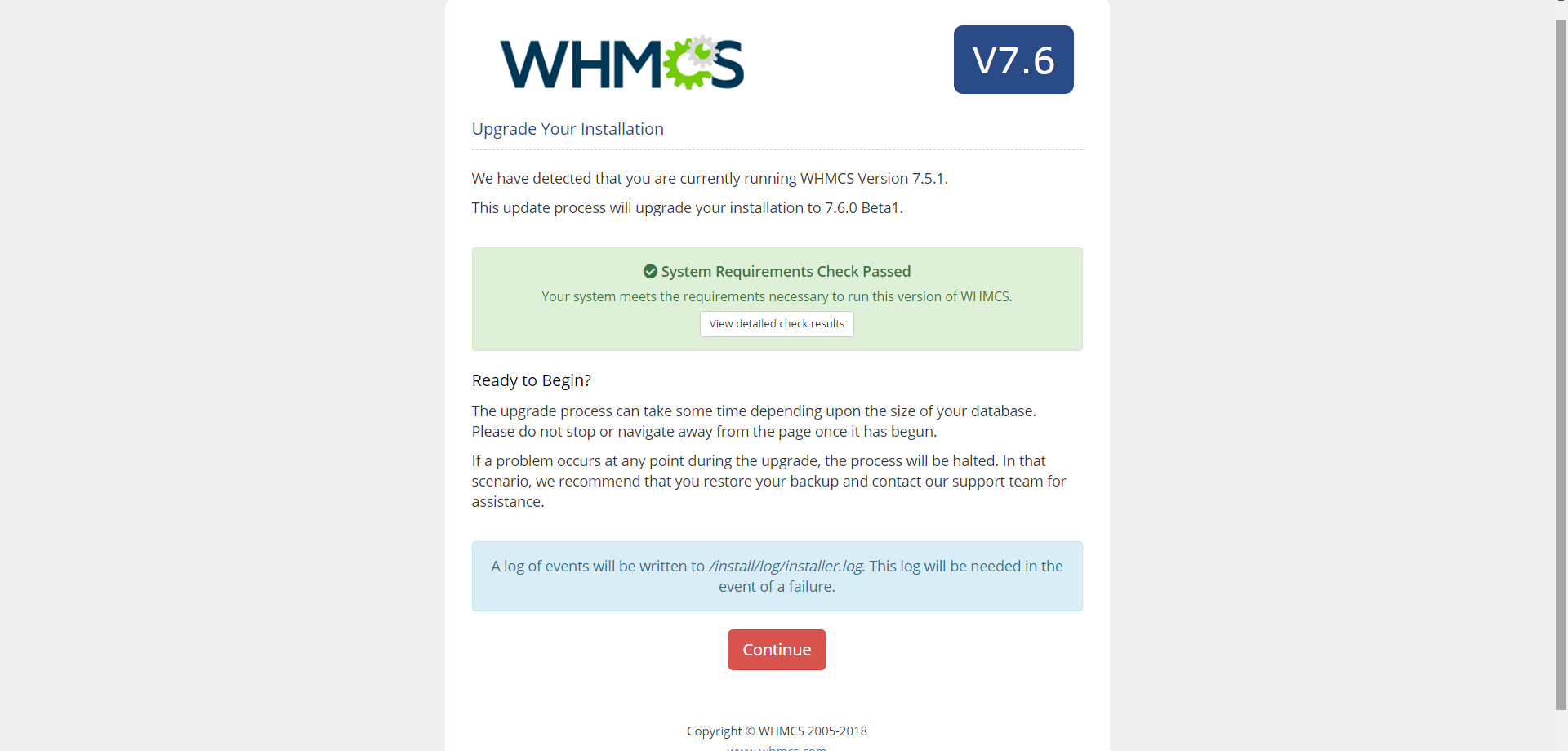
Step 5. Open your browser and run this URL : yourwhmcsdomain.com/install/install.php to run the setup.
eeeeee
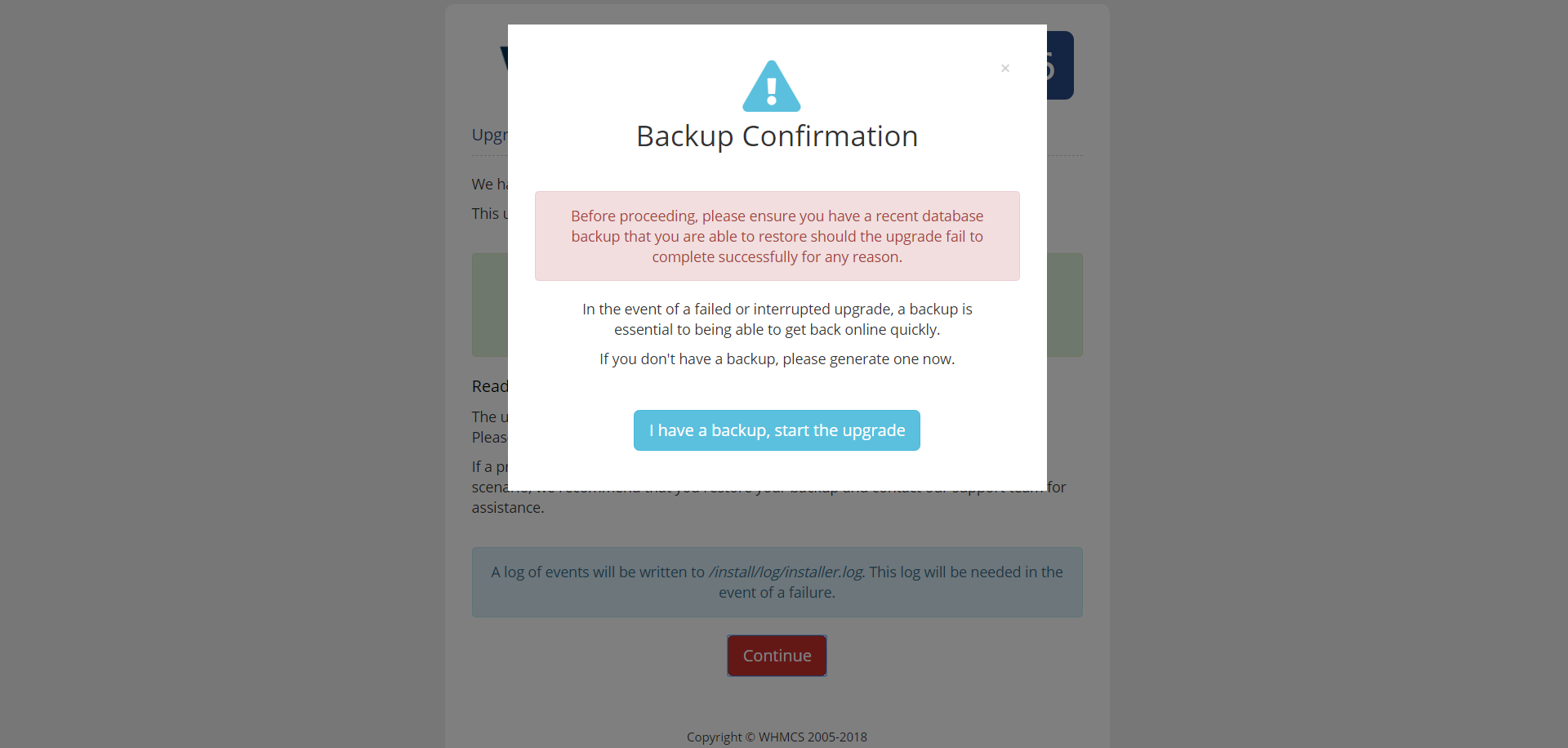
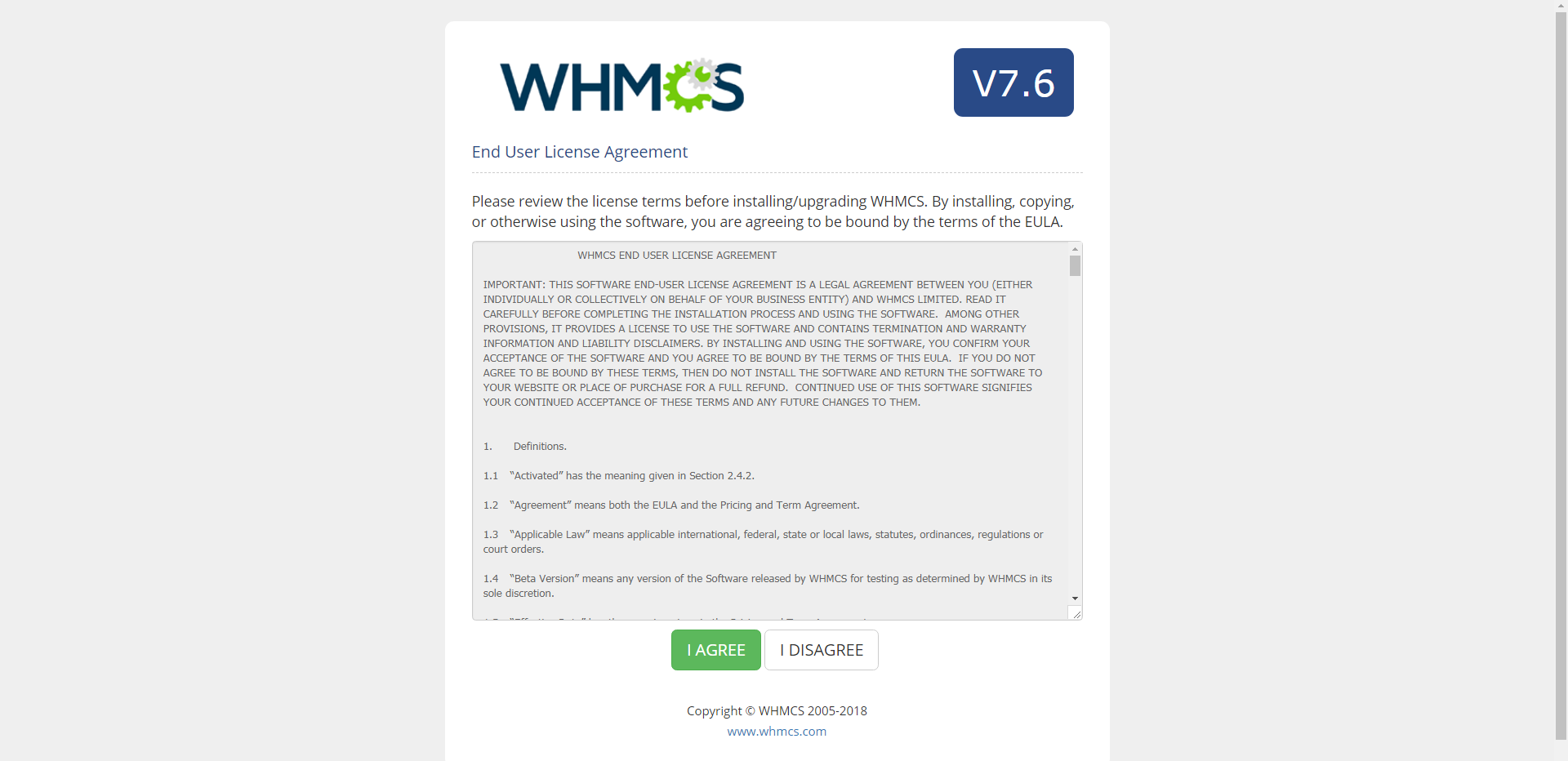
Step 6. Click on I Agree.
ewewewe
If your system passes all the required details this message will appear.
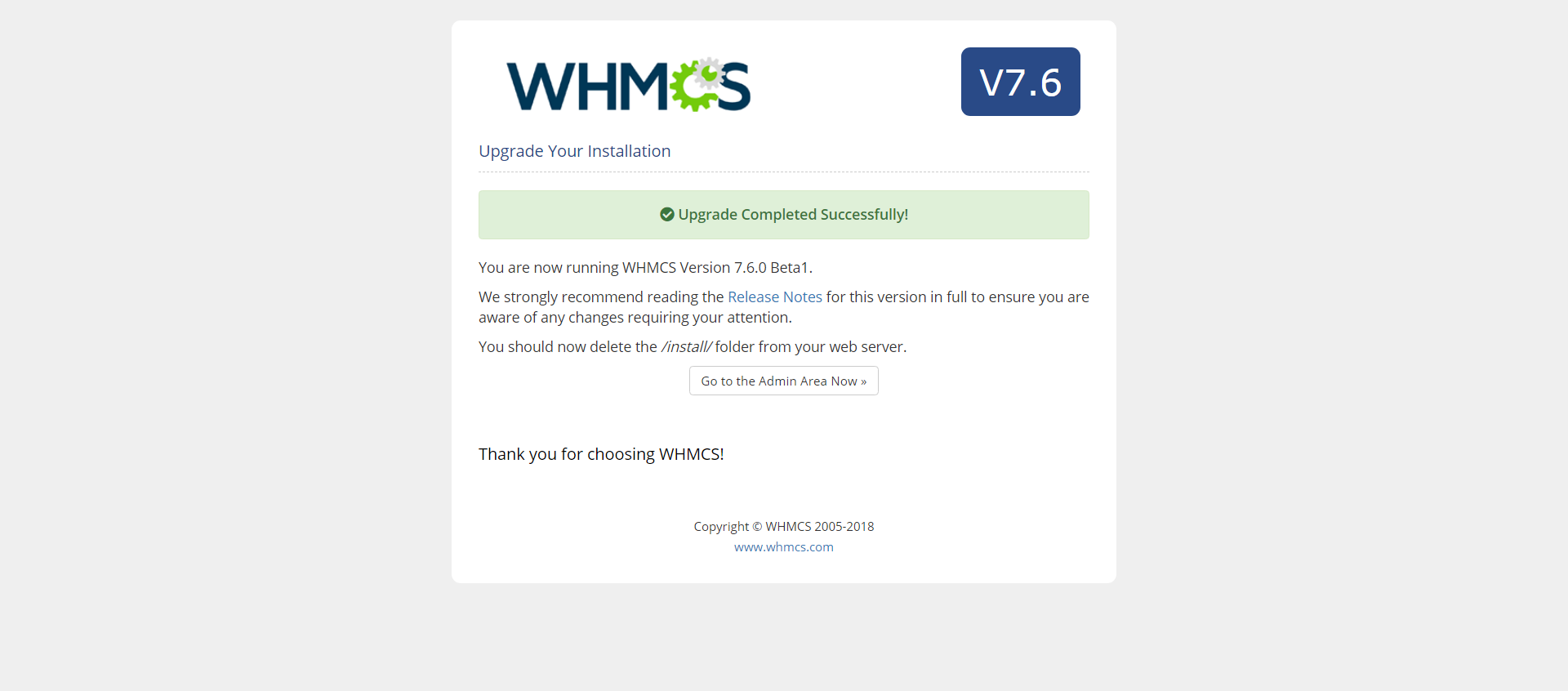
wewwwewew
image
Your Upgrade is Successful.
ddd
In case you face any issues in this upgrade, get in touch with our WHMCS developer, who have 9+ years experience in handling WHMCS custom development requests.

WHMCS 7.6 Beta Version Released

WHMCS 7.6 Beta Released

Enjoying the automated operations with WHMCS as we launch WHMCS 7.6 Beta

We love to serve our clients with our WHMCS Global Services. Today, we are pleased to announce that WHMCS has released its new version 7.6.

Want to check what is new in this 7.6 Upgrade?

WHMCS has released some new features and improvised the relevant as follows:

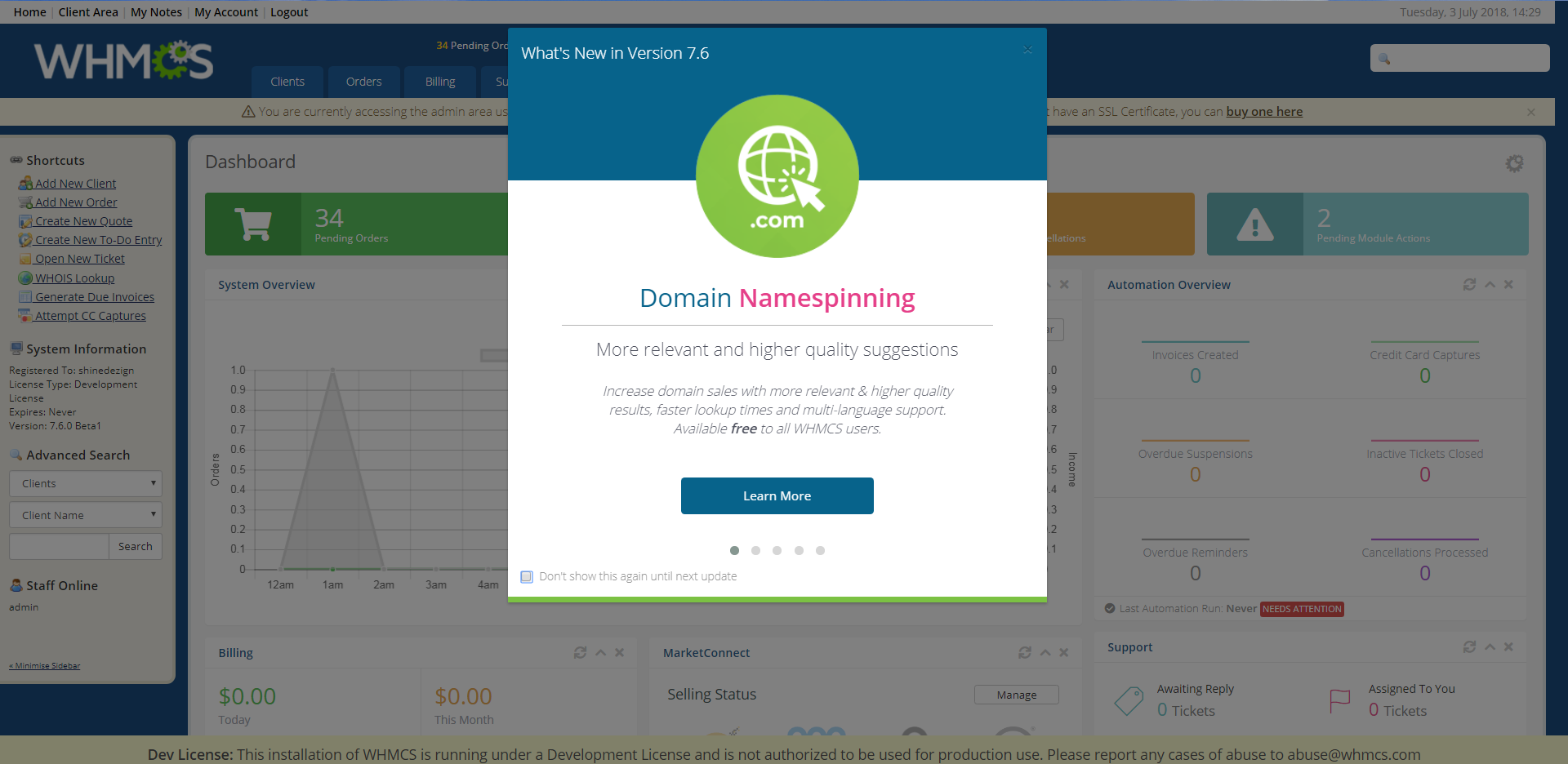
WHMCS Domain Name Spinning: WHMCS has been providing with the best domain name suggestions so that they can drive more and more domain registrations. But now, with the help of the machine learning, WHMCS name spinning delivers more relevant domain name suggestions. It delivers the better marketing leading speed.

If you are new to WHMCS, then it gets enabled by default. But, if you are using the WHMCS Standard WHOIS, then it automatically gets upgraded to the feature of new Domain namespinning. So, you can check out this behavior while navigating to Setup > Domain Registrars > Lookup Provider after the upgrade.

Font Awesome 5: They have introduced alteration in the naming and styling of icons as well as a number of template changes needed by the Font Awesome 5 migration.

The WHMCS users have to keep in mind to apply all the changes to the custom templates to neglect the missing or broken items.

Changes to the MaxMind functionality: In this new beta version of WHMCS, you will receive the changes in the Maxmind module as well as an update to a Maxmind API so you need Maxmind User ID for the authentication. If you have enabled MaxMind in WHMCS, then you should be entering your MaxMind user ID for the fraud check to make smooth and continue functioning.

You will attain the MaxMind API requests failing if there is a failure to enter the User ID. The user needs to visit the SetUp> Fraud Protection> MaxMind and make the user Id enter into the appropriate field. You can visit https://www.maxmind.com to acquire the User ID.

New Weebly plans:

The new beta version of WHMCS avails two new Weebly plans with the MarketConnect. The plans include:

  • Weebly lite: It is an entry-level offering designed for a single page site at $1.99/month.
  • Weebly performance: It is basicalLy an e-commerce option which is designed for power sellers to generate additional e-commerce related functionality.

If this feature of Weebly gets enable within the WHMCS installation, the above two plans will get created and avail automatically.

MarketConnect UX Updates:

With the new beta version of WHMCS 7.6, MarketConnect has launched a number of new features such as:

  • The improved design and styling of the client area as well as shopping cart promotions.
  • The newly launched options for sidebar promotion for all the MarketConnect services.
  • The support for built-in translation to customize or translate the promotions as well as upsell messaging.
  • Advanced user experience with the promotions and upsells.
Libraries which get updated along with the version:

The updated libraries:

  • phpmailer/phpmailer: 5.2.21 to 5.2.26
  • smarty/smarty: 3.1.29 to 3.1.32
  • tecnickcom/tcpdf: 6.2.12 to 6.2.17

Added libraries:

  • phpseclib/mycrypt_compat:1.0.5
  • phpmyadmin/sql-parser:4.2.4

So, these are the new features and some advancement in the latest version of WHMCS.

We are trying our best to contribute in the Beta testing process of the latest version 7.6 of WHMCS. We are finding little to moderate issues in the new Beta version, so reporting directly to WHMCS team to fasten the stable launch of 7.6 version. Let’s discuss in the comments the issues you find while upgrading and after.

Why Automation in VM Provisioning is Important for Web Hosting Companies?

Why Auto VM Provisioning is important for Web Hosting Companies

There were days when having a website was optional to run the business. But, now it is impossible to afford even a few minutes of downtime. It eventually means the only mission is to find the best web hosting provider for them. But it cannot be that much easy because there are so many options available from the local hosting service providers to the national web hosting providers for it you need to know why VM Provisioning is Important for Web Hosting Companies.

It is really hard to start your own web hosting company but not impossible. You may see thousands of fish in this web hosting industry but you must know how to swim above the water. It is not any quick rich scheme or any easy business to run.

Every business needs the organization usually needs web hosting services so that they can make their webpage accessible to the whole world on the world wide web. So, the main aim of any web hosting provider is to make live the portfolio of client websites as well as applications. As we can also observe that online market competition has been growing at a very quick rate. The market for web hosting services is growing swiftly with a 16% of compound annual growth rate according to the Global Forecast. So, we can expect that it will reach roughly USD 154 billion by the end of 2022.

Generally, web hosting companies opt for all the backend concerns which mainly indulge all the maintenance and repair of the servers. You guarantee 2x fast performance as well as 4x well-enhanced security to your customers. In the case of receiving dissatisfaction with the services from your customers, you must go for the option of a 30-day money-back guarantee which will make your core values strong.

There are some stats on the basis of which you can serve well as a web hosting provider:

1. Technical support

Everyone got the user’s guide and warranty while buying every product. Similarly, every smart solution comes with proper support, instructions as well a warranty. Many people have to face problems while using the relevant services and need urgent support. If the providers don’t bother about their customer’s situations, they may lose their users who won’t come back. A web hosting provider should always provide 24/7 technical support to their users in case of any technical issues at the server end. Assuring 0% downtime to your customers should be your sole motto.

2. Prompt setup

The web hosting provider needs to provide a proper setup to the organizations. Manually installing an operating system, and creating an IP address is getting old way. Here is a WHMCS Vmware module that provides auto VM provisioning when the user completes its purchase. It has the ability to remove all the entire IT operations required. Instead of running the setup manually, it makes the completed process automatic. The module automates several provisioning tasks such as network configuration, instances of start and stop the server; assigning IP & network adapter as well as installing OS on the server.

3. High Traffic Management

The web hosting provider must know how to handle and manage heavy traffic with the best load-balancing techniques.

4. Backups

To host a web, one must know how to manage the website backups. They must ensure the space on the web against data loss. Web hosting companies also provide optimal data security along with data backups on a daily basis. In case of an unfortunate incident where the system(s) is at loss or fail, the customers are guaranteed a quick restore and system backup.

5. Server Speed:

You must not annoy your customers with a slow server speed after gaining very reasonable traction. If you provide good server speed then the chances are they will attain improved conversions and bounce rates on their website. It will ultimately help your customers to rise above the search results.

If you lag behind in providing any of the services mentioned above, it will make you a bad web host which can have really negative effects on the search rankings of your customers. You could end up wasting your money, so many important resources, and mainly the hard work of your business. It will gradually affect your online authority in a long run. It is better to maintain all the points mentioned above while thinking of hosting a web server.

I am certainly sure that you will take care of all the principles mentioned above to make better growth of your web hosting company. Always take care of the fact that you provide the best and cheap hosting packages which actually suit the customer’s needs. If you like to achieve growth in your business, then you also must care about your customers’ business growth. It is really necessary to retain the trust of your customers by defining the core values of your business. The actual success of your web hosting solutions depends on the consistent reputation of your business.


Upgrade Your WHMCS Experience with WGS VMware Module V1.0.9

WGS-VMware-WHMCS-Module V1.0.9 Released

In our never-ending quest to improve our VMware module, we’ve rolled out a new version i.e., VMware V1.0.9 with some new updates. This is great news for all the users who are using our WHMCS VMware module. We have fixed bugs and introduced a few new features and enhancements.

Have a look below!

Bugs Fixed:

Error: Cannot find the object we requested to collect the properties for in servers

What’s New in VMware V1.0.9?

1. Use a single configurable option Group for all products:

Earlier, the module needs to update the new configuration for every product. But, now with the new feature of the VMware V1.0.9 module, you can create a single configurable group and can use it with the specified VMware products instead of creating a separate configuration for every product.

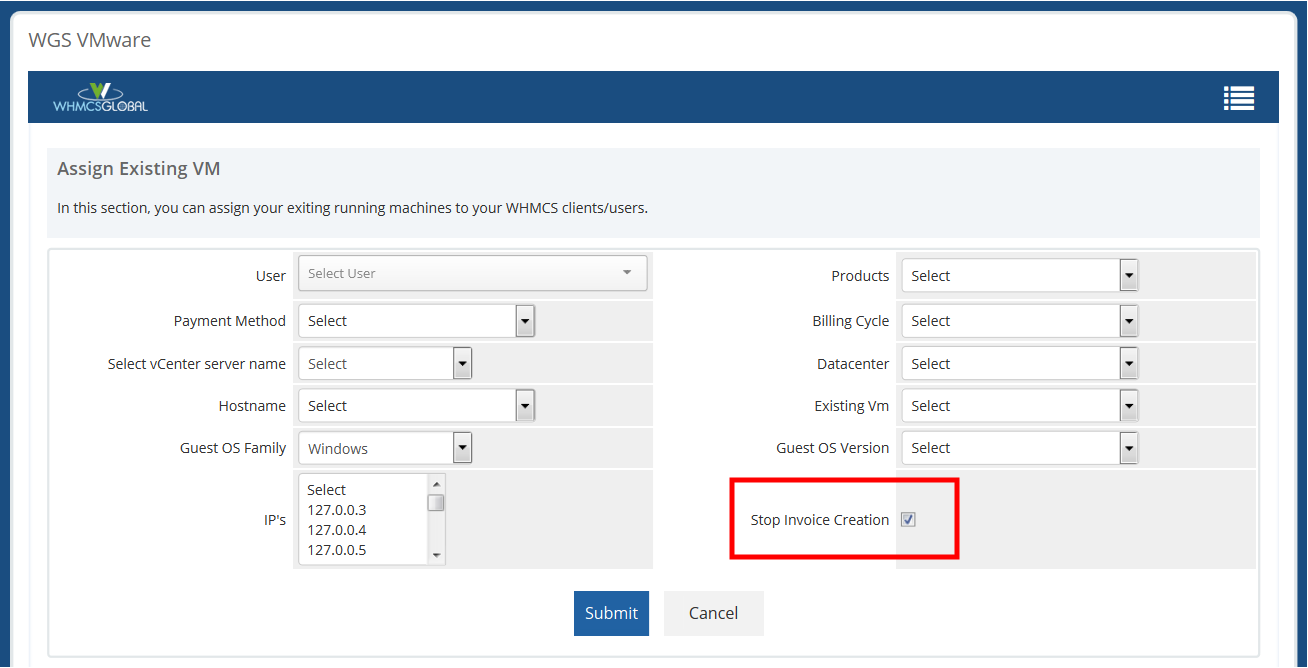
2. Stop the creation of invoices when Assign existing VMs:

Stop Invoice

Earlier, when you assign existing VMs to the user, WHMCS automatically generates the invoice for the customer. But with the help of this new feature, you can now stop this invoice creation process with a single click while assigning existing VMs to the user.

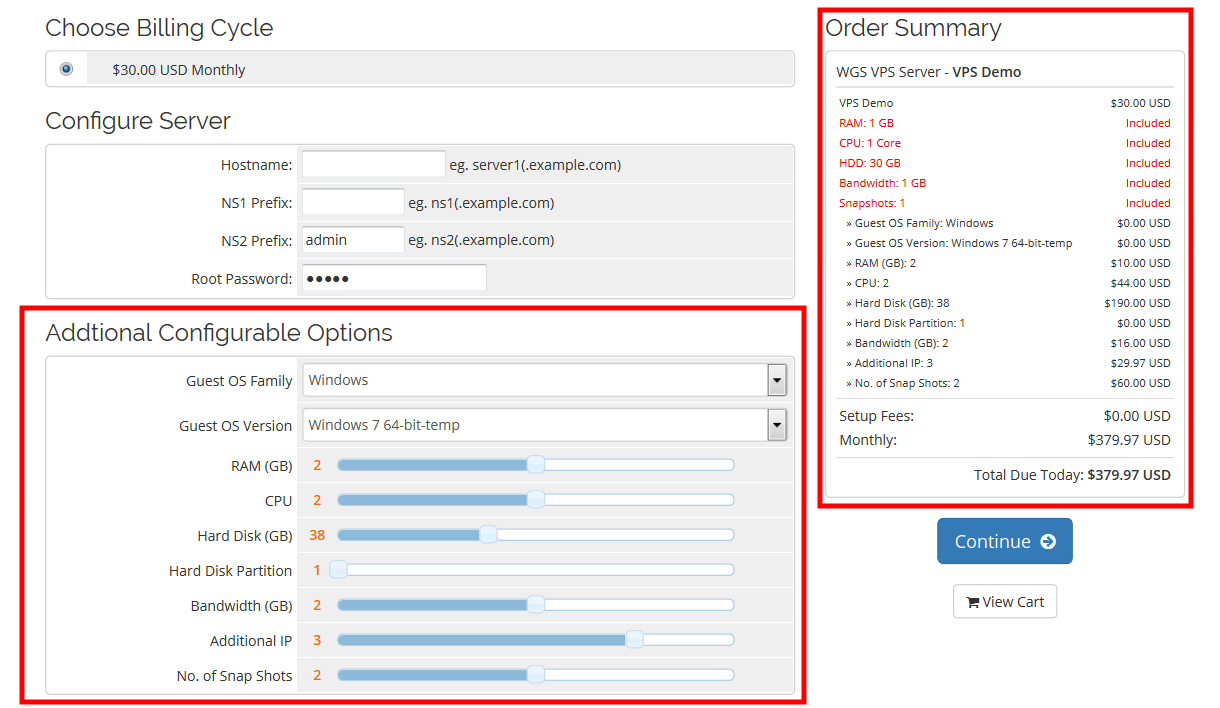
3. Advanced customized orders processing:

custom order WHMCS

The previous version of the WGS module carries the two-way set product with fixed values. Now, you can enjoy more advanced options for custom order processing as we’ve added an extra feature in which your customers can create their custom orders according to their needs. Suppose 1 GB RAM is the default order value, your customer can increase the size of the RAM according to his/her requirements.

Related Articles:

Support Services & Updates are paid for all one-time license users

support services

First of all, I would like to thank all our existing customers for their support and for using our services. The credit of our success goes to all our existing customers and our prospect customers. All our existing customers are aware that till now we are continuously updating and maintaining our modules and providing support and updates free of cost, but now there are some changes in our ONE-TIME License policies. It’s an official announcement that from 1st. April 2018 onwards all support & updates services are paid for one-time license users. So you all are requested to cooperate with us so that we can continuously maintain and update our WHMCS modules. Now if you need support & updates then you need to purchase these services from us. New policies are applicable from 01st April 2018. For now, all support services for one time users are closed. If you want to avail uninterrupted services please contact us on support or sales.

We are sharing the plans for the services:

Plan 1:

    • If your current One time plan is from $ 0- $49.99 then we will charge $16.49/year for support & updates.

Plan 2:

    • If your current One time plan is from $ 49.99- $99.99 then we will charge $24.49/year for support & updates.

Plan 3:

    If your current One time plan is from $ 99.99-$199.99 then we will charge $49.49/year for support & updates.

If anyone is seeking for support and updates then this policy will be effective from 01st April 2018.

Author : Manvinder Singh
Date : 05 February 2018

WGS OVH WHMCS Module V4.0.0 Released!

WGS OVH WHMCS Module V4.0.0 Released

New Feature Added


WHMCS Global Services is ready to launch SoyouStart’s latest version4.0.0.0  with all new features. We received many emails from our existing clients and they shared their views for the further improvement of our SoyouStart OVH module, we worked on it and now we are ready to launch. I would like to take the opportunity to thank all our existing customers for their support & suggestions.


1). Fully Automated Server provisioning:

If you want to order your VPS server it is not difficult now. You can’t imagine that VPS server purchase can be that much easy. VPS server now can be resold automatically through WHMCS. Now admin doesn’t need to purchase the server from OVH after order & no need to wait for a long time. All you need to do is add funds to your account and then you can purchase the server.

Customer will get the server instantly as soon as the payment process completed. Admin must have to add the pre-fund to their OVH account. Watch the below images. These will help you to order your own VPS server.

2). Automated Backup:

With our latest version users can get the automated backup. If users are opting this feature then they can get the back up in three ways. It depends on the user requirement that how they need the backup and they can process in that way. The backup tab will offer you following features:

  • User can see the list the backup date wise
  • User can restore the backup
  • User can mount the backup

  i). User can see the list the backup date wise: Here users can get the Daily backup, Weekly backup and Monthly backup. If you need to take the back up for a complete month please click on the monthly tab, if weekly please select weekly tab, if you want to choose daily backup kindly select daily backup and it’s done.

 ii). User can restore the backup: Now users are able to restore the backup very easily. Here you will get a tab “Restore Backup”, simply you need to click on that and back up is restored on your server.

 iii). User can mount the backup: Users can mount the back up as per their requirements.

3). Order Additional IP’s:

The main feature of this module is now we have given the ability to user to purchase the additional IP’s. With this feature user can purchase the additional IP’s. User can select the range of IP’s based on the location and invoice generated for selected the IP’s quantity after payment API will check the balance in OVH and assign the IP’s to that server.

The interface is user-friendly so the user will get a dropdown list and can purchase additional IP’s. In drop-down list user will get the option like “No. of IP’s : _____” Here you need to select the number that how many IP’s you want to order and then “Location _____” please select your location and then click on confirm.

IP order is done now you will get an invoice just pay for the invoice and your order for additional IP’s is done.

4). New Order form

5). Upgrade / Downgrade VM 

6). Bug Fixing:

i). Email Template Issue.

In soyoustart 3.0.5 to 3.0.7 release user were having an issue with email template. Now we have fixed the email template issue permanently. If admin put their own custom email template yes it will work.

ii). Fix the hostname issue.

In the previous version, there was a bug reported by our existing customers in our module when user reinstalls the server and put the custom hostname it was updating in WHMCS database but was not updating the hostname on the server side so now we have fixed this issue. Now it is getting updated in WHMCS Database as well as on server too.

iii). Fix the infinite loop issue.

In WHMCS 7 they update the jQuery element of product service page so some user was getting an infinite loop in that case if they enter the incorrect server details in client product service page so we have fixed this issue permanently. Now our users will not get this kind of issues.

iv). Rescue Mode:

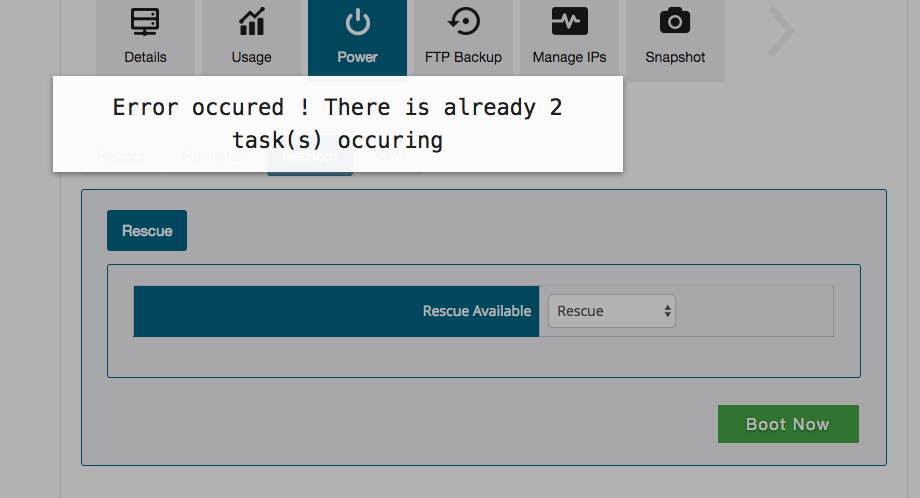
Most people were having an issue when they were trying to reboot in the rescue mode like given image. Now we have shown the progress bar if there any rescue mode task is going on user can see it in progress bar. So once the task is completed than the user can perform another action.
resuce_mode


Improvements:

We have done so many improvements in the latest module and few I am explaining in detail.

  • Reinstallation of Operating System
  • IPV4 added
  • Display the server statics
  • Fix the Partition issue during installation time

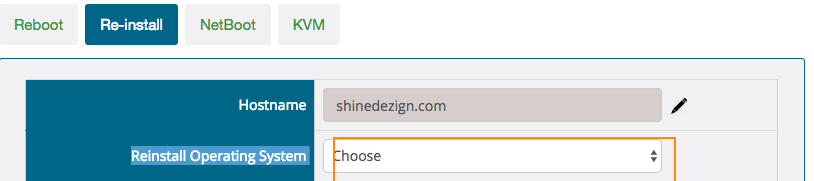
i) Reinstallation of Operating System: Once you will choose to reinstall operating system by default you will see the previously installed Operating System. And if you want to install the same OS then select same otherwise please select a required operating system from given the drop-down list.
reinstallation

ii). IPV4 added

Previously we were sending only main server IP. Now we are sending all the assigned IP’s to either its IPV4 or IPV6.

iii). Display the server statics

Big improvement in the VPS module is now user can see their VPS server CPU & Ram usage monthly, weekly and daily basis. Here you can see the graphic status of your CPU & RAM usage, the choice is yours what do you want to check for a day or week or month. It will display the required.
Owncloud reseller WHMCS V5.0.6 Out Now

Owncloude

WGS is ready to announce that we successfully released the “ownCloud reseller WHMCS v5.0.6 version” With this version we have added a reseller module feature. Here we did many changes as per user requirements. Here in this module, we added advanced features and much more. We received the feedback and suggestions from our existing users and after keeping everything in mind we are ready for this launch. Our latest version fully supports ownCloud 10. So it will fulfill your requirements completely, one solution for all your requirements.

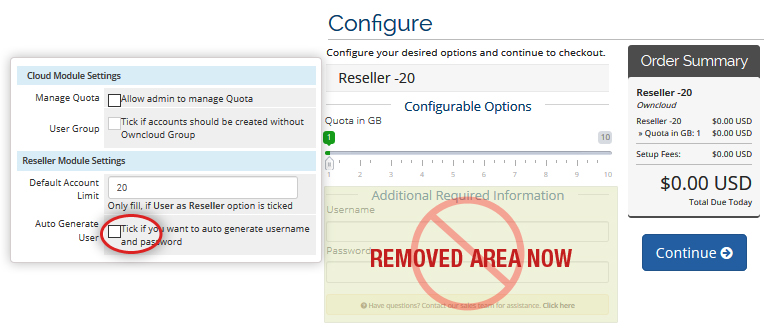
New Features: WHMCS Global Services added the latest features required by you. Now resellers have options to set the quota limit for the users and accounts. Resellers can enter the Username & Password automatically and manually. You can upgrade/downgrade the module as per your technical requirements. Our module fully supports ownCloud10. We fixed many bugs so now it will not take much time to install the module.

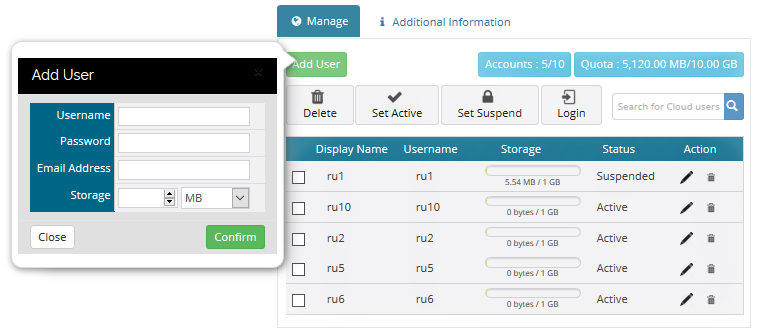
  • Reseller option: Now admin can create their ownCloud Reseller products and set their quota limit & Accounts limit. Reseller can manage their users in WHMCS as well as in their ownCloud account. Resellers can check the status of Disk usage of under their accounts. Resellers can change the Quota limits as per requirements.
    own_scr-blog-1
  • Option to enter username & password: With this version now we have given the option to admin how they want to create the ownCloud users with entering custom field value of username & password. Auto-generated passwords can be assigned to the current users and the user can add the password manually. Admin has the authority to decide that whether he wants to go for an Auto generated password or he wants to process a Manual password.
    own_scr-blog2
  • Upgrade / Downgrade: User and reseller can upgrade /downgrade the module according to their requirements.
  • Bug Fixing: We have fixed many bugs reported by our existing customers. So it will take least efforts to install and to work with the module.
  • User-Friendly Module: The module is totally user-friendly. Easy to use and understand that how we can work with this module.

Related Articles: 


Product Pricing :
Monthly : $12.90/mo
Annually : $120.90
Open Source code : $599.90

Announcement of updated Account Statement Module V1.0.4

Account Statement

WHMCS Global Services is ready with updated version of Account Statement module. We would like to thank you all for your valuable suggestions and for your feedback. After getting your feedback we are continuously working on improving our services .Facing problem in managing your account statements so we are ready with feature rich module with latest amendments.

So, here is the list of the features which will also help you to secure all your financial transaction.

  • VAT is added in total amount of transaction.
  • If you are paying via credit you can check in remaining credit.
  • Credit was not showing in the list now it is showing in the list.
  • It will create the PDF of all invoices of single user and email goes to client.
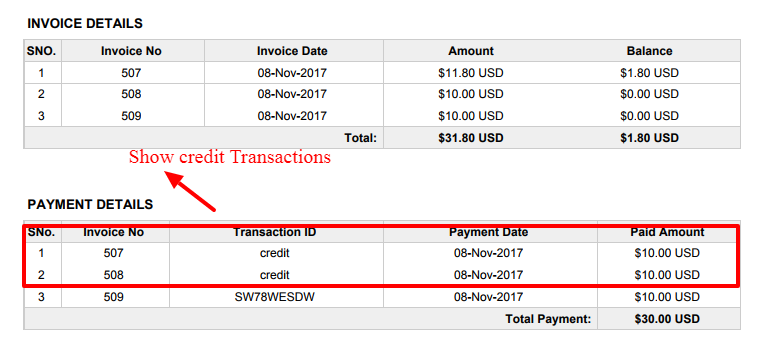
  • Initially “Credits” were not showing in Account statement PDF file. Now we changed it and now you can check the status of account statement with credit transactions too. It is visible now with name “Remaining Credit“.
    asm1
  • Initially based on Credit applied, “Payment Details” section was not being updated. But now it is updating now and row is being created. Here in the given screenshot you can check that how it works. Credit details are here, so you can track the record of credit and balance too.
  • Download the account statement in pdf format.

asm2

Bug Fixed:

Exact calculation of VAT: Initially incorrect VAT calculation happened if payment had done through “Credits”. But now VAT is properly calculated and correct amount is showing.

WGS VMware 1.0.6 Version is Released Now!

WHMCS VMware Module V1.0.6 Released Now banner image

We are pleased to announce that we have released the new update of WGS VMware V1.0.6 we are trying our best to make this module more productive.

Various bugs are fixed and new features are added in V-1.0.6 that you need to know about.

Related Articles:

New Features​

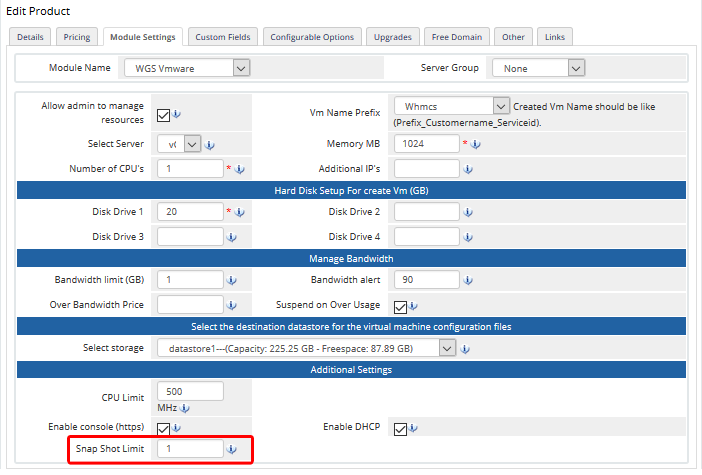
1. Snapshot​ ​Limit:​ In the previous version, there was no limit in the module setting to set the snapshot limit as per user demand. We have added this feature on high priority. So now the admin can set the limit of snapshot how many snapshots user can create for their VM. By default limit is set to 1.
v6_screenshot1
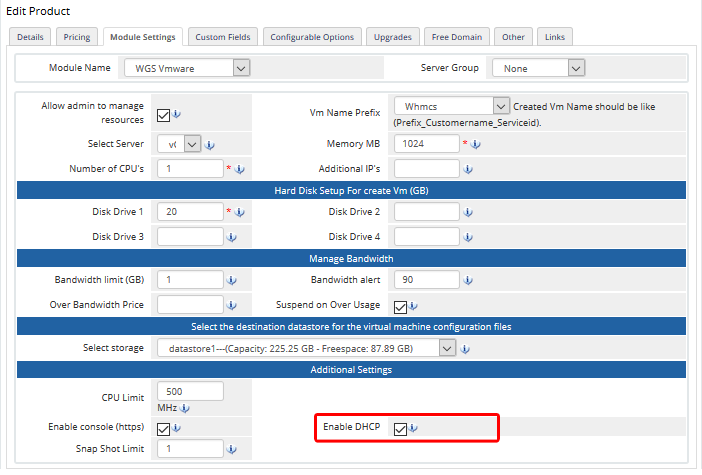
2.​ ​DHCP​ ​check​ ​integrated:​ ​In previous version, module was working with DHCP but now we have improved this feature. Previously there was no check like if provider is using DHCP but still our module was asking end user to input their IP’s. Now we have integrated the check product module setting if DHCP setting in enabled than our script will not ask user to enter the IP’s.
v6_screenshot2

3.​ ​ ​A​ ​feature​ ​to​ ​assign​ ​an existing​ ​VM​ ​with​ ​old​ ​user​ ​orders​ ​is​ ​added.

This is the great feature we have added now. If you were not using our module and were doing the manual work to create the VM and you were worried about how you will assign your VM to existing orders or products. No worry you can assign it now using our module with the existing service, no need to order a new service.

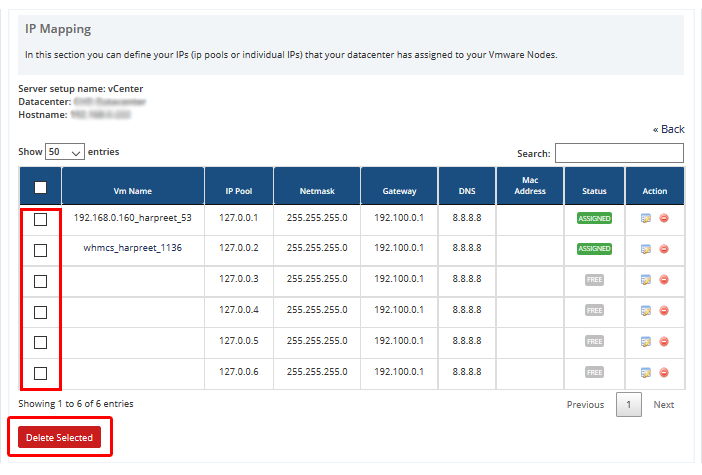
4. Delete​ ​multiple​ ​IPs:​ ​We​ ​have​ ​given​ a new option to delete multiple IPs from the IP pool. This is also added in the new version.
v6_screenshot3
5.​ ​Compatible​ ​with​ ​DSR:​ It’s good news for that people who are using VMware based on load balances. Now our module is fully supported with DSR. A DSR-based load-balanced routing feature is added that updates the hostname in the hostname custom field when client view the product.

Bugs fixing
  • You are unable to get the view of the folder VM’s list after selecting the existing VM. Now, this issue is fixed.
  • The issue regarding not getting the view of complete IP list instead of having the multiple Hostnames is fixed.
  • In this version, you can get the specific resource pool under the Hostname option while configuring the OS along with the add-on module.
  • The issue regarding the selection of Data center from the client side is fixed. Now, the data center selection option will be grayed out if there is availability of only one DC in the Vcenter.
  • Distributed switch network adaptors are not showing in OS mapping regarding issue is fixed.

GST Plugin For WordPress

WGS blog GST Plugin For Wordpress

As we all know Goods and Services Tax or GST is about to be launched on July 1st. WordPress users in India ​will now ​have a new ​problem of setting Tax Rules with GST ​and generating reports. WHMCS Global Services has come up with solution for this and has developed GST WordPress module for India.

As we all know there will be 3 types of Goods and Services Taxes applicable :

SGST:

    • In this revenue will be collected by the state governments for intra-state sales.

CGST:

    • In this revenue will be collected by the central government.

IGST:

    In this revenue will be collected by the central government for inter-state sales

SGST and CGST will be for intrastate transactions @9% each and IGST is applied for interstate transactions at flat 18%.

We have set all these rules and calculations in our module and you just need to install the module and select your state and that’s it. You are all done. Based on user selected state in his profile, it will automatically apply the required GST.

Let me give you an example of how it will work.

Suppose website Reseller in Punjab sells hosting to user in Punjab for Rs 1000. GST applicable will be 18% in which SGST will be 9% and CGST will be 9%. In this case website reseller will collect Rs. 180 and of this amount, Rs. 90 will go to Punjab government and Rs. 90 will go to the central government.

Same way if website owner sells hosting outside Punjab,let say to user in Delhi then in such case the website owner has to charge Rs.180 @ 18 % IGST. This IGST will go to the central government.

Reports: At any time if you want to check how much you have charged SGST, CGST and IGST for sales within India. You can view that easily and download the individual reports for each tax as an excel file as well.

Feature List :
  1. Admin can enter their GSTIN code for their store and that will be shown on invoice.
  2. Ability to enter the client GSTIN code and that will be shown on invoice.
  3. Admin can enter SAC code to show on the invoice that will be shown on invoice.
  4. All the Invoice generated are as per GST invoice format.
  5. In invoice we’re showing separate fields for SGST, CGST, and IGST on invoice.
  6. SGST, CGST, and IGST are automatically calculated and added to all transactional emails and pdf files.
  7. Reports: Ability to see the GST invoices (bifurcation of IGST, CGST & SGST) report in admin area.
Up Coming:
  1. Assign the SAC or HSN code with your multiple products.

WGS GST Module for WHMCS Features

GST WHMCS Blog image

As we all know Goods and Services Tax or GST is about to be launched on July 1st. WHMCS users in India will now have a new problem of setting Tax Rules with GST and generating reports. WHMCS Global Services has come up with solution for this and has developed WHMCS GST module for India.

As we all know there will be 3 types of Goods and Services Taxes applicable :

SGST: In this revenue will be collected by the state governments for intra-state sales.
CGST: In this revenue will be collected by the central government.
IGST: In this revenue will be collected by the central government for inter-state sales

SGST and CGST will be for intrastate transactions @9% each and IGST is applied for interstate transactions at flat 18%.

We have set all these rules and calculations in our module and you just need to install the module and select your state and that’s it. You are all done. Based on user selected state in his profile, it will automatically apply the required GST.

Let me give you an example of how it will work.

Suppose website owner in Punjab sells hosting to user in Punjab for Rs 1000. GST applicable will be 18% in which SGST will be 9% and CGST will be 9%. In this case website owner will collect Rs. 180 and of this amount, Rs. 90 will go to Punjab government and Rs. 90 will go to the central government.

Same way if website owner sells hosting outside Punjab,let say to user in Delhi then in such case the website owner has to charge Rs.180 @ 18 % IGST. This IGST will go to the central government.

Reports: At any time if you want to check how much you have charged SGST, CGST and IGST for sales within India. You can view that easily and download the individual reports for each tax as an excel file as well.


Feature List :

1. Admin can enter their GSTIN code for their store and that will be shown on invoice.
2. Ability to enter the client GSTIN code and that will be shown on invoice.
3. Admin can enter SAC code to show on the invoice that will be shown on invoice.
4. All the Invoice generated are as per GST invoice format.
5. In invoice we’re showing separate fields for SGST, CGST, and IGST on invoice.
6. SGST, CGST, and IGST are automatically calculated and added to all transactional emails and pdf files
7. Reports: Ability to see the GST invoices (bifurcation of IGST, CGST & SGST) report in admin area.

Up Coming:

1. Assign the SAC or HSN code with your multiple products.

WHMCS Module AWS Route53 v1.0.2 out now

WHMCS_aws

We are glad to announce that we are launching WGS AWS Route 53 v1.0.2. In this module, we have integrated DNS management which was much needed. Below are the details with new features that we have added and fixed some bugs in the existing module also.

New Features:
1. Added DNS Management:

Integrated the DNS management API with our module. Also we added some record types like PTR, SOA, SPF, SRV, and TXT.

Now the question in your mind which DNS record types does Amazon Route 53 Module supports.

Currently, our module supports the following DNS record types:
  • custom-check-hire A (address record)
  • custom-check-hire AAAA (IPv6 address record)
  • custom-check-hire CNAME (canonical name record)
  • custom-check-hire MX (mail exchange record)
  • custom-check-hire NAPTR (name authority pointer record)
  • custom-check-hire NS (name server record)
  • custom-check-hire PTR (pointer record)
  • custom-check-hire SOA (start of authority record)
  • custom-check-hire SPF (sender policy framework)
  • custom-check-hire SRV (service locator)
  • custom-check-hire TXT (text record)
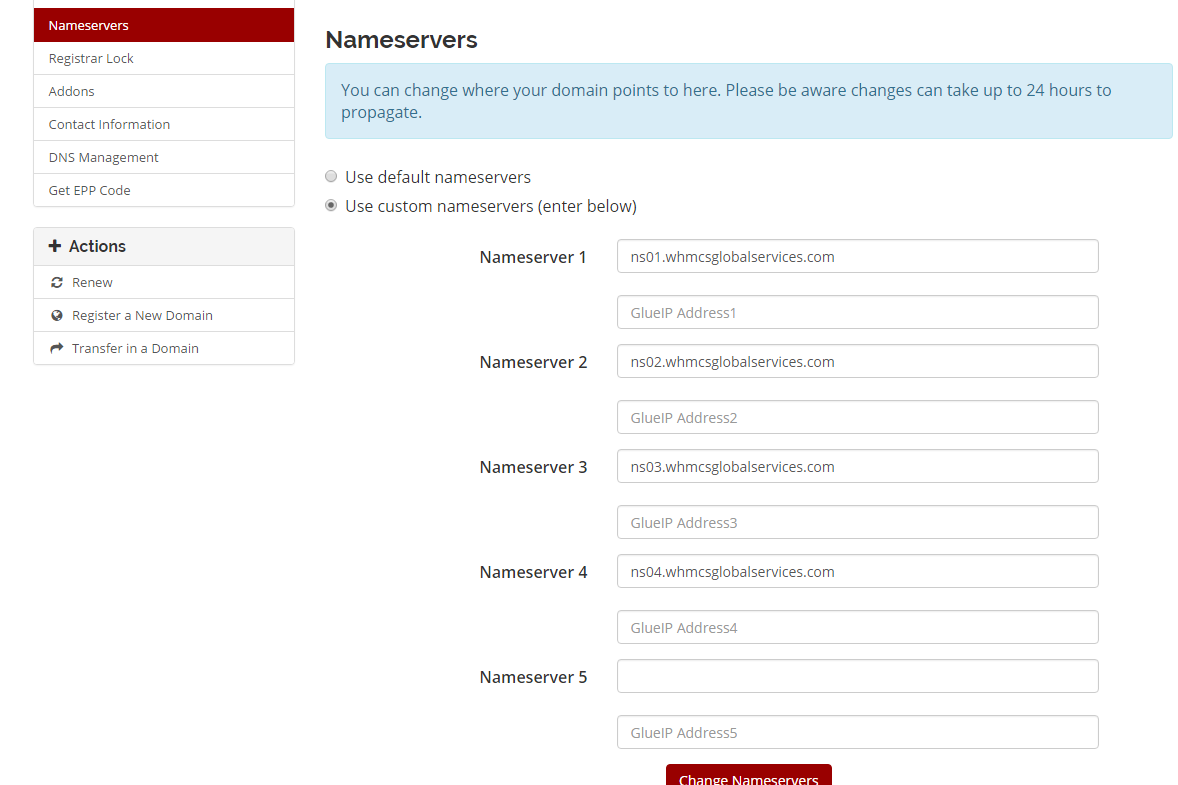
2. Glue IP Feature added

Admin can Enable/ Disable this feature while configuring the module.

name_server

    • 3. Our module is compatible with WHMCS v7.1.1
    • 4. Compatible with PHP7.
    • 5. By default, WHMCS shows priority only for MX record and for rest (like A(Address), CNAME (Alias) etc) shows “N/A”. So when update the DNS record WHMCS does not allows to modify the DNS priority. In order to enable DNS priority, we have to modify the template file.
    • 6. Made it Compatible with G-20 countries like Australia, Canada, Germany etc.
Bug fixes in our current module :
      • 1. Make our Module updated with Latest AWS SDK.
      • 2. Fixed State, Zip Code issue for different countries. Initially error was generated because AWS uses different Format for State Code & Zip code according to countries but our module picked default values.
      • 3. Now, it works according to Required State & Zip Code.

Last updated: 21-June-2017

WHMCS iRedMail v1.0.0 – Open Source Mail Server Solution

iredmail

iRedMail has been the proven solution for all the complex & complicated configurations which is also known as the open-source full-featured mail server solution.

iRedMail is the easiest and most reliable mail server with all of the line-up features. iRedMail is easy to install, and easy to use & it also supports the latest mail technologies & also supports all the major LINUX distributions.

WHMCS Global Services is coming up with the new & updated version of WHMCS iRedMail v1.0.0 which will benefit you with better mail server solutions & which will work for both the alignments i.e. for iRead Mail paid & iRedMail free.

Client Area Features:

  • The User can add new email addresses.
  • Users can change the password of accounts.
  • Users can add the forward email address of their webmail account.
  • Users can enable/disable webmail accounts.
  • Users can delete unnecessary webmail accounts.

Admin Area Feature:

  • Create Account
  • Suspend Account
  • Unsuspended Account
  • Terminate Account
There are multiple lined-up advantages for WHMCS iRedMail v1.0.0 which will surely give you the better mail server solutions such as:
  • Security Alignment – You have all your personal data on your own hard disk & you can control the email security, and inspect transaction logs. No other organization will be able to see the content of all the messages.
  • Unlimited Accounts – Forget about the products whose pricing is based on a number of mailboxes, you can create as many mail accounts (domains, users, mailing lists, admins) as you want.
  • Secure by Default – End users are forced to use mail services through secure connections.
  • Open Source – All components used in iRedMail are open-source software & you get the bug fixes and updates from the Linux/BSD vendors you trust.

iRedMail is the right way to build your mail server with open-source software.

We are launching our three subscription plans:

  • Monthly – $7.90 per month.
  • Annually- $79.90 per year.
  • Open Source -$399.90 Onetime payment.

WHMCS Global Services is offering its clients innovative personalized plans along with practical pricing. And, all three subscription plans i.e. monthly, annually & open-source offer several benefits along with their featured pricing benefit.

So, if you want more information about WHMCS iRedMail updated version v1.0.0 then, visit our website WGS iRed Mail Module.

Overview of WHMCS Blockchain – Simple & Secure Way To Digital Currency

WHMCS Blockchain

Summary: WHMCS Global Services is coming up with the new and updated version of WHMCS Blockchain v1.0.5 which will help you to secure all your business financial systems.

Blockchain is one of the recent & most advanced technologies which are nowadays captivating the market. The blockchain is the world’s leading software platform for all fundamental digital assets. The blockchain is a way of recording data into a digital ledger of transactions, arrangements, contracts, or commitments or, anything that needs to be independently recorded.

Being the largest producer of blockchain platforms in the world, we are using new advanced & innovative technologies to build fully better future aspects for all financial systems.


We bring up the latest & updated version of WHMCS Blockchain v1.0.5 with the extra implementations & line-up features such as
  • If a customer paid more than the required amount then, the extra amount is added to the credit balance.
  • If a customer paid the partial payment then his invoice remains unpaid & transactions will be added to that invoice.
  • Round UP Bitcoin Amount to 6 Decimal Places – this will help with some wallets that can go out as far with many decimal places as you require sometimes.

The required settings we have given to the admin so that he enables the roundup transaction value.


There are several advantages you can get from WHMCS Blockchain such as:
  • Transparency – No blockchain transaction can be tampered with or deleted post-execution. All changes to public blockchains can be publicly viewable.
  • Advanced durability – When there’s no central regulator, there’s no central point of failure as well. Blockchain is more resistant to different types of malicious attacks.
  • High-quality Data – Blockchain data is complete, consistent, timely, accurate, and widely available.
  • Process integrity– Users can trust that transactions will be executed exactly as the protocol commands removing the need for a trusted third party.
  • Lower Transaction Costs – By eliminating third-party intermediaries and overhead costs for exchanging assets, blockchains have the potential to greatly reduce transaction fees.

The blockchain is considered one of the key pillars of the digital world as it promises to provide secure & transparent transactions. Our aim is to build a more open, accessible & fair financial future.

WHMCS Global Services is working in the same field for the last couple of years & is well popularly known for honesty, commitment & teamwork. Our technology is re-building the financial services of an industry by constituting millions of people across the globe for confirming and concluding immediately and also without any costly channels.

So, if you want more information about WHMCS Blockchain updated version v1.0.5 then, visit our website WGS Blockchain Module.

Account Statement v1.0.3 Out Now!

Account-ststement-vr-3

Are you struggling to manage your essential aspects related to account transaction billing & collection?

So, here is the solution to all your struggles as we are here to happily announce the updated version of the Account Statement Module i.e. v1.0.3. As we know, that every organization needs to keep track of its financial activities so that there is a record of various sources of income and also the areas of expenditure.

The primary goal of the Account Statement Module is to provide an up to date source of balance and transaction information. It will also help you to relocate the prior statements from the specified time period.

The latest & the updated version of the Account Statement Module will help you to manage all your essential aspects related to account transaction billing & collection.

So, here is the list of the features which will also help you to secure all your financial transaction.

  1. Added the VAT price in the total amount of transaction.
  2. Given the option for Admin to send the Paid invoice only in a statement or both Paid/unpaid.
  3. Excluded the full refund payment in account statement.
  4. Partial payment transaction also added in account statement even if admin set only send paid transaction.
  5. Multi-language supported.
  6. Compatible with WHMCS 7.1.
Bug Fixed:
  1. Fix the mail sent multiple time to a single user.
  2. Fix TCPDF error issue.

Account Statement Module v1.0.3 is the fastest version as it is more convenient & environment-friendly. This updated version is an electronic form of your account statement which will help you to easily access through the process of WHMCS billing system.

So, take the full advantage of the updated version of Account Statement Module & sign-up with the trusted company to properly manage your financial problems.

Rack Manager V1.0.5 Released, Now!

Rack-manager

An introduction to a new product in the market is an extremely important so we are taking this opportunity to make this announcement that we are ready with the updated version of Rack Manager (V1.0.5).WGS is continuously working on updation of the products. The aim of WGS is client satisfaction and we are keen to do it.

Are you struggling to manage your Datacentre IP information and Rack related information?

We have the right Addon module for you – It’s Rack Manager Module (v1.0.5)! Have you tried it yet? If you haven’t – now is the right time to do it, as we have just added some new useful features and upgraded the interface.

The latest version of the module will help you manage your Rack information faster and hassle-free!

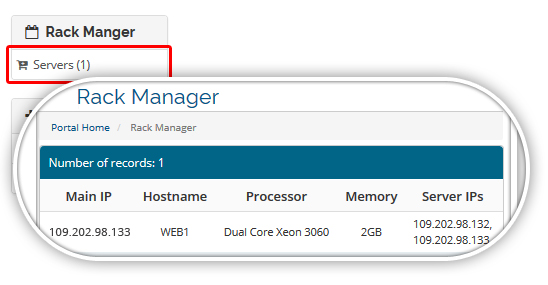
1) Display the Relation with client product service in the client area.

In WHMCS client area, you can view your server and assigned IP’s details. A user will get the Rack manager link under a category. The link should appear if admin assigns the rack manager server link to the customer.

rack_maage_srevice1

2) Increase the Rack U Limit from 46 U to 48 U.

In the new version, we have increased the “Rack Height” in “Manage Racks” tab from 46U to 48U. If user has 48U rack no worry, you can add the entry.

3) Increase the “Subnet” range from 24-29 to 20-29.

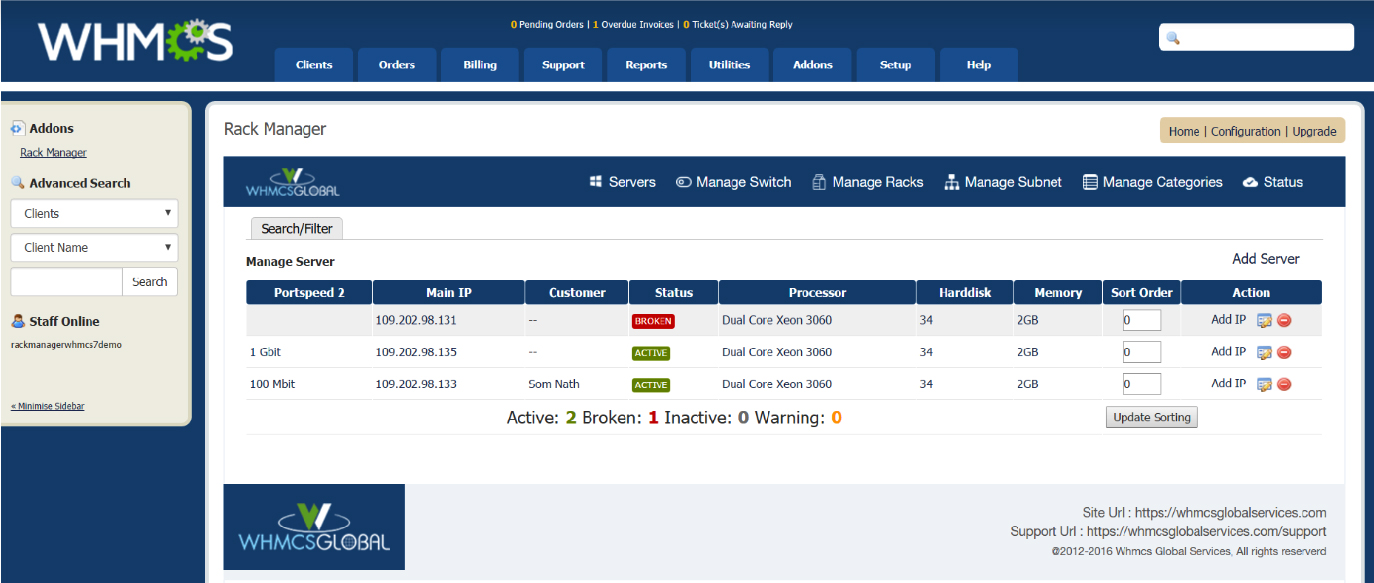
4) Improved the UI of add-on:

rack_module_img

Announcement for European Clients Of WGS

European-Clients

First of all thank you so much for your support and encouragement. We are really excited to announce you that we are coming with a payment gateway for European countries. It will be very beneficial for your business if you are using WHMCS. Yes, you are right we are talking about, myPOS WHMCS Payment Gateway module.

After a long research, we decided to integrate myPOS virtual API in WHMCS. Our clients are our valuable assets. So every day we try to focus on the requirements of our clients. We try to provide them the best solution in a pocket-friendly budget.

WHMCS Global Services is ready for the official launches of myPOS virtual WHMCS module. We are really glad to share the details of this new product. myPOS was launched in 2014. Its foundation was a strong belief that every entrepreneur should be able to avail the facility of card payments & modern technology to boost their business. It is very beneficial for the entrepreneur for business purpose.

If you want to use myPOS to accept payments there is no setup fee.

On your mobile, you can get the updates. You can check the transactions very smoothly. Payment mode will be hassle-free. In your hosting business, it is really beneficial. If you want to grow your business then go for a myPOS WHMCS payment gateway.

We know this thing that running a business is not so easy, but yes choosing a payment solution is easy now. It will ease your problems.

The idea behind this is to provide the comfort level to our clients. They can feel that we are actually working for them to provide something unique. That is helpful and beneficial for clients too for their business.

With the solid understanding of the challenges faced by business owners, we take pride in saving their money, easing their cash flow problems and providing tools that allow them to focus on the priorities of their business.

I am taking this opportunity to announce the features of myPOS WHMCS payment gateway module:

  1. One time payment & refund process within WHMCS.
  2. Helps European-based businesses to accept cashless payments.
  3. Payment products allow merchants to process cashless transactions both at physical retail locations and online.
  4. Compatibility with WHMCS 6.3.1, WHMCS 7.1.2 & PHP 7
  5. Very easy to open an account with Mypos.

Version: V1.0.0

You must be having a question in your mind that why should I use myPOS WHMCS payment gateway?

The answer is very simple with this account all of your money processed through the myPOS virtual payment gateway will be instantly available in your myPOS account. But yes only with one condition that your company must be headquartered in an EU or EEA country.

VMware 1.0.5 Version Out Now!

vmware

We are really happy & excited to announce to you that we are ready with our updated version of VMware. We would like to thank you all for your valuable suggestions and for your quality feedback. Your support means a lot to us. This is not the limit we are continuously doing amendments and updates in our module to deliver you the best quality product.

We need your support for this updated module too. Guide us, Suggest us, and write us if you have any ideas for the betterment of the product. We included many features and they will excite & amaze you.

Listed below are the VMware-1.0.5 WHMCS Module’s new features:
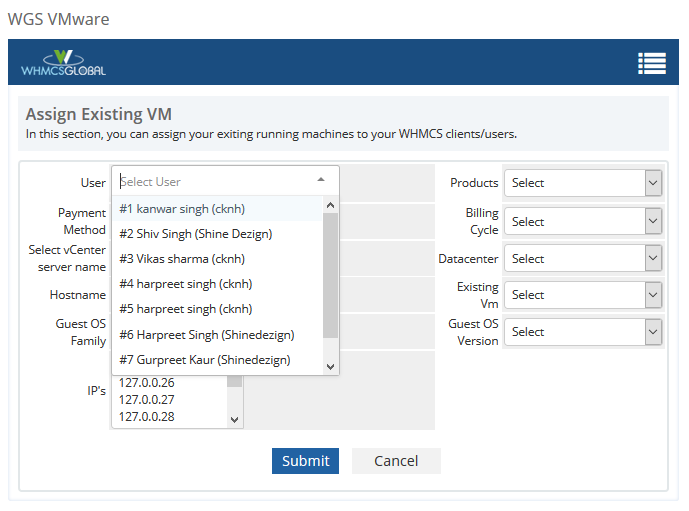
1) Make the User Selection Field More User-Friendly In Assign Existing VM.

In the previous version, it was not easy for an admin to find a user if there are multiple users with the same name. Now we have the company name and client id associated with the name and add a search feature as well.

existing_vm

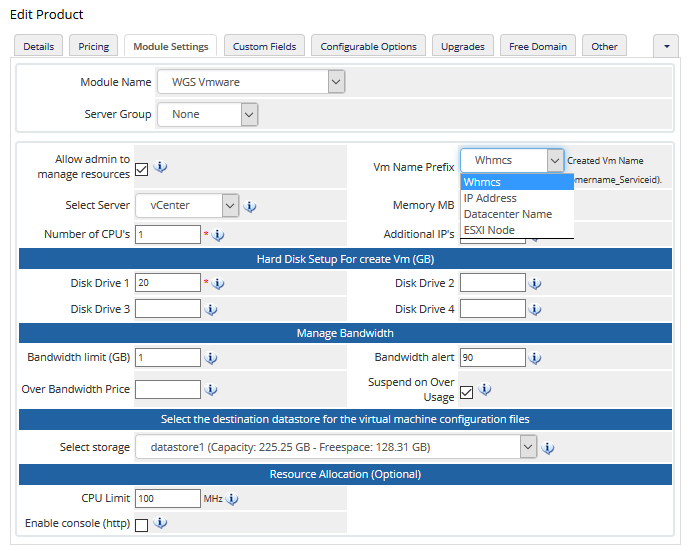
2) Option For Admin To Define The VM Name Pattern

In the previous version, the user was able to add or control the VM name but as per VMware clients feedback, we change this method. Now admin can set the prefix in product module setting and they can control the new VM name. So it should be like e.g. datacentername_whmcsclientname_serviceid.

vm_module_setting

3) Added The Memory Limit Feature

We pass the memory limit based on the ram selection if admin set like 1 GB ram then we set the memory limit as like 1024 MB for new VM which previously going unlimited.

4) Added The Operating System Configurable Options: Admin can set the price for these configurable options.

Related Articles:

Price updation in VMware module and SoYouStart module

price update

Firstly, We would like to thank you for your kind support and for your suggestions on making our modules better. After getting your feedback and your suggestions we are continuously working to upgrade our product. But we would like to inform you that now we have some updation in our plan and payment terms.

As we are continually working on the amendments and updation of the modules so to upgrade the product and to maintain the high standards. We are changing our plans and prices of the current packages of VMware and So You Start WHMCS module. We are expecting your support for the same. As you all know that we are providing the support 24*7 to all our clients as well as we are doing the amendments in the product. For up-gradation and for providing you better services we decided for price hike. We are expecting your support for the same.

New plans and pricing are as follows:

Support & Updates: $59.00

Yearly Subscription: $169.00

Source code Version: $650.00

Support & Updates: $59.00

Yearly Subscription: $120.90

Source code Version: $430.00

Note: Please note that our on-time Licensee was for our first hundred customers. Now we are not continuing with that scheme. Yes of course we will come with new introductory offers. We will keep you posted on that.

Your FAQ’s

Q. What Happens With Existing Monthly Users?

Ans:– From next month they will get an invoice for a Quarterly subscription. We will cancel all user’s monthly subscriptions.

Q. What Happens With Existing Yearly Users?

Ans:– From next year they will get invoice for an upgraded yearly subscription.

Hosting Partner Module Key Features

Key features

Hosting Partner Module Key features

1) It provides all the hosting control panel plugins so that one can install the plugin and start selling hosting services with Cloudflare integrated services.

CloudFlare can be integrated into any control panel. If you’re using one of the control panels below, you can start offering CloudFlare within a few minutes.

cPanel Download »
Parallels Plesk Panel Download »
Parallels Plesk Automation Download »
Parallels Automation Download »
Interworx Download »

2) Cloudflare hosting partner module provides CNAME functionality so that your user doesn’t have to modify the DNS and adding some DNS records one can start having Cloudflare services on his domain.

Two Ways to Configure CloudFlare

Partial Mode(CNAME)
Step1: Redirect Domain.com» www.domain.com
Step2: Point www.domain.com» www.domain.com.cdn.cloudflare.net
Step3: Add Cloudflare-resolve-to.domain.com CNAME to domain.com

Full DNS Mode

Step1: Point NS to CloudFlare Name Servers by using provided IPs
Step2: Manage all DNS Records through CloudFlare
3) Getting hosting partner API key from module itself.
4) Cloudflare ready available resources section in which one can easily get all the email templates to send it to their customers. click
5) Domains section provides you the functionality for adding and deleting domains from your hosting partner account.
Order Now

So You Start, ovh and kimsufi v3.0.5 Out Now

OVH

Hi Greeting,

We are pleased to announce that with your continued support and our hard work, We proudly set to release the updated version of So You Start– v3.0.5

Related Articles:

New Feature Added:

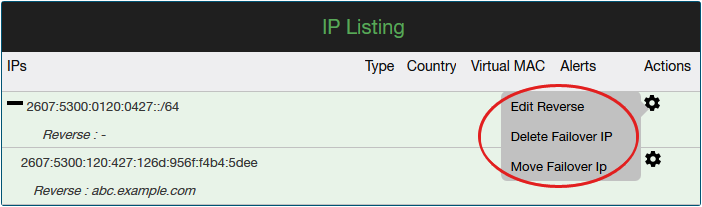
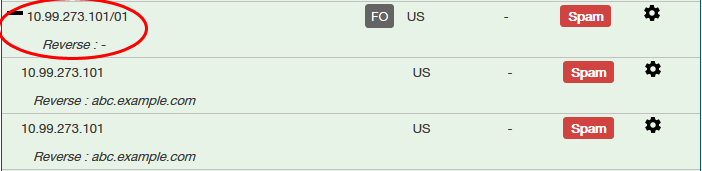
1) Now we are listing the IPs of IPv6 within the subnets. The User can see the listing of the complete IP pool that is allocated by the OVH Datacenter.
ip_reverse
2) The Edit Reverse DNS issue is also fixed. Reverse DNS can be done for individual IPv6 IP.
ip_reverse2
3) The Italian language was added for email piping.

Bug Fix:

Fixed the IPV4 design issue.

Announcement of librenms WHMCS Module v1.0.1 update

librenms WHMCS Module

Hi Greeting,

All the community members. We are pleased to announce we have released the next update of librenms WHMCS Module

Below are the new feature added in the module :

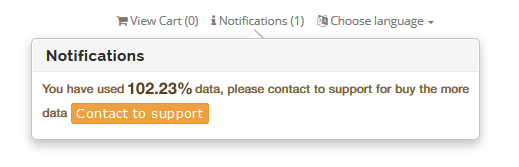
Add alert on client area.

When user reached the “x” usage then the module will show the notification on client area. So that user can buy more data or upgrade the plan. Module sends the notification via email as well.

notification_img

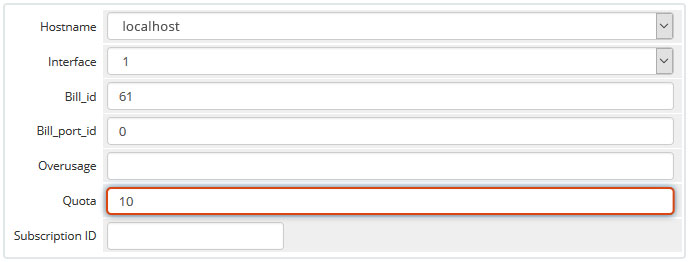
Added the option to change Quota of billable item per service.

We have given a “Quota” text field with client service in WHMCS admin area. you can change the Quota for related client service.

form_img

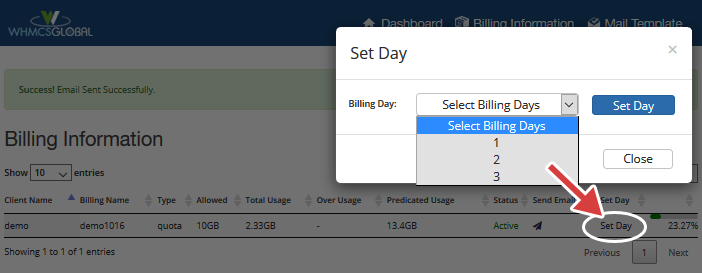
Ability to specify the billing date.

With in addon module you can manage your all Librenms users bills which have created by WHMCS users.

set_day

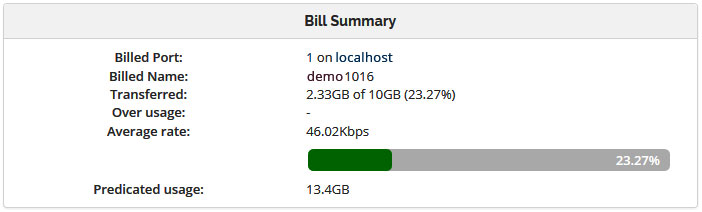
Show the Predicted Usages.

In new updated version, we are showing the predicted usage for related user bill.

bill_sumry

How to Remove File Extension (.php) from URL using .htaccess in WHMCS?

How to remove file extention

Hi,

Have you ever thought you can remove .php extension in your whcms URL? Yes, you can. WGS providing the solution for removing the file extension in whmcs url.


BUY BEST WHMCS THEMES


Suppose if you want the URL ‘domain.com/whmcs/login.php‘ to display as ‘domain.com/whmcs/login‘ for whatever reason. Some like the way it looks, others believe it helps with SEO, and others believe it is better for security. I am unsure the last two hold any bit of truth, however. This is a feature you can implement via your htaccess file. This article will guide you through doing so via your cPanel.

  1. Log into your cPanel
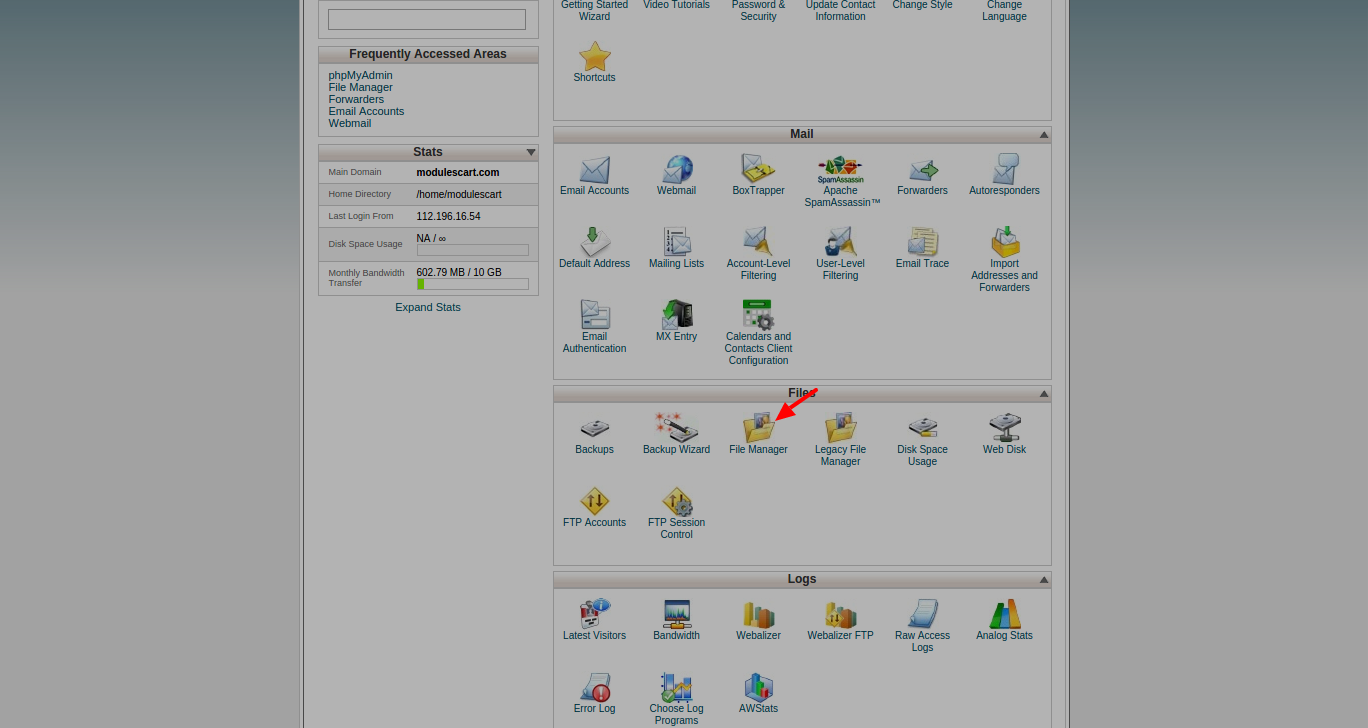
  2. Find the Files category and click on the File Manager icon.
    step1
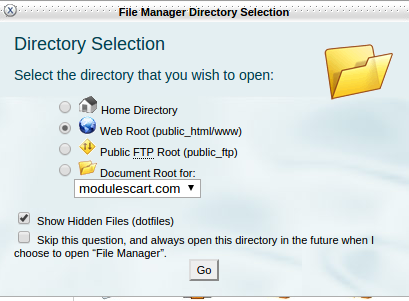
  3. A popup box will appear. For the primary domain, click on the Web Root radio button. For addon domains, click on the dropdown and find your desired addon domain name. Be sure the checkbox next to Show Hidden Files is checked. Click the Go button to enter the File Manager.
    step2
  4. You should now be in the root folder of the domain you chose. Look for the .htaccess file and right click on it. This brings up a menu. Find and click on the Edit option. If you get a popup box, simply find and click the Edit button in the lower right corner to continue to the editor.
    step3
  5. You are now in the text editor. As most sites are coded with either htm or php, we have include the code for both below.
    RewriteCond %{HTTPS} off
    RewriteRule ^(.*)$ https://your_domain.com/$1 [L,R=301]
    RewriteEngine On
    Options +FollowSymLinks
    Options -Indexes
    Options -MultiViews#RewriteRule !.*\.php$ %{REQUEST_FILENAME}.php [QSA,L]# Announcements
    RewriteRule ^announcements/([0-9]+)/[a-z0-9_-]+\.html$ ./announcements.php?id=$1 [L,NC]
    RewriteRule ^announcements$ ./announcements.php [L,NC]# Downloads
    RewriteRule ^downloads/([0-9]+)/([^/]*)$ ./downloads.php?action=displaycat&catid=$1 [L,NC]
    RewriteRule ^downloads$ ./downloads.php [L,NC]# Knowledgebase
    RewriteRule ^knowledgebase/([0-9]+)/[a-z0-9_-]+\.html$ ./knowledgebase.php?action=displayarticle&id=$1 [L,NC]
    RewriteRule ^knowledgebase/([0-9]+)/([^/]*)$ ./knowledgebase.php?action=displaycat&catid=$1 [L,NC]
    RewriteRule ^knowledgebase$ ./knowledgebase.php [L,NC]RewriteCond %{REQUEST_FILENAME}.php -f
    RewriteRule !.*\.php$ %{REQUEST_FILENAME}.php [QSA,L]
  6. Be sure to hit the Save Changes button in the upper right corner to save your new htaccess configuration. Your site should now display the address without the file extension.

VMware WHMCS Module Coming Soon

VMware whmcs module

We are glad to announce the release of the WHMCS Module for VMware Integration. It communicates with Vsphere directly through Web client using service API with no need for Command line.

Client Area Feature:

  • Auto-provisioning of Linux & Windows VMs (vSphere 5.1 or higher).
  • VM Folder directory/Sub-folder support.
  • Multiple Data Center and host support on VMware module.
  • vSphere Active Directory and/or Local User support.
  • VM Bandwidth Tracking support and limitation.
  • Get the following info from VMware to display in client area: Server Name, Server Power State, Guest OS Status, Guest IP Addresses, Detected Guest OS, Guest Host Name, VMware Tools Status, VMware Tools Version, VM Recent Task, and Guest Disk Space.
  • System information: Clients are able to see the information in the client area.
  • System uptime: clients are able to view server uptime.
  • Memory graph: Clients are able to view RAM usage.
  • Power state: clients are able to see the status of VMs.
  • CPU state: clients are able to see CPU usage in both general and in Power state.
  • Disk usage: clients are able to see the disk usage status of VMS.
  • Power off: Powering off VM from client area.
  • Power On: clients is able to power on VM from the client area.
  • Pause/Unpause: Clients are able to Pause/Unpause VM from the client area.
  • Reboot Hard: Clients are able to Hard reboot VM from the client area.
  • Soft reboot: client is able to Soft reboot VM from the client area.
  • Update: clients are able to Auto-update VMware tools from the client area.
  • Unmount /Mount: clients are able to Unmount /Mount VMWare Tools from the client area.
  • Log: clients are able to see all logs from clients are (reset/reboot/…).

Admin Area Feature:

  • Select IP for each VMS on VMware WHMCS Module.
  • Select the host or migrate each Vms Between host and datacenters.
  • Suspend / unsuspended.
  • Power off /power on / restart /reload Os.
  • Select and change Os from the provisioning template.
  • Choose the amount of bandwidth.
  • Limit the traffic of each Vms through the default traffic or customize the value of traffic.

Recommended Reading

Why Account Statement Important in WHMCS?

account statement

WHMCS Account Statement Module aids with all aspects of your account transactions, billing, and collections. The module is designed to suit the account statement needs of hosting firms as well as any business that manages online billing transactions using the WHMCS CMS.

This module allows a user to automate online billing account statements, which may be used for bank statements, cash daybooks, and so on. WHMCS Account statement module distributes all statements to users on their anniversary date every month.

Moreover, this module provides a quick, easy, and eco-friendly method to obtain your statements. It is an electronic version of your account statements that you may view conveniently using the WHMCS Billing System.

Key Feature of WHMCS Account Statement Module

1. Collective Statement: The account statement module offers admin multiple options such as date range selection, recipient customization, email personalization with a message, and convenient mass mail settings.

2. Get Your statements in the Client Area: This module provides users with the ability to access their client area and download the desired statement at any time.

3. Download Specific User Statement: The Account Statement Module lets you access past statements from a specified period. Simply select two dates, and you can download the statement in PDF format or have it sent via email.

4. PDF Statement Layout: Customizable PDF file with editable logo, address, paper size, and fonts. Includes invoice details and transaction status based on your preferences.

5. Customizable layout with color options: The account statement module allows admins to customize the layout and color scheme, including background and text colors, to their preferences.


How WHMCS Admin can Set PDF / Email Template Settings

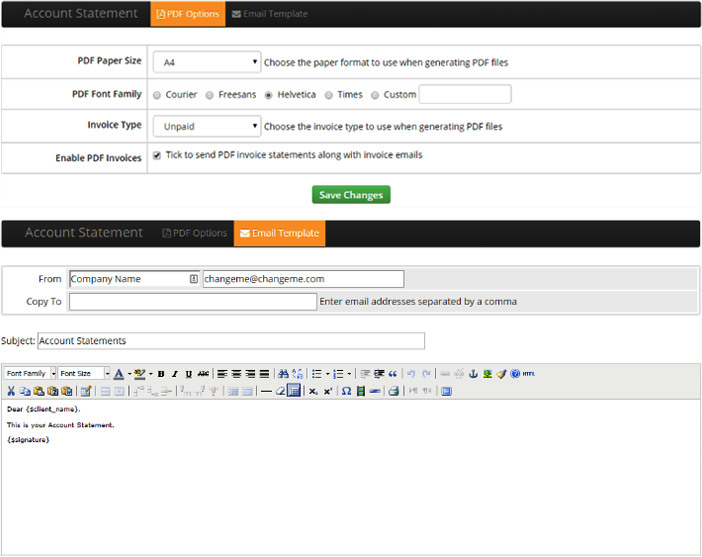
Open “Addons => Account Statement” to setup the PDF paper size, font family, invoice type and email template. When anyone will generate the statement, PDF page size and fonts will make statement visibility more attractive. So admin has options to set-up all these things as per your need and choices.

statment11_img


How to Generate PDF Statement and Send Manually to Particular Clients?

Open “Clients => View/Search Clients” menu and then select any client for which you want to generate statement.

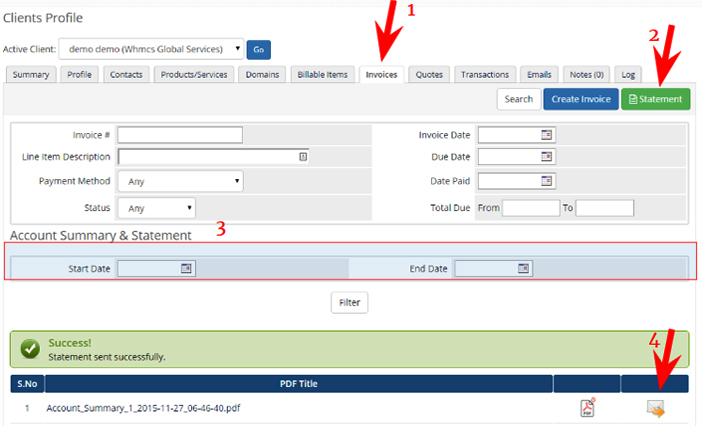
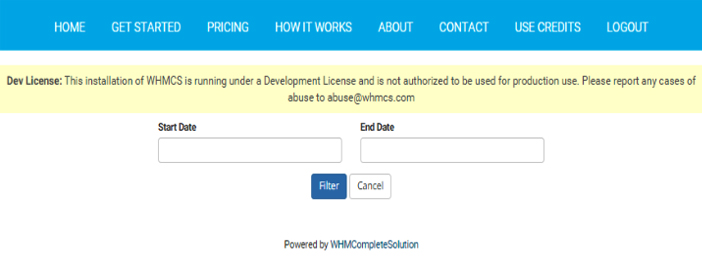
You can get the client transactions accounts statement for the specified time period. Open the default invoice view and a new “Statements” button will be visible there, just click that button, the system will ask you to select two dates for which period you want to send the statement. You can either download the statement in PDF format or can send to the client via email.
account statement


How Admin Can Generate PDF Statement in Client Area?

Site owner to have first set the account statement link in their client area you can add anywhere link should be like this
http://whmcsurl.com/index.php?m=accountStatement

statment13_img


Related Articles:

So you Start, OVH and Kimsufi v3.0 Released Now

So you Start V3.0

We are pleased to inform you that we have updated our WHMCS So You Start Module with some awesome NEW FEATURES and Bug Fixes that So You Start V3.0.

What We Have For You With So You Start V3.0

  • The module is fully compatible now with VPS servers.
  • Load IPs from the local database.
  • Order email with server details to the client.
  • For the VPS server you can now customize the domain name that will be displayed to the end user.
  • The Intervention history will show the history of action that has been performed based on your client’s active services in WHMCS.
  • You Customize the hostname option during the OS installation process.
  • Rescue mode email to clients via email Piping.
  • Monitoring emails going to clients from OVH via email piping.
  • Customize the hostname option during the OS Installation process.
  • The total hard disk size is shown during the OS Installation process.
  • You can delete the virtual MAC option if a virtual MAC has already been created.
  • Separated languages from original WHMCS languages that will not conflict with WHMCS update.

Recent Bug Fixes

  • Now, whenever a reboot or reinstall is in progress the tabs will be disabled.
  • IPv6 will now display the IPs in the pool where users can edit reverse for them.
  • IP loading Issues if RDNS is not created.
  • New data email on re-install the server from the client area.
  • Separated languages from original WHMCS languages that will not conflict with WHMCS update.
  • Change the compatible OS templates.

How to update

Please ensure you back up your active template files and So you Start the module before updating the module. The steps are as below:-

  • Login in our member area.
  • Navigate to My Products > My Services > Click on the Active service view details There you will find a stable version.
  • Updated documentation is attached along with files.

Why Everyone Should Know About Blesta?