Manually tracking invoices in spreadsheets, sending payment reminders one by one, and provisioning accounts by hand—if that’s how you manage hosting clients, you are already wasting time and money. As your client base grows, that approach breaks down quickly.
WHMCS changes that entirely. It automates billing, provisioning of hosting services, support, and domain management in one platform built specifically for hosting businesses. This article walks you through everything: how reseller hosting works, how WHMCS fits into the stack, how to set it up, and what to watch out for along the way.
Key Takeaways
- Reseller hosting allows you to sell web hosting services under your own brand without managing physical servers.
- WHMCS automates billing, provisioning, support, and domain management from a single platform.
- WHM acts as the server management layer, while WHMCS serves as the automation and client management layer.
- New hosting accounts can be created automatically after payment through WHMCS and WHM integration.
- Automated invoicing and payment reminders reduce administrative workload and improve cash flow.
- WHMCS provides a self-service client portal for account management, upgrades, and support requests.
- Proper setup requires configuring servers, hosting packages, payment gateways, and automation rules.
- Third-party WHMCS modules and themes can enhance functionality, branding, and customer experience.
- Common challenges include licensing costs, resource overselling, module compatibility, and support scaling.
- Combining reseller hosting with WHMCS enables a scalable and professional hosting business with minimal manual effort.
What is Reseller Hosting?
Reseller hosting is a business model where you purchase bulk disk space and bandwidth from a parent hosting provider , divide it into smaller packages under your own brand, and sell those packages to end clients. You operate as a hosting company without owning or managing physical infrastructure.
The Core Components
When you sign up for a reseller hosting plan, you get access to WHM (Web Host Manager), a server-level control panel that sits above cPanel. Through WHM, you can:
- Create and manage individual cPanel accounts for each of your clients
- Set resource limits per account (disk, bandwidth, email accounts, databases)
- Monitor overall server resource usage across your client base
- Suspend, terminate, or modify accounts without contacting your parent host
Who Reseller Hosting is Best Suited For
- Web agencies managing hosting for multiple client sites
- Freelance developers who want a recurring revenue stream alongside project work
- Entrepreneurs looking to launch a hosting brand without investing in a data center
- IT consultants who want to bundle hosting with managed services
What is WHMCS and Why Does It Matter for Resellers?
WHMCS (Web Host Manager Complete Solution) is a web-based client management, billing, and automation platform built specifically for hosting businesses. It sits between you and your clients, handling every touchpoint from the moment someone places an order to the moment they cancel.
Core Functions
Billing and Invoicing: Generates invoices automatically on renewal cycles, supports one-time and recurring charges, and handles proration, late fees, and tax rules by region.
Client Portal: Gives clients a self-service dashboard to manage their services, pay invoices, open support tickets, and upgrade or downgrade plans.
Support Ticketing: Built-in helpdesk with department routing, ticket escalation, canned replies, and email piping—no third-party support tool required at launch.
Domain Management: Integrates with registrar APIs such as Namecheap, OpenSRS, ResellerClub, Enom, and others, so clients can register, transfer, and renew domains directly through your storefront.
Automation: The most important function for resellers: WHMCS provisions new cPanel accounts in WHM automatically upon payment, suspends accounts for non-payment, and terminates them after a grace period—all without manual intervention.
The model works because the margin between what you pay wholesale and what you charge retail is yours to keep. Profitability scales with client volume, not infrastructure spend.
How Reseller Hosting with WHMCS Works
Understanding the full stack before you build it saves significant troubleshooting time later. Here’s how the three layers connect:
The Provision Chain
| Layer | Who | Tool Used | What They Control |
| Parent Provider | Your upstream host | Server-level WHM | Physical server, root access, your reseller account |
| You (Reseller) | Your Business | WHM + WHMCS | Client cPanel accounts, packages, nameservers |
| End Clients | Your customers | cPanel | Their own files, emails, databases, subdomains |
WHMCS operates at the reseller layer. It is the client-facing interface that your customers interact with and the automation engine that communicates with WHM behind the scenes.
The Order Flow
- A client visits your storefront, selects a plan, and completes a checkout.
- WHMCS generates an invoice and collects payment via your configured payment gateway.
- Upon payment confirmation, WHMCS sends an API call to WHM using the cPanel module.
- WHM creates a new cPanel account for the client using the package specifications you defined.
- WHMCS emails the client with their hosting control panel login credentials automatically.
On renewal, WHMCS invoices the client again. Non-payment triggers automatic suspension after your configured grace period.
Reseller Hosting with WHMCS vs. Without WHMCS
| Feature | With WHMCS | Without WHMCS |
| Billing automation | Fully automated invoicing, reminders, and payment collection | Manual invoicing via PayPal, spreadsheets, or separate tools |
| Client portal | Self-service portal for account management, upgrades, and tickets | No centralized client interface |
| Account provisioning | Automatic cPanel account creation on payment | Manual WHM account creation per client |
| Support ticketing | Built-in helpdesk with email piping and departments | Relies on email inbox or separate tool (Freshdesk, Zendesk) |
| Domain management | Integrated domain registration and renewal | Clients manage domains independently |
| Scalability | Handles hundreds of clients without proportional staff increase | Operational overhead grows linearly with client count |
| Setup complexity | Moderate, requires configuration and testing before launch | Low initially, but complexity increases manually over time |
Step-by-Step Guide: How to Set Up Reseller Hosting with WHMCS
Step 1: Choose a Reseller Hosting Provider with WHMCS Integration
- Not all reseller hosts make WHMCS setup frictionless. Look for providers that offer:
- Full WHM root-equivalent access (or reseller-level WHM access)
- cPanel/WHM as the control panel, which is required for WHMCS’s native provisioning module
- Private nameserver support.
- WHMCS licensing as an add-on or bundled option.
Step 2: License and Install WHMCS
- Download the WHMCS installer package from your client area at whmcs.com
- Upload and extract it to your domain’s public HTML or a subdirectory (e.g., yourdomain.com/billing)
- Run the web-based installer, enter your license key, and connect it to a MySQL database
- Complete the setup wizard to configure your company name, currency, and admin credentials
WHMCS also offers an Installation or Softaculous one-click install on many hosts, which simplifies the process further.
Step 3: Connect WHMCS to WHM (Server Configuration)
- This is the core integration step. In WHMCS Admin:
- Navigate to System settings> Servers Setup>
- Click to Add New Server
- Enter your server’s hostname or IP address
- Set the server type to cPanel
- Enter your WHM username (usually “root” or your reseller username) and your WHM API token (generated in WHM under Development > Manage API Tokens)
- Set the nameservers (ns1.yourdomain.com, ns2.yourdomain.com) matching what you configured in WHM
- Click on Test Connection to confirm whether WHMCS can communicate with WHM.
- If the test fails, check that your server’s firewall allows API access on port 2087, WHM’s SSL port.
Step 4: Create Hosting Packages and Products
In WHM, first create package templates, such as “Starter—5 GB disk space, 50 GB bandwidth, and 10 email accounts.” These define the resource limits WHMCS will apply when provisioning new accounts. Then, in WHMCS, go toSystem Settings > Products/Services:
- Create a Reseller Hosting Packages in your created Reseller Hosting Packages group
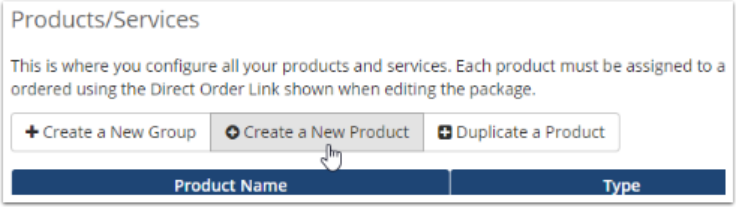
- To create packages, click on “Create a New Product”, enter product name, description, enable require domain with that product, setup pricing for each billing under ‘Pricing’ tab
- Under the “Module settings” tab for each product, select cPanel as the module and select the created “Server Group”.
- Locate to WHM reseller package to this WHMCS package for automation.
- Under “Upgrades” assign other packages for upgrade or downgrade package for your customers.
Step 5: Configure Payment Gateways
WHMCS supports PayPal, Stripe, Authorize.net, and dozens of regional gateways through built-in modules and third-party add-ons. For most new resellers, starting with PayPal and Stripe covers the majority of clients. In WHMCS Admin, go to System settings > Payment Gateways, click Activate next to your chosen gateway, and enter the API credentials from the payment provider’s dashboard.
Enable automatic payment capture if your gateway supports it. This allows WHMCS to charge stored payment methods on renewal without client action.
Step 6: Configure Automated Provisioning and Lifecycle Rules
Under System Settings> Automation Settings, configure:
- Invoice Generation: How many days before renewal to generate an invoice. Five to seven days is standard.
- Overdue Notices: Schedule reminder emails at 3, 7, and 14 days past due.
- Automatic Suspension: Suspend services a set number of days after the invoice due date, commonly 5–7 days.
- Automatic Termination: Terminate and delete the cPanel account after an additional grace period, commonly 14–30 days.
Step 7: Set Up Your Client-Facing Storefront and Go Live
WHMCS includes a built-in storefront (the “Cart” template system). Customize it with your logo, brand colors, and plan descriptions. Configure your domain to point to your WHMCS installation, set up SSL, and add your terms of service and privacy policy pages.
Before launch, complete this checklist:
- Test order flow end-to-end (place order → pay → account created → credentials emailed)
- Confirm nameservers resolve correctly
- Test a support ticket submission
- Verify invoice emails reach the inbox (check SPF/DKIM settings on your sending domain)
Creating Your First Reseller Hosting Product
Step 1: Create a Reseller Hosting Product
Go to Configuration > System Settings > Products/Services. In WHMCS 7.10 and earlier, go to Setup > Products/Services > Products/Services.
Step 2: Click Create a New Product
Step 3: Choose Reseller Hosting
Select Reseller Hosting as the product type. Choose the desired product group and enter a name for the product.
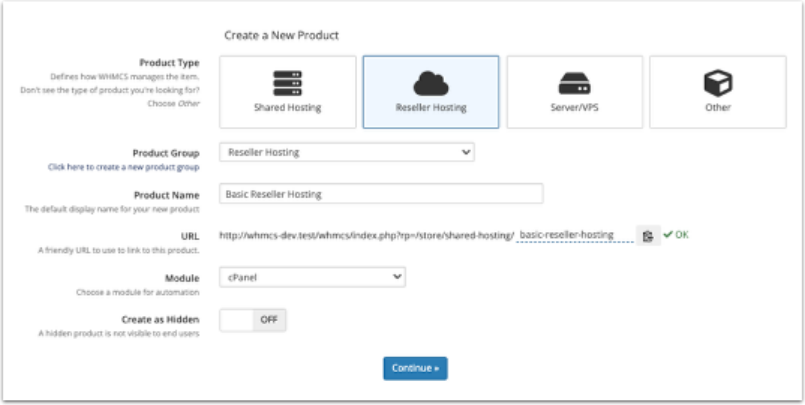
Step 4: Set the Product Description
If you have already set up the server or know the module you want to use, select it under Module. Click Continue, and a new page will appear. In the Details tab, add the product description.
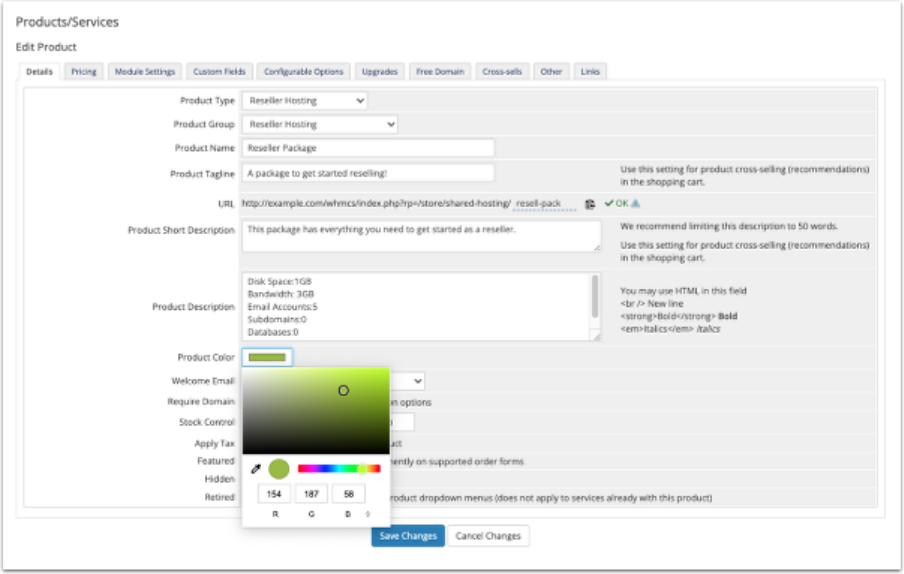
Step 5: Enable Require Domain
This setting is mandatory for hosting products. Without it, customers cannot complete checkout.
Step 6: Choose a Welcome Email Template
This email is sent automatically when the product is provisioned. Pre-built templates are available under Configuration > System Settings > Email Templates. In WHMCS 7.10 and earlier, go to Setup > Email Templates. Customize the template before going live so the branding and onboarding instructions match your business.
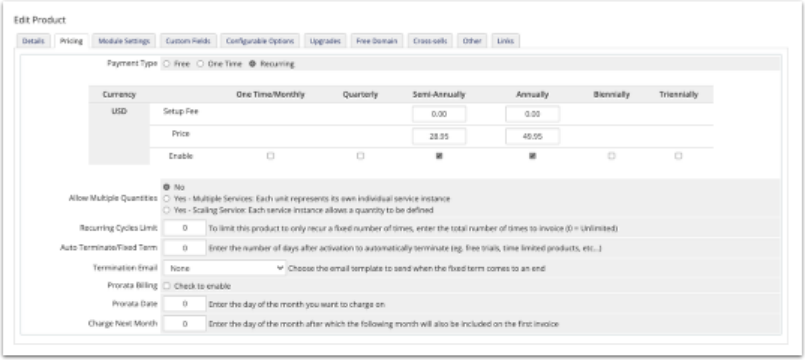
Step 7: Configure Pricing
In the Pricing tab, set Payment Type to Recurring, then enter your monthly price. Add a setup fee if applicable. You can add multiple billing cycles, such as monthly, quarterly, and annual. For a monthly-only product, leave the other cycles blank.
For this example, the product will only be available on a monthly basis.
Step 8: Set Up the Module
In the Module Settings tab, confirm the provisioning module. In this case, cPanel carries over from your earlier selection. Complete the remaining fields.
Step 9: Select the WHMCS Package
For cPanel-based products, pick the package from the WHM Package Name dropdown. This list appears only after the module is selected and pulls directly from your WHM server. WHMCS reads the package list, so the package must already exist in WHM.
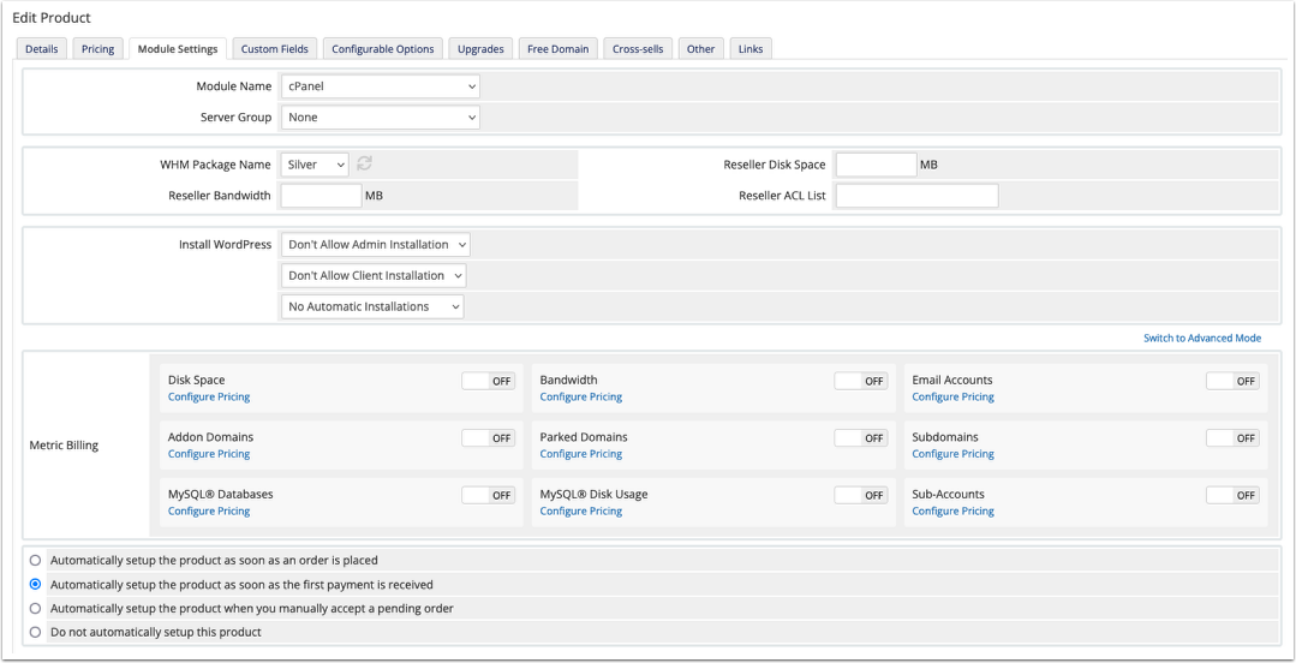
Step 10: Set Automatic Provisioning Behavior
At the bottom of the Module Settings tab, select how the product provisions, such as automatically on payment or manually. Click Switch to Advanced Mode for additional configuration options if you are building a reseller package.
Click Save Changes to publish the product.
(Source: WHMCS.com )
Must-Have WHMCS Modules for Reseller Hosting Businesses
Beyond WHMCS’s built-in modules, WHMCS Global Services (WGS) is one of the most established third-party providers in the ecosystem, offering 50+ ready-to-use modules and themes built specifically to extend reseller functionality.
| Module | Purpose | Annual Pricing |
| WHMCS Cloudflare Module (WGS) | It allows resellers sell Cloudflare plans directly through their WHMCS site | $239.20 |
| VMware WHMCS Module (WGS) | Automates VMware VPS/dedicated server provisioning, cutting manual IT workload | $239.20 |
| OVH / SoYouStart / Kimsufi Module (WGS) | It allows resellers resell OVH, SoYouStart, and Kimsufi VPS and dedicated servers | $159.20 |
| Smart eKYC Module (WGS) | Identity verification for client onboarding,useful for fraud-sensitive markets | $119.20 |
| Account Statement Module | Generates downloadable client account statements for billing transparency | $135.20 |
Best WHMCS Themes for Your Reseller Hosting Business
Alongside the default WHMCS theme, WGS’s template lineup is widely used across reseller storefronts and is worth evaluating before building a custom theme from scratch.
| Theme | Purpose | Pricing |
| HostX Theme | Modern hosting storefront with client-focused layouts and built-in SEO tools to boost conversions | $115.20 |
| CloudX Theme | It allows you to set up your professional website. | $72 |
| ClientX Theme | ClientX is designed to transform the default WHMCS client area into a modern, customizable, and user-friendly portal. | $79.20 |
| AdminX Theme | It is designed to enhance the default WHMCS admin area with a modern, intuitive, and productivity-focused interface | $39.20 |
Common Challenges in Reseller Hosting With WHMCS
1. Manual Account Provisioning
Challenge
Manually creating a hosting account for every new client is time-consuming and increases the likelihood of configuration errors, especially as your customer base grows.
Solution
Integrate WHMCS with supported hosting control panels like cPanel, Plesk, DirectAdmin and others to automate account provisioning. Once a payment is confirmed, WHMCS can instantly create hosting accounts, assign hosting packages, configure services, and send welcome emails without manual intervention.
2. Delayed Invoice Payments
Challenge
Late or missed payments can disrupt revenue, increase administrative work, and result in unpaid services remaining active.
Solution
WHMCS automates recurring billing by generating invoices, sending payment reminders, and issuing overdue notices. It also supports multiple payment gateways and can automatically suspend overdue services and reactivate them once payment is received.
3.Managing Multiple Hosting Plan
Challenge
Handling multiple packages with different storage, bandwidth, email account, and pricing structure can become as difficult as your service offerings expand.
Solution
Use WHMCS product groups, configurable options, and hosting control panel integration to manage plans efficiently.
4. Growing Customer Support Requests
Challenge
As your reseller hosting business grows, managing an increasing number of customer support requests becomes more demanding.
Solution
WHMCS includes an integrated support ticket system, knowledge base, and canned responses to streamline customer service. You can also integrate AI-powered support assistants to resolve common queries quickly and reduce support workload.
5. Domain Registration Management
Challenge
Managing domain registrations, renewals, transfer, and DNS records manual for consumers for valuable time and increases the risk of missed renewals.
Solution
Connect WHMCS with supported domain registrars to automate domain registrations, renewal, transfers, WHOIS management, DNS
6.Service Renewals and Account Suspension
Challenge
Tracking expired hosting services manually may lead to unpaid accounts remaining active or customer experiencing unexpected service interruptions.
Solution
WHMCS automates renewal reminders, overdue account suspensions and service reactivation after successful payment, ensuring consistent billing and service management.
7. Scaling Your Reseller Hosting Business
Challenge
As your customer base expands, manually managing accounts, billing, support, and renewals becomes increasingly inefficient.
Solution
WHMCS centralizes and automates billing, provisioning, support, renewals, notifications, and account management, allowing you to scale your reseller business without proportionally increasing operational overhead.
8. Pricing and Profit Margin Optimization
Challenge
Maintaining competitive pricing while protecting profit margins can be challenging in a highly competitive hosting market.
Solution
WHMCS enables you to create flexible pricing models, promotional discounts, bundled services, recurring coupons, and configurable upgrades to increase customer value while maximizing revenue.
9. Fraud Prevention and Security
Challenge
Fraudulent orders, fake registrations, and payment abuse can result in financial losses and unnecessary server resource consumption.
Solution
WHMCS supports fraud prevention through integrations with services like CAPTCHA verification, email verification, and customizable fraud screening rules before automatic account provisioning.
10. Resource Usage Management
Challenge
Some customers may have their allocated CPU, memory, bandwidth or disk space, potentially impacting server performance for other users.
Solution
Integrate WHMCS with your hosting control panel to monitor resource usage, enforce package limits, and automatically recommend or process hosting upgrades when resource limits are reached.
11. Customer Communication
Challenge
Keeping customer informed about invoices, renewals, maintenance schedules, and service updates manually is inefficient and prone to delays.
Solution
WHMCS automates customer communication using customizable email templates for account activation, invoices, payment confirmations, renewal reminders, maintenance notifications, and support updates.
12. Third-Party Service Integration
Challenge
Integrating billing systems, hosting control panels, payment gateways, SSL providers, domain registrars, and cloud services can be complex and time-consuming.
Solution
WHMCS offers an extensive ecosystem of built-in integrations, modules, and APIs that connect seamlessly with hosting control panels, payment gateways, domain registrars, SSL providers, cloud platforms, and other third-party services, enabling centralized and efficient business management.
Conclusion
Reseller hosting gives you a low-cost entry point into the hosting business. WHMCS gives you the automation layer that makes it scalable. Together, they let one person run a professional hosting operation that clients experience as a full-featured, branded service. The setup requires upfront configuration work, but once the provisioning chain is live and tested, the core business runs with minimal manual intervention.