Whether you manage a handful of switches in a small office or thousands of routers across a distributed enterprise, choosing the right network monitoring tool is one of the most consequential infrastructure decisions you can make. A great tool gives you early warning of outages, bandwidth bottlenecks, and performance anomalies before your users even notice them. A poor fit wastes engineering hours on configuration and drowns the team in false-positive alerts.
Two open-source giants have dominated this space for years: LibreNMS and Zabbix. Both are free, actively maintained, and capable of monitoring complex networks, but they have fundamentally different philosophies, architectures, and ideal use cases. This guide puts them side by side across every dimension that matters like; ease of setup, scalability, alerting, API depth, WHMCS billing integration, and more.
Key Takeaways
- LibreNMS prioritizes simplicity and fast deployment, while Zabbix focuses on depth, flexibility, and enterprise-scale control.
- LibreNMS can be up and running in hours with minimal configuration. Zabbix requires significantly more setup, including templates, triggers, and agents.
- LibreNMS excels with SNMP-based automatic device discovery. Zabbix supports discovery, but it’s more manual and configurable.
- Zabbix is built for large-scale environments (thousands of hosts) using proxies. LibreNMS is best suited for small to mid-sized networks unless carefully tuned.
- LibreNMS is network-focused (routers, switches, bandwidth). Zabbix covers everything, servers, apps, cloud, IoT, and more.
What is LibreNMS?
LibreNMS is a free, open-source, PHP/MySQL/SNMP-based network monitoring system originally forked from Observium. It was purpose-built to make network monitoring easy and immediately useful, you point it at your network, and it discovers and starts monitoring your devices automatically.
What is Zabbix?
Zabbix is a mature, enterprise-grade, open-source monitoring platform capable of tracking millions of metrics across servers, networks, applications, cloud services, and IoT devices. It was first released in 2001 and has evolved into one of the most powerful self-hosted monitoring solutions available today.
Unlike LibreNMS’s cron-based model, Zabbix uses a C-based service architecture and supports Zabbix Agent2, a lightweight daemon that actively pushes data from monitored hosts, distributing the collection load and significantly reducing CPU overhead on the monitoring server.
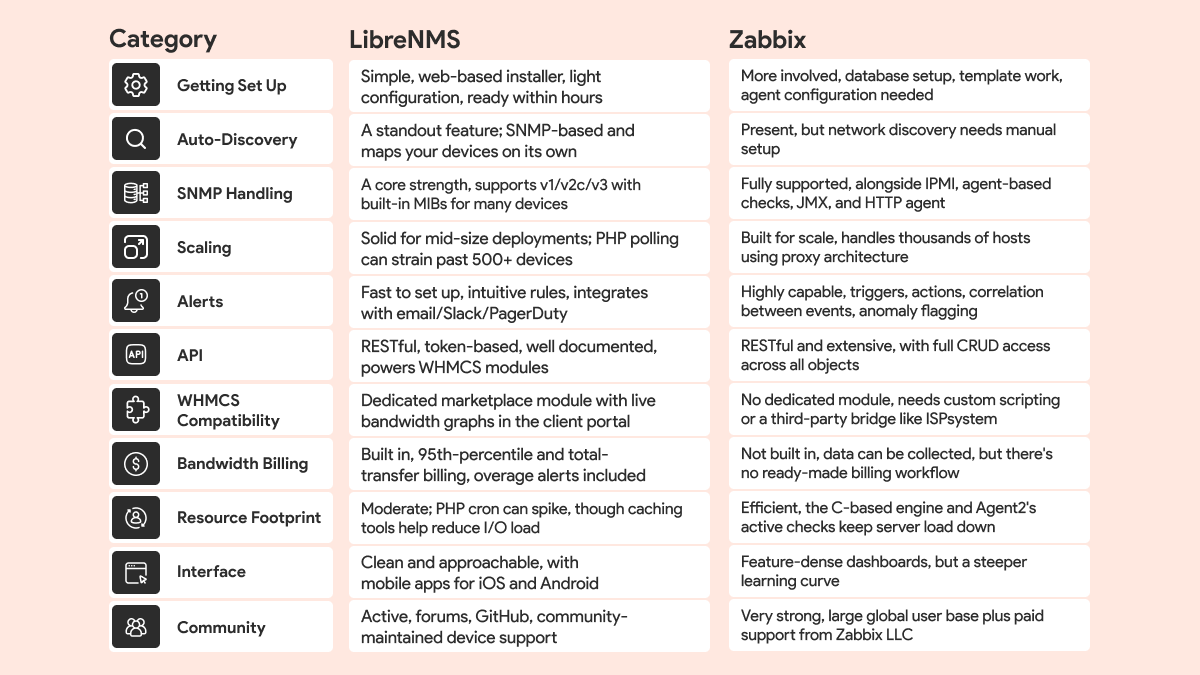
Feature Comparison Table: LibreNMS vs Zabbix
Setup & Installation: LibreNMS vs Zabbix
Installing LibreNMS
LibreNMS is widely praised for being “beyond easy to set up.” The project maintains comprehensive documentation and a validated installation script. The typical stack is PHP 8.1+, MySQL/MariaDB, and an Apache or nginx web server. A fresh install on Ubuntu can be completed in under an hour:
Quick Install Summary
- 1. Install dependencies (PHP, MySQL, Apache).
- 2. Clone the LibreNMS repository: git clone https://github.com/librenms/librenms.git /opt/ librenms.
- 3. Run the web installer to configure the database connection.
- 4. Set up SNMP community strings on your network devices.
- 5. Run auto-discovery, LibreNMS maps your entire network automatically.
Once installed, adding new devices is largely automatic. LibreNMS uses SNMP to walk each device’s MIB tree, identify the vendor, load the appropriate device module, and begin collecting performance data. No manual template assignment is required for most standard network hardware.
Installing Zabbix
Zabbix installation is more involved. The official recommendation is to install via packages from the Zabbix repository, using a dedicated database (MySQL, PostgreSQL, or Oracle) and an Apache/nginx frontend. A typical Ubuntu 22.04 install using Zabbix 7.4 looks like this:
Quick Install Summary
- 1. Add the Zabbix repo: wget https://repo.zabbix.com/zabbix/7.4/.
- 2. Install server, frontend, and agent: apt install zabbix-server-mysql zabbix-frontend-php zabbix-apache-conf zabbix-agent.
- 3. Create and initialize the database, then set credentials in /etc/zabbix/zabbix_server.conf.
- 4. Complete the web setup wizard at http://your-server/zabbix.
- 5. Add hosts manually, assign templates, and configure triggers.
The real setup work begins after installation: Zabbix requires you to design your monitoring templates, configure discovery rules, and tune triggers carefully to avoid alert fatigue. For large environments, you will also deploy Zabbix Proxy instances to distribute polling load. This is powerful but time-consuming, plan for several days of configuration work in a non-trivial environment.
WHMCS Integration: LibreNMS vs Zabbix
For hosting providers and ISPs that use WHMCS as their billing and client management platform, the integration story between the two tools is strikingly different.
LibreNMS + WHMCS
LibreNMS has a dedicated LibreNMS WHMCS Module listed on the WHMCS Marketplace, developed by WHMCS Global Services. The integration directly connects LibreNMS’s bandwidth billing data to WHMCS’s product and billing engine. Key capabilities include:
- Real-time bandwidth usage graphs displayed in the client portal.
- Automatic overage billing when clients exceed quota thresholds.
- Overage notifications at configurable thresholds (e.g., 85% and 95% of quota).
- Per-service quota management from the WHMCS admin panel.
- Configurable billing date per client.
- Support for both Quota and CDR (Call Detail Record) billing types.
Under the hood, the module communicates with LibreNMS via its REST API. The WHMCS admin provides the LibreNMS API URL and token during module configuration, and the module automatically creates bills, assigns ports, and calculates overages using LibreNMS’s native Billing Module, which supports both total data transferred and 95th percentile accounting.
Additionally, HostBill (a WHMCS alternative) offers its own LibreNMS integration that includes projected usage forecasts, bandwidth spike alerts, and the ability to assign graphs to colocation device entries, providing a similarly polished billing experience.
Zabbix + WHMCS
Zabbix has no equivalent first-party or widely available WHMCS module. While Zabbix’s API can expose bandwidth metrics and its monitoring data can theoretically feed a billing system, this requires custom development work. Some ISPs use ISPsystem’s VMmanager, which integrates with Zabbix for infrastructure monitoring and offers a separate WHMCS connector, but this is an indirect chain, not a purpose-built billing integration.
Pros & Cons: LibreNMS vs Zabbix
LibreNMS
| Pros | Cons |
|---|---|
| Extremely fast to set up and get monitoring. | PHP cron polling can spike CPU at scale. |
| Best-in-class SNMP auto-discovery. | Performance degrades beyond ~500–1000 devices without tuning. |
| Native bandwidth billing module (95th %ile support). | Less customizable than Zabbix for complex alert logic. |
| Direct WHMCS Marketplace integration | Limited server/application monitoring (primarily network-focused). |
| Clean, user-friendly web interface. | No commercial support option |
| Mobile apps for iOS and Android. | Smaller mindshare in enterprise environments. |
| Resource-efficient for small/medium networks. | |
| Strong community and active GitHub. |
Zabbix
| Pros | Cons |
|---|---|
| Scales to tens of thousands of hosts. | Steep learning curve, not beginner-friendly. |
| Extremely flexible: templates, triggers, actions. | Complex initial setup; days of template tuning required. |
| C-based engine with efficient resource usage at scale. | No native bandwidth billing module. |
| Agent-based monitoring for detailed server metrics. | No WHMCS Marketplace module. |
| Built-in anomaly detection and event correlation. | Easy to generate alert storms without proper trigger engineering. |
| Commercial support available from Zabbix LLC. | UI can feel overwhelming for new administrators. |
| #1 ranked NMS on PeerSpot with 8.6 average rating. | |
| Broad integrations: ServiceNow, Jira, Slack, Grafana. |
Which One Should You Choose?
The choice depends entirely on your team’s goals, technical depth, and the nature of your business. Here’s a decision framework based on real-world use cases.
Choose LibreNMS if…
- You run an ISP or hosting company using WHMCS.
- Bandwidth billing and overage tracking is critical.
- You need monitoring operational within days.
- Your network is primarily SNMP-capable hardware.
- Your team is small and time is scarce.
- You monitor <500 devices or a mid-size network.
- You value simplicity and fast time-to-value.
Choose Zabbix if…
- You manage a large enterprise or multi-site network.
- You need server, app, and cloud monitoring alongside network.
- You have dedicated monitoring engineers on staff.
- You need anomaly detection and AI-assisted alerting.
- You are integrating with ITSM tools like Jira or ServiceNow.
- You need commercial SLA-backed vendor support.
- You can invest weeks in tuning for long-term gains.
Conclusion
LibreNMS and Zabbix are both exceptional open-source monitoring platforms, but they serve different masters. LibreNMS asks less of you upfront and delivers network visibility almost immediately, with a billing ecosystem purpose-built for service providers. Zabbix demands more but repays that investment with unmatched scalability, flexibility, and monitoring depth across every layer of your infrastructure.
Before making your decision, audit your requirements honestly: How many devices will you monitor? Does your team have the bandwidth to tune Zabbix templates? Do you need WHMCS billing integration? Is bandwidth billing a revenue-critical feature? Your answers will point clearly to one platform or the other.
Whichever you choose, both tools have active communities, solid documentation, and years of production-hardened development behind them. You cannot make a bad choice, only a choice that fits your context better or worse.